Problem:
Purely visual controls are being displayed to screen readers.
Impact:
Screen reader users will have a separate, non-visual user experience when moving through the carousel since they navigate the DOM without paying special attention to the currently selected slide.
For a screen reader it's more important that the list of slides is laid out correctly in the DOM. The carousel controls are purely visual elements and should be removed from the accessibility tree to avoid confusion.
Recommended Solution:
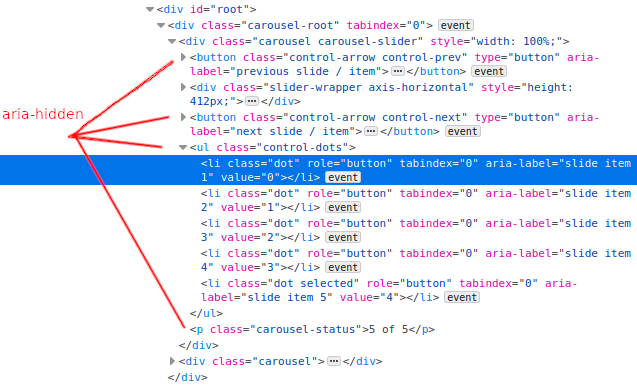
Any visual controls for the carousel should be removed for screen readers. This can be done by setting aria-hidden on the slide dots (.control-dots) and carousel arrows (.control-arrow).
There are currently some aria-label attributes set on the carousel dots (.dot). If the parent element has aria-hidden added then these should also be removed since they won't be possible for screen readers to reach. The same would also apply for the carousel arrows (.control-arrow) if they have an aria-hidden attribute added.
The current slide label (.carousel-status) is also hard for screen reader users to understand as it reads "X of Y" after the slide contents in the DOM. Since this is also a purely visual element it should be hidden from screen readers with aria-hidden as well.

Problem:
Purely visual controls are being displayed to screen readers.
Impact:
Screen reader users will have a separate, non-visual user experience when moving through the carousel since they navigate the DOM without paying special attention to the currently selected slide.
For a screen reader it's more important that the list of slides is laid out correctly in the DOM. The carousel controls are purely visual elements and should be removed from the accessibility tree to avoid confusion.
Recommended Solution:
Any visual controls for the carousel should be removed for screen readers. This can be done by setting
aria-hiddenon the slide dots (.control-dots) and carousel arrows (.control-arrow).There are currently some
aria-labelattributes set on the carousel dots (.dot). If the parent element hasaria-hiddenadded then these should also be removed since they won't be possible for screen readers to reach. The same would also apply for the carousel arrows (.control-arrow) if they have anaria-hiddenattribute added.The current slide label (
.carousel-status) is also hard for screen reader users to understand as it reads "X of Y" after the slide contents in the DOM. Since this is also a purely visual element it should be hidden from screen readers witharia-hiddenas well.