ramips: add support for TP-Link Archer C20 v4#1620
Conversation


|
Please create an extra commit for renaming the c20 to c20v1. It shouldn't be in the commit adding support for the c20v4. The rename will cause issues for people using a c20v1. But I'm fine to do so, since we don't have support for the c20v1 in stable and keeping compatibility within in the development version (master) isn't than crucial. |


 mkresin
left a comment
mkresin
left a comment
mkresin
left a comment
There was a problem hiding this comment.
Please use git commit --amend to add changes to your commit. Use git push --force to overwrite your github repository/branch. The PR will afterwards update automatically. Please don't close this PR and open a new one.
| *"C20 v1") | ||
| name="c20v1" | ||
| ;; | ||
| *"C20 v4") |
There was a problem hiding this comment.
Drop the C20 v4 here and use the compatible string as boardname in all files (tplink,c20v4).
| endef | ||
| DEVICE_VARS += TPLINK_FLASHLAYOUT TPLINK_HWID TPLINK_HWREV TPLINK_HWREVADD TPLINK_HVERSION | ||
|
|
||
| define Device/ArcherC20v4 |
There was a problem hiding this comment.
Please use define Device/tplink_c20v4 here.
| TPLINK_HWREVADD := 0x4 | ||
| TPLINK_HVERSION := 3 | ||
| endef | ||
| TARGET_DEVICES += ArcherC20v4 |
There was a problem hiding this comment.
TARGET_DEVICES += tplink_c20v4
| &pinctrl { | ||
| state_default: pinctrl0 { | ||
| gpio { | ||
| ralink,group = "p0led_an", "p2led_an", "perst", "refclk", "wdt", "wled_an"; |
There was a problem hiding this comment.
must be:
ralink,group = "i2s", "refclk", "p0led_an", "p1led_an", "p2led_an", "p3led_an", "p4led_an", "wdt";
- power led uses a pin of the i2s group
- rfkill button uses the refclk pin
- reset button used the wdt pin
- wlan2g led uses the p4led_an pin
- wlan5g led uses the p3led_an pin
- wps led uses the p2led_an pin
- lan led used the p1led_an pin
- green wan led uses the p0led_an pin
- orange wan led uses gpio pin which can be configured only as gpio

|
All done! Please, check it. Thanks! |
|
Looks good so far. I have one more change request. Would you please seperate boardname and version number with a minus. The same in the dts as well of course:
Please add a commit message to the "ramips: rename TP-Link Archer C20 to TP-Link Archer C20 v1" commit. Explain why you have done the changes and add a note that you migrated the board to the generic board detection. Have a look at #594 for some related commit messages. |
|
I have just finished changes. I hope that commit message now is correct. Thanks. |
|
Not yet. You need to change Device/tplink_c20v4 to Device/tplink_c20-v4 as well. Same for the tplink_c20v1 and the TARGET_DEVICES variable. Please do a full runtime test on your c20-v4 afterwards including a sysupgrade and so on. |
Done
Unfortunately I have no device by the hand. Users of a forum help me with testing. Therefore it will take some time. |
|
Just leave a note if the test was done. A new bootlog would be handy as well. |

| endef | ||
| DEVICE_VARS += TPLINK_FLASHLAYOUT TPLINK_HWID TPLINK_HWREV TPLINK_HWREVADD TPLINK_HVERSION | ||
|
|
||
| define Device/tplink_c20-v4 |

There was a problem hiding this comment.
Keep the alphabetical order
There was a problem hiding this comment.
In general @heinzek is correct here. But I have already a commit in my staging tree which will break to alphabetical order anyway. Hence I've not requested to keep alphabetical order and it doesn't really matter till my stuff is committed as well.
There was a problem hiding this comment.
I will correct it.
| DEVICE_TITLE := TP-Link ArcherC20 v4 | ||
| TPLINK_FLASHLAYOUT := 8Mmtk | ||
| TPLINK_HWID := 0xc200004 | ||
| TPLINK_HWREV := 0x283 |
There was a problem hiding this comment.
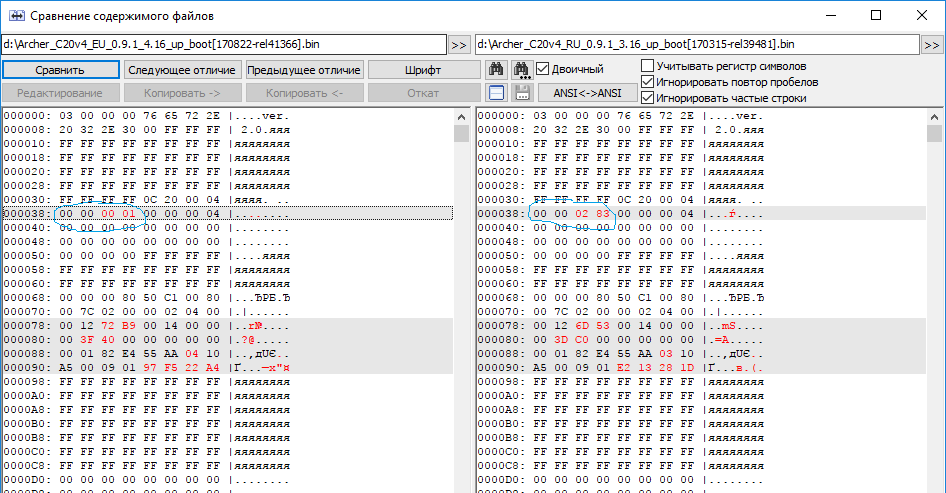
Why 0x238? I see in EU firmware HWREV 0x1
There was a problem hiding this comment.
In my region firmware HWREV is 0x283. I didn't check a HWREV code for other regions. It turns out that a code everywhere different. At the moment there is no problem because of we can't install firmware via tp-link webinterface (For example, for Archer C20 v1 it's true). Is there options in this case? Maybe the EU region should be by default?
There was a problem hiding this comment.
Look here: 24043a0
Factory image notes:
These devices use version 3 of TP-Link header, fortunately without RSA
signature (at least in case of devices sold in Europe). The difference
lays in the requirement for a non-zero value in "Additional Hardware
Version" field. Ideally, it should match the value stored in vendor
firmware header on device ("0x4"/"0x13" for these devices) but it seems
that anything other than "0" is correct.
You can set a random "non-zero" value in this field and everything is OK
There was a problem hiding this comment.
@heinzek But I have difference only in HWREV code! HWREVADD (Additional Hardware
Version) is the same for EU and RU regions.
| @@ -0,0 +1,170 @@ | |||
| /dts-v1/; | |||
|
|
|||
| #include "mt7628an.dtsi" | |||
There was a problem hiding this comment.
You can include TL-WR84XN.dtsi and remove:
chosen, memory, spi, ehci, ohci
In "wmac" leave only "mtd-mac-address-increment",
In "Ethernet" remove "mtd-mac-address"
ps. Maybe its good time to change filename from TL-WR84XN.dtsi to TPLINK_8M.dtsi ?
There was a problem hiding this comment.
Please don't include the TL-WR84XN.dtsi or at least not as long as the file is named TL-WR84XN.dtsi. Such DTS files are a pain to read.
TPLINK_8M.dtsi is way better. But it shouldn't happen in context of this PR. I'm, fine to merge an extra PR which does these kind of optimizations.
There was a problem hiding this comment.
Please don't include the TL-WR84XN.dtsi
Ok
|
New logfile: LEDE_Bootlog.txt
Any ideas? |
To be honest, it doesn't make any sense. If the upgrade via command line works without any errors, it should work via LuCI as well. LuCI is just a web frontend for for the sysupgrade command and doesn't do any extra checks. Nevertheless, I really would like to know what went wrong for your tester. Would you please ask for a (putty/serial) logfile of a sysupgrade done via command line. It could be of course that the tester used a wrong image with LuCI or has some kind of caching issues with the browser. @heinzek Any advice what to do with the HWREV? You are way more familiar with the tp-link images than I. |
|
@mkresin The user from a forum has started sysupgrade process via webinterface once again and everything has passed perfectly. So there is no any problem. |

TP-Link Archer C20 v4 is a router with 5-port FE switch and
non-detachable antennas. It's based on MediaTek MT7628N+MT7610EN.

Specification:
- MediaTek MT7628N/N (580 Mhz)
- 64 MB of RAM
- 8 MB of FLASH
- 2T2R 2.4 GHz and 1T1R 5 GHz
- 5x 10/100 Mbps Ethernet
- 3x external, non-detachable antennas
- UART (J1) header on PCB (115200 8n1)
- 7x LED (GPIO-controlled*), 2x button, power input switch

* WAN LED in this devices is a dual-color, dual-leads type which isn't
  (fully) supported by gpio-leds driver. This type of LED requires both
  GPIOs state change at the same time to select color or turn it off.
  For now, we support/use only the green part of the LED.
* MT7610EN ac chip isn't not supported by LEDE. Therefore 5Ghz won't
  work.

Flash instruction:

The only way to flash LEDE image in ArcherC20v4 is to use
tftp recovery mode in U-Boot:

1. Configure PC with static IP 192.168.0.66/24 and tftp server.
2. Rename "openwrt-ramips-mt7628-ArcherC20v4-squashfs-tftp-recovery.bin"
   to "tp_recovery.bin" and place it in tftp server directory.
3. Connect PC with one of LAN ports, press the reset button, power up
   the router and keep button pressed for around 6-7 seconds, until
   device starts downloading the file.
4. Router will download file from server, write it to flash and reboot.

Signed-off-by: Maxim Anisimov <maxim.anisimov.ua@gmail.com>
This changes device name from "TP-Link Archer C20" to "TP-Link Archer C20 v1"
because of TPLINK released new TP-Link Archer C20 v4. Additionally
migration to the generic board detection has been made.

Signed-off-by: Maxim Anisimov <maxim.anisimov.ua@gmail.com>
In case of Archer C20 v4 it's not true, because of difference only in HWREV code for EU and RU regions. The devices by hardware are identical. EU firmware header data was seted to resolve this question. I hope that this variant will ok. Please accept patches if there are no other problems. Thanks! |
|
Thanks! Merged into my staging tree. |
3 participants


TP-Link Archer C20 v4 is a router with 5-port FE switch and
non-detachable antennas. It's based on MediaTek MT7628N+MT7610EN.
Specification:
(fully) supported by gpio-leds driver. This type of LED requires both
GPIOs state change at the same time to select color or turn it off.
For now, we support/use only the green part of the LED.
work.
Flash instruction:
The only way to flash LEDE image in ArcherC20v4 is to use
tftp recovery mode in U-Boot:
to "tp_recovery.bin" and place it in tftp server directory.
the router and keep button pressed for around 6-7 seconds, until
device starts downloading the file.
Signed-off-by: Maxim Anisimov maxim.anisimov.ua@gmail.com
LEDE_Bootlog.txt