This is a performance-optimized fork of ryoppippi/ccusage with 14x faster analysis on large datasets via per-file caching.
| Feature | Official ccusage | This Fork |
|---|---|---|
| Per-file result caching | No | Yes — 14x speedup |
| Re-parsing unchanged files | Every run | Skipped (cache hit) |
| Large dataset performance | Slow on 1000+ sessions | Fast regardless of size |
Changes: 2 files modified (_file-cache.ts + data-loader.ts), 474 lines added, fully backward-compatible. See PR #922 for details.
Tested with 8,714 session files (177K entries, 3.3GB total):
| Scenario | Time | Speedup |
|---|---|---|
| Original ccusage v18 | 74s | baseline |
| Cached (cold, building cache) | 48s | 1.5x |
| Cached (warm, no date filter) | 18s | 4x |
Cached (warm) + --since |
5s | 14x |
Used this fork to analyze Claude Code token spending and drive context optimization:
| Metric | Before | After | Reduction |
|---|---|---|---|
| Enabled plugins | 15 | 7 | -53% |
| Hooks per tool call | 8-10 | 5-6 | -40% |
| CLAUDE.md cascade | ~8,425 tokens | ~4,570 tokens | -46% |
| Session startup overhead | ~35-50K tokens | ~20-25K tokens | ~50% |
| Daily cost (agentic workflow) | ~$4,300 | ~$2,100 (est.) | ~50% |
See companion tool: claude-context-optimizer — a Claude Code plugin that audits and optimizes context window usage.
# 1. Clone
git clone https://github.com/LEON-gittech/ccusage.git
cd ccusage

# 2. Install dependencies
pnpm install

# 3. Build
pnpm build

# 4. Link globally
cd apps/ccusage
pnpm link --global

# 5. Verify
ccusage --helpIf you already have the official ccusage installed via npm/pnpm:
# 1. Remove the official version
npm uninstall -g ccusage
# or
pnpm remove -g ccusage

# 2. Clone and build this fork
git clone https://github.com/LEON-gittech/ccusage.git
cd ccusage
pnpm install && pnpm build

# 3. Link globally (replaces the ccusage command)
cd apps/ccusage
pnpm link --global

# 4. Verify it's the fork version
ccusage --help
# Cache files will appear in ~/.cache/ccusage/ after first run# 1. Unlink the fork
cd /path/to/ccusage/apps/ccusage
pnpm unlink --global
# 2. Reinstall official
npm install -g ccusageBelow is the original README from the upstream project.



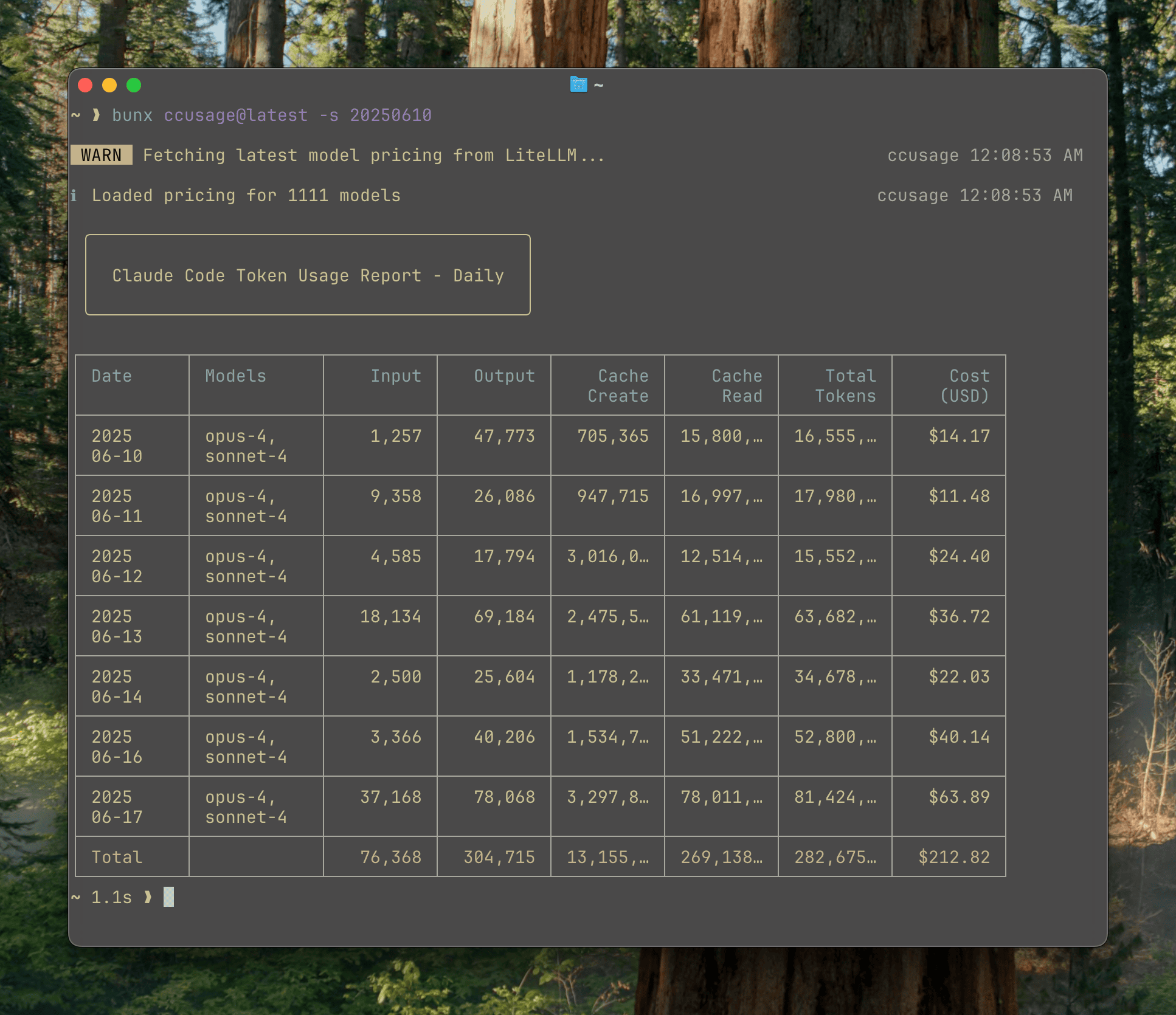
Analyze your Claude Code token usage and costs from local JSONL files — incredibly fast and informative!
📊 ccusage - Claude Code Usage Analyzer
The main CLI tool for analyzing Claude Code usage from local JSONL files. Track daily, monthly, and session-based usage with beautiful tables.
🤖 @ccusage/codex - OpenAI Codex Usage Analyzer
Companion tool for analyzing OpenAI Codex usage. Same powerful features as ccusage but tailored for Codex users, including GPT-5 support and 1M token context windows.
🚀 @ccusage/opencode - OpenCode Usage Analyzer
Companion tool for analyzing OpenCode usage. Track token usage and costs from OpenCode sessions with the same reporting capabilities as ccusage.
🥧 @ccusage/pi - Pi-agent Usage Analyzer
Companion tool for analyzing pi-agent session usage. Track token usage and costs from your pi-agent sessions with daily, monthly, and session-based reports.
⚡ @ccusage/amp - Amp Usage Analyzer
Companion tool for analyzing Amp session usage. Track token usage, costs, and credits from your Amp CLI sessions with daily, monthly, and session-based reports.
🔌 @ccusage/mcp - MCP Server Integration
Model Context Protocol server that exposes ccusage data to Claude Desktop and other MCP-compatible tools. Enable real-time usage tracking directly in your AI workflows.
Thanks to ccusage's incredibly small bundle size (), you can run it directly without installation:
# Recommended - always include @latest to ensure you get the newest version
npx ccusage@latest
bunx ccusage

# Alternative package runners
pnpm dlx ccusage
pnpx ccusage

# Using deno (with security flags)
deno run -E -R=$HOME/.claude/projects/ -S=homedir -N='raw.githubusercontent.com:443' npm:ccusage@latest
💡 Important: We strongly recommend using
@latestsuffix with npx (e.g.,npx ccusage@latest) to ensure you're running the most recent version with the latest features and bug fixes.
npx @ccusage/codex@latest       # OpenAI Codex usage tracking
npx @ccusage/opencode@latest    # OpenCode usage tracking
npx @ccusage/pi@latest          # Pi-agent usage tracking
npx @ccusage/amp@latest         # Amp usage tracking
npx @ccusage/mcp@latest # MCP Server# Basic usage
npx ccusage # Show daily report (default)
npx ccusage daily # Daily token usage and costs
npx ccusage monthly # Monthly aggregated report
npx ccusage session # Usage by conversation session
npx ccusage blocks # 5-hour billing windows
npx ccusage statusline # Compact status line for hooks (Beta)
# Filters and options
npx ccusage daily --since 20250525 --until 20250530
npx ccusage daily --json # JSON output
npx ccusage daily --breakdown # Per-model cost breakdown
npx ccusage daily --timezone UTC # Use UTC timezone
npx ccusage daily --locale ja-JP # Use Japanese locale for date/time formatting
# Project analysis
npx ccusage daily --instances # Group by project/instance
npx ccusage daily --project myproject # Filter to specific project
npx ccusage daily --instances --project myproject --json # Combined usage
# Compact mode for screenshots/sharing
npx ccusage --compact # Force compact table mode
npx ccusage monthly --compact # Compact monthly report- 📊 Daily Report: View token usage and costs aggregated by date
- 📅 Monthly Report: View token usage and costs aggregated by month
- 💬 Session Report: View usage grouped by conversation sessions
- ⏰ 5-Hour Blocks Report: Track usage within Claude's billing windows with active block monitoring
- 🚀 Statusline Integration: Compact usage display for Claude Code status bar hooks (Beta)
- 🤖 Model Tracking: See which Claude models you're using (Opus, Sonnet, etc.)
- 📊 Model Breakdown: View per-model cost breakdown with
--breakdownflag - 📅 Date Filtering: Filter reports by date range using
--sinceand--until - 📁 Custom Path: Support for custom Claude data directory locations
- 🎨 Beautiful Output: Colorful table-formatted display with automatic responsive layout
- 📱 Smart Tables: Automatic compact mode for narrow terminals (< 100 characters) with essential columns
- 📸 Compact Mode: Use
--compactflag to force compact table layout, perfect for screenshots and sharing - 📋 Enhanced Model Display: Model names shown as bulleted lists for better readability
- 📄 JSON Output: Export data in structured JSON format with
--json - 💰 Cost Tracking: Shows costs in USD for each day/month/session
- 🔄 Cache Token Support: Tracks and displays cache creation and cache read tokens separately
- 🌐 Offline Mode: Use pre-cached pricing data without network connectivity with
--offline(Claude models only) - 🔌 MCP Integration: Built-in Model Context Protocol server for integration with other tools
- 🏗️ Multi-Instance Support: Group usage by project with
--instancesflag and filter by specific projects - 🌍 Timezone Support: Configure timezone for date grouping with
--timezoneoption - 🌐 Locale Support: Customize date/time formatting with
--localeoption (e.g., en-US, ja-JP, de-DE) - ⚙️ Configuration Files: Set defaults with JSON configuration files, complete with IDE autocomplete and validation
- 🚀 Ultra-Small Bundle: Unlike other CLI tools, we pay extreme attention to bundle size - incredibly small even without minification!
Full documentation is available at ccusage.com
For contributors and developers working on ccusage, we provide a Nix flake-based development environment:
# Clone the repository
git clone https://github.com/ryoppippi/ccusage.git
cd ccusage

# Allow direnv (automatically loads Nix environment)
direnv allow

# Or manually enter the development shell
nix develop
This ensures consistent tooling versions across all contributors and CI systems. The development environment is defined in flake.nix and automatically activated via direnv when entering the project directory.
Check out ccusage: The Claude Code cost scorecard that went viral