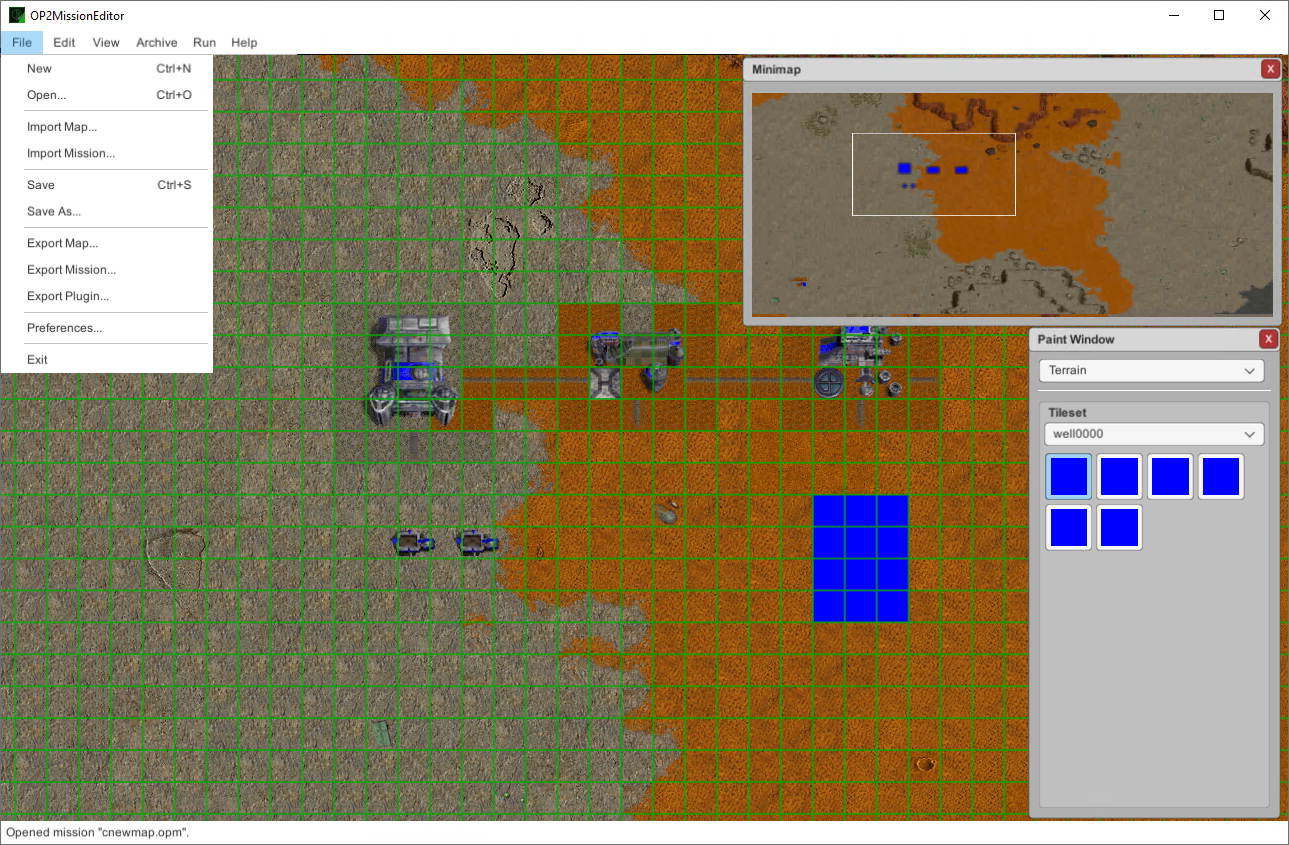
Mission Editor for Outpost 2
You can download the mission editor from the release page. Works with Outpost 2: Divided Destiny 1.4.1.
If you can create missions just fine, but the game crashes when you try to start it in Outpost 2, you may need the .NET Framework Runtime.
The editor should work "out of the box". Make sure you turn on the run permission for the .x86_64 file.
You must install the .NET Framework with Wine Tricks to get missions to run in the game.
- Create a new mission from scratch
- Open existing
.op2mission files - Save and Save As
.op2missions - Import / export raw
.mapfiles - Import / export the mission JSON payload separately from the map
- Export a runnable
.dllplugin for the game (combines the mission JSON, map, and the appropriatePluginTemplate.dllfrom StreamingAssets) - Tracks unsaved-changes state; prompts on close/new/open
- 2D tilemap view with pan and scroll
- Render terrain straight out of the player's Outpost 2 install (
.vol/.clmarchives in legacy installs, loose.bmps in the OPU/base/tilesets layout for Outpost 2 1.4.1) - Tile painting (Paint Window ? Terrain pane) using the actual game tilesets (
well0000.bmp, etc.) - Per-tileset palette in the Paint Window with the current selected variant (e.g.
well0002) - Cell Types pane — paint passability/special tile flags (DozedArea, Tube, NormalWall, LavaWall, MicrobeWall, etc.)
- Walls / Tubes pane — paint walls and tube networks
- Texture cache with manual "Clear Texture Cache" command
- Paint Window panes for: Structures, Vehicles, Wreckage, Resources (beacons, ore, magma vents, fumaroles, etc.)
- Per-unit properties: owning player, variant, ID, health
- Both Eden and Plymouth structure sets supported
- Pre-bundled sprite art for all units, structures and resources (no game install needed for unit graphics — only terrain comes from the game)
- Start-location markers and beacons rendered with prefabs from
Assets/Resources/Game/
- Edit mission-level metadata via the Mission Properties dialog
- Music tracks: add / remove / reorder (up/down) the mission's playlist
- Map properties dialog (stub — currently no-op in code)
- Player Properties dialog: add / remove players
- Per-player tech tree: add / remove completed technologies (read from the game's tech sheet via the resource manager)
- Alliances: add / remove allies between players
- Mission Variants dialog: create multiple branching variants of the same mission
- Per-variant difficulty levels (easy/normal/hard etc.) — add, remove, rename
- Selection state for the variant + difficulty currently being edited; mutations apply to the active variant or master as needed
- Toggleable Grid overlay with user-configurable color (RGBA via Preferences)
- Toggleable Unit overlay (highlight ring/box around placed units)
- Toggleable Unit info text (labels)
- Minimap window with live map preview
- Selected paint preview drawn as an overlay before commit
- Extract a single file from a
.volor.clm - Extract all files from a
.vol/.clm - Create a new
.volor.clmarchive from a set of files (auto-filters files exceeding the 8-char filename limit)
- Run Outpost 2 — launches the game. Prefers
OPU/OPULauncher.exe(Outpost 2 1.4.1 / OPU), falls back to legacyOutpost2.exe. - Copy SDK to Game — copies
DotNetInterop.dll+ the mission SDK (DotNetMissionSDK_v<N>.dll) from StreamingAssets into the game directory so exported plugins can find the runtime they need.
- Pick the Outpost 2 game directory (path used for resource loading and the Run command)
- Grid overlay color
- Editor window resolution
- All prefs persisted via Unity
PlayerPrefs
- About dialog with version info
- Direct links to: Outpost Universe homepage, Outpost Universe forum, GitHub repository
- Built-in Console window (toggleable from View menu) tee'd from
UnityEngine.Debug.Log/LogWarning/LogError - Status bar at the bottom shows the last log line
- Auto-detects
<gameDir>/OPU/and searchesOPU/base,OPU/base/tilesets,OPU/libs,OPU/mapsas resource roots - Backward compatible: pre-1.4.1 installs continue to work with a single
gameDirectory - Single
ArchiveResourceManagerwrapper used by tile loading, mission load, and tech-tree reading