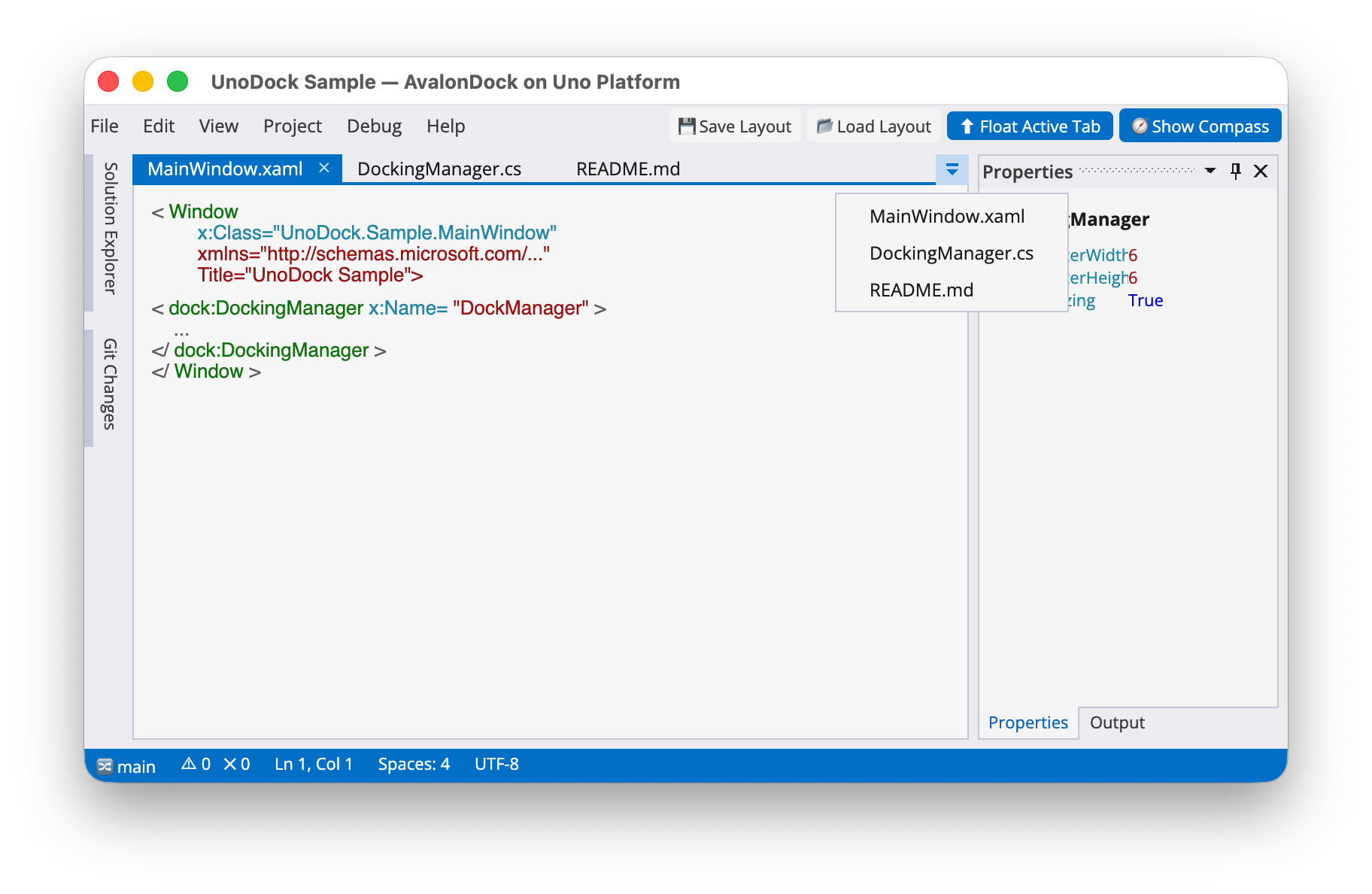
UnoDock is a desktop-first port of AvalonDock to Uno Platform and WinUI 3.
Current scope:
- Target Uno Skia Desktop on Windows and macOS in initial builds.
- Do not target Linux yet
- Do not target WinUI 3 yet
- Do not target mobile during the bootstrap phase (v0.x.x).
Current scope:
- Target Uno Skia Desktop.
- Do not target mobile during the bootstrap phase (v0.x.x).
- Windows 11 (Windows 10 may work but is not a primary target)
- macOS, 3 most recent versions from 2023-2025
WinUI 3 support is planned later.
Linux support is planned later.
If you are looking for support of a specific platform, business sponsorship is the way to accelerate that work. Please reach out to us at homepage.
Several NuGet packages are available:
The core docking manager component.
VS2013 theme.
VS2010 theme.



Install the core package and one theme package:
dotnet add package LeXtudio.UnoDock
dotnet add package LeXtudio.UnoDock.Themes.VS2013
Load the theme resources before the window XAML is initialized. This makes the
UnoDock_VS2013_* brushes available to the docking manager and to any surrounding
UI that wants to match the same palette.
using Microsoft.UI.Xaml;
using UnoDock.Themes.VS2013;

public sealed partial class MainWindow : Window
{
    public MainWindow()
    {
        Application.Current.Resources.MergedDictionaries.Add(
            new Vs2013LightTheme().ThemeResourceDictionary);

        InitializeComponent();
    }
}
Then declare a DockingManager and provide an initial layout. UnoDock follows the
AvalonDock model names, so documents live in LayoutDocumentPane and dockable
tool windows live in LayoutAnchorablePane.
<Window
    x:Class="MyApp.MainWindow"
    xmlns="http://schemas.microsoft.com/winfx/2006/xaml/presentation"
    xmlns:x="http://schemas.microsoft.com/winfx/2006/xaml"
    xmlns:dock="using:AvalonDock"
    xmlns:dockLayout="using:AvalonDock.Layout"
    xmlns:dockThemes="using:UnoDock.Themes.VS2013">

    <dock:DockingManager x:Name="DockManager">
        <dock:DockingManager.Theme>
            <dockThemes:Vs2013LightTheme />
        </dock:DockingManager.Theme>

        <dock:DockingManager.Layout>
            <dockLayout:LayoutRoot>
                <dockLayout:LayoutPanel Orientation="Horizontal">

                    <dockLayout:LayoutAnchorablePane DockWidth="240">
                        <dockLayout:LayoutAnchorable Title="Solution Explorer"
                                                     ContentId="solution-explorer">
                            <TextBlock Margin="8" Text="Project tree goes here" />
                        </dockLayout:LayoutAnchorable>
                    </dockLayout:LayoutAnchorablePane>

                    <dockLayout:LayoutDocumentPane>
                        <dockLayout:LayoutDocument Title="Document.md"
                                                   ContentId="document-md">
                            <TextBox AcceptsReturn="True"
                                     TextWrapping="Wrap"
                                     Text="Document content goes here" />
                        </dockLayout:LayoutDocument>
                    </dockLayout:LayoutDocumentPane>

                    <dockLayout:LayoutAnchorablePane DockWidth="220">
                        <dockLayout:LayoutAnchorable Title="Properties"
                                                     ContentId="properties">
                            <TextBlock Margin="8" Text="Selected item properties" />
                        </dockLayout:LayoutAnchorable>
                    </dockLayout:LayoutAnchorablePane>

                </dockLayout:LayoutPanel>
            </dockLayout:LayoutRoot>
        </dock:DockingManager.Layout>
    </dock:DockingManager>
</Window>
Use stable ContentId values for every document and tool pane. They are used by
layout persistence and make it possible to restore panes back to the right
application content later.
Study the sample project for layout save/load, floating window diagnostics, and a fuller Visual Studio-style shell.
Early preview (v0.x.y) releases are available on NuGet.
The API is not yet stable and may change without a major version bump. Feedback is welcome to help shape the future of UnoDock.
- More themes
- Logical tree improvements
- Accessibility support (screen readers, keyboard navigation, etc.)
UnoDock is licensed under the Microsoft Public License (Ms-PL). See LICENSE for details.
Copyright (c) 2026 LeXtudio Inc. All rights reserved.
UnoDock builds on and includes code from the AvalonDock project.
AvalonDock is licensed under the Microsoft Public License (Ms-PL). See externals/AvalonDock/LICENSE and
THIRD_PARTY_NOTICES.md for attribution and full license text. The NuGet packages
produced by this repository also include the third-party license text and notices.