
Close the context gap between your data model and your AI assistant.



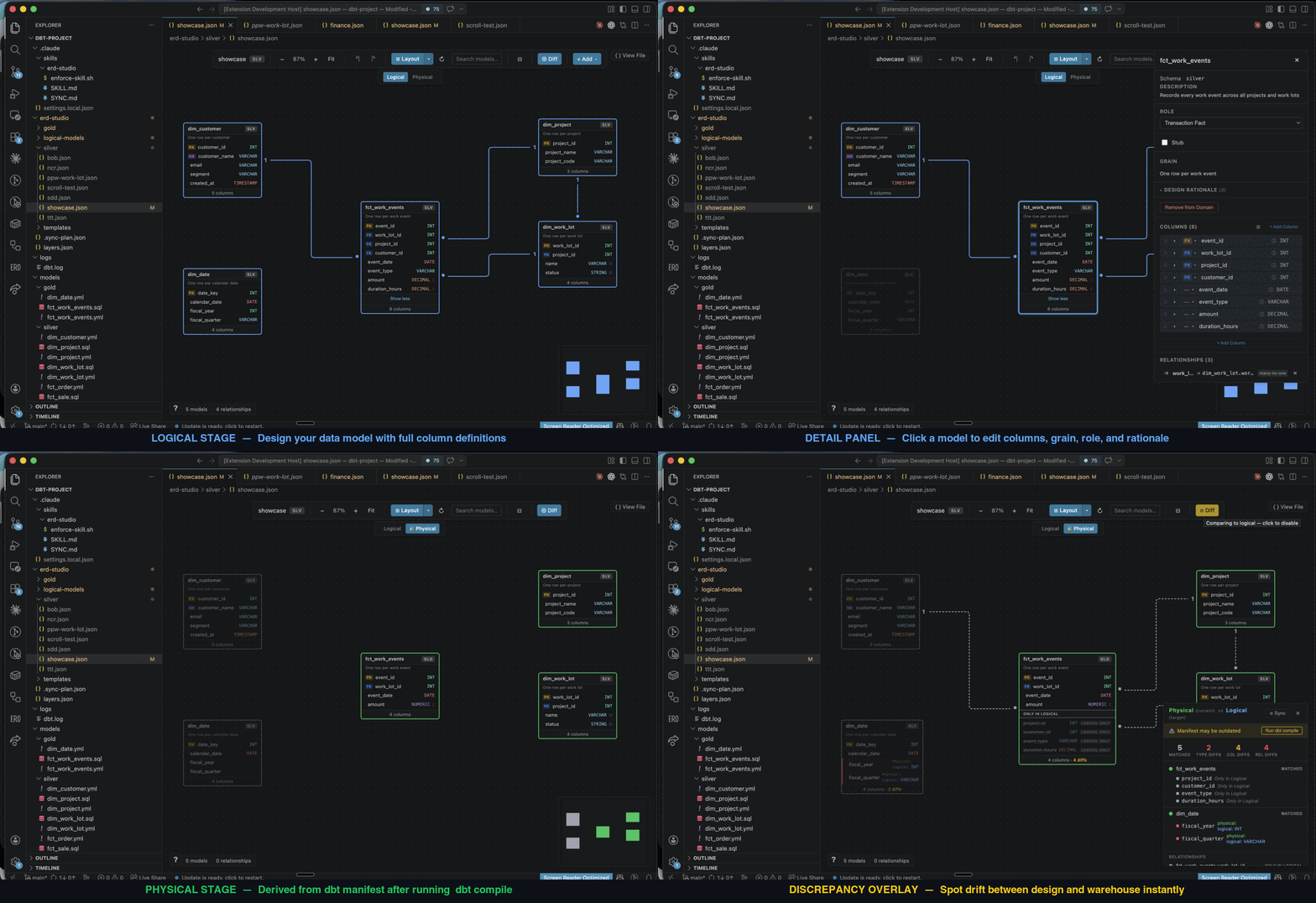
If you build data pipelines with dbt, your design lives in one tool (SqlDBM, Erwin, dbdiagram) and the actual code lives in another. That split creates three problems:
- The diagram drifts from the code. Change a column in dbt and the ERD doesn't notice. Change the ERD and the code doesn't notice. You're the only thing holding them together — and you forget.
- You can't refresh one part of the warehouse on its own schedule. Other ERD tools don't tag your dbt models by domain, so "rebuild just the customer area every hour" isn't a button — you have to wire it up by hand.
- Your AI can't read your model. Tools like SqlDBM keep the design behind a UI. Every prompt re-explains the same join keys, grain, and cardinality — and the AI still drifts.
That's why ERD Studio exists.
ERD Studio is a free and open source, AI-native alternative that puts the semantic model in the same repo as the SQL, as a visual canvas both you and the AI can read and write.
Under the hood, your model is plain YAML and JSON — AI reads it natively, git diffs it cleanly, and the canvas is just the human-readable view. No proprietary format, no lock-in.
Other ERD tools draw the boxes and arrows. ERD Studio captures the modelling decisions behind them — grain, SCD types, additivity, model roles, design rationale — as first-class fields the AI can read, not freeform notes locked behind a vendor UI.
Point the AI at your bronze layer. It profiles the sources, drafts an ERD on the canvas against your requirements and modelling style (Kimball, Inmon, etc.), and you refine it. The AI then writes the dbt models, schema YAML, and tests from the design you signed off on.
Already have dbt models? Point ERD Studio at your manifest.json — it reads your existing relationship and uniqueness tests to seed an ERD on day one.
No more brain-as-middleware.
The diagram is the prompt.
Today: built for medallion architectures on dbt projects. More frameworks coming.
Because the canvas lives in your repo, you also get:
|
Model history and warehouse history commit together and stay in lockstep by default. |
ERD Studio writes a |
|
Compare your design to what dbt actually built (read from |
When design and warehouse disagree, ERD Studio generates a JSON plan mapping every discrepancy to a concrete fix. Pick the source of truth per item; the AI executes it. |
Prerequisites: VS Code 1.85+ • dbt project with dbt_project.yml • manifest.json in target/
Quick install: Cmd+P →
ext install liamwynne.erd-studio
- Install ERD Studio from the VS Code Marketplace.
- Open your dbt project in VS Code and click the ERD Studio icon in the Activity Bar.
- Initialize — follow the prompt to create the
erd-studio/folder. - Install the AI harness — Cmd+Shift+P →
dbt: Install AI Coding Harness. - Create a domain — Cmd+Shift+P →
dbt: Create Semantic Domain. - Tell your AI what to build — describe the scope, point it at bronze, let it draft the ERD. Review on the canvas. Prompt it to generate the dbt code.
The harness installs the right file for your assistant:
| Assistant | Harness file |
|---|---|
 |
.claude/skills/erd-studio/SKILL.md |
 |
.github/instructions/erd-studio.instructions.md |
 |
.gemini/styleguide.md |
 |
AGENTS.md |
The baseline harness teaches your assistant the domain format and sync workflow, with a guard that blocks AI edits to erd-studio/ until the spec is loaded. Layer your own skills, prompts, and style guides on top so the generated dbt reflects your team's conventions.
How it works — file format, folders, and lifecycle (click to expand)
A guide to the file format and lifecycle so you can edit by hand, debug AI output, and understand what the canvas is showing.
ERD Studio stores your semantic model as plain text files in your dbt repo. The visual canvas is a renderer for those files — you can edit them in any text editor and the canvas updates, or edit on the canvas and the files update.
Two kinds of file do all the work:
- Model YAML — one file per table. Describes the table itself: columns, types, grain, role.
- Domain JSON — one file per diagram. References models by name, draws relationships between them, stores canvas positions.
A model is reusable across diagrams. dim_customer can appear in both your "Sales" and "Marketing" domains — there's still only one YAML for it. A domain is a single ERD view.
After setup, your dbt project gets:
your-dbt-project/
├── erd-studio/
│   ├── layers.json              # Layer definitions (silver, gold, etc.)
│   ├── logical-models/          # Model definitions — one YAML per table
│   │   ├── dim_customer.yml
│   │   ├── dim_project.yml
│   │   └── fct_order.yml
│   ├── silver/                  # Domains in the silver layer
│   │   ├── customer-360.json
│   │   └── orders.json
│   ├── gold/                    # Domains in the gold layer
│   │   └── reporting.json
│   └── templates/               # Optional starting points for new models
│       ├── dimension.json
│       ├── fact.json
│       ├── bridge.json
│       └── scd2.json
├── selectors.yml                # Auto-generated dbt selectors (one per domain)
└── target/manifest.json         # Your dbt build artifact — ERD Studio reads it
Layer folders match what's in layers.json. You're not stuck with silver/gold — rename them to fit your warehouse (staging/mart, bronze/silver/gold/platinum, or your own scheme).
erd-studio/logical-models/dim_customer.yml:
name: dim_customer
schema: silver
description: Customer master, deduplicated and SCD2-tracked.
grain: One row per customer (current + history)
modelRole: conformed-dim
columns:
  - name: customer_sk
    dataType: BIGINT
    description: Surrogate key
    isPrimaryKey: true
  - name: customer_id
    dataType: VARCHAR
    description: Source system identifier
    isNaturalKey: true
    scdType: 1
  - name: email
    dataType: VARCHAR
scdType: 2| Field | Purpose |
|---|---|
grain |
The "one row per ___" statement. The single most important design decision. |
modelRole |
Architecture role: conformed-dim, domain-dim, transaction-fact, periodic-snapshot, accumulating-snapshot, factless-fact, bridge, reference. |
isPrimaryKey |
Surrogate or business PK. |
isNaturalKey |
Business identifier (email, SKU, source system ID). |
isForeignKey |
Design intent — separate from the relationships you draw in the domain JSON. |
scdType |
0 fixed, 1 overwrite, 2 track history. |
additiveType |
For fact measures: additive, semi-additive, non-additive. |
rationale |
Optional. Free-text fields capturing why: purpose, design, grainChoice, roleChoice, scdStrategy, measures. |
erd-studio/silver/orders.json:
{
  "schemaVersion": 5,
  "domain": "orders",
  "layer": "silver",
  "description": "Order transactions and project dimensions",
  "logical": {
    "models": ["fct_order", "dim_project"],
    "relationships": [
      {
        "fromModel": "fct_order",
        "fromColumn": "project_id",
        "toModel": "dim_project",
        "toColumn": "project_id",
        "cardinality": "many-to-one"
      }
    ]
  },
  "viewConfig": {
    "positions": {
      "fct_order": { "x": 100, "y": 200 },
      "dim_project": { "x": 400, "y": 100 }
    }
  }
}
The thing to notice: logical.models is an array of strings — names of files in logical-models/. The domain doesn't duplicate columns; it just references the model. This is why you can edit dim_customer.yml once and have every domain that includes it pick up the change.
| Field | Purpose |
|---|---|
schemaVersion: 5 |
Required. The current format version. |
logical.models[] |
Names matching logical-models/{name}.yml. |
logical.relationships[] |
FK relationships drawn between models in this diagram. |
viewConfig.positions |
Canvas x/y per model. Updated when you drag. |
viewConfig.annotations |
Sticky-note "build notes" you can pin to the canvas. |
stubColumns[] |
Optional. Suppresses "missing physical columns" warnings for conformed dimensions where you only model the keys. |
Open a domain on the canvas and you'll see a Logical / Physical toggle.
- Logical stage — what you and the AI designed. Reads from
logical-models/*.ymland the domain JSON. - Physical stage — what dbt actually built. Derived at runtime from
target/manifest.jsonand your existing dbt schema YAMLs (models/**/*.yml). Nothing is written to disk for the physical stage — it's recomputed from the manifest each time you switch.
Cardinality on the physical stage is inferred from your existing dbt tests:
| dbt test on FK side | dbt test on PK side | Cardinality shown |
|---|---|---|
no unique test |
unique |
many-to-one |
unique |
unique |
one-to-one |
unique_combination_of_columns |
unique_combination_of_columns |
composite key |
So an existing dbt project with decent test coverage gets a useful Physical stage on day one — no extra config.
When you run Install AI Coding Harness, ERD Studio writes the schema spec into the location your assistant looks at by default:
| Assistant | File written |
|---|---|
| Claude Code | .claude/skills/erd-studio/SKILL.md |
| GitHub Copilot | .github/instructions/erd-studio.instructions.md |
| Google Gemini | .gemini/styleguide.md |
| OpenAI Codex | AGENTS.md (appended) |
The spec teaches the AI:
- Which file to edit for each operation (column changes go in the YAML; relationship changes go in the JSON)
- The naming conventions (
dim_,fct_,ref_,brg_prefixes for dimensions, facts, references, bridges) - The full field reference (every key documented above)
For Claude Code, the install also adds a PreToolUse hook at .claude/settings.local.json that blocks the first edit to any erd-studio/ file in a session until the assistant has loaded the skill. No half-read spec, no drift.
The harness embeds a version marker. When you upgrade ERD Studio, the extension detects out-of-date harness files and prompts to update.
Two things are written for you — don't hand-edit them.
selectors.yml lives at the dbt project root. ERD Studio writes one selector per domain:
selectors:
  - name: domain_silver_orders
    definition:
      union:
        - method: fqn
          value: fct_order
        - method: fqn
          value: dim_project
So dbt run --selector domain_silver_orders refreshes every model in your "orders" diagram. Regenerated whenever a domain changes. Selectors you write yourself (anything not prefixed domain_) are preserved across regenerations.
Discrepancy reports — toggle "Compare to Physical" on the canvas. ERD Studio runs a comparison between Logical and Physical and overlays the result:
| Status | Meaning |
|---|---|
| Matched | Same model / column / relationship on both sides |
| Extra | In source, not in target (e.g. you designed it, dbt hasn't built it) |
| Missing | In target, not in source (e.g. dbt has it, your model doesn't) |
| Type mismatch | Same column, different dataType |
| Cardinality mismatch | Same relationship, different cardinality |
Type comparison normalises common aliases (varchar/string, int/integer, timestamp_ntz/timestamp, etc.) so equivalent types don't show as mismatches.
For unrecoverable drift, the AI can generate a sync plan at erd-studio/.sync-plan.json — every discrepancy mapped to a concrete action (add-to-logical, update-type-in-physical, etc.). You pick the source of truth per item; the AI executes it.
All three write to the same files. Pick whichever fits the task.
| If you want to… | Easiest path |
|---|---|
| Add a column to one model | Edit the YAML directly. |
| Reshape a domain (add models, draw relationships) | The canvas. |
| Backfill many models from sources | Ask the AI ("read the bronze layer and draft a star schema for orders"). |
| Document a design decision | Edit the YAML's rationale field. |
| Change a cardinality on the diagram | The canvas, or the JSON's relationships[]. |
VS Code dirty-state, undo/redo, and git all work as you'd expect — every write goes through the editor's WorkspaceEdit API.
That's the whole system. Three folders, two file types, one diagram per JSON, one model per YAML.
Open source (MIT) • Made for the dbt community
View source • Report a bug • Start a discussion