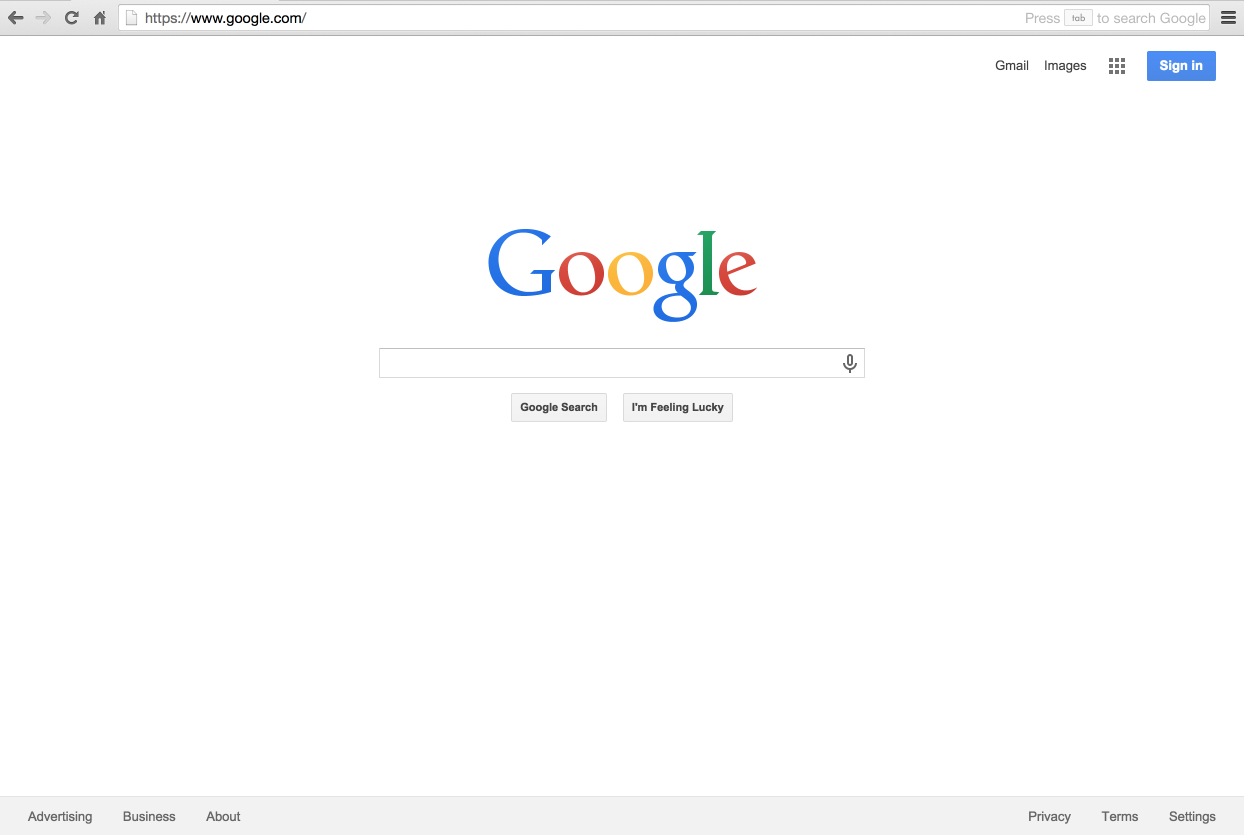
Over the next two weeks, you're going to be building a clone of the Google home page, one of the mostly visited pages in the world. Google itself is a successful company popular for it's highly efficient searched engine built with a meticulous algorithm.
The challenge is to get as far as you can in 3 hours!
It's totally fine if you get stuck or blocked as you will have more time to work on this, but try your best to push through
This will test:
- HTML
- CSS
- GitHub
-
Create the exact replica of the Google Home Page so that if we cannot tell the difference between the original and the copy when we look at it.
-
Remember, you are NOT being asked to implement the functionality of the Google Home Page (so don't worry about links or search), but only the interface + layout (using HTML and CSS).
-
For this challenge, do not open the chrome developer tools or download the html page. In order to get the most out of this challenge, you should develop the page from scratch.
- Fork this repository to create a copy of it on your GitHub account (only do this the first time)
- Navigate to your forked homework repository
- Click "Clone or Download" (green button)
- Select "Open in Desktop" - you should have the Desktop app installed before doing this
- Follow the instructions to download the repo to your computer
- Have fun coding!
-
We have an
index.htmlfile and astyle.cssfile, which you will be working on. Do all your HTML work inindex.htmland all your styling (CSS works) instyle.css. -
We also have an
/imgsdirectory, in case you want to store any images to use on your Google Clone (aka Google logo, etc.). We left you some logos to use if you'd like; you're welcome to find some on your own too! -
DO NOT add any more files or use any JavaScript codes for this challenge.
To test your progress and see your work in the browser - simply navigate to your project directory + open index.html
- In GitHub Desktop - it should show all your code changes already. Make sure to commit your changes (section in the bottom left) with a summary description

- After committing, the center navigation should be clear
- Click "Push Origin" on the top

- Now your work is saved to your GitHub repo - great job!
- You can always "push your code" to your repo so that it's accessible anywhere you have Internet
Good Luck!
-
DON’T BE A PERFECTIONIST! You’re just trying to make it look like google.com, not actually function like it and it doesn’t have to be spaced exactly the same way to the pixel. Any dropdown menus or form submissions or hover-highlighting should be ignored (unless you can do it!).
-
USE GOOGLE! You’ll probably run into roadblocks where you can’t figure out how to do something so do what all good devs do… Google it!
-
If you’re frustrated with trying to get buttons or inputs to style the way you want (for instance, they seem to just not respond to any styles), look into the css property -webkit-appearance: none; or -moz-appearance if you’re using Firefox.
-
Start with just putting the main elements on the page (the logo image and search form), then get them placed horizontally. You can either download the Google logo or link directly to its URL on the web in your
tag.
-
Next do the navbar across the top, first building the content and then trying to position it. Check out how to build a horizontal CSS navbar if you’re lost.
-
Finally, put in the footer, which should be very similar to the top navbar.
-
In general, do as much on your own as you can before relying on the developer tools (or viewing the page’s source code) to help you along. Push your project to Github using the instructions above!
- FLEXBOX
- img tags
- anchor tags
- How to build a navbar
- Google!!!!