UPDATE: I've eventually found out that mesa is the cause behind this error!
* Cinnamon version (cinnamon --version): **4.8.6**
- Please specify if you are using the daily builds PPA
(https://launchpad.net/~linuxmint-daily-build-team/+archive/ubuntu/daily-builds): **No**
* Distribution - (Mint 17.2, Arch, Fedora 25, etc...): **Mint 20.1**
* Graphics hardware *and* driver used

* 32 or 64 bit: **64 but**
* Attach ~/.xsession-errors, or /var/log/syslog **Currently I do not have access to this.**
Issue
This happened a few days ago now, but I was recommended that I post this issue here.
I've only recently installed Linux Mint, on an old laptop that used to run Windows 7.
Linux Mint works perfectly and better than other distros on this device, insofar as I go towards the update that it recommends I take. Twice, I've installed the update, rebooted my device, only to be greeted with: (along the lines of)
Cinnamon has crashed
Disable Applets
Run in safe mode
Blah blah
If I disable applets and do whatever I can, it is all in vain since I'm perpetually stuck in a loop of Cinnamon crashing outside of being in safe mode. Due to this, with Timeshift, I was forced to return back to a period before I installed the updates; twice until I figured out the root of the problem.
Of-course, I can always ignore these updates, but its quite agitating to be frank.
Steps to reproduce
The update I installed was:
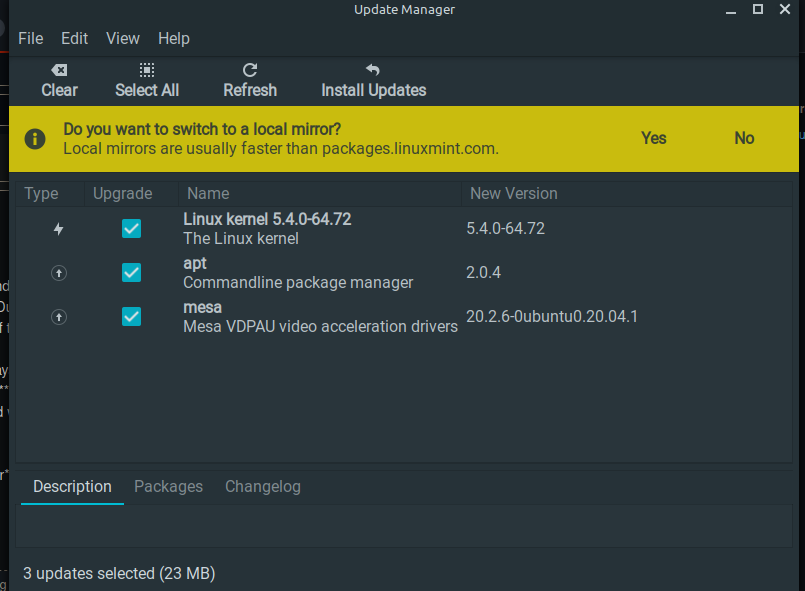
Immediately after I rebooted the device. The first time around, I also sudo apt updated, and did a few other miscellaneous tidying-ups. The errors come up after I log in.
Expected behaviour
I expect to be greeted with my wonderful Cinnamon desktop environment <3
Other information
I don't really know how this all works, so please tell me if I should add any more information. For safe measures, here's my
Neofetch
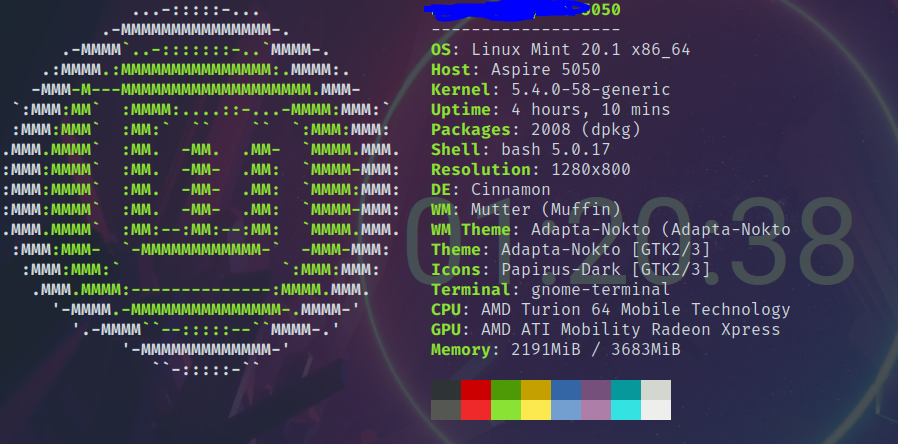
Configuration info, if applicable
Is it applicable?

UPDATE: I've eventually found out that mesa is the cause behind this error!
Issue
This happened a few days ago now, but I was recommended that I post this issue here.
I've only recently installed Linux Mint, on an old laptop that used to run Windows 7.
Linux Mint works perfectly and better than other distros on this device, insofar as I go towards the update that it recommends I take. Twice, I've installed the update, rebooted my device, only to be greeted with: (along the lines of)
If I disable applets and do whatever I can, it is all in vain since I'm perpetually stuck in a loop of Cinnamon crashing outside of being in safe mode. Due to this, with Timeshift, I was forced to return back to a period before I installed the updates; twice until I figured out the root of the problem.
Of-course, I can always ignore these updates, but its quite agitating to be frank.

Steps to reproduce
The update I installed was:
Immediately after I rebooted the device. The first time around, I also sudo apt updated, and did a few other miscellaneous tidying-ups. The errors come up after I log in.
Expected behaviour
I expect to be greeted with my wonderful Cinnamon desktop environment <3
Other information
I don't really know how this all works, so please tell me if I should add any more information. For safe measures, here's my
Neofetch
Configuration info, if applicable
Is it applicable?