


A native macOS menu bar app for controlling your HomeKit smart home devices.
- Menu bar access - Control your smart home from the macOS menu bar
- Full HomeKit support - Lights, switches, outlets, fans, thermostats, AC units, blinds, locks, garage doors, humidifiers, air purifiers, valves, cameras, and security systems
- Scenes - Execute and toggle HomeKit scenes with automatic state tracking
- Favourites - Pin frequently used devices, scenes, and groups to the top of the menu
- Multi-home support - Switch between multiple HomeKit homes
- Native experience - Built with AppKit for a true macOS look and feel
- Menu bar pinning - Pin rooms, devices, scenes, or groups as separate menu bar items with optional keyboard shortcuts
- Device groups - Create custom groups to control multiple devices at once (Pro)
- iCloud sync - Sync favourites, groups, and settings across your Macs (Pro)
- Deeplinks - Control devices from Shortcuts, Alfred, Raycast, Stream Deck (Pro)
- Cameras - Live video feed with overlay action buttons to control nearby accessories (Pro)
- Doorbell notifications - Automatic camera view with live stream when a doorbell rings (Pro)
- Webhooks/CLI - Built-in HTTP server with a dedicated CLI tool (Pro)
- Itsytv - Free companion app for controlling Apple TV from your menu bar
| Device type | Features |
|---|---|
| Lights | On/off, brightness slider, RGB color picker, color temperature picker |
| Switches & Outlets | On/off toggle, in-use indicator for outlets |
| Fans | On/off, speed slider, auto mode, rotation direction, swing mode |
| Thermostats | Off/Heat/Cool/Auto modes, target temperature stepper, heating/cooling thresholds for Auto mode |
| AC / Heater-Cooler | Auto/Heat/Cool modes, temperature control, swing mode toggle |
| Blinds / Window coverings | Position slider, horizontal/vertical tilt control |
| Locks | Lock/unlock toggle with status |
| Garage doors | Open/close toggle, status display (opening/closing/stopped), obstruction detection |
| Humidifiers & Dehumidifiers | Auto/Humidify/Dehumidify modes, humidity display, water level indicator, swing mode |
| Air purifiers | Manual/Auto modes, speed slider, swing mode |
| Valves | Open/close toggle, in-use indicator (irrigation, shower, faucet types) |
| Security systems | Off/Stay/Away/Night modes, triggered state indicator |
| Cameras | Live video feed with overlay action buttons to control nearby accessories (Pro) |
| Doorbells | Automatic camera view on ring with live stream and configurable chime sound (Pro) |
| Temperature & Humidity sensors | Summary display per room with ranges |
Pin rooms, devices, scenes, or groups directly to the menu bar for instant access. Each pinned item appears as a separate menu bar icon. Optionally display names next to icons and assign custom keyboard shortcuts for even faster control.
Create custom groups of devices to control multiple devices at once. Groups can be scoped to a room or made global. Light groups support full control (power, brightness, color), blind groups control position, and lock groups toggle all locks together. Groups show partial state indicators when devices differ (e.g., "2/3 on").
View live video feeds from your HomeKit cameras directly in the menu bar. Overlay action buttons let you control nearby accessories without leaving the camera view — toggle lights and outlets, open garage doors and gates, or lock and unlock doors.
When a HomeKit doorbell rings, the camera panel automatically opens in the top-right corner of the screen with a pinned live stream of the doorbell camera. A configurable chime sound plays on ring. Both the automatic camera display and the sound can be independently toggled in Settings → Cameras.
Sync your favourites, hidden items, device groups, shortcuts, and pinned items across all your Macs.
Control your HomeKit devices from external apps using URL schemes. Perfect for Shortcuts, Alfred, Raycast, Stream Deck, and other automation tools.
URL format:
itsyhome://<action>/<target>
Actions:
| Action | URL format | Example |
|---|---|---|
| Toggle | itsyhome://toggle/<Room>/<Device> |
itsyhome://toggle/Office/Spotlights |
| Turn on | itsyhome://on/<Room>/<Device> |
itsyhome://on/Kitchen/Light |
| Turn off | itsyhome://off/<Room>/<Device> |
itsyhome://off/Bedroom/Lamp |
| Brightness | itsyhome://brightness/<0-100>/<Room>/<Device> |
itsyhome://brightness/50/Office/Lamp |
| Position | itsyhome://position/<0-100>/<Room>/<Device> |
itsyhome://position/75/Living%20Room/Blinds |
| Temperature | itsyhome://temp/<degrees>/<Room>/<Device> |
itsyhome://temp/22/Hallway/Thermostat |
| Color | itsyhome://color/<hue>/<saturation>/<Room>/<Device> |
itsyhome://color/120/100/Bedroom/Light |
| Scene | itsyhome://scene/<Scene%20Name> |
itsyhome://scene/Goodnight |
| Lock | itsyhome://lock/<Room>/<Device> |
itsyhome://lock/Front%20Door |
| Unlock | itsyhome://unlock/<Room>/<Device> |
itsyhome://unlock/Front%20Door |
| Open | itsyhome://open/<Room>/<Device> |
itsyhome://open/Garage/Door |
| Close | itsyhome://close/<Room>/<Device> |
itsyhome://close/Bedroom/Blinds |
Target formats:
Room/Device- Device in specific room (e.g.,Office/Spotlights)Room/group.Name- Group scoped to a room (e.g.,Office/group.All%20Lights)group.Name- Global group (e.g.,group.Office%20Lights)
Testing from terminal:
open "itsyhome://toggle/Office/Spotlights"
open "itsyhome://toggle/Office/group.All%20Lights"
open "itsyhome://toggle/group.Office%20Lights"
open "itsyhome://scene/Goodnight"
open "itsyhome://brightness/50/Bedroom/Lamp"
Note: Spaces in room or device names must be URL-encoded as %20.
A built-in HTTP server that lets you control and query your HomeKit devices from any tool on your network — terminal, scripts, other apps, or the dedicated itsyhome CLI.
Enable the server in Settings → Webhooks/CLI. Default port: 8423.
Control endpoints:
curl http://localhost:8423/toggle/Office/Spotlights
curl http://localhost:8423/on/Kitchen/Light
curl http://localhost:8423/off/Bedroom/Lamp
curl http://localhost:8423/brightness/50/Office/Lamp
curl http://localhost:8423/position/75/Living%20Room/Blinds
curl http://localhost:8423/temp/22/Hallway/Thermostat
curl http://localhost:8423/color/120/100/Bedroom/Light
curl http://localhost:8423/scene/Goodnight
curl http://localhost:8423/lock/Front%20Door
curl http://localhost:8423/unlock/Front%20Door
curl http://localhost:8423/open/Garage/Door
curl http://localhost:8423/close/Bedroom/Blinds
Query endpoints:
| Endpoint | Description |
|---|---|
/status |
Home summary (rooms, devices, reachable/unreachable counts) |
/list/rooms |
List all rooms |
/list/devices |
List all devices with type and reachability |
/list/devices/<room> |
List devices in a specific room |
/list/scenes |
List all scenes |
/list/groups |
List all device groups (includes room info for room-scoped groups) |
/list/groups/<room> |
List groups available in a specific room (room-scoped + global) |
/info/<target> |
Detailed device/room info with current state |
Response format:
{"status": "success"}
{"status": "error", "message": "device not found"}
CLI tool:
Install the dedicated CLI for a better terminal experience:
brew install nickustinov/tap/itsyhomeSee itsyhome-cli for full documentation.
Control your HomeKit devices directly from an Elgato Stream Deck using the Itsyhome Stream Deck plugin. Requires the webhook server to be enabled.

Actions:
| Action | Description |
|---|---|
| Switch/Outlet | Toggle a switch or outlet on/off |
| Execute scene | Trigger a HomeKit scene |
| Light | Toggle a light on/off with optional target brightness |
| Fan | Toggle a fan on/off with speed display |
| Humidifier | Toggle a humidifier/dehumidifier on/off with humidity display |
| Lock | Lock/unlock with optimistic feedback |
| AC | Toggle thermostat/AC with mode-aware icons (heat/cool/auto) |
| Status | Display temperature or humidity readings |
| Blinds | Open/close blinds with position display |
| Garage door | Open/close garage door with state feedback |
| Security system | Arm/disarm a security system with mode selection |
| Group | Turn on/off a device group with partial count display |
Features include color-coded icons per device type, dynamic state display, live state polling, optimistic updates for slow devices (locks, garage doors), custom on/off colors, and optional labels for multi-button setups.
Source code: itsyhome-streamdeck
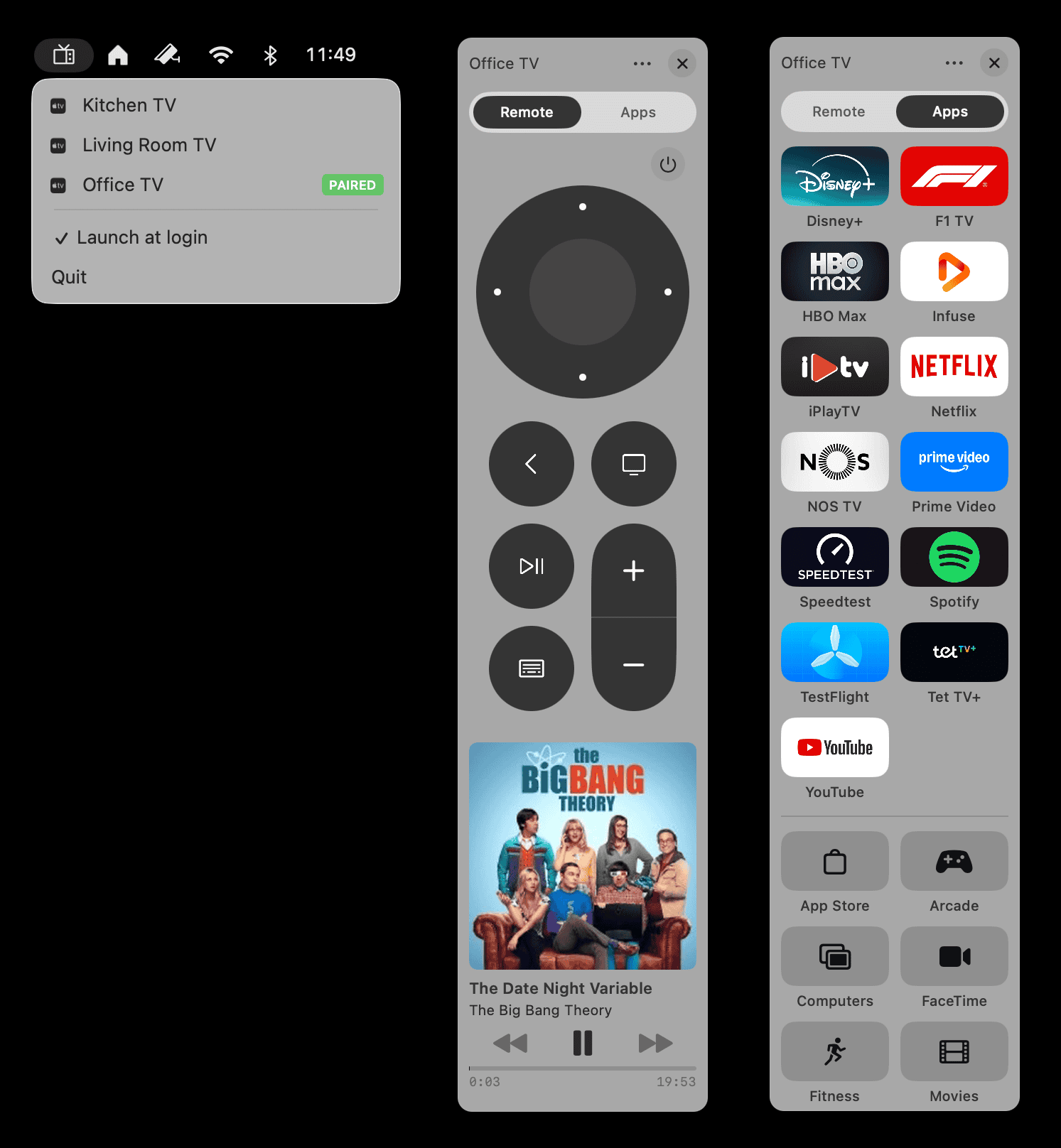
|
Itsytv is a free, open-source macOS menu bar app for controlling Apple TV — the missing remote app for your Mac.
Built with Swift and SwiftUI. Free forever, MIT licensed. |
- macOS 14.0 or later
- Xcode 15.0 or later
- XcodeGen for project generation
- Apple Developer account with HomeKit entitlement
brew install xcodegengit clone https://github.com/nickustinov/itsyhome-macos.git
cd itsyhome-macosEdit project.yml and update:
options:
  bundleIdPrefix: com.yourdomain  # Your reverse domain

settings:
  base:
DEVELOPMENT_TEAM: YOUR_TEAM_ID # Uncomment and set your team IDxcodegen generateopen Itsyhome.xcodeprojSelect the Itsyhome scheme and run on My Mac (Mac Catalyst).
This app uses Mac Catalyst with a native AppKit plugin for the menu bar:
Itsyhome/
├── iOS/                           # Main Catalyst app (hidden, headless)
│   ├── AppDelegate.swift          # App lifecycle, loads macOS plugin
│   ├── HomeKitManager.swift       # HomeKit integration (Mac2iOS protocol)
│   ├── SceneDelegate.swift
│   └── CameraSceneDelegate.swift  # Camera window handling
├── Shared/                        # Shared code between iOS and macOS
│   ├── BridgeProtocols.swift      # Bridge protocols & codable data structures
│   └── URLSchemeHandler.swift     # URL scheme deeplink handling
└── Resources/

macOSBridge/                       # Native AppKit plugin for menu bar
├── MacOSController.swift          # Main menu bar controller (iOS2Mac protocol)
├── MenuBuilder.swift              # Builds NSMenu from service data
├── ActionEngine/                  # Unified API for executing actions
│   ├── ActionEngine.swift         # Core action execution engine
│   ├── ActionParser.swift         # Parses actions from URL schemes
│   └── DeviceResolver.swift       # Resolves targets to devices
├── MenuItems/                     # Device-specific menu item views
├── DesignSystem/                  # shadcn/ui-inspired design tokens
├── Controls/                      # Custom UI controls
├── Settings/                      # Preferences & settings UI
├── Pro/                           # Pro subscription management (StoreKit 2)
├── Sync/                          # iCloud sync (Pro)
├── Webhook/                       # HTTP server (Pro)
├── Models/                        # Data models
└── Utilities/                     # Helpers (color conversion, icon mapping)
The iOS/Catalyst app runs headless and manages HomeKit communication. It loads the macOSBridge plugin which provides the native AppKit menu bar interface. Communication happens via bidirectional protocols (Mac2iOS & iOS2Mac) with JSON-serialized data.
- The Catalyst app initializes HomeKit and monitors for device updates
- Device data is serialized to JSON and passed to the macOS plugin
- The plugin renders custom
NSMenuItemviews with controls - User interactions are sent back to the Catalyst app to execute HomeKit commands
The project uses XcodeGen to generate the Xcode project from project.yml. After making changes to project configuration:
xcodegen generateThe project includes comprehensive unit tests for the macOSBridge plugin. Run tests with:
xcodebuild test -scheme Itsyhome -destination "platform=macOS"Test coverage includes:
| Test suite | Description |
|---|---|
*MenuItemTests |
Menu item behaviour for all device types (Light, Switch, Fan, Thermostat, AC, Blind, Lock, GarageDoor, Humidifier, AirPurifier, Valve, SecuritySystem) |
ValueConversionTests |
Type conversion utilities for HomeKit values |
LocalChangeNotifiableTests |
Notification protocol for syncing menu items |
ActionEngineTests |
Action parsing and execution (toggle, brightness, scenes, etc.) |
ActionParserTests |
URL scheme parsing |
DeviceResolverTests |
Target resolution logic |
URLSchemeHandlerTests |
URL scheme handler |
WebhookServerTests |
HTTP server lifecycle and endpoints |
CloudSyncManagerTests |
iCloud sync |
CloudSyncTranslatorTests |
ID translation for sync (cameras, groups, order, shortcuts) |
DeviceGroupTests |
Device group functionality |
PreferencesManagerTests |
Settings persistence |
IconResolverTests |
Device icon resolution |
ProStatusCacheTests |
Pro status caching |
Startup diagnostics logging can be enabled by setting StartupLogger.enabled = true in macOSBridge/Utilities/StartupLogger.swift. Logs are emitted via os_log with subsystem com.nickustinov.itsyhome and category Startup, viewable in Console.app or via:
log stream --predicate 'subsystem == "com.nickustinov.itsyhome"' --level infoWhen the webhook server is running, three debug endpoints are available to inspect raw HomeKit data:
| Endpoint | Description |
|---|---|
GET /debug/<name> |
Returns characteristics, service type, limits, room, and reachability for a specific device or service matched by name |
GET /debug/all |
Dumps all accessories with their services, rooms count, and scenes count |
GET /debug/raw |
Returns the complete raw HomeKit data dump from the iOS bridge including service groups, zones, action sets, and triggers |
Example using curl:
curl http://localhost:<port>/debug/all
curl http://localhost:<port>/debug/Living%20Room%20Light
curl http://localhost:<port>/debug/rawThis app requires the HomeKit entitlement. You'll need to:
- Enable HomeKit capability in your Apple Developer account
- Create an App ID with HomeKit enabled
- The entitlement is already configured in
Itsyhome/Itsyhome.entitlements
MIT License © 2026 Nick Ustinov - see LICENSE for details.
Nick Ustinov
- Email: nick@ustinov.cc
- Website: itsyhome.app
- GitHub: @nickustinov
- Website: itsyhome.app
- Issues: GitHub Issues
Contributions are welcome! Please feel free to submit issues and pull requests.