URL support for hashnode posts in recent posts plugin#206
URL support for hashnode posts in recent posts plugin#206luisfalconmx wants to merge 2 commits intolowlighter:masterfrom luisfalconmx:hashnode-recent-posts-plugin
Conversation


 lowlighter
left a comment
lowlighter
left a comment
lowlighter
left a comment
There was a problem hiding this comment.
For the query bugfix it's ok 👍🏼
As for the url support, unfortunately it won't work when embed on GitHub 😕
I think it's done to reduce risk of HTML injections, but AFAIK GitHub remove all interactivity from SVG images before rendering them (including external links and hover animations), so you can only choose to redirect to either image source or to a single url using markdown.
It may have changed since though, so what you can try is to switch your metrics workflow to your fork and test whether your posts links on your profile readme do work
- uses: luisfalconmx/metrics@hashnode-recent-posts-plugin
  with:
    # options
If it does, I'll merge the remaining changes 🙂

|
I have done the tests as you mention and the link just doesn't work. I suppose that the code of this branch does not add value other than the change in the query, so I do not consider that the changes in the master branch are mixed. |

|
Yeah, it does only when checking the raw image 😕 There is a project to create a "markdown" template (though it's still in early design) but you'll be able to use metrics data and format them how you want, including clickable links so ultimately it'll be possible in the future 🙂 |
|
With next release you'll be able to use the upcoming markdown posts plugin from the markdown template. It won't solve exactly the fact that links are not clickable within SVG images, but I guess it's still a suitable workaround, some plugins are better as textual versions (only drawback is that it does requires a bit more work to setup) Thanks a lot for your interest in metrics and for contributing 🙂 |

2 participants


Hi, I made some improvements to the recent posts plugin specifically for hashnode.
URL Support
First add the option Posts custom url where a custom url can be inserted if required.
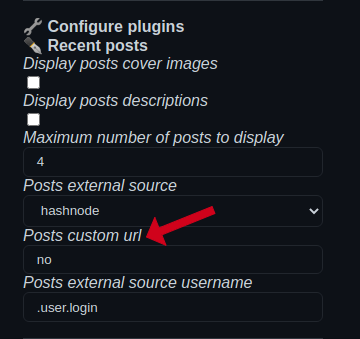
If the previous option has the value "no" then the url will be "https://USER.hashnode.dev/" (USER will be replaced by the provided github user)
The generated url will be inserted in the title and description of each post to create a link to the post.
Minor change in GraphQL Query
In the query the page had the value 1. This will show the publications from the tenth which does not meet the purpose of the plugin.
Just change from 1 to 0 so that it shows exactly the most recent posts.
This change is too simple, but I had to explain it.