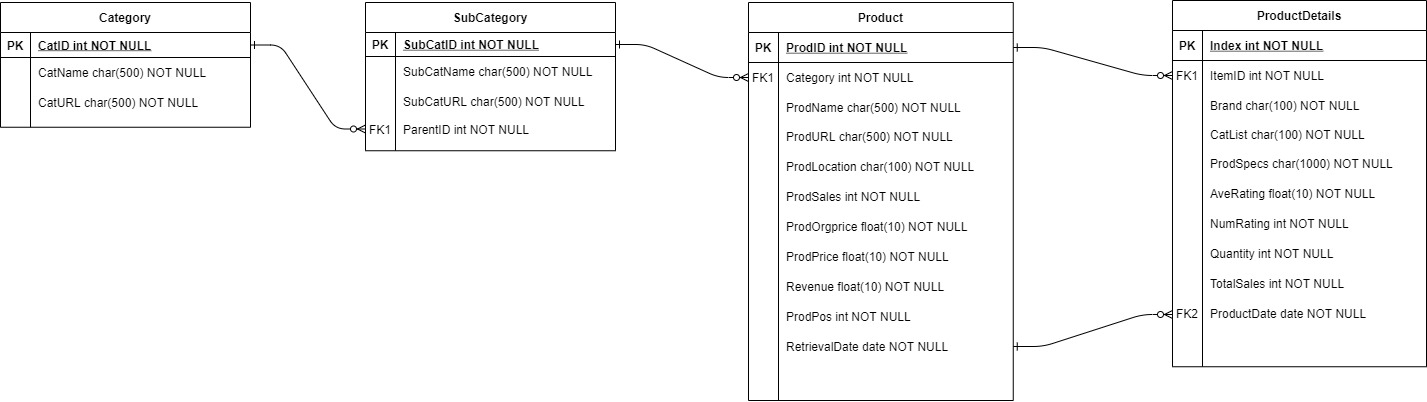
- download anaconda: https://docs.anaconda.com/anaconda/install/windows/
- ensure system is in python 3
- download chromedriver according to system latest chrome version: https://chromedriver.chromium.org/downloads
- extract zip file
- place the file in project folder
- selenium
- pyarrow
- google-cloud-bigquery
- os
- io
- json
- pandas
- numpy
- logging
- time
- get bq credentials json file from google cloud platform (IAM & Admin > Service Account > Keys)
- add new json key
- place the file in project folder
Create BAT file to run scripts on Task Scheduler
- open Anaconda Prompt on computer
- navigate to Shopee-MR folder
| Script | Description | How to run |
|---|---|---|
| categories | get main categories | python categories.py |
| subcategories | get subcategories | python subcategories.py |
| mainCat | run both categories and subcategories scripts | python mainCat.py |
| product | get top 300 products from each subcategory | python products.py |
| productdetails | get detailed product information for each product | python productdetails.py |
| mainProd | run both product and productdetails scripts | python mainProd.py |
| keyword | users can search for specific keyword | python keyword.py |
- chromedriver.exe
- bq creds
- console display the number of rows uploaded in Category table in shopee-mr bigquery
- if error occurs:
- it will be logged in the console
- df.csv file will be created
- chromedriver.exe
- bq creds
- console display the number of rows uploaded in SubCategory table in shopee-mr bigquery
- if error occurs:
- it will be logged in the console
- subcat_df.csv file will be created
run through each subcategory in bigquery to collect product data such as name, monthly sales, price, location and etc
- chromedriver.exe
- bq creds
- validation check for existing products in each subcategory that exist in bigquery for the month
- console display the number of rows uploaded in Product table in shopee-mr bigquery
- if error occurs:
- it will be logged in the console
- prod_df.csv file will be created
run through each product stored in bigquery for the month and collect data such as brand, catlist, product specifications, ratings, quantity available and total sales
- chromedriver.exe
- bq creds
- validation check for existing product details in each subcategory that exist in bigquery for the month
- console display the number of rows uploaded in ProductDetails table in shopee-mr bigquery
- if error occurs:
- it will be logged in the console
- proddetails_df.csv file will be created
- chromedriver.exe
- bq creds
- keyword input in anaconda prompt
- console display the number of rows uploaded in Keyword table in shopee-mr bigquery
- if error occurs:
- it will be logged in the console
- csv file will be created named 'keyword {retrievaldate}'
https://datastudio.google.com/u/0/reporting/b2f9b608-3069-4a75-8c98-09b74aed29eb/page/p_fk44kszvnc