


"Every exhibit has a story. Now it can tell it."
Gemini Live Agent Challenge 2026 — Category: Live Agents.
- Live demo: https://guideqr.ai
- Demo video: https://youtu.be/PICosF4za00?si=UuSnuXthNXDCGDS4
- Devpost: https://geminiliveagentchallenge.devpost.com/
197+ museums in Vietnam alone — yet most international visitors leave without truly understanding what they're seeing.
- Human guides are expensive (~$15,000/month for multilingual coverage) and unavailable outside opening hours
- Traditional audio guides are static: no follow-up questions, no personalization, no interactivity
- Language barriers cut off millions of tourists from exhibit stories told only in the local language
- Existing museum apps require downloads and signups — visitors simply don't bother
MuseAI transforms any museum exhibit into a real-time, interruptible AI conversation — no app required.
- Scan — Visitor scans a QR code at the museum entrance or beside any exhibit
- Identify — Camera vision recognizes the exhibit instantly
- Converse — Gemini Live API answers questions in real-time, grounded in verified museum knowledge (no hallucinations)
- Switch — Visitor changes language mid-conversation across 10 supported languages (VI, EN, DE, RU, AR, ES, FR, JA, KO, ZH)
- Read + See — Live transcript displays alongside voice output, and contextual illustration images from museum data are shown to make explanations more vivid (useful in noisy spaces and for accessibility)
Zero installation. Zero language barrier. Every exhibit, every visitor, every language.
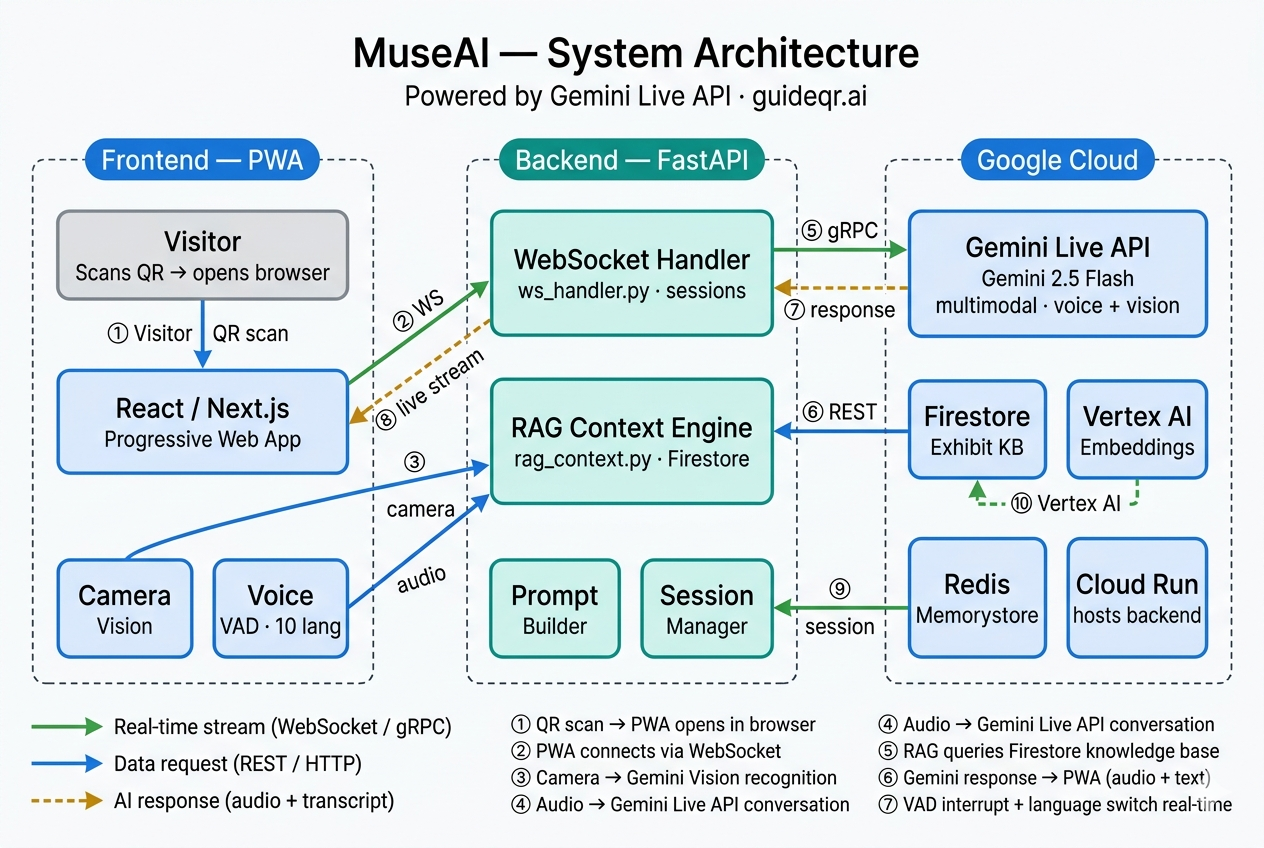
QR Scan -> Next.js PWA -> /welcome -> /camera-tour or /exhibit/[id]
-> WebSocket (FastAPI) -> Gemini Live API
-> RAG Context (Firestore + Embeddings)
-> Real-time voice response + transcript
| Layer | Technology |
|---|---|
| Live Voice Agent | Gemini Live API (gemini-2.5-flash-native-audio-preview-12-2025) |
| Embeddings | GEMINI_EMBEDDING_MODEL (default: gemini-embedding-001) |
| Backend | Python FastAPI + WebSocket |
| Frontend | Next.js (App Router, PWA-style UX) |
| Database | Firestore |
| Storage | Google Cloud Storage |
| Hosting | Google Cloud Run |
| CI/CD | GitHub Actions |
- Real-time voice conversation (interruptible)
- Camera-based exhibit recognition
- Camera tour flow (
/camera-tour) for guided object scan before conversation - RAG-grounded answers from museum data
- Multilingual guide for tourists: VI, EN, DE, RU, AR, ES, FR, JA, KO, ZH
- Landing page demo localized in 10 languages with browser language detection and
?lang=override - Voice + transcript mode for noisy environments
- Transcript-linked visual illustrations from museum-curated image data
- Accessibility support for deaf/hard-of-hearing visitors
- QR-first, no app install
- Admin CMS (super admin + museum admin)
- Analytics events pipeline
MuseAI is designed for mixed visitor groups in real museums:
- Tourists can switch to their preferred language and keep context per exhibit.
- Transcript stays visible while AI speaks, useful in crowded/noisy galleries.
- During transcript playback, the interface can show relevant exhibit/scenes images curated by the museum to improve understanding.
- Transcript-first usage supports visitors with hearing impairments.
- Staff can still provide the same guided experience without extra devices.
- Python 3.11+ (3.12 also works)
- Node.js 20+
- Google Cloud project with billing enabled
gcloudCLI installed and authenticated- APIs enabled in your GCP project:
- Firestore API
- Cloud Storage API
- Gemini API / Vertex AI API
- Cloud Run API (for deployment)
- Artifact Registry API (for deployment)
This is not an offline-only project. Local UI can run without cloud, but full features require:
- Firestore (museums/exhibits/admin/session metadata)
- Gemini API / Gemini Live (voice + reasoning)
- Google credentials (service account or ADC)
This section is optimized so a new developer can reproduce the project quickly with minimal guesswork.
git clone https://github.com/huypq3/museai.git
cd museaiUse one of these methods:
- Service account JSON (recommended for backend local run):
# Put file at backend/service-account.json
ls backend/service-account.json- ADC user login (fallback):
gcloud auth application-default loginSet active project:
gcloud config set project <YOUR_GCP_PROJECT_ID>cd backend
cp .env.example .envEdit backend/.env with at least these required values:
JWT_SECRET=<strong_random_64_hex_or_more>GEMINI_API_KEY=<your_gemini_api_key>GOOGLE_CLOUD_PROJECT=<your_project_id>GOOGLE_APPLICATION_CREDENTIALS=./service-account.json(if using service account file)ALLOWED_ORIGINS=http://localhost:3000PUBLIC_APP_URL=http://localhost:3000GCS_BUCKET=<your_bucket_name>GCS_BUCKET_NAME=<your_bucket_name>
Optional but useful for local:
APP_ENV=developmentENFORCE_HTTPS=falseWS_REQUIRE_EPHEMERAL_TOKEN=trueVOICE_MAX_OUTPUT_TOKENS=900
cd backend
python3 -m venv .venv
source .venv/bin/activate
pip install -r requirements.txt
uvicorn main:app --host 0.0.0.0 --port 8080 --reload
Backend health check:
curl http://localhost:8080/healthOpen another terminal:
cd museai/frontend
cp .env.example .env.local
Set:
NEXT_PUBLIC_BACKEND_URL=http://localhost:8080NEXT_PUBLIC_APP_URL=http://localhost:3000
Then run:
npm install
npm run devOpen another terminal:
cd museai/backend
source .venv/bin/activate
python scripts/seed_firestore.py
python scripts/seed_knowledge_base.py
python scripts/seed_scenes.py- Frontend:
http://localhost:3000 - Welcome:
http://localhost:3000/welcome?museum=vietnam_ethnology_museum - Camera tour:
http://localhost:3000/camera-tour?museum=vietnam_ethnology_museum - Backend health:
http://localhost:8080/health
Frontend type-check:
cd museai/frontend
npx tsc --noEmit
Backend syntax check:
cd museai
python3 -m py_compile backend/main.py backend/live/ws_handler.py backend/vision/recognizer.py
Run tests:
cd museai
pytest -qgoogle.auth.exceptions.DefaultCredentialsError
- Cause: GCP credentials not configured.
- Fix:
- set
GOOGLE_APPLICATION_CREDENTIALS=./service-account.jsoninbackend/.env, or - run
gcloud auth application-default login.
- set
- Frontend shows CORS / cannot call backend
- Cause:
ALLOWED_ORIGINSmissing frontend URL. - Fix: set
ALLOWED_ORIGINS=http://localhost:3000in backend.env, then restart backend.
- Voice connects then closes immediately
- Cause: missing/invalid
GEMINI_API_KEY, JWT/session config, or WS limits too strict. - Fix:
- verify
/health - verify
GEMINI_API_KEY,JWT_SECRET - keep default WS limits from
.env.example.
- verify
- Camera recognition always unknown
- Cause: museum has no seeded exhibits or low-quality frame.
- Fix:
- run all seed scripts
- test with seeded museum/exhibit
- ensure backend logs show
Vision recognize request.
- Admin login fails on fresh setup
- Cause: no admin seeded / wrong password.
- Fix:
- use
ADMIN_USERNAME=adminand setADMIN_PASSWORDorADMIN_PASSWORD_HASHin.env - rerun relevant seed/bootstrap flow.
- use
See backend/.env.example.
Required vars (minimum for full run):
JWT_SECRET(required, >= 32 chars)GEMINI_API_KEY(required)GOOGLE_CLOUD_PROJECT(required)GOOGLE_APPLICATION_CREDENTIALS(required for local GCP auth)ALLOWED_ORIGINS(must include frontend origin)PUBLIC_APP_URL(recommended, QR URL fallback)GCS_BUCKET/GCS_BUCKET_NAME
Important runtime tuning vars:
GEMINI_LIVE_MODEL(defaultgemini-2.5-flash-native-audio-preview-12-2025)GEMINI_EMBEDDING_MODEL(defaultgemini-embedding-001)VOICE_MAX_OUTPUT_TOKENS(default currently900)VOICE_TEMPERATURE(default0.55)MAX_REQUEST_BYTES(default:10485760)WS_MAX_PER_IP,WS_MAX_PER_HOUR,WS_MAX_AUDIO_CHUNK_BYTES,WS_MAX_MESSAGE_SIZELOGIN_MAX_ATTEMPTS,LOGIN_LOCKOUT_MINUTES,LOGIN_IP_MAX_ATTEMPTSDAILY_GEMINI_BUDGET_USD,MONTHLY_GEMINI_BUDGET_USD
QR URL fallback order in backend: museum.qr_base_url -> PUBLIC_APP_URL -> FRONTEND_PUBLIC_URL -> APP_PUBLIC_URL -> http://localhost:3000.
See frontend/.env.example.
Required vars:
NEXT_PUBLIC_BACKEND_URLNEXT_PUBLIC_APP_URL
Note: frontend auto-derives WebSocket URL from NEXT_PUBLIC_BACKEND_URL automatically.
This repository is configured to build/deploy from GitHub Actions workflows. For this mode, frontend build-time env comes only from GitHub Actions Variables and GitHub Actions Secrets. The workflow does not rely on Vercel project env during CI build.
Variables:
NEXT_PUBLIC_BACKEND_URL(must behttps://...run.appin production)NEXT_PUBLIC_APP_URL(for examplehttps://www.guideqr.ai)GCP_PROJECT_IDCLOUD_RUN_REGIONCLOUD_RUN_SERVICEARTIFACT_REPOSITORYALLOWED_ORIGINSPUBLIC_APP_URLGCS_BUCKET_NAME- Optional tuning vars:
GEMINI_LIVE_MODEL,GEMINI_EMBEDDING_MODEL,VOICE_*,WS_*,LOGIN_*,MAX_REQUEST_BYTES,DAILY_GEMINI_BUDGET_USD,MONTHLY_GEMINI_BUDGET_USD
Secrets:
GCP_SA_KEYJWT_SECRETGEMINI_API_KEYREDIS_URL(optional; empty allowed)VERCEL_TOKEN(frontend deploy)VERCEL_ORG_IDVERCEL_PROJECT_ID
Use this mode only if you are not using the GitHub Actions workflow. If you deploy directly in Vercel UI/CLI, frontend env comes from Vercel Environment Variables.
At minimum set:
NEXT_PUBLIC_BACKEND_URL=https://<your-cloud-run-service>.run.appNEXT_PUBLIC_APP_URL=https://<your-frontend-domain>
If you deploy from GitHub Actions, configure the same variables/secrets listed in Mode A.
PROJECT_ID="your-project-id"
REGION="asia-southeast1"
SERVICE="museai-backend"

# Build & push
gcloud builds submit ./backend \
  --tag "asia-southeast1-docker.pkg.dev/${PROJECT_ID}/museai-repo/backend:latest"

# Deploy
gcloud run deploy "${SERVICE}" \
  --image "asia-southeast1-docker.pkg.dev/${PROJECT_ID}/museai-repo/backend:latest" \
  --platform managed \
  --region "${REGION}" \
  --allow-unauthenticated \
  --set-env-vars "GOOGLE_CLOUD_PROJECT=${PROJECT_ID},APP_ENV=production,ENFORCE_HTTPS=true,ALLOWED_ORIGINS=https://guideqr.ai,https://www.guideqr.ai,PUBLIC_APP_URL=https://guideqr.ai,MAX_REQUEST_BYTES=10485760,WS_MAX_PER_IP=5,WS_MAX_PER_HOUR=100"
After deploy, verify:
gcloud run services describe "${SERVICE}" --region "${REGION}" --format='value(status.url,status.latestReadyRevisionName)'
gcloud run services logs read "${SERVICE}" --region "${REGION}" --limit=100Deploy frontend/ to Vercel (recommended).
If using GitHub Actions:
- Set
NEXT_PUBLIC_BACKEND_URL=https://<your-cloud-run-service>.run.appin GitHub Actions Variables - Set
NEXT_PUBLIC_APP_URL=https://<your-frontend-domain>in GitHub Actions Variables - Set
VERCEL_TOKEN,VERCEL_ORG_ID,VERCEL_PROJECT_IDin GitHub
If using direct Vercel deploy instead:
- Set
NEXT_PUBLIC_BACKEND_URL=https://<your-cloud-run-service>.run.appin Vercel Environment Variables - Set
NEXT_PUBLIC_APP_URL=https://<your-frontend-domain>in Vercel Environment Variables
Provide at least one for judges:
- Cloud Run service URL (public)
- GCP Console screenshot/video of running service
- CI/CD evidence:
.github/workflows/deploy-backend.yml.github/workflows/deploy-frontend.ymlbackend/Dockerfile
museai/
├─ backend/
│  ├─ api/
│  ├─ auth/
│  ├─ live/
│  ├─ rag/
│  ├─ vision/
│  ├─ scripts/
│  ├─ requirements.txt
│  ├─ Dockerfile
│  └─ main.py
├─ frontend/
│  ├─ app/
│  ├─ components/
│  ├─ hooks/
│  ├─ lib/
│  └─ package.json
├─ .github/workflows/
└─ README.md
- Category: Live Agents
- Mandatory technologies used:
- Gemini Live API
- Google GenAI SDK
- Cloud Run
- Judging criteria mapping:
- Innovation & UX: real-time voice + camera + QR
- Technical implementation: WebSocket streaming + RAG + RBAC CMS
- Demo & presentation: [Add demo video link]
- Do not commit
.env, service account JSON, or secrets. - Rotate keys before public demo.
- Use strong
JWT_SECRETand bcrypt password hashes. - If any secret is accidentally exposed in logs/chat, rotate immediately.
MIT