
What's PowerLens?
PowerLens is a lightweight Oh-My-Zsh plugin that embeds live macOS system metrics directly into your zsh RPROMPT. A single background daemon collects all data every 2 seconds; the prompt reads a cached JSON file on each "precmd" — adding less than 5ms to prompt render time regardless of how many terminal windows you have open.
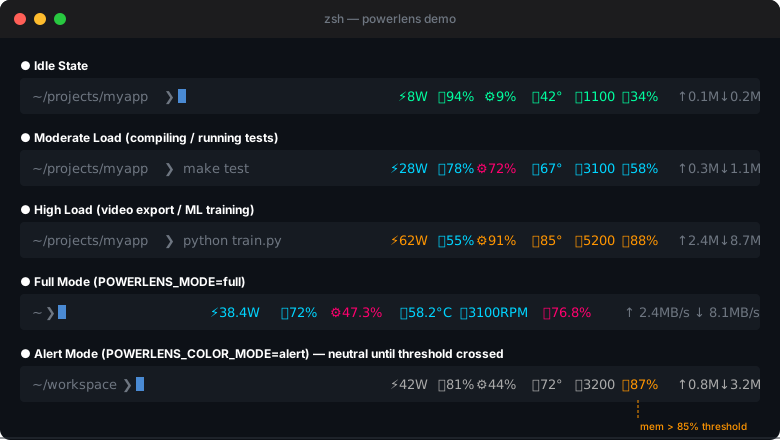
Features in v1.0.0
| Metric | Source | Display |
|---|---|---|
| Power (W) | "powermetrics" plist / ioreg fallback | ⚡38W |
| Battery % | IOKit (CGO) | 🔋87% / 🔌87% (charging) |
| CPU % | gopsutil | ⚙34% |
| CPU Temp (°C) | "powermetrics" (Apple Silicon) / SMC (Intel) | 🌡55° |
| Fan Speed (RPM) | SMC (IOKit CGO) | 🌀1200 |
| Memory % | gopsutil | 🧠62% |
| Network I/O | gopsutil + route/networksetup | ↑1.2M↓3.8M |
Display & Color
- Two modes: "compact" (abbreviated) and "full" (with units)
- Two color schemes: "multi" (4-level gradient per metric) and "alert" (neutral until threshold)
- Per-metric toggles: Show or hide any metric independently
Architecture Highlights
- Singleton daemon: N terminal windows → 1 Go process, never more
- Crash recovery: Stale data (>10s) auto-detected; daemon restarted silently
- SSH-aware: Daemon skipped in remote shells; shows "--" gracefully
- Native APIs: Apple Silicon + Intel via IOKit / SMC; no sudo required
Installation
Oh-My-Zsh (recommended)
git clone https://github.com/luyangkk/powerlens.git ~/.oh-my-zsh/custom/plugins/powerlensAdd "powerlens" to your plugins list in ~/.zshrc, then reload.
Build from Source
cd ~/.oh-my-zsh/custom/plugins/powerlens
make install
Requires Go 1.21+ on macOS 12+.
Requirements
- macOS 12 (Monterey) or later
- Zsh 5.8+
- Oh-My-Zsh
- Apple Silicon (arm64) or Intel (amd64)
Full Documentation
See README.md for configuration options, color reference, and behavior details.
License: MIT