A GNOME desktop application that acts as a private software storefront for Windows, Linux and DOS games and applications. Think GNOME Software, but the "packages" are pre-configured app archives stored on a network share or web server.
The primary use case is a home-lab or family server: a maintainer packages and publishes apps from their machine using the built-in Package Builder; everyone else browses the catalogue and installs with one click.
Windows apps run via umu-launcher with GE-Proton. Linux native apps are extracted and launched directly. DOS games run via DOSBox Staging (auto-downloaded on first use).
| Browse catalogue | App detail |
|---|---|
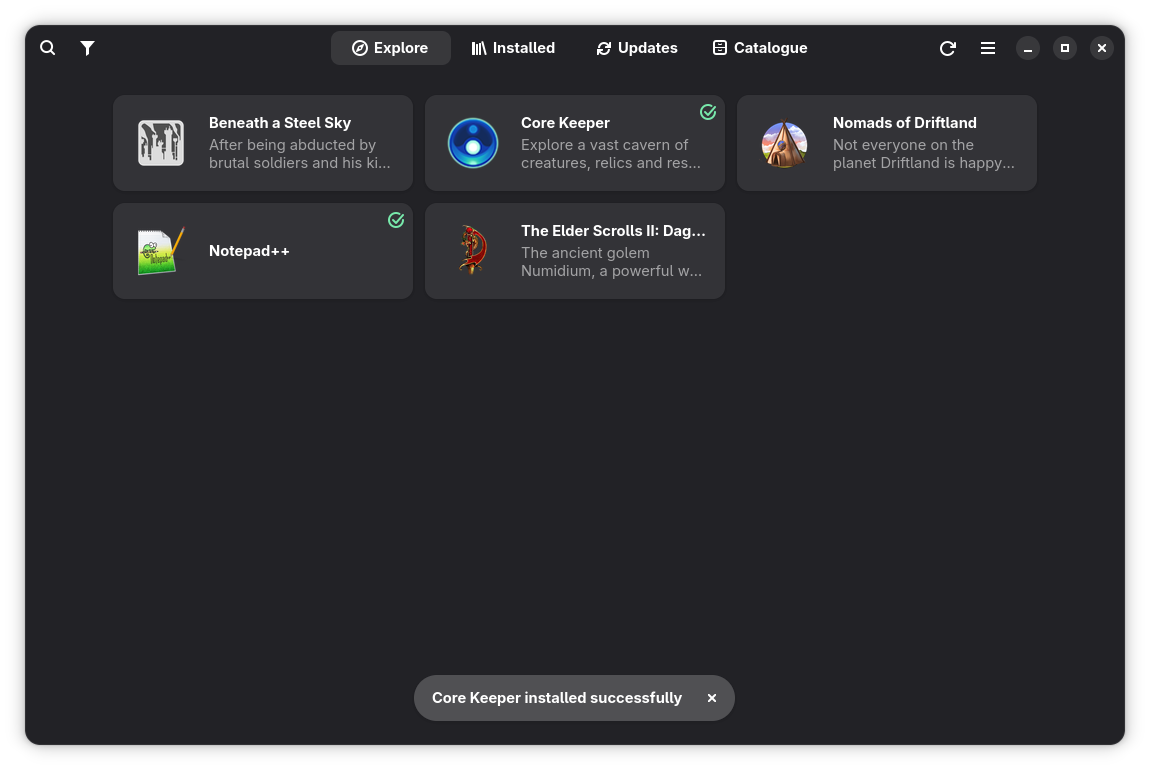 |
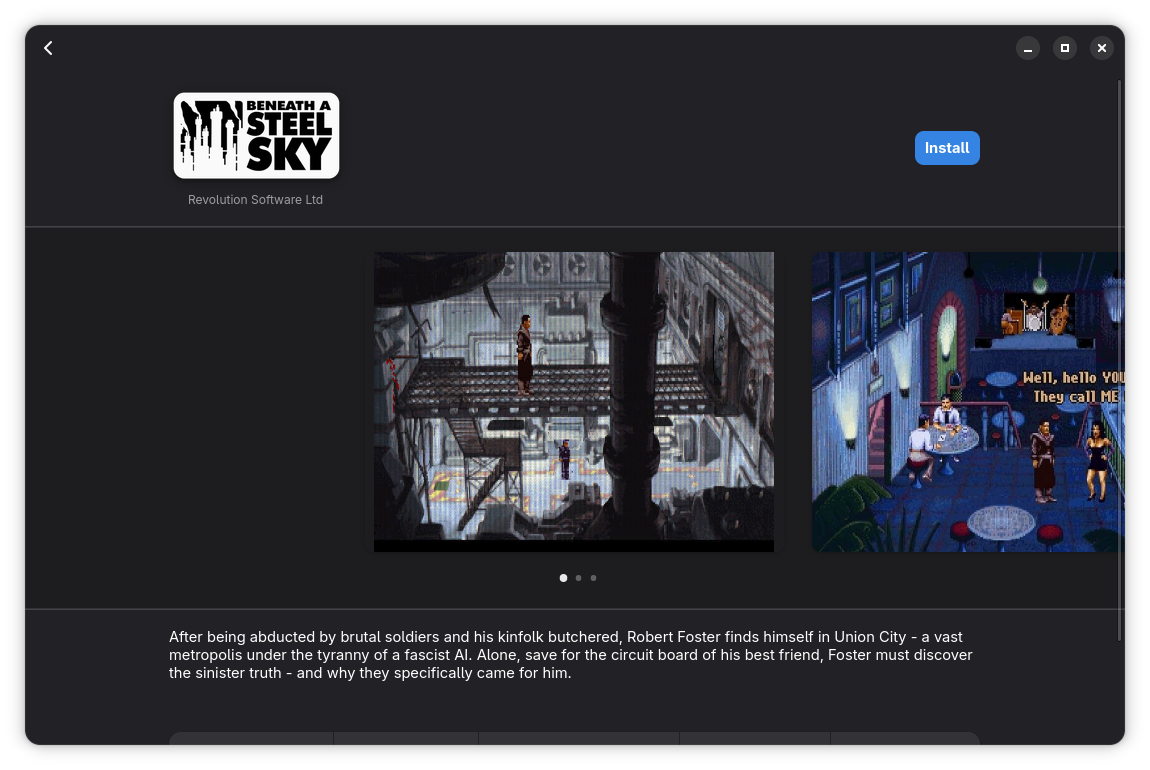 |
| Package builder | Metadata editor |
|---|---|
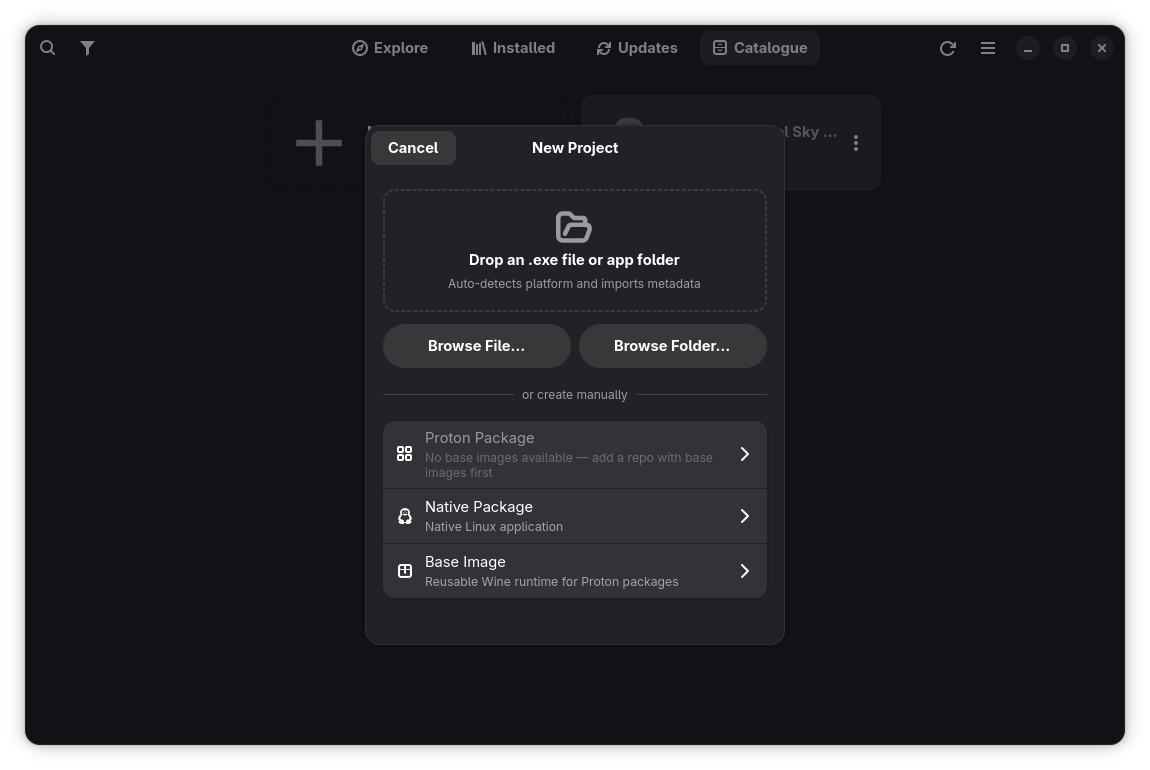 |
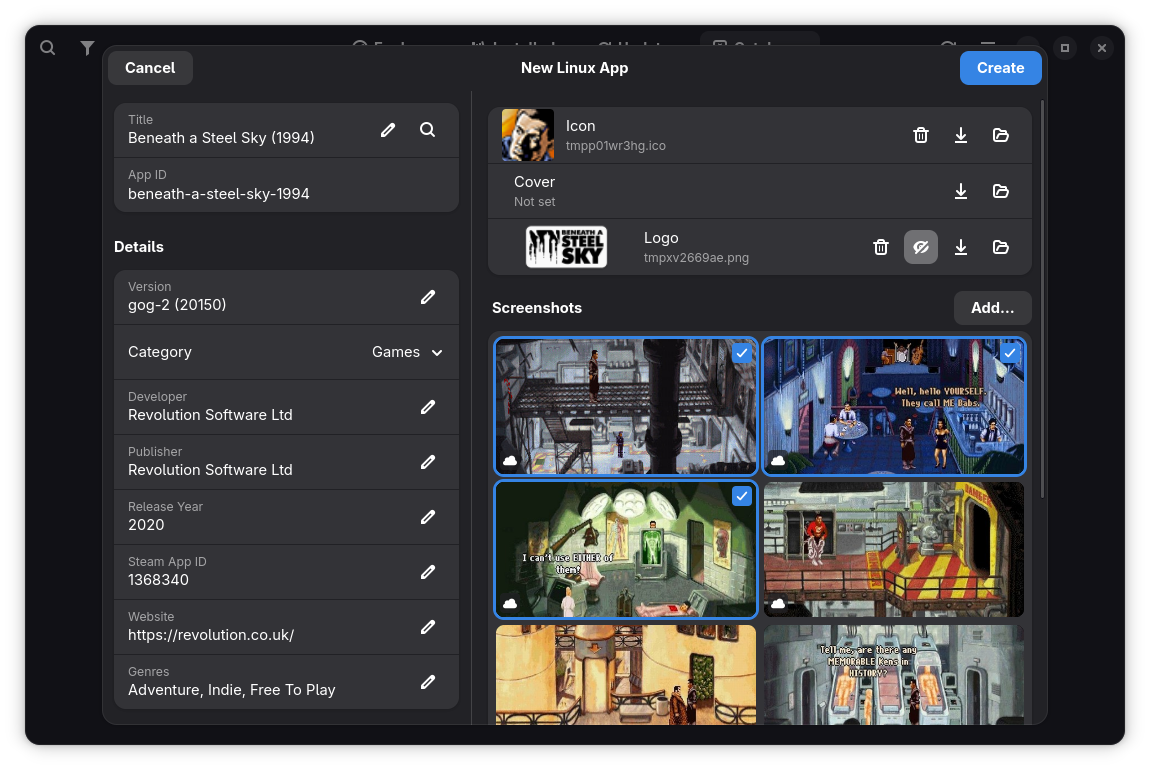 |
Browsing & discovery
- GNOME Software-style grid with Explore, Installed, and Updates tabs
- Card view (compact) and capsule view (Steam-style portrait covers)
- Filter by category, genre, platform (Windows/Linux/DOS), or repository
- Full-text search across app names and summaries
- Update badge on the Updates tab with automatic CRC32 change detection
Installing & running
- One-click install, update, and remove
- Delta packages — shared base images keep downloads small (typically 50–500 MB vs 2–3 GB)
- Chunked downloads with per-chunk CRC32 verification (~1 GB each)
- Multi-target launch — apps with multiple entry points (e.g. game, editor, launcher) show a picker
- Per-app launch parameters — override DXVK, VKD3D, audio driver, and debug flags
- Runner management — browse and install GE-Proton versions from GitHub Releases
- Desktop shortcuts with support for multiple launch targets
- Backup and import user files — export modified saves/configs as
.tar.zst, restore later - Open install folder from the detail view
- Offline mode — cached catalogue allows browsing and launching when the repo is unreachable
DOS games
- GOG DOSBox games auto-detected during import and converted to native DOSBox Staging packages
- DOSBox Settings dialog — machine type, CPU speed, display, shaders, sound, MIDI (FluidSynth/MT-32), and mixer effects
- DOSBox Staging runtime auto-downloaded from GitHub Releases on first use
For maintainers (requires a writable repo)
- Package Builder with four project types: Windows (Proton), Linux (native), DOS, and Base Image
- Smart import — drag-and-drop a folder, installer, or GOG game onto the New Project dialog; platform auto-detected
- Initialise a WINEPREFIX, install winetricks dependencies, run
.exeinstallers, configure launch targets, test-launch, and publish - Steam Store metadata lookup — auto-fill title, description, cover art, and screenshots
- Edit metadata and delete entries directly from the detail view or the builder
- Delta archive creation — automatic BLAKE2b diff against a base image
- Configurable install location (Settings) with auto-migration of existing installs
Lutris and Heroic are game managers — they help you configure, install, and run games on your own machine. You still set up each game yourself: pick a runner, tweak prefix settings, install dependencies, and troubleshoot.
Cellar is a game distributor. A maintainer does all that setup work once, packages the result (a fully configured WINEPREFIX, a native app bundle, or a DOS game), and publishes it to a shared catalogue. Everyone else just clicks Install — no configuration, no knowledge of Wine required. The end user experience is closer to an app store than a game manager.
If you're setting up games for yourself and enjoy tweaking things, Lutris and Heroic are great tools. If you want other people (family, friends, a LAN party) to install preconfigured games without touching a terminal, that's what Cellar is for.
This project is AI-assisted and in early testing. That said, the codebase is actively checked with:
- Ruff — linting and style enforcement (E/F/W/I rule sets) on every change
- CodeQL — GitHub's semantic code analysis for security vulnerabilities — 0 alerts as of last scan
- Bandit — Python security linter (hardcoded secrets, injection, insecure calls) — 0 high/medium issues
If you spot something the tooling missed, please open an issue.
Cellar organises Windows app packages into a three-tier dependency chain:
Runner  (GE-Proton10-32)                     ← GE-Proton binary
  ↑
Base    (GE-Proton10-32-allfonts)            ← clean WINEPREFIX + shared deps
  ↑
App     (my-game)                            ← delta archive (changes only)
A runner is a GE-Proton build. A base image is a clean WINEPREFIX created with that runner plus shared dependencies (fonts, runtimes via winetricks). An app is a delta archive containing only the files that differ from its base — typically 50–500 MB instead of the full 2–3 GB prefix.
At install time, Cellar seeds a new prefix from the base using copy-on-write (reflinks on btrfs/XFS, regular copy elsewhere), then overlays the delta. Archives are split into ~1 GB chunks so only one chunk needs to be on disk at a time.
Linux native apps and DOS games skip this hierarchy — they're just extracted and launched directly.
For the full technical details, see docs/INTERNALS.md.
A Cellar repository is just a directory — local or remote — that holds a
catalogue.json index and app assets.
- Create the directory. Any writable location works: a local path, an SFTP server, or an SMB share.
- Add it in Cellar. Open Preferences → Repositories → Add. Enter the
URI (e.g.
/mnt/nas/cellar,sftp://alice@nas/srv/cellar,smb://nas/cellar). - Cellar initialises it automatically. If no
catalogue.jsonexists, Cellar offers to create one with an empty skeleton.
For HTTP-served repos, point a web server at the directory. HTTP repos are read-only — publish via a writable transport and serve over HTTP for users. See docs/AUTH.md for bearer token setup with nginx or Caddy.
A base image is a shared WINEPREFIX that Windows app packages build on top of. Create one before publishing any Windows app packages.
- Open the Package Builder tab → New Project → select Base Image.
- Choose a GE-Proton runner from the list — Cellar downloads it if needed.
- Click Initialise to create an empty WINEPREFIX with that runner.
- Use the Dependencies section to install shared libraries via winetricks (fonts, Visual C++ runtimes, .NET, DirectX, etc.).
- Click Publish and choose the target repo.
- Open the Package Builder → New Project → select Proton App (or drag-and-drop an installer / game folder onto the dialog — Cellar auto-detects the platform).
- Select your base image from the dropdown.
- Install the application — run a
.exe/.msiinstaller inside the prefix, drag additional files onto the drop zone (DLC, patches), or use "Browse Prefix" to place files manually. - Configure launch targets — Cellar scans for new executables after each install and offers to add them. You can also add targets manually.
- Test-launch from the builder to verify everything works.
- Fill in metadata — title, category, description, icon, cover, and screenshots. Use the Steam lookup button to auto-fill from the Steam Store.
- Click Publish. Cellar automatically computes the delta against the base image — only changed files are included.
- New Project → select Native App or DOS App (or drop a folder / GOG game — GOG DOSBox games are auto-detected and converted).
- Set the source folder containing the app or game files.
- Configure launch targets and fill in metadata as above.
- Click Publish.
| Scheme | Example | Writable |
|---|---|---|
| Local path | /mnt/nas/cellar |
Yes |
file:// |
file:///mnt/nas/cellar |
Yes |
http:// / https:// |
https://cellar.home.arpa/repo |
No |
sftp:// |
sftp://alice@nas.home.arpa/srv/cellar |
Yes |
smb:// |
smb://nas.home.arpa/cellar |
Yes |
- HTTP(S) — read-only with optional bearer token auth.
- SFTP — pure-Python via paramiko. Key auth via ssh-agent or
~/.ssh/config. - SMB — pure-Python via smbprotocol (SMBv2/v3). No GVFS mount required.
Credentials are stored per-repo via libsecret (org.freedesktop.secrets
D-Bus interface — GNOME Keyring, KDE KWallet, or the Flatpak secrets
portal). Falls back to config.json (mode 0600) when no secret service
is available.
- Language: Python 3.10+
- UI toolkit: GTK4 + libadwaita 1.4+ (GNOME 45+)
- Windows compatibility: umu-launcher + GE-Proton
- DOS compatibility: DOSBox Staging (auto-downloaded runtime)
- Runner index: GitHub Releases API (GloriousEggroll/proton-ge-custom), cached in memory
- Local data: SQLite via
sqlite3stdlib - Network I/O:
requestsfor HTTP/HTTPS;paramiko(pure Python) for SFTP/SSH;smbprotocolfor SMB - Credentials:
gi.repository.Secret(libsecret / GNOME Keyring / KWallet portal); falls back toconfig.json(chmod 0600) - Image handling: Pillow (load, resize, crop, ICO/BMP→PNG, optimise)
- Archive handling:
tarfilestdlib;zstandardfor.tar.zstarchives - File sync:
rsyncsubprocess; Python fallback if rsync is absent - Metadata: Steam Store API (no auth required); SteamGridDB for high-res icons, covers, and logos (optional API key)
Download the pre-built Flatpak from the latest release or add the Flatpak repo for automatic updates:
# One-time: add the Cellar Flatpak repo
flatpak remote-add --user --if-not-exists cellar https://macaon.github.io/cellar/

# Install (or update)
flatpak install --user cellar io.github.cellar
The Flatpak bundles all dependencies including libadwaita, so it works on any distro regardless of system library versions.
- App drawer: search for Cellar in GNOME Activities / KDE app launcher
- Terminal:
flatpak run io.github.cellar
git clone https://github.com/macaon/cellar
cd cellar
pip install requests Pillow zstandard smbprotocol paramiko pytest
PYTHONPATH=. CELLAR_REPO=tests/fixtures python3 -m cellar.main
CELLAR_REPO accepts a local path or any supported URI. The test fixtures
under tests/fixtures/ work out of the box for local development.
PYTHONPATH=. python3 -m pytest tests/ -v| Feature | GNOME | KDE |
|---|---|---|
| Browse, install, update (HTTP(S) / SSH repo) | Yes | Yes |
| Browse, install, update (local path) | Yes | Yes |
| SMB repos | Yes | Yes |
| Visual integration | Native Adwaita | Renders with Adwaita styling |
- docs/REPO_FORMAT.md — catalogue schema and field reference
- docs/INTERNALS.md — chunked archives, delta packages, safe updates, local data layout
- docs/AUTH.md — bearer token authentication with nginx and Caddy
GPL-3.0-or-later
Cellar is built on the work of many open-source projects:
- GTK and libadwaita — UI toolkit and GNOME platform library
- umu-launcher — unified Wine/Proton launcher
- GE-Proton — custom Proton builds by GloriousEggroll
- DOSBox Staging — modern DOS emulator (transparent runtime for DOS games)
- NoUniVBE — UniVBE bypass for GOG DOS games
- Pillow — image processing
- paramiko — pure-Python SSHv2
- smbprotocol — pure-Python SMBv2/v3
- zstandard — Zstandard compression bindings
- RapidFuzz — fuzzy string matching (MIT)
- Requests — HTTP client
- PyGObject — Python bindings for GLib/GTK/GStreamer
- SteamGridDB — high-res game icons, covers, and logos (optional API key)
Tab and category icons are CC0-1.0 sourced from the GNOME icon set.
This application was developed with the help of Claude by Anthropic. Claude assisted with architecture decisions, implementation, and debugging throughout the project.