Repository navigation
Backup
What to copy, where to keep it, and how to prove it works before the day it matters. Two deployments, two roads — and the same drill at the end.
Owner: the repository maintainer. Update this line when that changes; a runbook without a name
is a document nobody owns.
Last drill: 2026-10-23 — automated, by server/backup.test.ts, and it runs on every push.
One database. Everything a server holds is in it: accounts, sessions, boards, lanes, items, the history a card carries, the change feed and the leases. There are no uploads and no object storage, so a backup of the database is a backup of the workspace.
The browser's own localStorage is a cache, not a backup. docs/server-runtime.md says why.
npm run backup -- backup ./kanbantoolkit.db ./backups
# backed up ./kanbantoolkit.db → ./backups/kanbantoolkit-2026-10-23T02-00-00-000.db (412 KB, keeping 30 days)
The copy is taken with VACUUM INTO, which is a single read transaction: it is consistent while the
server keeps running, and it is compact. A plain file copy can catch a write half-written, which is
the one thing a backup must not do.
Daily, from cron:
0 2 * * * cd /srv/kanbantoolkit && npm run backup -- backup ./kanbantoolkit.db ./backups >> ./backups/backup.log 2>&1Retention is 30 days by default (--keep-days=30), pruned by the file's own timestamp.
Admin → Backups takes the same copy, in BACKUP_DIR (beside the database by default), and lists
the files with their size and time. Download saves one; Restore from a file verifies an
uploaded database and stages it — it does not replace the live file while connections are open.
The screen says what was verified and what to do next.
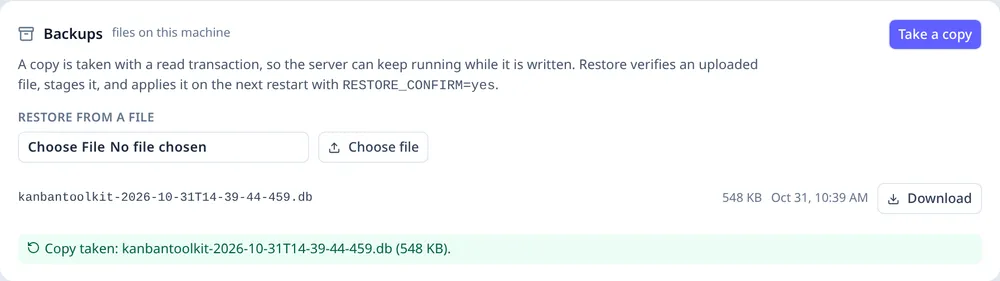
Admin → Backups: a verified copy, a list of the copies on the machine, and the stage-and-restart route for putting one back.
A Worker has no filesystem. Its Backups tab says the database provider owns backup and restore, and points at the provider's console; it does not pretend an in-app file copy exists.
A second copy, with another provider, is the part that is not optional. A backup on the machine that fails is not a backup. Any of these, nightly, after the copy:
rclone sync ./backups remote:kanbantoolkit-backups
# or: restic backup ./backups
# or: scp -r ./backups host:/elsewhere/kanbantoolkitnpm run backup -- restore ./backups/kanbantoolkit-2026-10-23T02-00-00-000.db ./kanbantoolkit.db --force
# restored … (3 boards, 128 items)It refuses to overwrite without --force, because a restore is run on a day something has already
gone wrong and the second mistake of that day must not be the restore. After copying it checks
PRAGMA integrity_check and the row counts, so the command says what it restored, not just that a
file moved.
Then restart the server. The migrations run on boot (server/migrate.ts).
A restore staged from Admin → Backups is applied by the Node entry on the next boot when
RESTORE_CONFIRM=yes is set. The live database is first copied to pre-restore-<stamp>.db beside it,
so the restore has its own undo. Without the variable the pending file stays where it is and the
startup log says so.
D1 keeps its own history, and it is the provider's to keep:
-
Time Travel — automatic, 30 days, restore to any minute:
npx wrangler d1 time-travel restore kanbantoolkit --timestamp=2026-10-22T02:00:00Z -
An export, for a copy outside Cloudflare:
npx wrangler d1 export kanbantoolkit --remote --output=kanbantoolkit-2026-10-23.sql
The export is the second copy: keep it somewhere that is not the same account. It is a .sql file
and restoring it is wrangler d1 execute kanbantoolkit --remote --file=….
Neither of these is a daily task anyone performs — the schedule is the provider's, and R1 asks that it is visible and non-zero. Check it once a quarter, and check that the export job still runs.
Do this at least once a quarter, and after any change to the schema or the deployment:
- Take an export from the app. Settings → export the workspace, as the person who owns it (R5). This is the known-good answer, in the app's own vocabulary.
- Restore yesterday's backup into a scratch environment — a second database file, or a second branch of D1. Never over the live one.
- Compare. The restored workspace's export should equal the one from step 1, apart from what changed in between. Counts are the quick check: boards, items, placements, edges, and the log entries are in the restored copy.
- Write the date here. The line at the top of this file is the record.
The automated part of the drill — seed a workspace, back it up, restore it into a scratch file, and
compare the whole workspace object — runs in server/backup.test.ts on every push. It cannot reach
the provider's backups, which is why the manual steps above exist rather than instead.
-
The browser's snapshots. They are a ring in
IndexedDB, for a bad edit in a tab — not a backup, and never a substitute for one. - Configuration. The provider's client secrets and the database path live in the environment; they are documented in Configure and should be kept wherever the operator keeps secrets.