Repository navigation
Reading a board
A board is more than one list of cards. It has columns, one or more cards flows, initiatives that roll work up, a side drawer for the detail, and a boundary for work that lives somewhere else. This page explains what each part is showing.
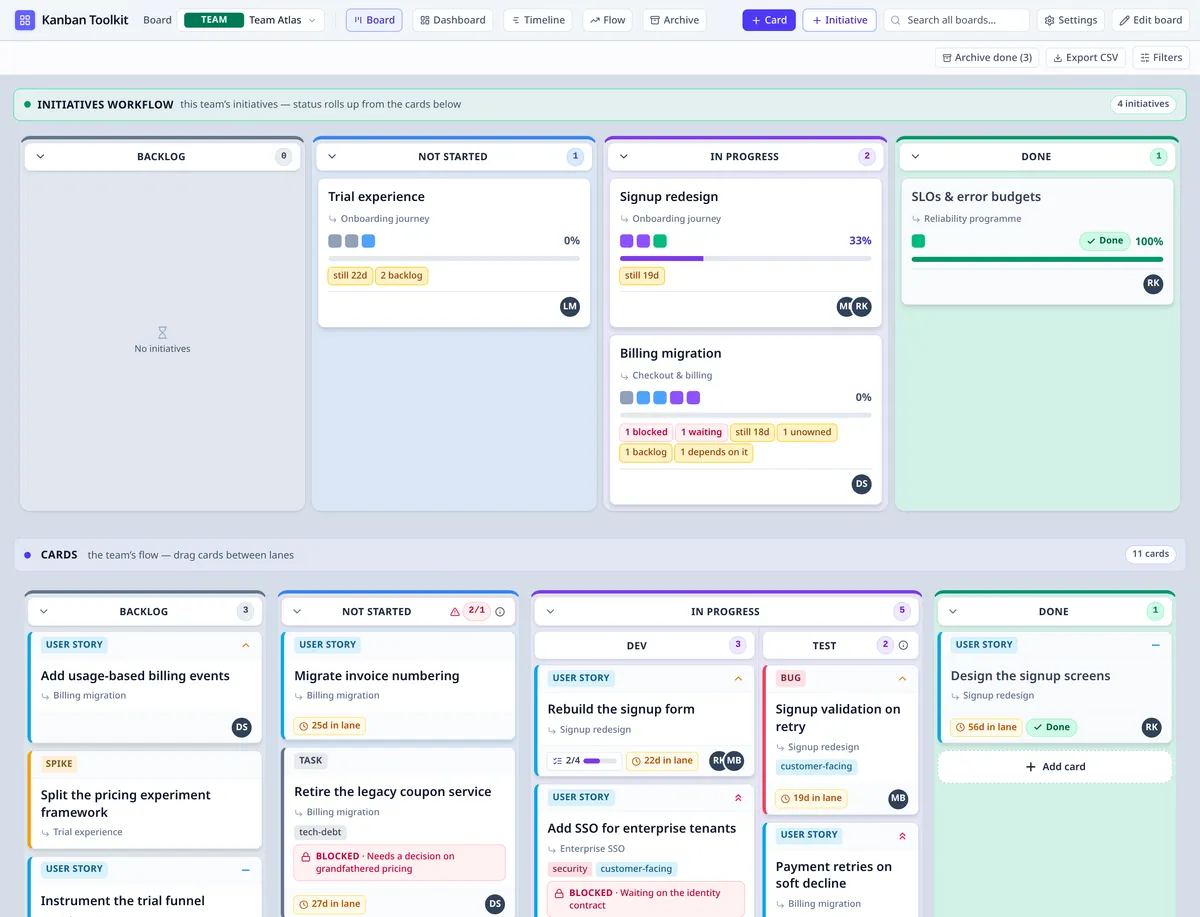
The two altitudes on one board: the initiatives flow above, the team's Cards flow beneath, both using Backlog, Not Started, In Progress and Done.
Every flow has the same four top-level columns, and they are fixed:
| Column | Stage | What it means |
|---|---|---|
| Backlog | backlog |
Work that is not committed yet. |
| Not Started | notStarted |
Work the team has committed to but not begun. |
| In Progress | inProgress |
Work somebody has started. |
| Done | done |
Work that is finished. |
The column is the card's status. There is no separate status field to keep in step: moving a card into a column is what changes its stage, and a card that leaves Done is open again. The same four stages are the sections of the initiatives flow, so a card and the outcome above it are read in the same vocabulary.
A column can be split into named cells, arranged in columns or rows. Every cell stays in the stage of the column it came from, so a split makes the board more precise without inventing a fifth stage. The top-level columns themselves are not added, removed or reordered.
A board has exactly one initiatives flow and one or more cards flows.
- Each cards flow is its own set of the four columns, with its own name, its own WIP limits and its own place in the stack. The flows are drawn as bands, one below another, not as tabs — so two Backlogs are visibly two different answers.
- A card belongs to exactly one cards flow. Dragging it into another flow is a move: the target flow's columns and WIP limits apply, and the card keeps its identity and history.
- Edit board is where a cards flow is added, renamed, reordered or removed. A flow can only be removed while it is empty, and while another cards flow remains.
- The board's default drop cell and its WIP enforcement are board-wide, so a new card or a card moved from elsewhere lands consistently wherever it came from. The Flow view can be narrowed to one cards flow.
- A template captures a set of cards flows — their names, columns and limits — and a new board made from it gets all of them. A programme or portfolio board has no cards flow of its own.
Each flow's header stays at the top of the board while its columns scroll, so a reader moving through a long lane never loses which flow — and which set of columns — is in front of them. The initiatives and boundary bands behave the same way. A cards flow uses the board's own margin rather than adding a second inset inside it: a wide flow has the width it needs, and its columns line up with the bands above and below.
A workflow's chevron folds that whole band away to its header: the name, the count and the controls stay, and the columns give their room to the workflow below. The initiatives, cards and boundary bands each fold on their own, and the state is a view choice rather than an edit.
Clicking a card or an initiative opens the side drawer on the right; the board stays visible beside it. The same drawer opens from search, the dashboard, the timeline and the archive.
- Overview holds the fields: title, description (Markdown), status, priority, type, people, tags, target dates and checklist.
- Hierarchy shows the parent, the work below, and dependencies. A dependency links two items and says one waits for the other; it runs across the hierarchy, never along it. A card cannot wait on its own parent or on anything below it, and a link that would close a loop is refused rather than corrected — the picker opens a searchable list and offers only the items the link would be accepted for. A dependency is a plan, not a block: it never stops a move, and it clears itself when the item waited on reaches Done.
- Activity is the item's own history: every move, edit, note and link, with who and when.
The drawer is where editing happens. If somebody else is editing the same card, their lease is shown and the fields are closed for you until they finish; a Viewer, and an archived or discarded item, are read-only. A Viewer can still leave a note; an archived item accepts no edits or notes. The eye button on an initiative starts Focus, which highlights its lineage on the board; opening an archived item does not start it. A portfolio offers no focus: its outcomes live on the programme and team boards beneath it, and the strategy map is already grouped by what the work is for, so there is no board of its own to dim. People are chosen from the workspace's own directory — with their photo, or their initials when there is none — and typing a name searches it; it never creates a person, because an account arrives by invitation. Escape closes the drawer.
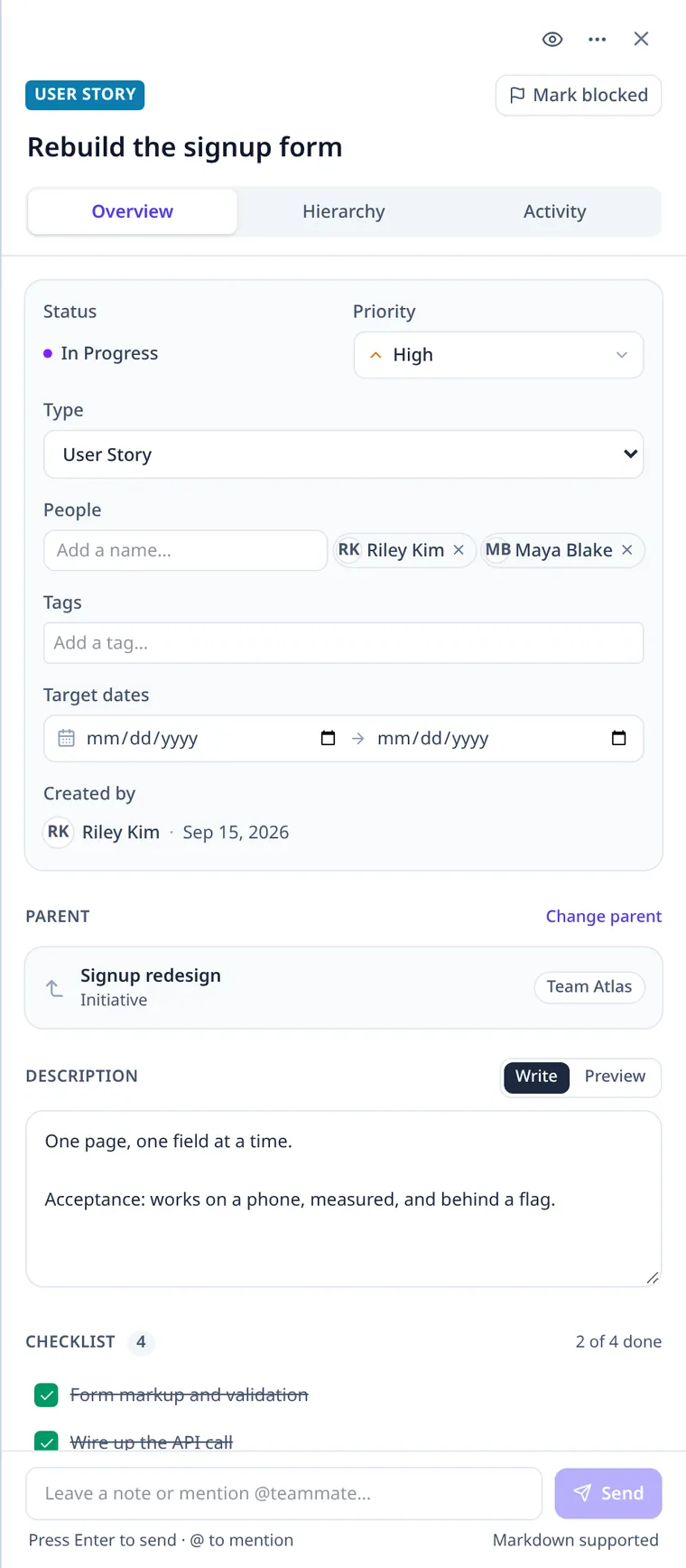
The drawer is the card's own page beside the board: fields in Overview, lineage in Hierarchy and the history in Activity.
An initiative is the outcome above the cards. It has no status field and no estimate of its own: its status is read from the leaves below it, and its size is the number of those leaves.
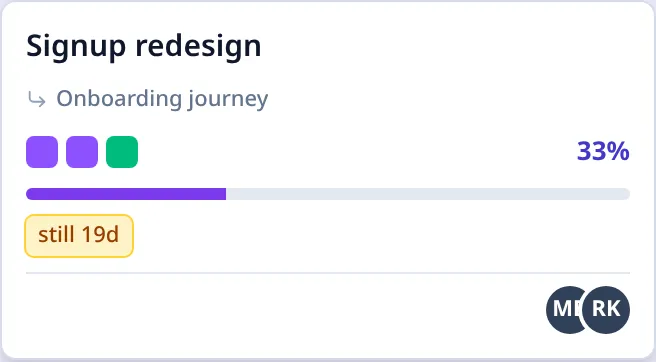
An initiative card: the pips are its direct children, the percentage is the share of leaves done, and the roll-up label says what it rolls up to.
The small coloured squares across an initiative card are its direct children, one pip each, in the order of the four stages. The colour is the child's own stage — green for Done, violet for In Progress, blue for Not Started, grey for Backlog — so "how much green" is a glance rather than a count.
- A pip is a way into that child: clicking it opens the child and, on a board, brings it into view.
- Pips are direct children, not every descendant. The work beneath a child is behind that child's own card.
- Up to 12 pips are drawn; beyond that a +N says how many more there are. The count includes filed-away children, because the rollup counts them too.
The percentage and the bar beside the pips are the same number: the share of the leaf issues below the initiative that are done. Every leaf counts once — however many levels of decomposition sit above it — and an archived leaf still counts, so filing away finished work does not lower a parent's progress.
The denominator is all the leaves, including those still in Backlog, so planning more uncommitted work moves the percentage back. A Backlog leaf does not drag the initiative's status backwards, but it does count in the percentage. An initiative with nothing below it has no percentage and no bar: that is a different fact from 0%, and the absence says it. Done on the card means every leaf below is done.
An initiative's section is derived from the same rollup:
| The leaves below | The initiative reads as |
|---|---|
| Every leaf Done | Done |
| Anything started | In Progress |
| Nothing started, but something committed | Not Started |
| Everything still in Backlog, or nothing below | Backlog |
The initiative therefore moves between Backlog / Not Started / In Progress / Done by itself when the work below changes. You do not drag it across a section boundary; dragging arranges it within its section, and a move that would cross a section is refused because the work, not the placement, decides the section. If its saved cell belonged to another section, the board draws it in the derived section rather than in the wrong column.
Some work waits on something that lives on another board. The Boundary — waiting on section below the cards is where that edge is read.
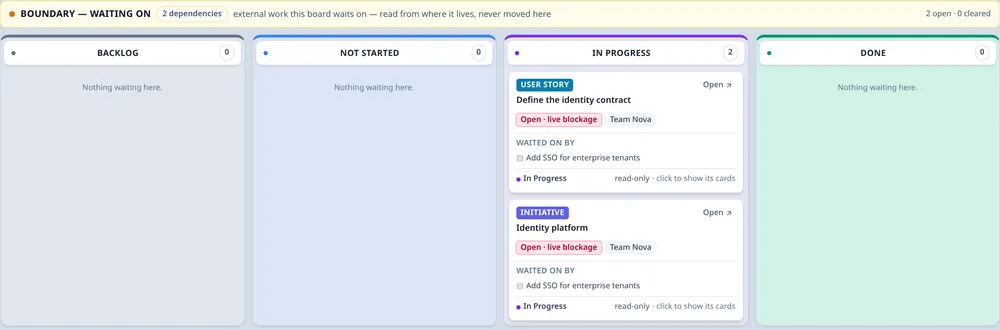
The boundary is a lens over external work: the item is shown in the stage its own rollup gives it, and the cards here that wait on it are named beside it.
- It appears only when at least one card on this board depends on an item placed on another board.
- The external item is shown in the column its own rollup selects, on its own home board. It is not copied or moved here, and it is not a placement: it creates no WIP, no card count and no rollup on this board.
- Each entry names the home board, its state, and the cards here that wait on it. The card that waits wears a Waiting on … chip; selecting a boundary card highlights its dependents, and selecting a dependent's chip takes you to the boundary card.
- The section is a lens, not an editor: nothing can be dragged into it, and the only way to move the external work is to open it on the board that owns it.
The entries have four states:
| State | What it means |
|---|---|
| Open · live blockage | A card here has started and the external item is not done. It is the loudest state. |
| Open · planning risk | A card here is still Backlog and the external item is not done. It is a risk to the plan, not a live stop. |
| Satisfied | The external item is done; the card here has not finished yet. |
| Closed | The card here is done. |
A cleared entry stays in the workflow after it is satisfied or closed, so a reader can see what the board was waiting for last week. The Waiting on chip on a card disappears as soon as the link is no longer open; the workflow keeps the history. The header counts what is open and what has been cleared.
A card moves through its cards flow → its stage, and the rollup of the initiative above it, change with it → the initiative's pips, percentage and section follow automatically → if it waits on work from another board, the boundary entry and the card's Waiting on chip show that edge. Every part is a reading of the same item, not a copy of it.
- Board types — team, programme and portfolio boards, and what each is for.
- Warnings and signals — every badge and warning, and what it means.
- Using the application — the board, a card, an initiative and the views.