Repository navigation
Board types
Every board has a flight level — Team, Programme or Portfolio. The level is not a label on the board: it decides what the board renders, what work can be entered on it, and where its initiatives roll up. Choose it when the board is made.
| Team | Programme | Portfolio | |
|---|---|---|---|
| What it holds | Its team's cards, and the initiatives they roll up into | Its own initiatives, plus a band for each linked board | Objectives and the initiatives mapped to them, wherever those live |
| What it shows | Cards flows, the initiatives flow, dashboard, timeline, flow metrics, archive | The initiatives flow and bands of linked boards; dashboard and timeline | A strategy map: objectives, key results, coverage gaps |
| Cards | Yes — a card belongs to a team board | No cards flow | No cards flow |
| Flow metrics | Yes | Not offered | Not offered |
| Used for | Doing the work | Coordinating teams and rolling work up | Deciding and communicating what the work is for |
The three levels link upward. A programme can aggregate team boards, or other programme boards; a portfolio can link programmes. The aggregation graph may be any depth and mix the levels, so long as it stays acyclic — a board cannot end up beneath itself.
The working board. It carries the team's own cards flows — one or more sets of the four typed columns — and the initiatives flow the cards roll up into. Cards are made here, moved here, and limited here; the board's WIP policy, card types, tags, default drop cell and flow metrics all belong to this level.
This is where a card's real life happens. An initiative on the same board is the outcome the work belongs to, and its progress is computed from the cards below it.
Use it for
- A product squad delivering features, with work moving Backlog → Not Started → In Progress → Done.
- A support team whose incoming requests are a second cards flow beside its delivery work, so the queue has its own columns and WIP limit without mixing with planned work.
- A platform team whose cards roll up into an initiative that a programme reads, without anyone keeping a second tracker for the programme.
Not for: portfolio reporting, or a list of other teams' work. Put a programme above it instead.
A coordination board. (The app labels this level Program.) It has its own initiatives flow — the outcomes the programme owns — and a band for each linked board, showing the initiatives from the teams or programmes beneath it. It does not carry a cards flow: nobody makes a card on a programme board, because the work belongs to the team that does it.
The programme is for the questions a single team cannot answer: which initiatives are moving, which are blocked or waiting, which teams depend on each other, and what the combined picture looks like. Its dashboard and timeline read the same initiatives, not a copy of them.
Each linked band is read-only: it is a rollup of that board's initiatives, and the band says so at its header. To move an initiative, change its flow or edit its board design, use Open board — the work stays on the board that owns it.
Use it for
- A value stream over three squads: one band per squad, read for progress, risk and dependencies.
- A programme bridging two delivery teams that ship together, where each team keeps its own board and the programme shows what the combined delivery is doing.
- A line of business that aggregates several programmes, each of which aggregates its own teams.
Not for: a second set of tickets, or day-to-day task management. If a card needs to move, it belongs on a team board beneath the programme.
The strategy board. It leads with the strategy map: the board's own initiatives grouped by the objectives they serve, with key results and the two coverage gaps — an objective nothing serves, and an initiative serving nothing. Objectives and key results are authored here; an initiative serves one objective, and is moved between them deliberately.
A portfolio has no cards flow and no bands. Its links to programmes still exist for the rollup, but the portfolio surface chooses to read the work by objective rather than by team. That is the point of the level: a reader should see whether the strategy is covered, not which squad is busiest.
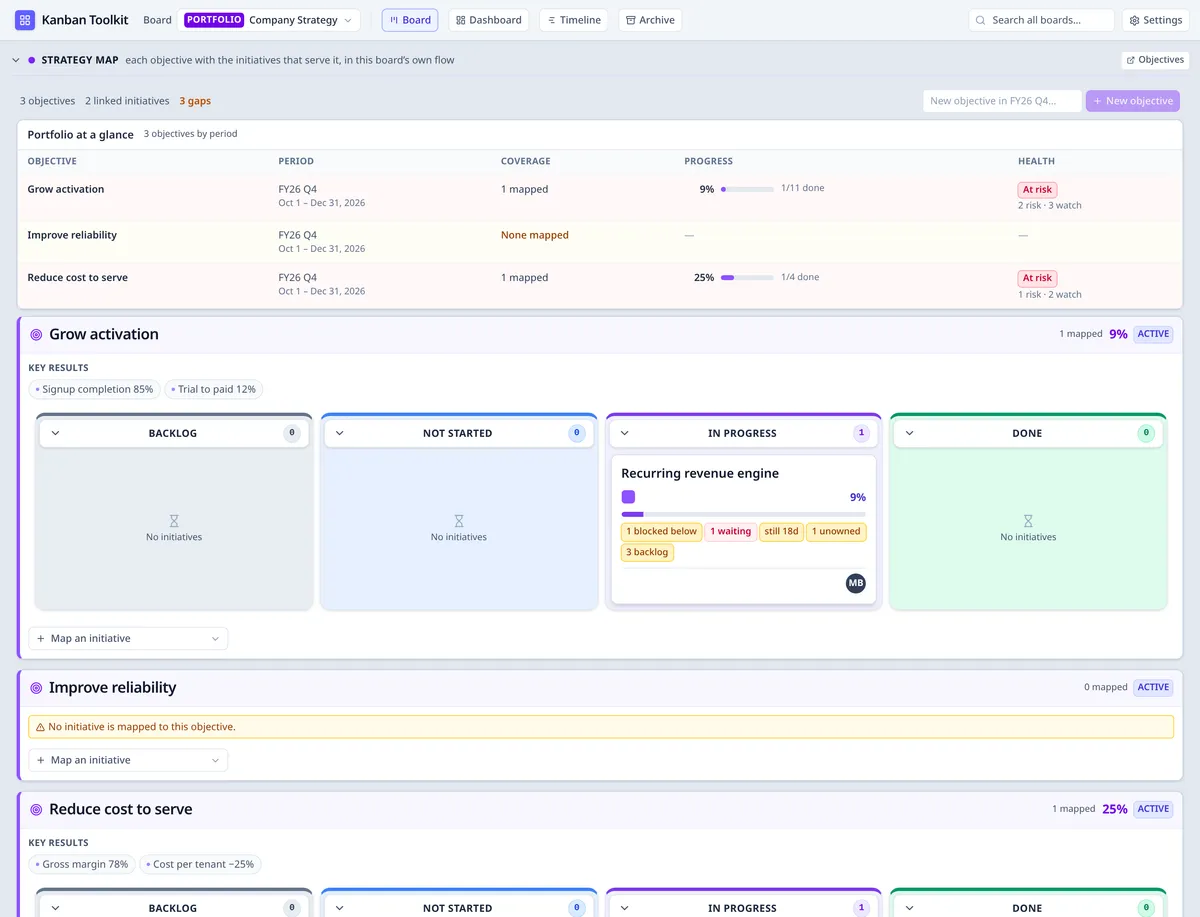
A portfolio board: the risk reading at the top, then each objective with the initiatives mapped to it in the board's own four-stage flow.
Use it for
- An annual or quarterly strategy with a small set of objectives, each carrying the initiatives that serve it, reviewed for coverage and dropped work.
- An investment review: what is being funded, what it is for, and where a stated objective has no initiative behind it.
- A leadership board that connects outcomes to delivery without turning into a delivery board.
Not for: tracking cards or team flow. Use the programme and team boards beneath it for that.
Its settings. A portfolio board's settings are its title, its description, the fixed flight level and the boards it reads. It has none of the work-shaped settings a team board has — no card types, no initiative kinds, no tags, no cell for new cards to land in, no WIP policy and no template — because it holds no cards and arranges no lanes of its own.
Open the portfolio board and choose Objectives. This is the only place objectives and key results are authored; they are not a global view.
Periods. A period is a record with a name and the window it covers — not a label typed onto
each objective. Choose one in Period, or press New period, name it (for example FY27 Q1)
and give it a Starts and Ends date; its first objective joins it. The window belongs to the
period, so setting it once is the deadline for every objective committed for it: an objective has
no target date of its own. Set or change the dates beside the Period select at any time; a
period can be deleted only while no objective is committed for it. Periods read in calendar order —
start date, then name — and a period with no window yet sorts after the dated ones.
Add an objective. With the period chosen, type the outcome beside New objective and press Enter or the button. The card's title is editable in place. Aim for three to five objectives in a period; the view warns above five, because the limit is a commitment rather than a capacity. Keep the status active while the period is running and move it to reviewed at the end. There is no score: the completeness read from the work below is the measure.
Key results. Add the statements that say what the objective means. A key result is a line of text, not a number or a target: the objective's completeness is computed from the work below the initiatives that serve it, so there is no hand-entered percentage that can disagree with the work.
Connect an initiative. Any initiative that is a top-level outcome — one that is not part of another initiative — can be mapped to an objective, wherever its board sits: a team's own initiative, a programme's, or one placed on the portfolio. At the bottom of an objective card, Map an initiative opens a searchable list: type a title or a board to narrow it, and choose the outcome. The board it lives on is named beside each one. An initiative serves one objective, so choosing one that already serves another moves it; the row says “moves from …” before you commit. Detach one with the × beside it. Mapping is attribution: it never counts as WIP, and it does not move a card.
Why only a top-level outcome. An objective's completeness is the work below its mapped initiatives. A nested initiative inherits its parent's objective through the hierarchy, so mapping it as well would count the same work twice — or leave the parent's card and the objective reading different numbers. The rule keeps progress a partition: each piece of work counts toward exactly one objective, and a mapped initiative's percentage is its own rollup. An initiative that is already mapped cannot be rolled up under another; unmap it first if the work belongs elsewhere.
See the gaps. The strategy map groups the initiatives mapped to each objective, wherever they live, and shows both coverage gaps: an objective that nothing serves, and a top-level initiative in the portfolio's remit — its own and those of the boards beneath it — that serves nothing. An objective's completeness is the union of the leaves below its initiatives — each leaf once — and an objective nothing serves has no percentage at all, because there is no work to read.
Read the risk. Above the flows, Portfolio at a glance is one row per objective, grouped by period: the period's window, how many initiatives are mapped to it, its completeness and the health of those initiatives. The four readings — No coverage, At risk, Watch and On track — are derived from the same rules the cards and the strategy map use, and every cell says its reading in words as well as colour. Choosing an objective takes you to its flow below; the heatmap is a way in, not a second report.

The heatmap is a reading, not a second report: one row per objective, with the period's window, coverage, progress and health all derived from the work below.
Ask what the board is for, not who opens it:
- Does work move through columns? A team board.
- Do you need to see several teams or a value stream together? A programme board.
- Are you deciding or communicating what the work is for, with objectives and coverage? A portfolio board.
The type is fixed when the board is created. It is not a skin: it decides which surfaces exist and where the initiatives roll up. A board made as a team board and later changed to a programme would not gain the bands of work that was never linked to it — it would lose the cards flow that holds its work instead. So the application refuses the change in the settings panel, in the store and on the server, rather than warning and proceeding. To change the level, create a new board of the other type and move or link the work there. Start at the level the work belongs to.
A company runs one portfolio, Company Strategy, with objectives such as “Recurring revenue engine”. The outcome itself lives on the programme board that owns it — Digital line of business — and the portfolio links it to the objective; the portfolio holds no initiatives of its own. Product Delivery links the team boards Team Atlas and Team Nova. Atlas and Nova each work their own cards; their initiatives appear as bands on Product Delivery; the initiatives that serve an objective appear on the portfolio's strategy map, whether they live on a programme or a team board.
The same card is read three ways without being copied: the team moves it, the programme rolls it up, and the portfolio asks which objective it serves. No level keeps its own version of the work.
- Using the application — the board, a card, an initiative and the views.
- Reading a board — the drawer, columns, pips, rollups, multiple flows and the boundary.
- Lean metrics — the Flow view, which is a team board's own reading.