Companion software for the AI Native Business book by Manav Sehgal — a local-first agent runtime and builder scaffold for AI-native businesses.







npx ainative-businessOpen localhost:3000. That's it — zero config, local SQLite, own your data.
Profiles & Policies · Blueprints & Schedules · Built-in Playbook · Open Source
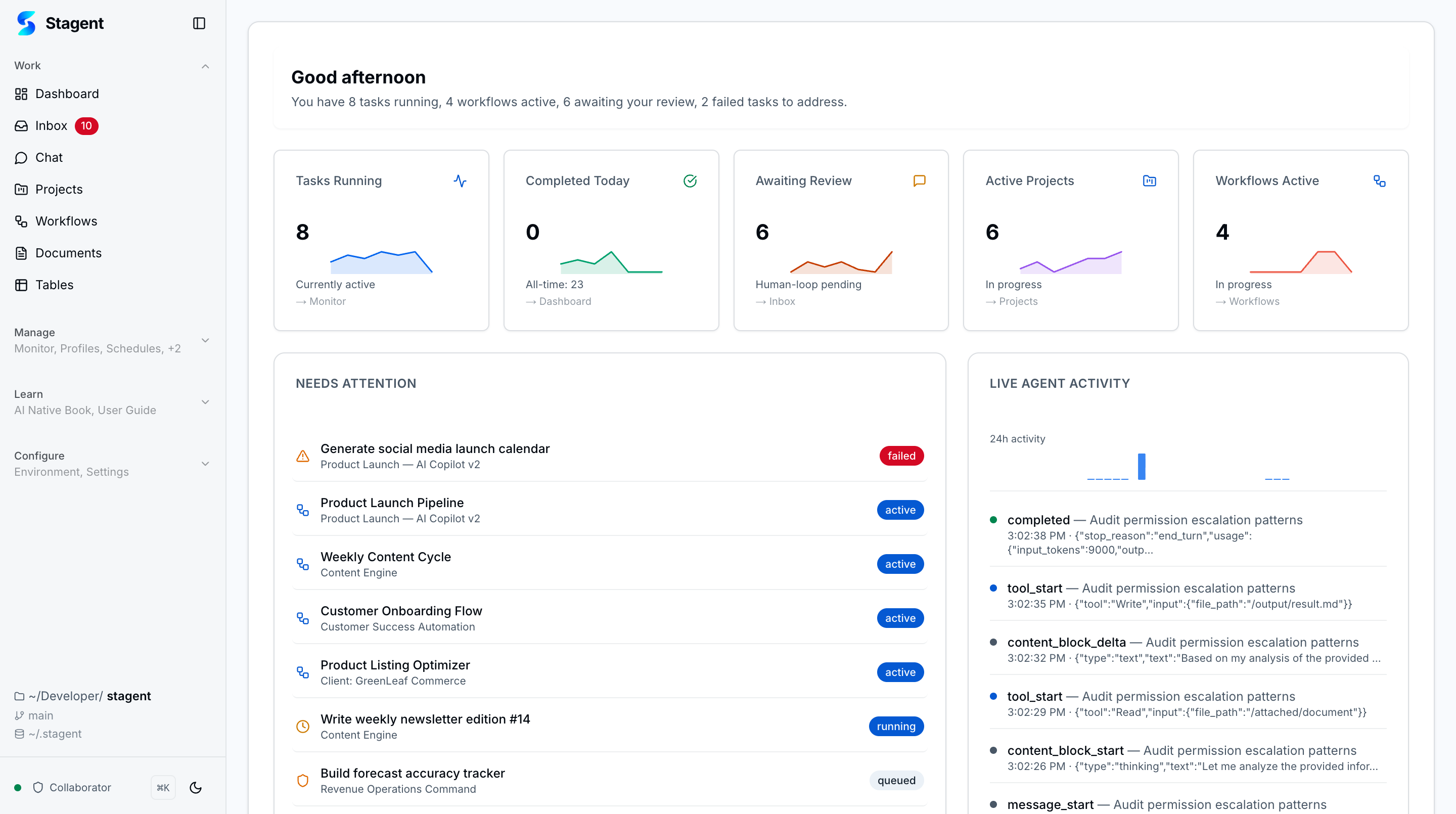
| Home Workspace | Reusable Profiles | Workflow Blueprints | Governed Execution |
|---|---|---|---|
| Workspace briefing with active work, pending review, project signals, and live activity | Specialist definitions with prompts, tool policy, and runtime tuning you can reuse | Pre-configured templates with dynamic forms, YAML editing, and lineage tracking | Human-in-the-loop approvals, tool permissions, and ambient supervision |
The AI agent stack is broken for business operators. You can spin up an agent in minutes — but running it reliably for real work means stitching together orchestration, governance, cost controls, and team coordination yourself. ainative closes that gap with a single local-first platform where agents do the work and you stay in control.
- Local-first — SQLite database, no cloud dependency,
npx ainative-businessand go - Multi-provider — Claude Code + OpenAI Codex App Server behind one runtime registry
- Your rules, enforced — Tool permissions, inbox approvals, and audit trails for every agent action
- Your AI team — 21 specialist profiles ready to deploy, each with instructions, tool policies, and runtime tuning
- Business processes, automated — 6 workflow patterns (sequence, planner-executor, checkpoint, parallel, loop, swarm)
- Know what you spend — Usage metering, budgets, and spend visibility per provider and model
Solutions Leader, AWS Frontier AI.
Author, AI Native open book. 2M+ Kaggle views. Ex Amazon AGI.
ainative & AI Native — Free and open source. Building AI Native over weekends, using personal laptop and capped AI plans.
- Harvard — Disruptive Strategy
- MIT Sloan — Design Thinking
- Berkeley Haas — Leading Innovative Change
"ainative is a personal research project exploring what it takes to build AI-native on a shoestring budget over weekends." The AI Native open book serves as its 14-chapter playbook expanding this research.
Manav is a solutions leader at AWS Frontier AI, collaborating with Anthropic, NVIDIA, and Disney on production AI and agentic systems. His 25-year career spans Xerox PARC (1996), HCL's digital practice, Daily Mail, Amazon AGI, and AWS, where he has delivered scale AI programs for Amazon Retail and Alexa. He led AWS pandemic response which was honored by President of India award for the customer. He holds credentials from Harvard, MIT Sloan, Berkeley Haas. He has studied Computer Engineering and Lean Management.
"ainative is a personal research project exploring what an AI-native operating system looks like." The AI Native book is its 14-chapter playbook for building autonomous business systems with AI agents.
ainative and AI Native are personal works of Manav Sehgal created in own personal time and resources. While they may refer to AWS technologies which enable the AI Native promise, the opinions expressed in the website are author's personal opinions and not that of the employer.
- Data Science Solutions (2017)
- React Speed Coding (2015)
Run the same business process on different AI providers without changing a line of configuration. ainative's shared runtime registry routes tasks, schedules, and workflow steps through Claude Code (Anthropic Claude Agent SDK) and OpenAI Codex App Server, landing everything in the same inbox, monitoring, and cost surfaces. Switching providers is a settings change, not a rewrite.
| Feature | What it does | |
|---|---|---|
| 🏠 | Home Workspace | Workspace briefing with active work, pending review, project signals, and live activity |
| 📌 | Task Execution | Status-driven execution board for planned, queued, running, completed, and failed work |
| 📁 | Projects | Portfolio-level organization with scoped context and working directories |
| 🔀 | Workflows | Multi-step orchestration with sequence, planner-executor, and checkpoint patterns |
| 🧩 | Workflow Blueprints | Reusable templates for spinning up common automations quickly |
| 🧠 | Agent Profiles | Reusable specialist definitions with prompts, tool policy, and runtime tuning |
| ⏰ | Schedules | Recurring and one-shot automations with cadence, expiry, and firing controls |
| 📄 | Documents | Upload, preprocess, inspect, and link files to tasks and projects |
| 📊 | Tables | Airtable-like structured data with spreadsheet editing, charts, triggers, and agent tools |
| 📥 | Human-in-the-Loop Inbox | Approve tool use, answer questions, and review results from one queue |
| 💬 | Chat | Tool catalog with model selection, @ mentions, slash commands, and browser automation |
| 👀 | Monitoring | Live runtime visibility with log streaming, filters, and health signals |
| 🔁 | Provider Runtimes | Shared runtime layer with Claude Code and OpenAI Codex App Server adapters |
| 🧪 | Parallel + Swarm Workflows | Bounded fork/join and swarm orchestration without a free-form graph editor |
| 💸 | Cost & Usage | Provider-aware metering, budgets, and spend visibility for governed runs |
| 🚨 | Ambient Approvals | Shell-level approval prompts that keep Inbox as the durable supervision queue |
| 🔒 | Tool Permissions | Trusted-tool policies with explicit "Always Allow" rules |
| 📋 | Kanban Board | Inline editing, bulk operations, and persistent board state |
| 🤖 | AI Assist → Workflows | Bridge task assist recommendations into governed workflow execution |
| 🧬 | Agent Self-Improvement | Agents learn patterns from execution history with human-approved context evolution |
| 🎯 | Tool Permission Presets | Pre-configured permission bundles (read-only, git-safe, full-auto) with layered apply/remove |
| 📦 | Workflow Context Batching | Workflow-scoped proposal buffering with batch approve/reject for learned context |
| 🧪 | E2E Test Automation | API-level end-to-end test suite covering both runtimes, 4 profiles, and 4 workflow patterns |
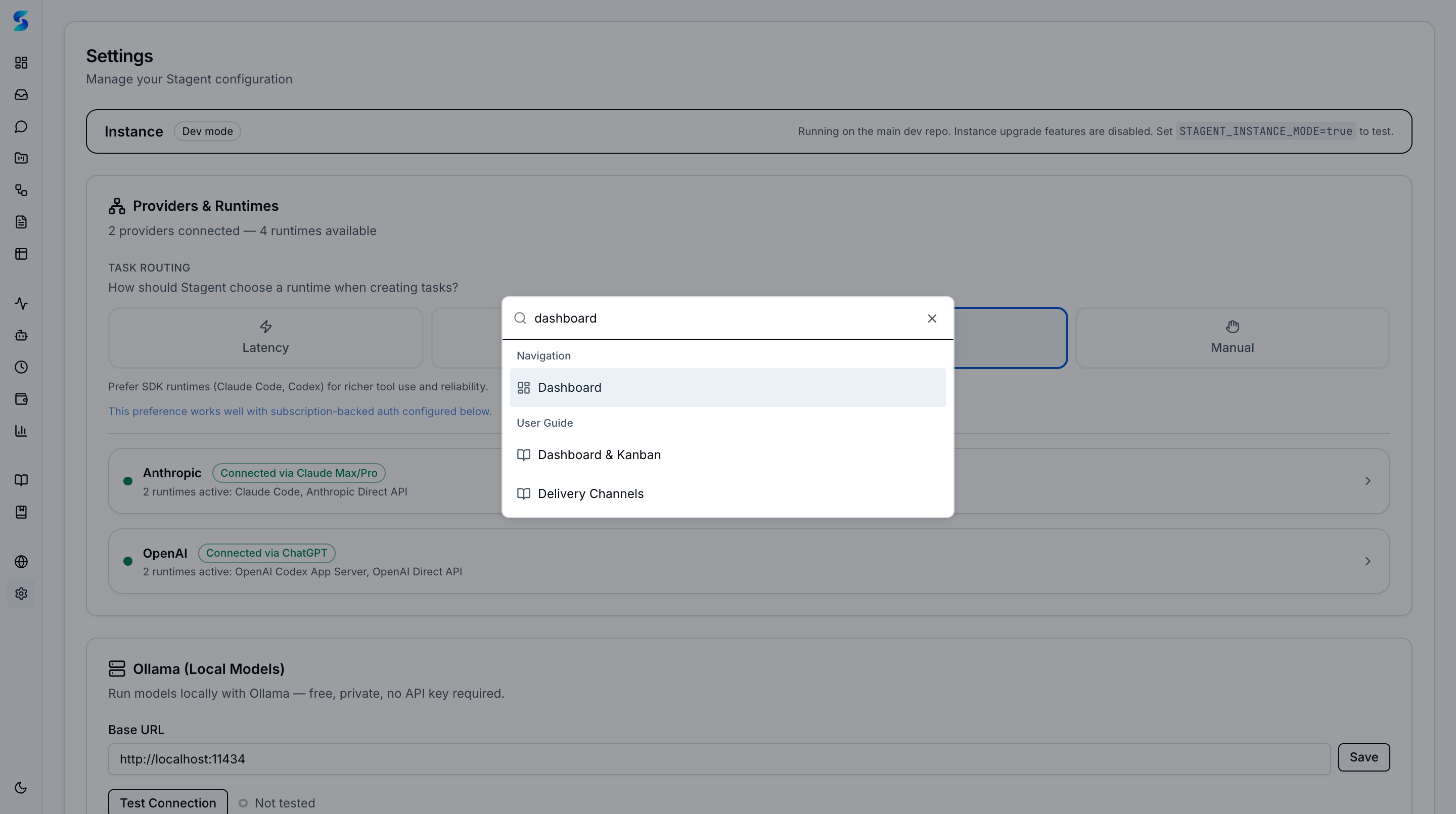
| ⌨️ | Command Palette | Global ⌘K search for fast navigation across tasks, projects, workflows, and settings |
| 🧱 | Skill Composition | Activate up to 3 skills at once with conflict detection and runtime-aware capability gates |
| 🔎 | Filters & Saved Searches | #key:value filter grammar, pinned and saved searches surfaced in ⌘K palette |
| 🛡️ | Upgrade Detection | Hourly upstream check with in-app notifications and guided merge sessions |
| 📖 | Playbook | Built-in documentation with usage-stage awareness, adoption heatmap, and guided learning journeys |
| 📚 | Living Book | AI-native book reader with 9 chapters, agent-powered regeneration, staleness detection, and reading paths |
| 🌐 | Environment | Control plane for Claude Code and Codex CLI environments with scanning, caching, sync, and templates |
| 🔧 | Browser Tools | Chrome DevTools and Playwright MCP integration for browser automation in chat and task execution |
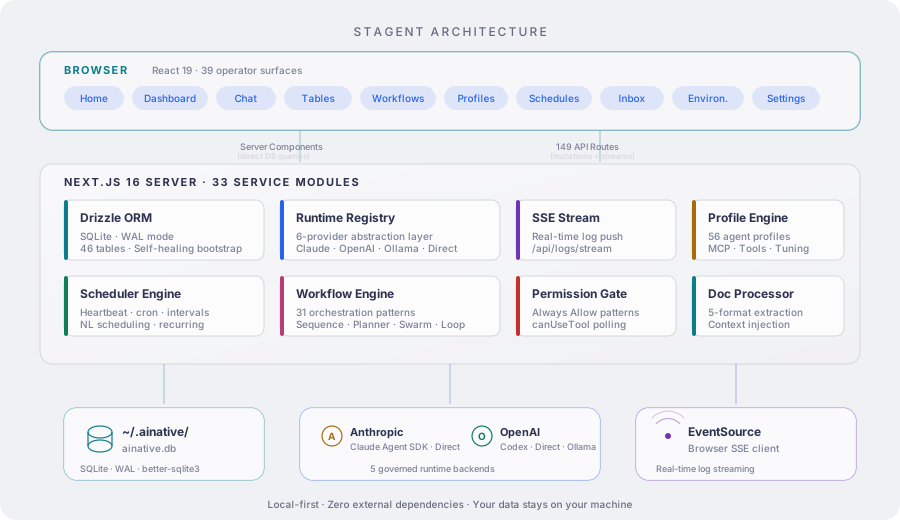
Key design decisions:
- Server Components for reads — Pages query SQLite directly, no API layer for reads
- Fire-and-forget execution —
POST /api/tasks/{id}/executereturns 202, agent runs async - Notification-as-queue — The
notificationstable is the message bus for human-in-the-loop; agents poll it viacanUseTool - SSE for streaming —
/api/logs/streampushes agent logs to the browser in real time - Provider runtime abstraction — Tasks, schedules, workflows, task assist, and health checks route through shared runtime adapters instead of provider-specific entry points
- Reusable agent profiles — Profiles define instructions, allowed tools, runtime tuning, and MCP configs for repeated use
- Permission pre-check — Saved "Always Allow" patterns bypass the notification loop for trusted tools
- Learned context loop — Pattern extraction → human approval → versioned context injection creates a supervised self-improvement cycle
- Permission presets — Layered preset bundles (read-only ⊂ git-safe ⊂ full-auto) that compose with individual "Always Allow" patterns
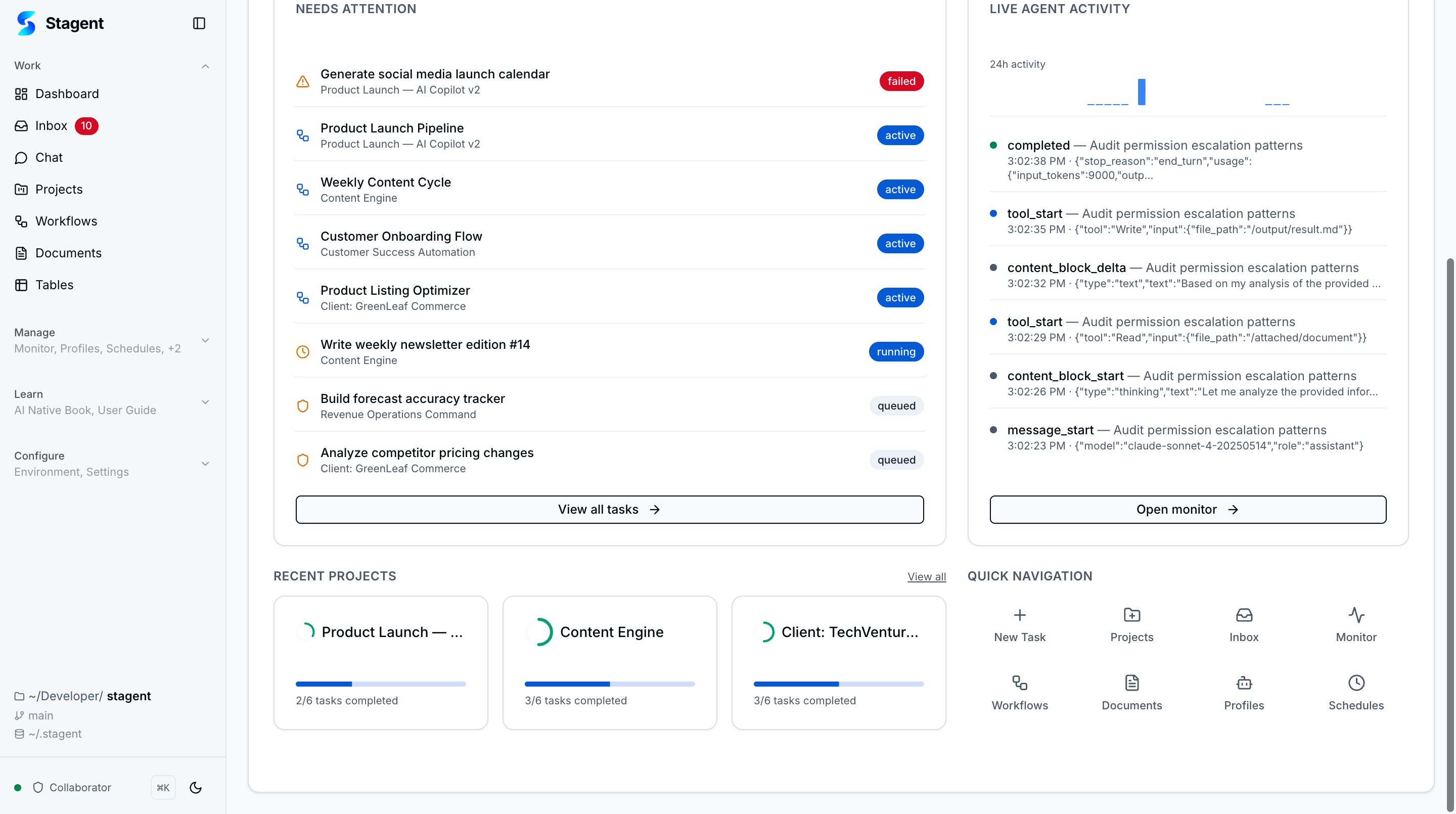
Workspace-level briefing with active work, pending review, failed items, project counts, and live agent activity. The home view is designed for daily triage before you drill into execution, inbox, or monitoring detail.
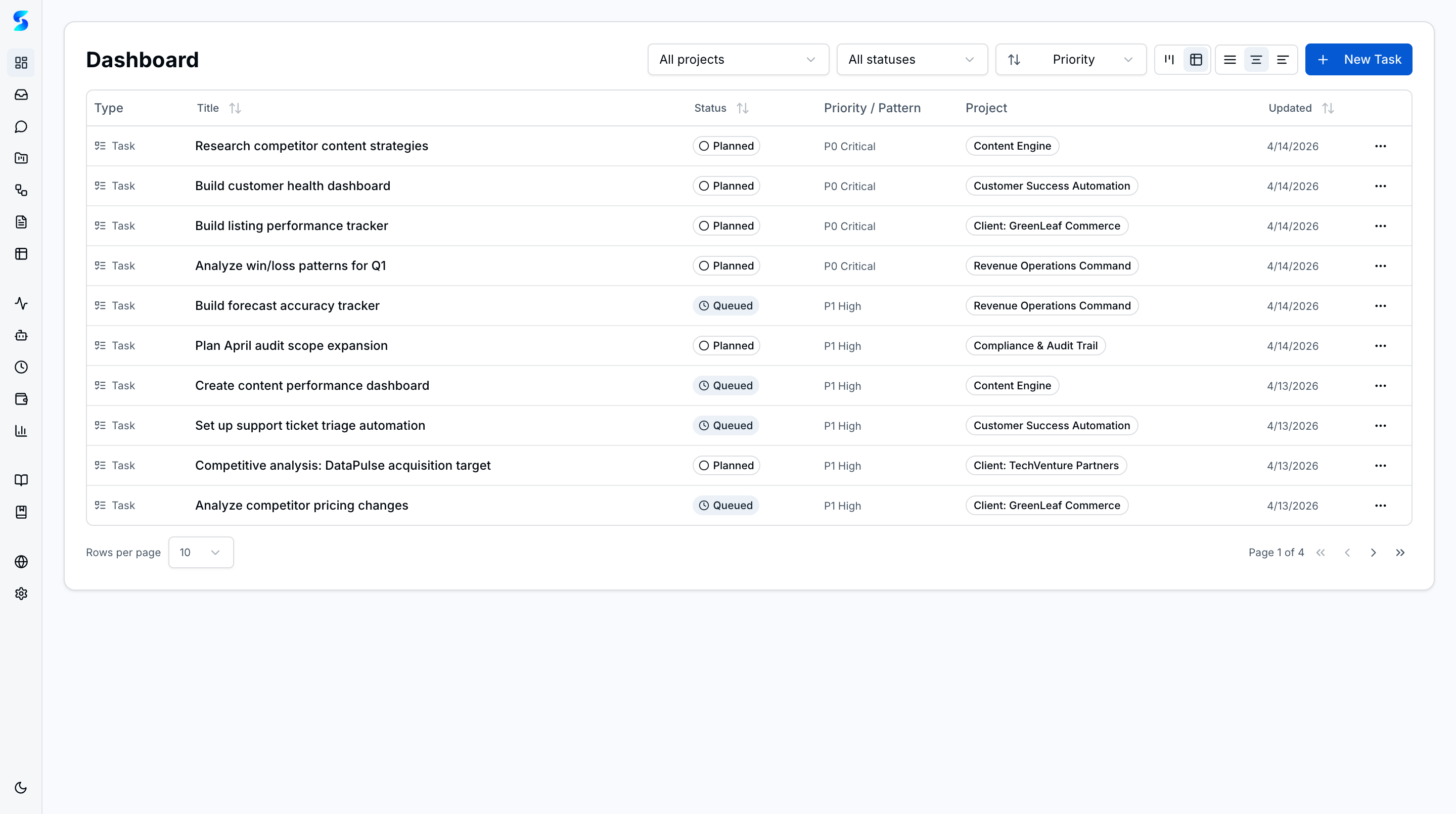
Status-driven execution board with five columns: Planned → Queued → Running → Completed → Failed. Filter across projects, create tasks inline, and open task detail to inspect status, description, and runtime state without leaving the board.
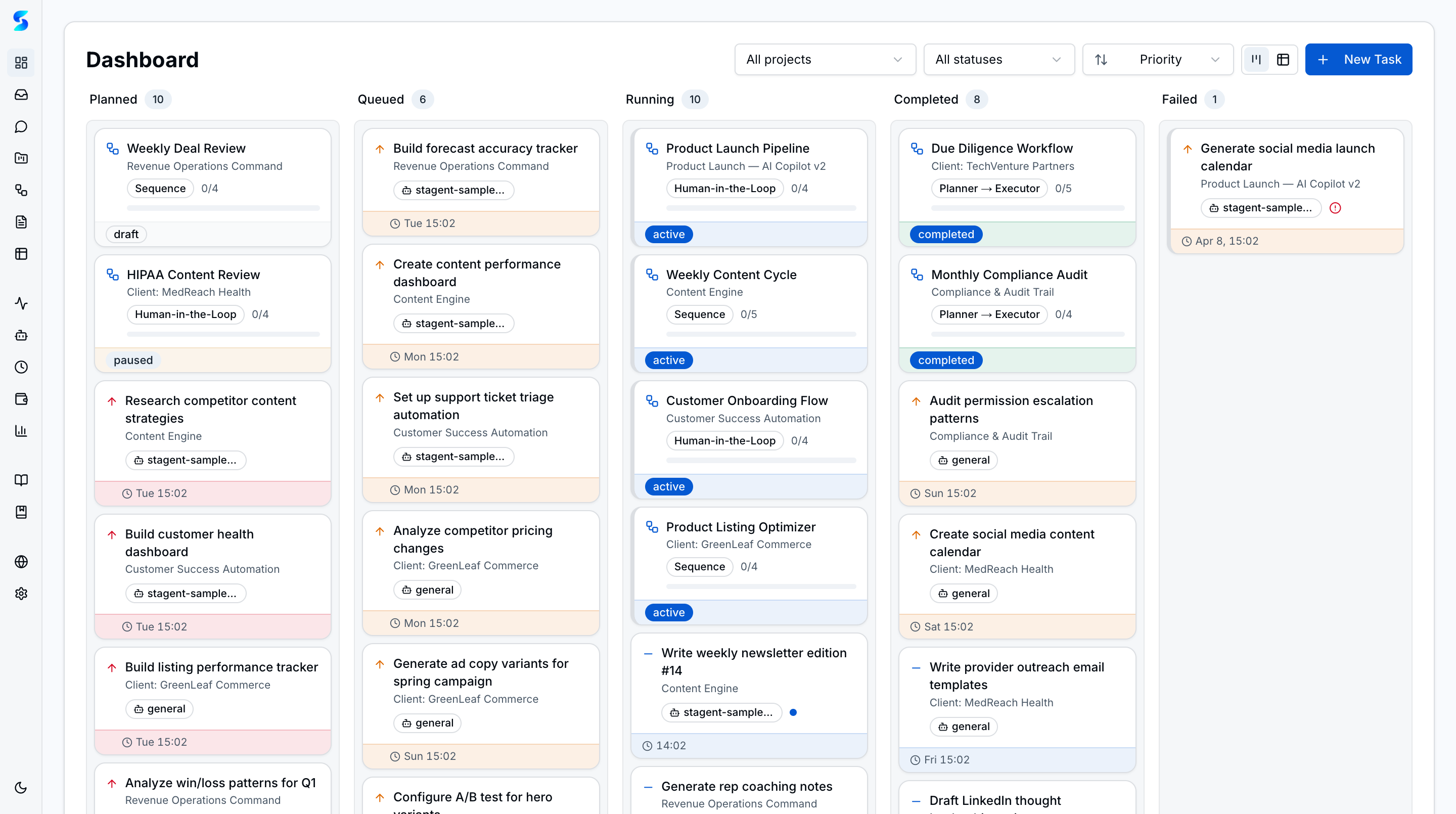
| Table View |
|---|
 |
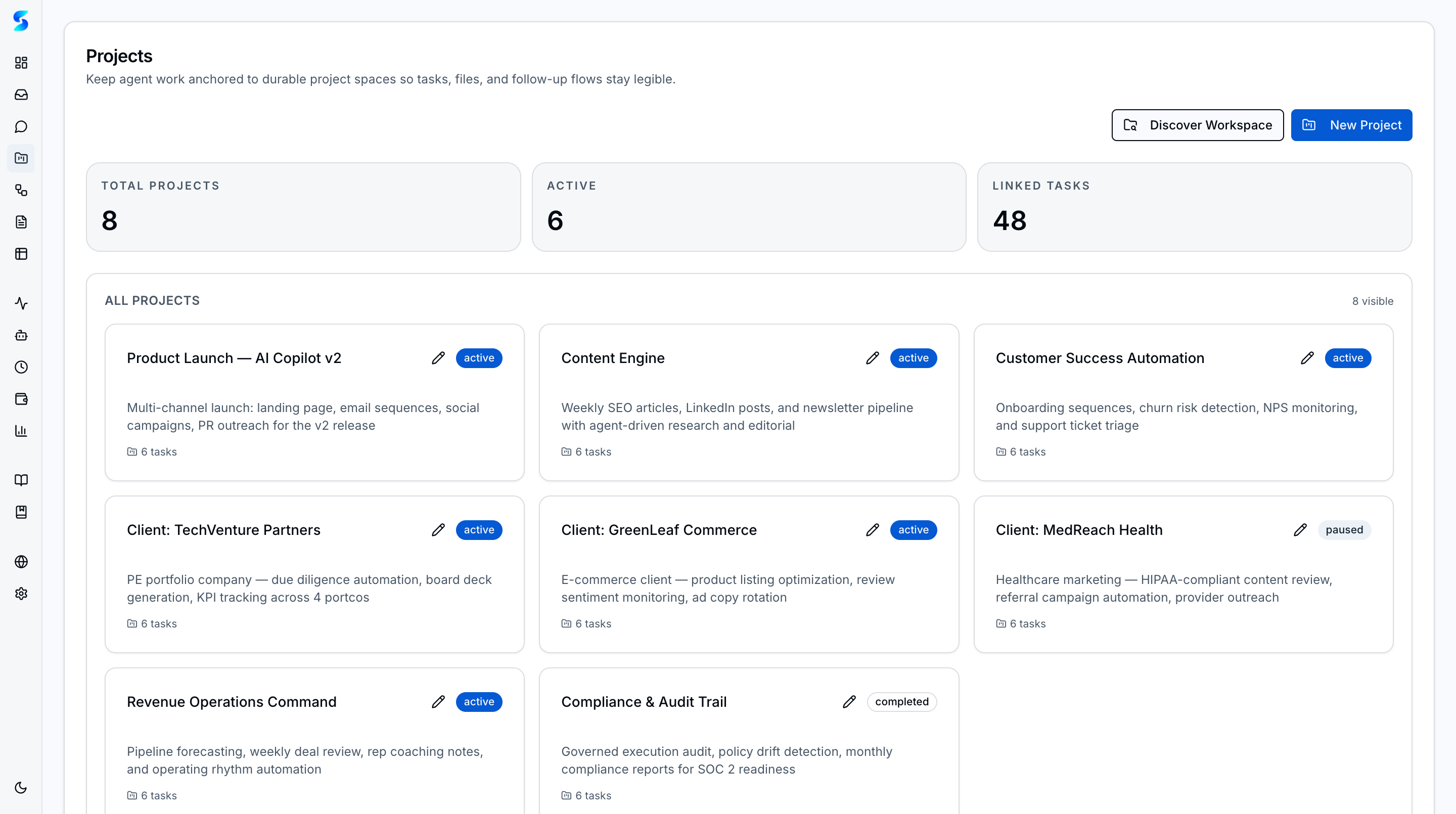
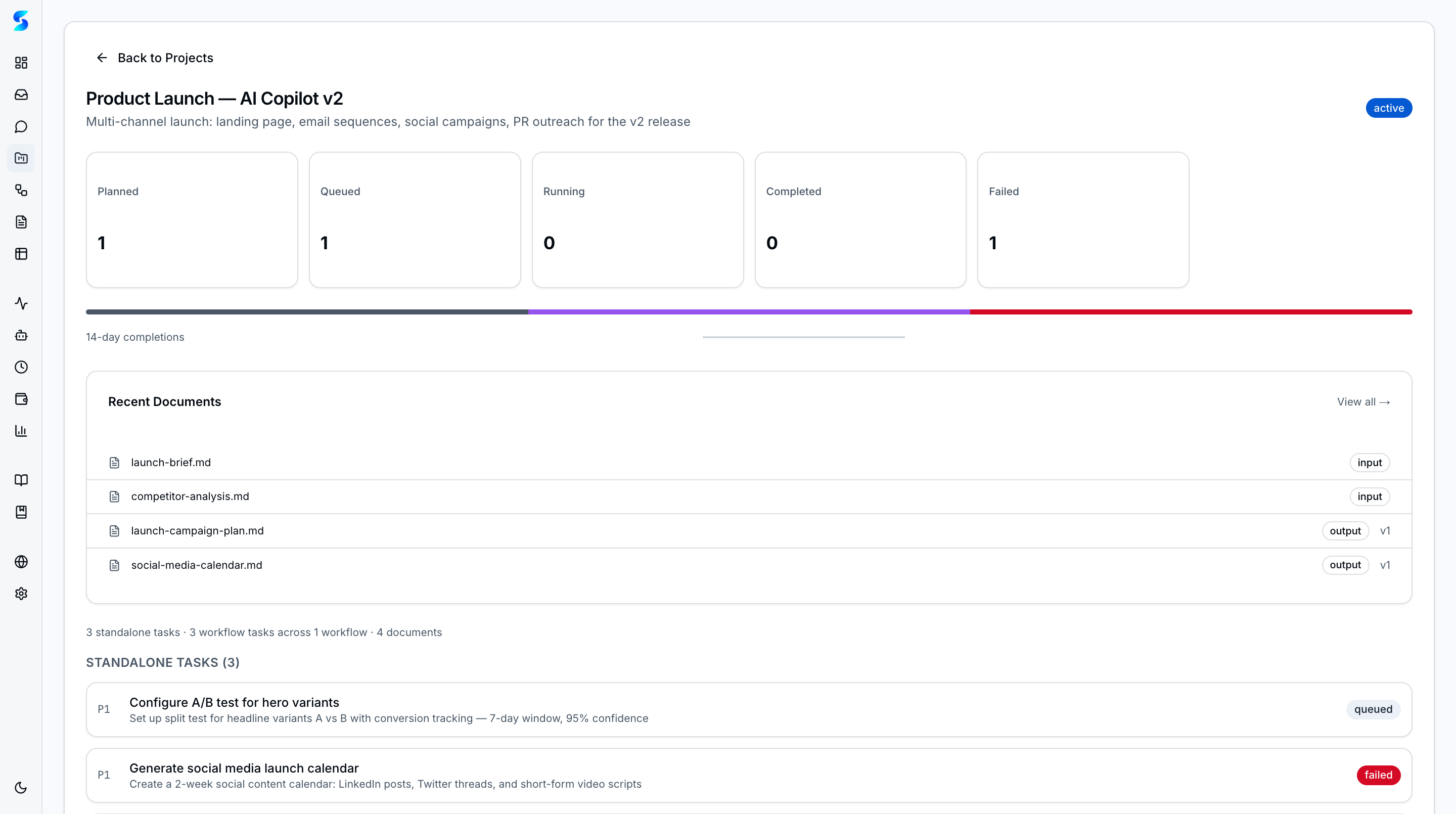
Create and organize projects as containers for related tasks. Each project can specify a working directory — agent tasks resolve cwd from the project's path, enabling agents to operate on external codebases. Server-rendered project cards with task counts, status badges, and a detail view at /projects/[id].
| Project Cards | Project Detail |
|---|---|
 |
 |
ainative supports two governed execution runtimes behind a shared runtime registry:
- Claude Code via the Anthropic Claude Agent SDK
- OpenAI Codex App Server via
codex app-server
Tasks, schedules, and workflow steps can target a runtime explicitly, while settings exposes runtime-specific authentication and health checks. Runtime-specific execution still lands in the same inbox, monitoring, and task state surfaces.
Claude Agent SDK integration with the canUseTool polling pattern remains the default Claude execution path. Tasks are dispatched fire-and-forget and run asynchronously, while every tool call, reasoning step, and decision is surfaced through inbox approvals and monitor logs.
OpenAI Codex App Server is integrated as ainative's second governed runtime. Codex-backed tasks preserve project working directories, document context, resumable thread IDs, inbox approval requests, user questions, and provider-labeled logs. The same runtime can also power task assist, scheduled firings, and workflow child tasks.
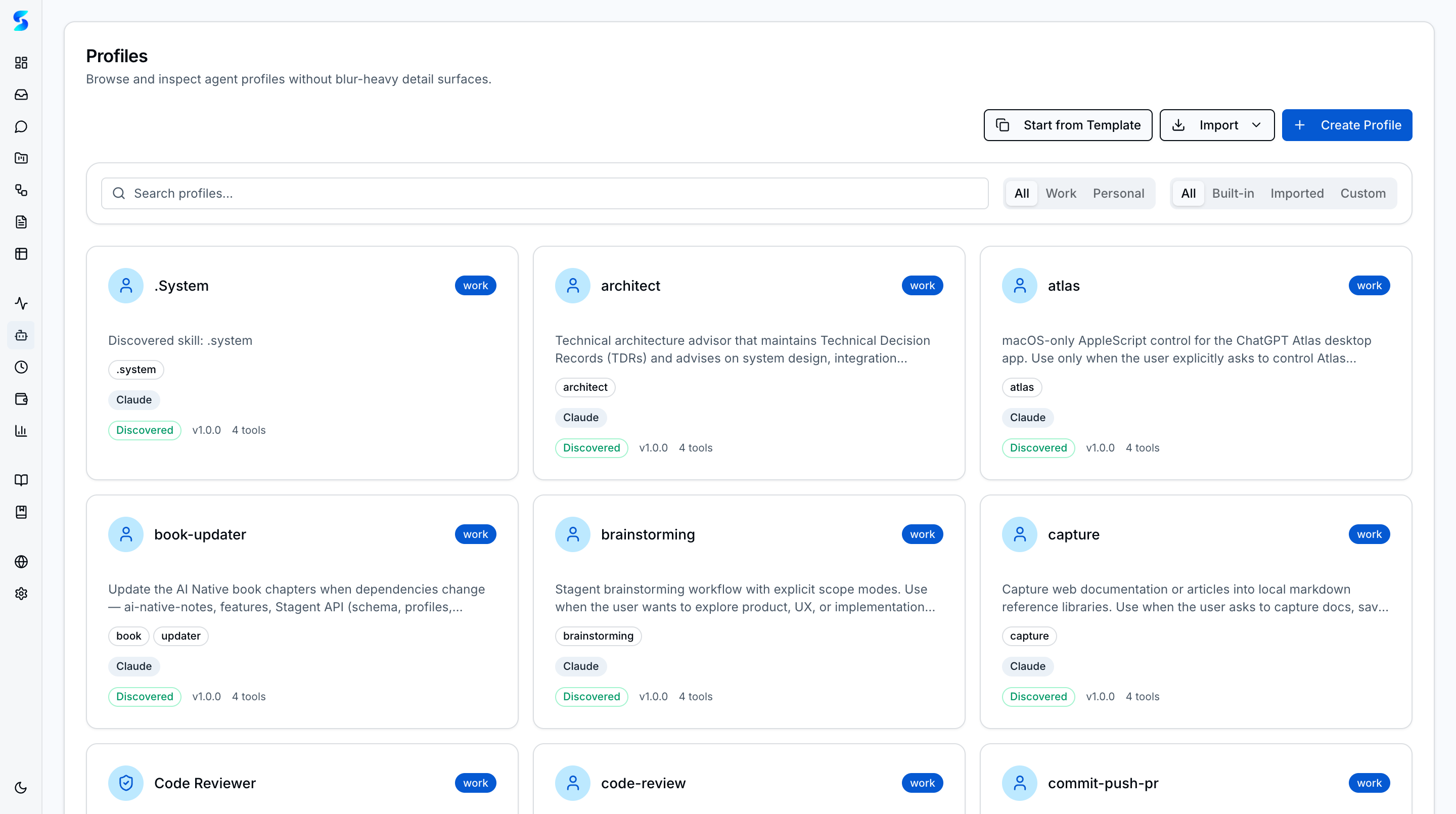
Profile-backed execution with specialist definitions for different job types. Each profile packages instructions, allowed tools, max turns, and output format so teams can reuse behavior intentionally instead of relying on ad hoc prompts. Profile cards display role-based icon circles with keyword-inferred colors (blue for work, purple for personal), alongside domain tags, runtime badges, and tool counts. Workflow steps and schedules can reference profiles directly, and runtimes can be selected independently when provider support differs.
Multi-step task orchestration with six patterns:
- Sequence — Steps execute in order
- Planner→Executor — One agent plans, another executes each step
- Human-in-the-Loop Checkpoint — Pauses for human approval between steps
- Parallel — Concurrent branch execution with fork/join synthesis
- Loop — Iterative agent execution with configurable stop conditions
- Swarm — Mayor/workers/refinery multi-agent orchestration
State machine engine with step-level retry, project association, and real-time status visualization.
ainative supports two bounded expansion patterns on top of the workflow engine:
- Parallel research fork/join — 2-5 concurrent branches followed by one synthesis step
- Swarm orchestration — mayor → worker pool → refinery with retryable stages and configurable worker concurrency
Both patterns preserve the same governed task model, runtime selection, monitoring stream, and workflow detail surface instead of introducing a separate orchestration product.
AI-powered task creation: generate improved descriptions, break tasks into sub-tasks, recommend workflow patterns, and estimate complexity through the shared runtime task-assist layer. Claude and OpenAI task assist now both route through the provider runtime abstraction.
Bridge from AI task assist to workflow engine: when task assist recommends a multi-step plan, a "Create as Workflow" button converts the recommendation into a validated workflow definition with per-step profile assignments, dependency ordering, and pattern selection across all six workflow types. The WorkflowConfirmationSheet lets operators review and edit steps, profiles, and configuration before creating the workflow. A keyword-based profile suggestion fallback ensures steps get reasonable profile assignments even without the AI classifier.
Agents learn from execution history through a human-approved instruction evolution loop. After each task completion, the pattern extractor analyzes logs and proposes context updates — concise behavioral rules the agent should follow in future runs. Operators approve, reject, or edit proposals before they take effect. Learned context is versioned with rollback support and size-limited summarization to prevent unbounded growth. A sweep agent can audit the codebase for improvement opportunities and create prioritized tasks from its findings.
During workflow execution, the pattern extractor buffers context proposals into a learning session instead of creating individual notifications per proposal. When the workflow completes, all proposals are surfaced as a single batch for review. Operators can approve all, reject all, or review individually — reducing notification noise from multi-step workflows while preserving human oversight. The batch review component integrates into the existing pending approval host.
Resume failed or cancelled agent tasks with one click. Tracks retry counts (limit: 3), detects expired sessions, and provides atomic claim to prevent duplicate runs.
Iterative agent loop pattern with four stop conditions: max iterations, time budget, human cancel, and agent-signaled completion. Each iteration creates a child task with previous output as context. Loop status view with iteration timeline, progress bar, and expandable results. Pause/resume via DB status polling.
Curated agent profiles across work and personal domains, built as portable Claude Code skill directories with profile.yaml sidecars. The profile gallery displays role-based icon circles with keyword-inferred colors and supports domain filtering and search, while YAML customization, GitHub import, and behavioral smoke tests keep profile behavior inspectable and reusable.
Pre-configured workflow templates across work and personal domains. Browse blueprints in a gallery with pattern-colored icon circles, domain tags, and difficulty badges. Preview steps and required variables, fill in a dynamic form, and create draft workflows with resolved prompts and profile assignments. Create custom blueprints via YAML or import from GitHub URLs. Lineage tracking connects workflows back to their source blueprint.
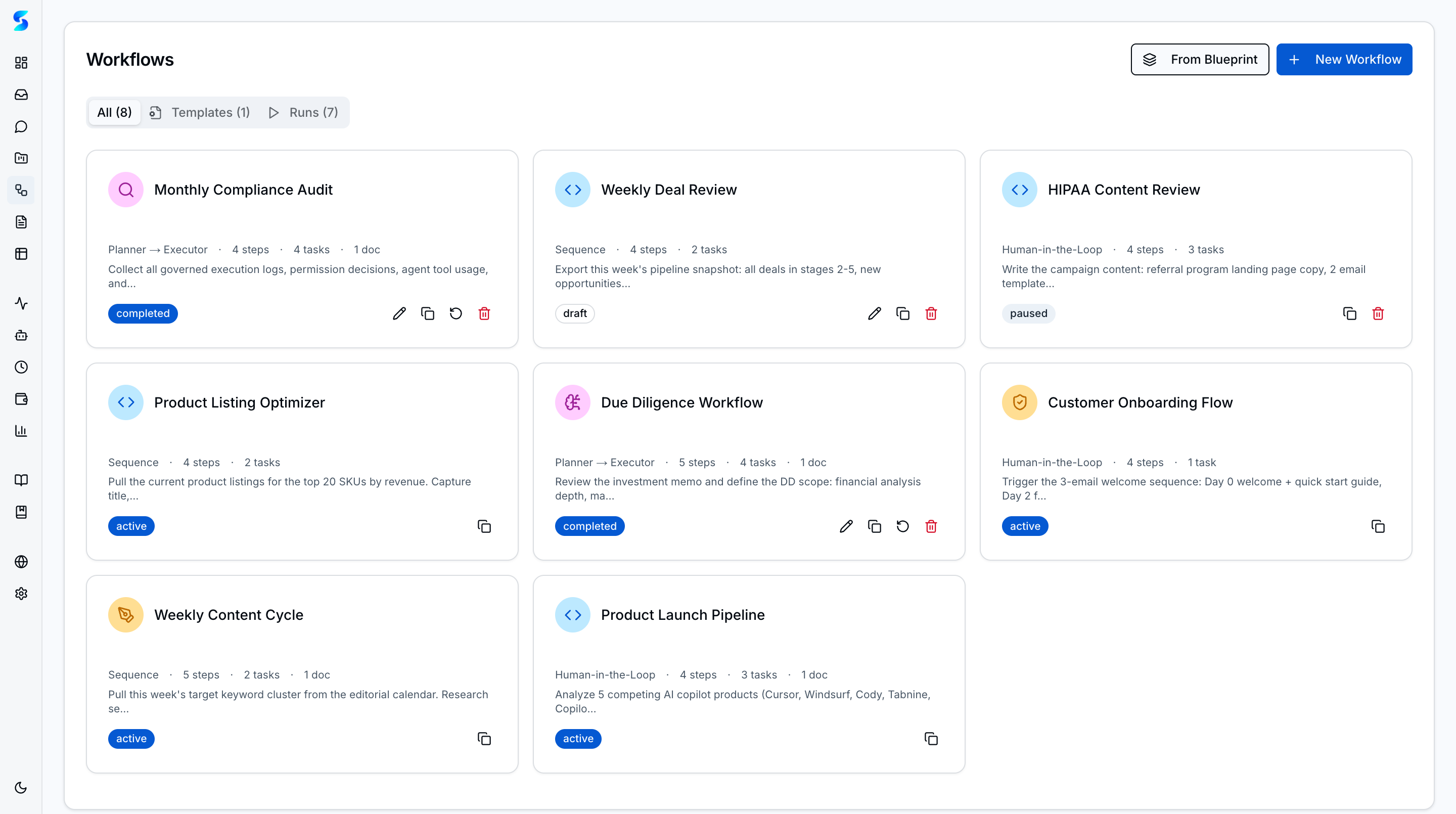
| Workflow Detail |
|---|
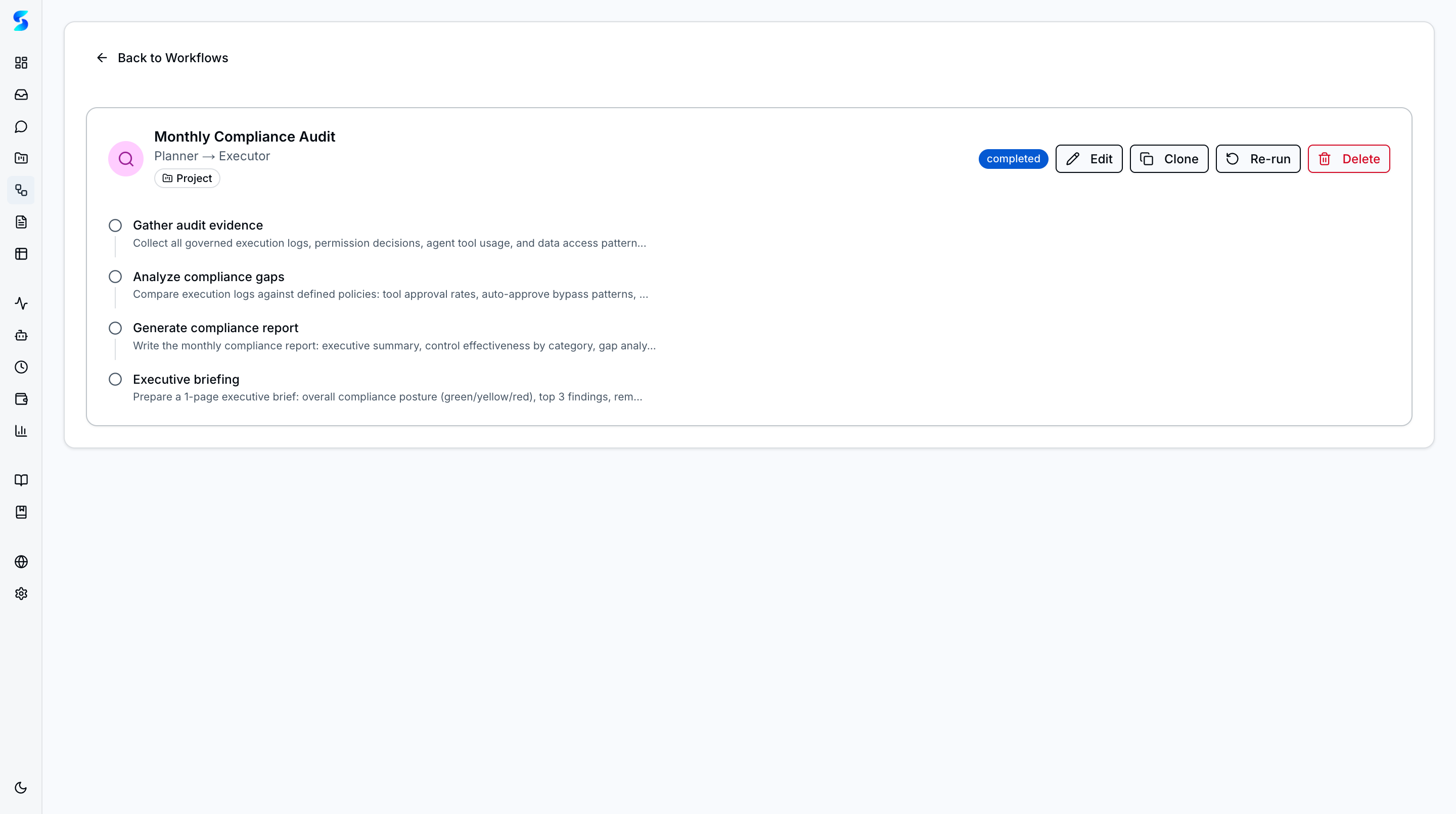 |
Full document browser at /documents with table and grid views. Upload files with drag-and-drop, preview images/PDFs/markdown/code inline, search by filename and extracted text, and filter by processing status or project. Bulk delete, link/unlink to projects and tasks.
| Table View | Grid View |
|---|---|
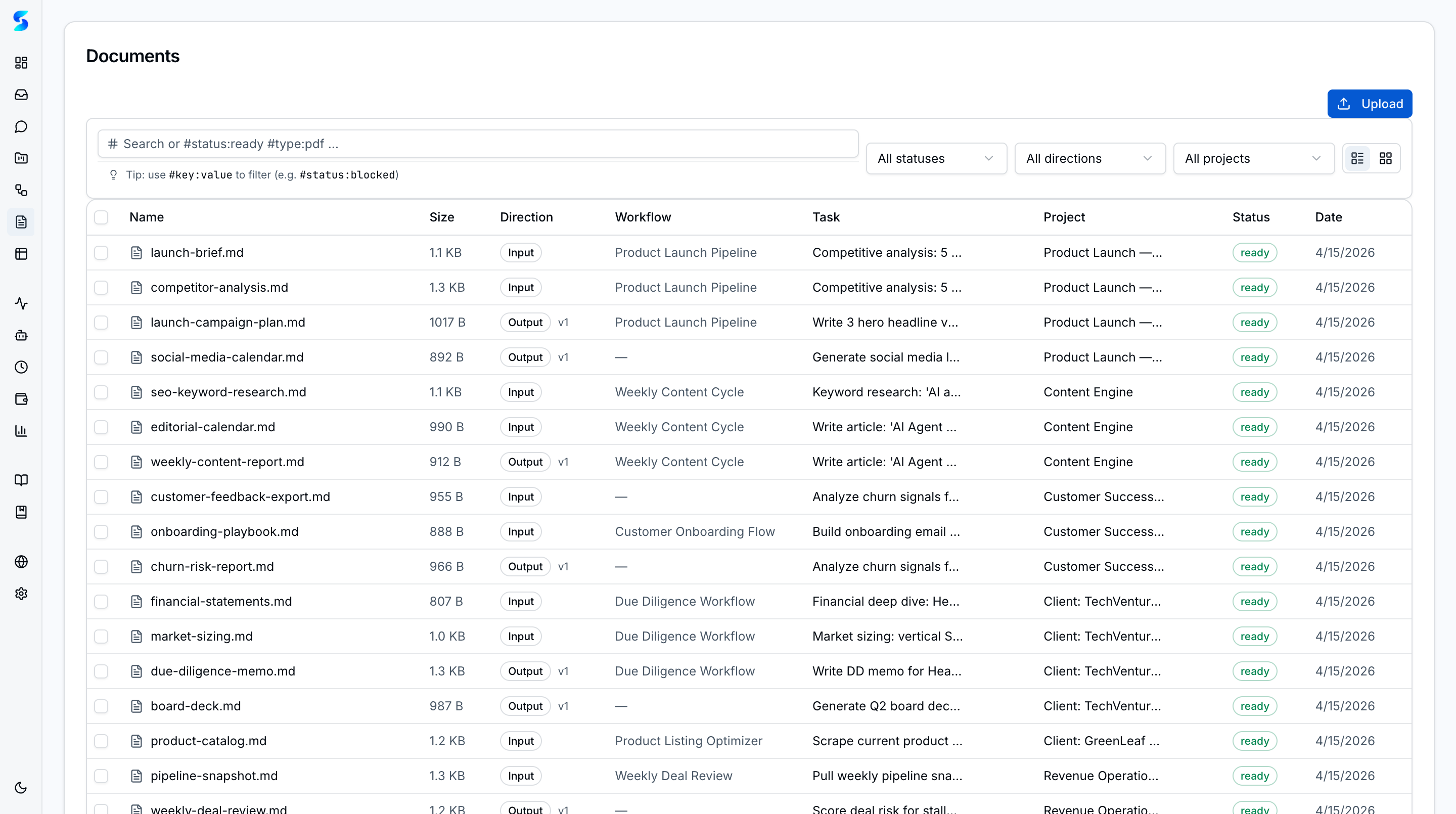 |
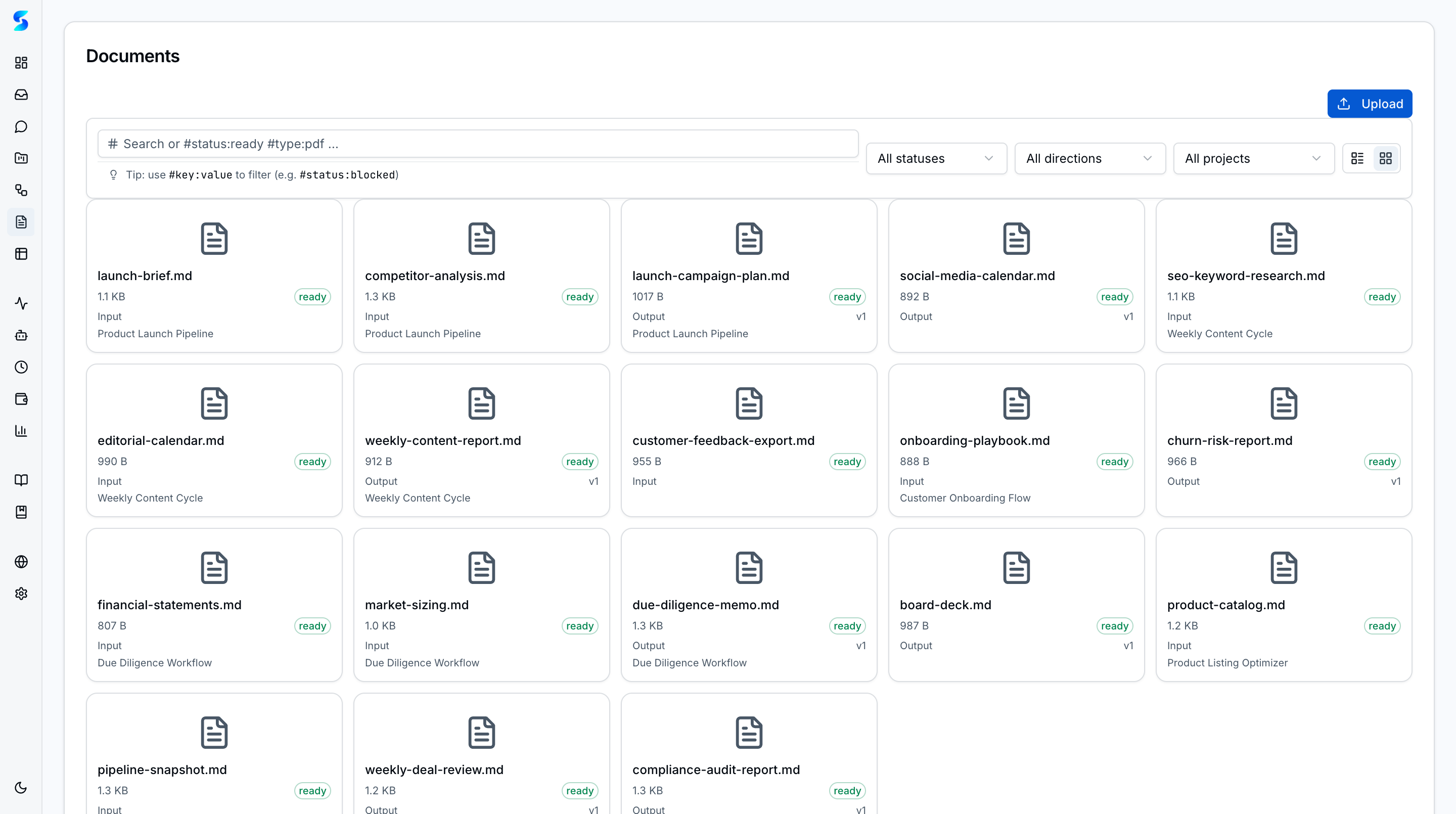 |
Automatic text extraction on upload for five file types: text, PDF (pdf-parse), images (image-size), Office documents (mammoth/jszip), and spreadsheets (xlsx). Extracted text, processed paths, and processing errors are tracked per document.
Documents linked to a task are automatically injected into the agent's prompt as context. The context builder aggregates extracted text from all linked documents, giving agents access to uploaded reference material without manual copy-paste.
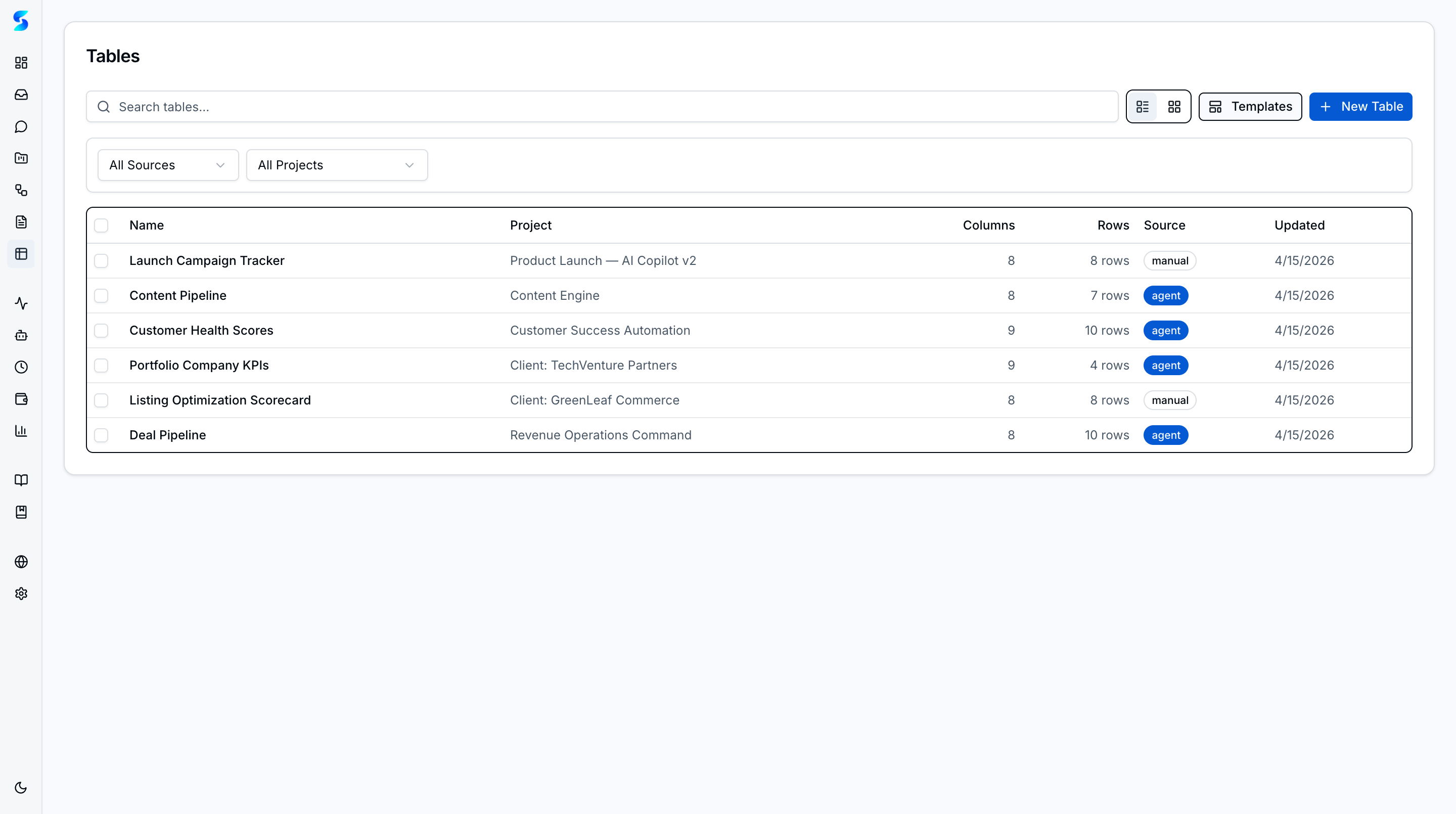
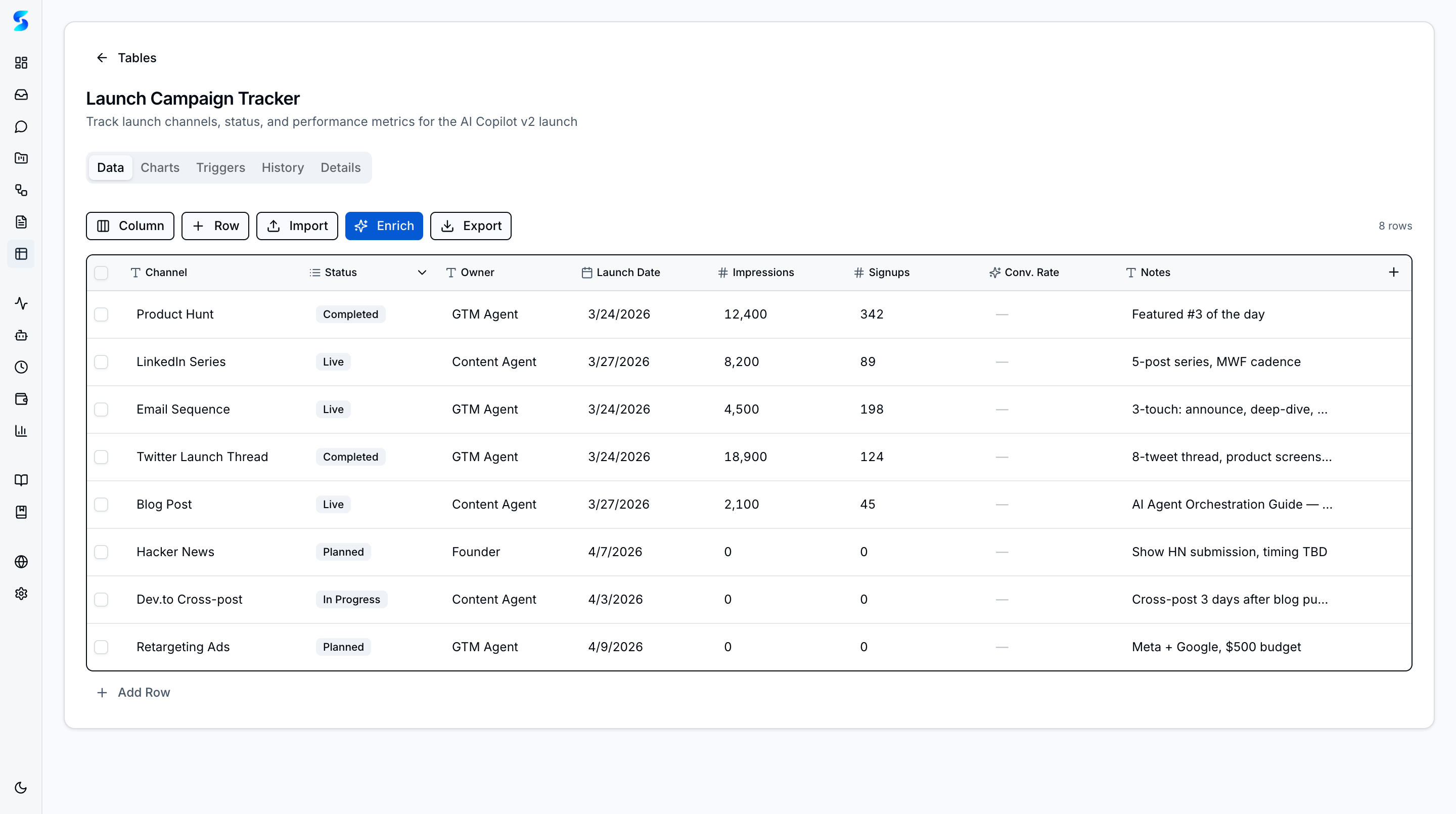
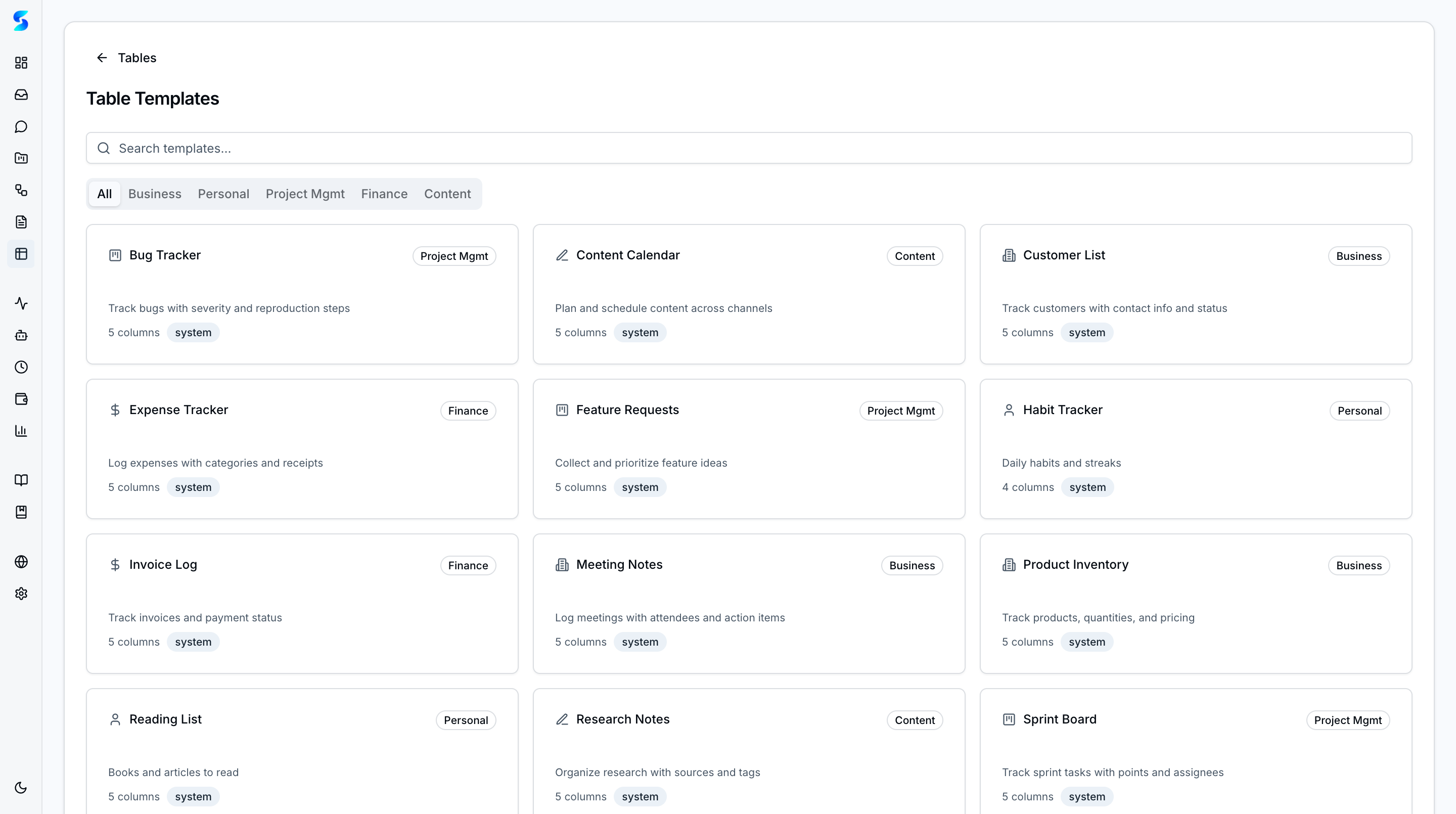
Airtable-like structured data system at /tables with 14 features. Create tables from scratch, import from CSV/XLSX documents, or use one of 12 built-in templates across 5 categories. Each table includes an inline spreadsheet editor with keyboard navigation, type-aware cell renderers, computed columns with formula support (12 functions including sum, avg, if, daysBetween), and optimistic saves.
| Table List | Spreadsheet Editor |
|---|---|
 |
 |
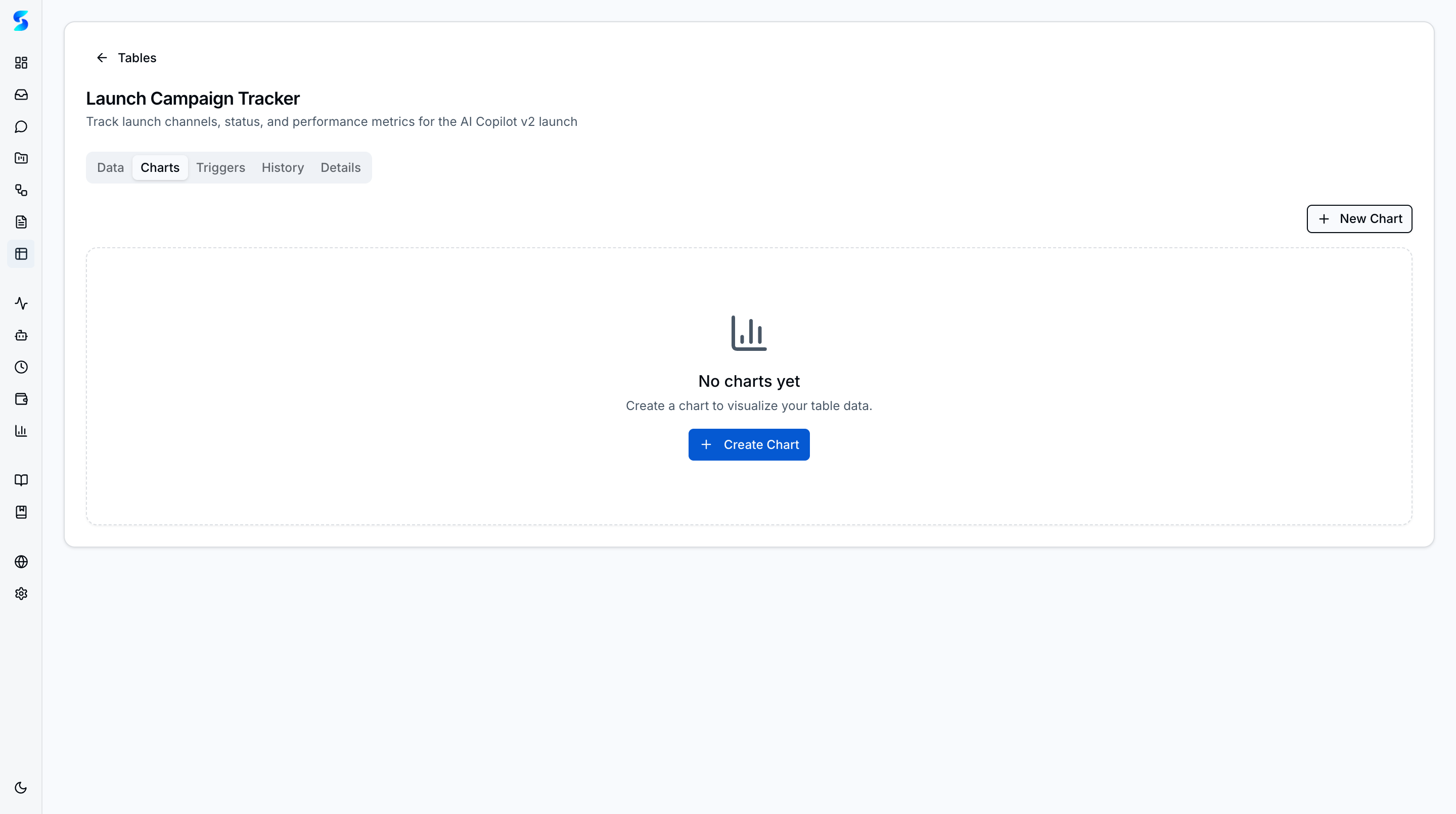
| Charts | Template Gallery |
|---|---|
 |
 |
- Charts — Bar, line, pie, and scatter charts with configurable X/Y axes and aggregation
- Workflow triggers — Automated actions fired when row data matches conditions
- 12 agent tools — Agents can list, query, aggregate, search, add/update/delete rows, and create tables
- Cross-table relations — Link rows across tables with searchable relation combobox
- Export — CSV, XLSX, and JSON export for any table
- Row versioning — History tab with snapshot-before-mutation and rollback to previous versions
Built-in documentation system at /playbook with usage-stage awareness that adapts content to your experience level (new, early, active, power user). Browse feature reference docs and guided learning journeys organized by persona (Personal, Work, Power User, Developer). Adoption heatmap tracks which features you've explored, while journey cards show progress through multi-step learning paths. Markdown rendering with automatic internal link resolution, table of contents, related docs, and screengrab embedding.

AI-native book reader at /book with 9 chapters across 3 parts (Foundation, Intelligence, Autonomy). Each chapter is generated from ainative's own source code and feature docs by the document-writer agent — making this a book that writes itself.
- Chapter regeneration — one-click regeneration via the document-writer agent profile with fire-and-forget task execution
- Staleness detection — git-based change tracking compares source file timestamps against
lastGeneratedByfrontmatter to show when chapters need updating - Live progress streaming — SSE subscription shows real-time agent steps during generation (Reading files → Planning → Composing → Writing) with fade-in animation
- Reading paths — 4 persona-based paths (Getting Started, Team Lead, Power User, Developer) filter chapter navigation
- Try It Now — each chapter links to related Playbook feature docs and user journeys
- Author's Notes — collapsible callout blocks with behind-the-scenes commentary
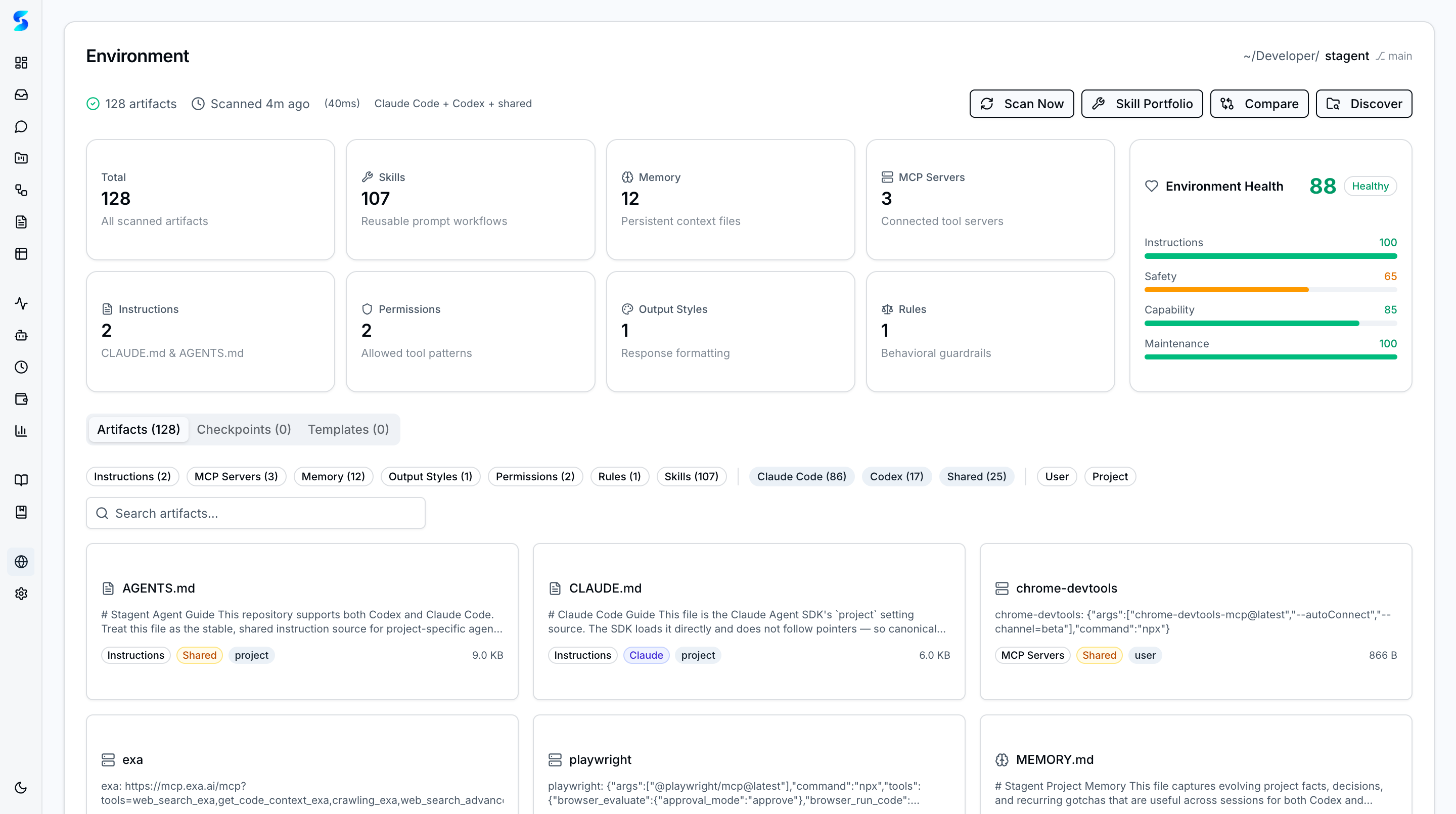
ainative doubles as a control plane for AI coding environments — scanning, caching, and syncing configuration for Claude Code and Codex CLI across projects. The environment dashboard surfaces detected tools, active configurations, git checkpoint status, and health scores.
- Environment Scanner — detects Claude Code and Codex CLI configurations, MCP servers, skills, and project settings
- Environment Cache — persists scanned state for fast dashboard rendering without re-scanning
- Environment Dashboard — unified view of all detected environments with health indicators
- Git Checkpoint Manager — tracks environment state via git commits for rollback and comparison
- Environment Sync Engine — bidirectional sync between local config and cached state
- Project Onboarding — guided flow for setting up new projects with environment-aware defaults
- Environment Templates — reusable environment configurations for common project types
- Cross-Project Comparison — compare environment settings across projects
- Skill Portfolio — aggregate view of skills across all detected environments
- Environment Health Scoring — composite health score based on configuration completeness and freshness
- Agent Profile from Environment — auto-generate agent profiles from detected environment capabilities
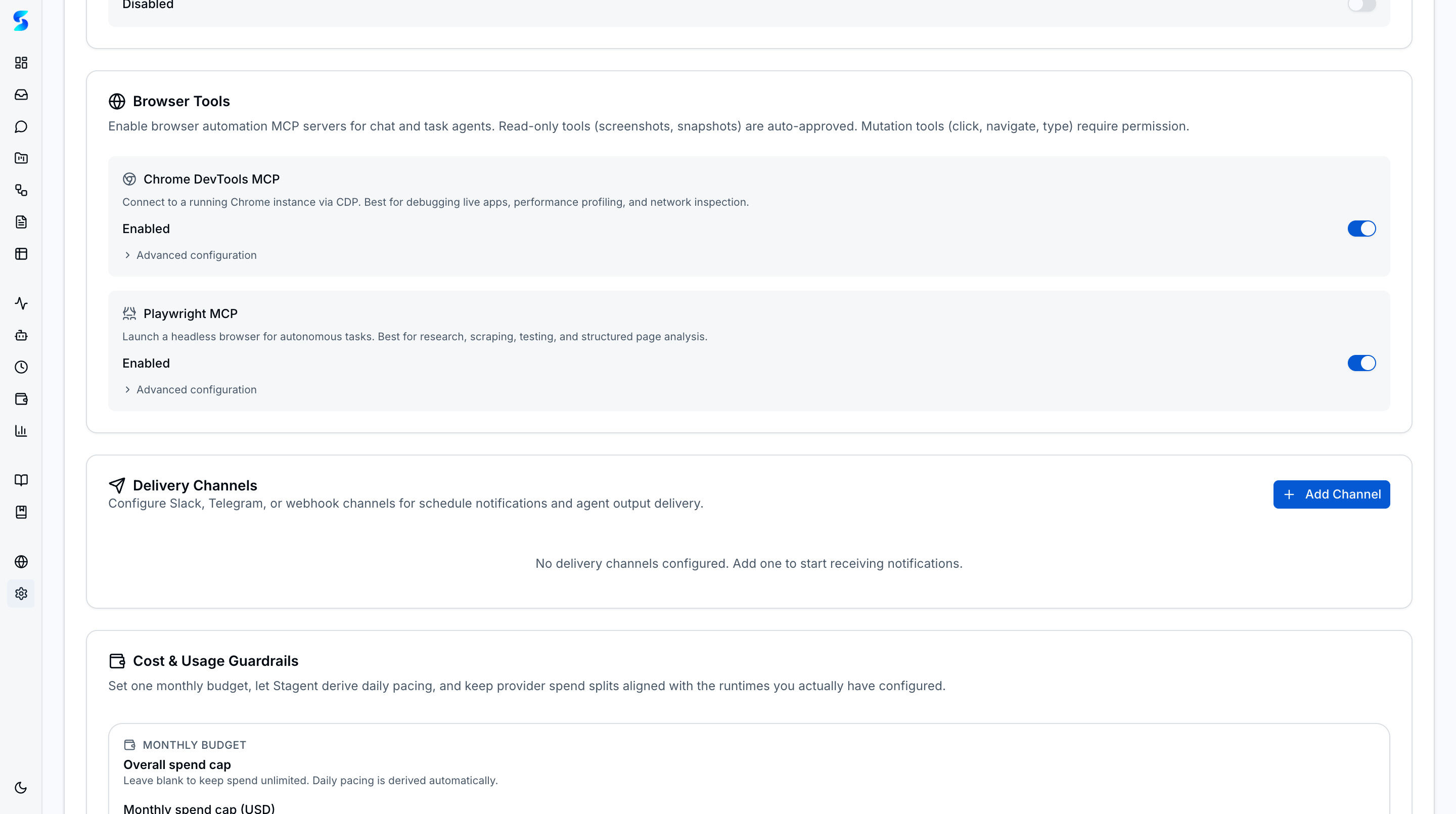
Enable browser automation in chat and task execution through two MCP integrations: Chrome DevTools MCP (29 tools for connecting to a running Chrome instance via CDP) and Playwright MCP (50+ tools for headless browser automation). Configure both from Settings with independent toggles and permission tiering — read-only operations auto-approve while mutations are gated through the inbox approval flow.
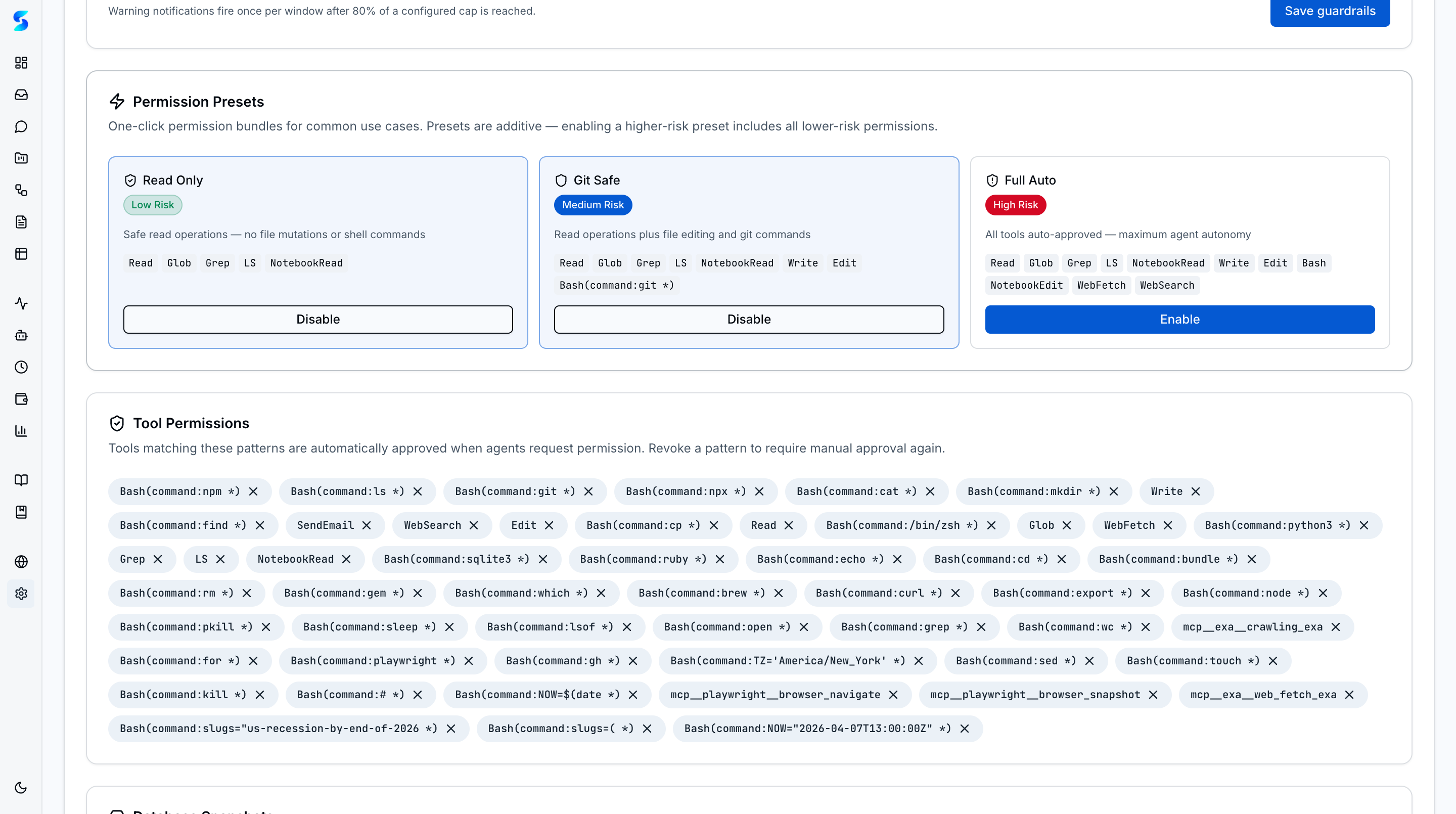
"Always Allow" option for agent tool permissions. When you approve a tool, you can save it as a pattern (e.g., Bash(command:git *), Read, mcp__server__tool). Saved patterns are checked before creating notifications — trusted tools are auto-approved instantly. Manage patterns from the Settings page. AskUserQuestion always requires human input.
Pending permission requests now surface through a shell-level approval presenter on any route, so operators can respond without leaving the page they are working on. Inbox remains the durable queue and source of truth, while the ambient surface provides the fast path for active supervision.
Pre-configured permission bundles that reduce friction for common tool approval patterns. Three layered presets — read-only (file reads, glob, grep), git-safe (adds git operations), and full-auto (adds write, edit, bash) — compose with existing "Always Allow" patterns. Presets are layered: enabling git-safe automatically includes read-only patterns; removing git-safe only strips its unique additions. Risk badges indicate the trust level of each preset. Manage presets from the Settings page alongside individual tool permissions.
Hourly poller checks the upstream origin/main for new commits and surfaces them via an in-app UpgradeBadge + notification queue. If three consecutive checks fail, a single deduplicated "Upgrade check failing" notification is inserted (and cleared on the next successful tick). The upgrade-assistant profile drives guided merge sessions end-to-end — including free-form questions and 3-choice option cards when a merge conflict or drifted main requires operator input. Dev repos are fully gated via STAGENT_DEV_MODE and a .git/ainative-dev-mode sentinel so contributor pushes are never blocked.
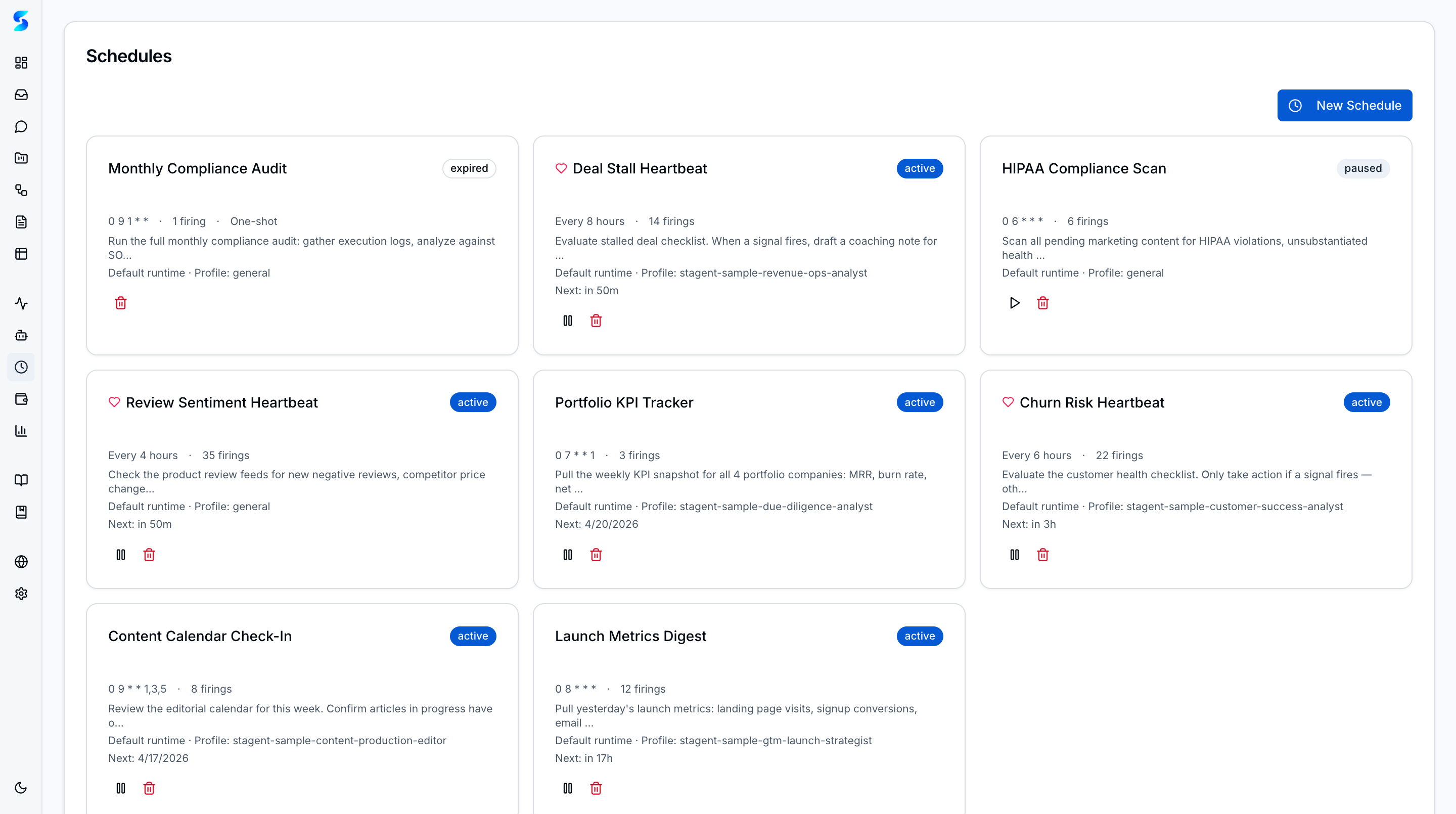
Time-based scheduling for agent tasks with human-friendly intervals (5m, 2h, 1d) and raw 5-field cron expressions. One-shot and recurring modes with pause/resume lifecycle, expiry limits, and max firings. Each firing creates a child task through the shared execution pipeline, and schedules can now target a runtime explicitly. Scheduler runs as a poll-based engine started via Next.js instrumentation hook.
Pure SVG chart primitives (Sparkline, MiniBar, DonutRing) with zero charting dependencies. Integrated into: homepage stats cards (7-day trends), activity feed (24h bar chart), project cards (completion donuts), monitor overview (success rate), and project detail (stacked status + 14-day sparkline). Full accessibility with role="img" and aria-label.
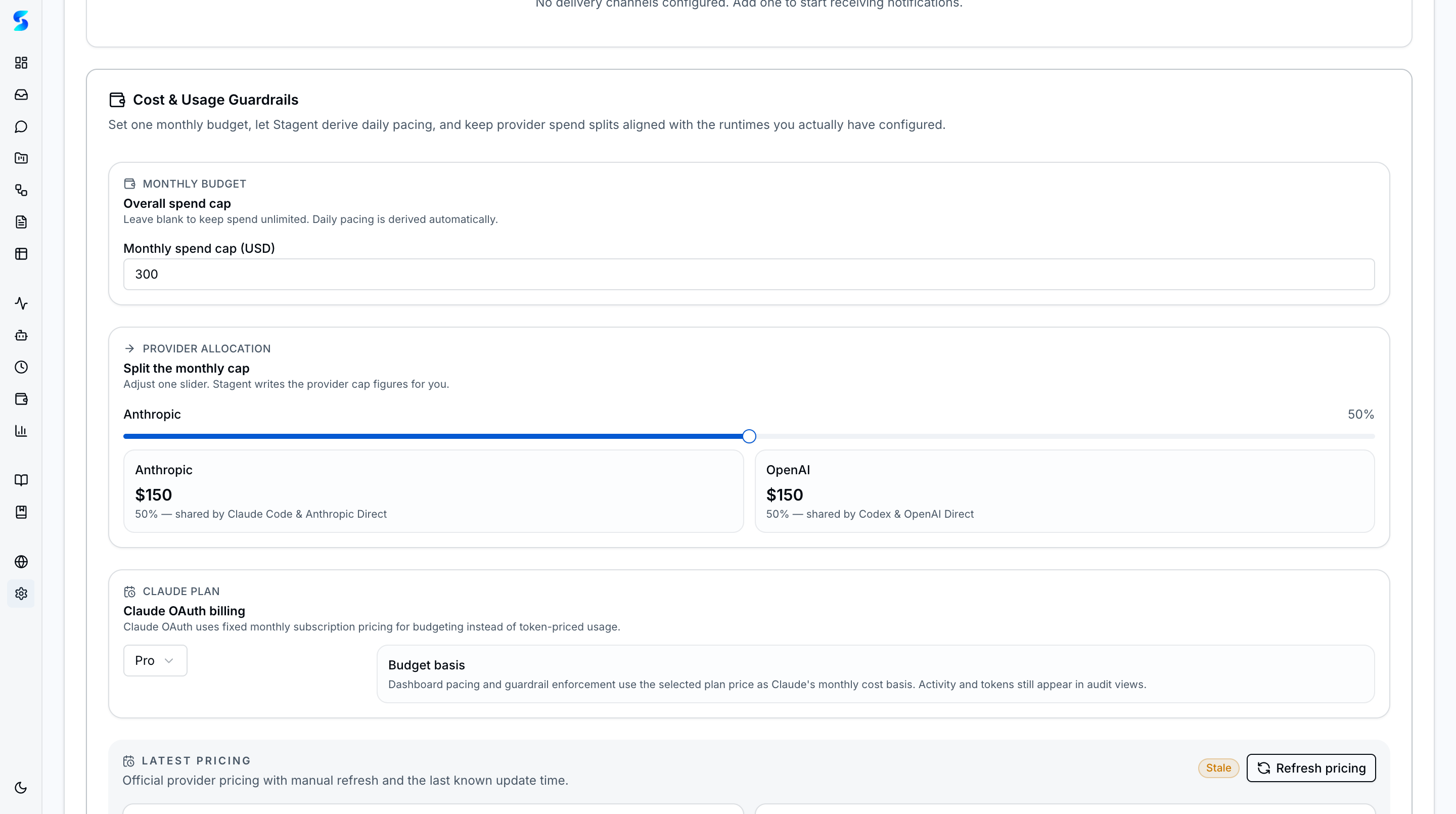
Provider-normalized metering tracks token and spend activity across tasks, resumes, workflow child tasks, schedules, task assist, and profile tests. The dedicated Cost & Usage surface adds summary cards, trend views, provider/model breakdowns, and budget-aware audit visibility on top of the usage ledger.

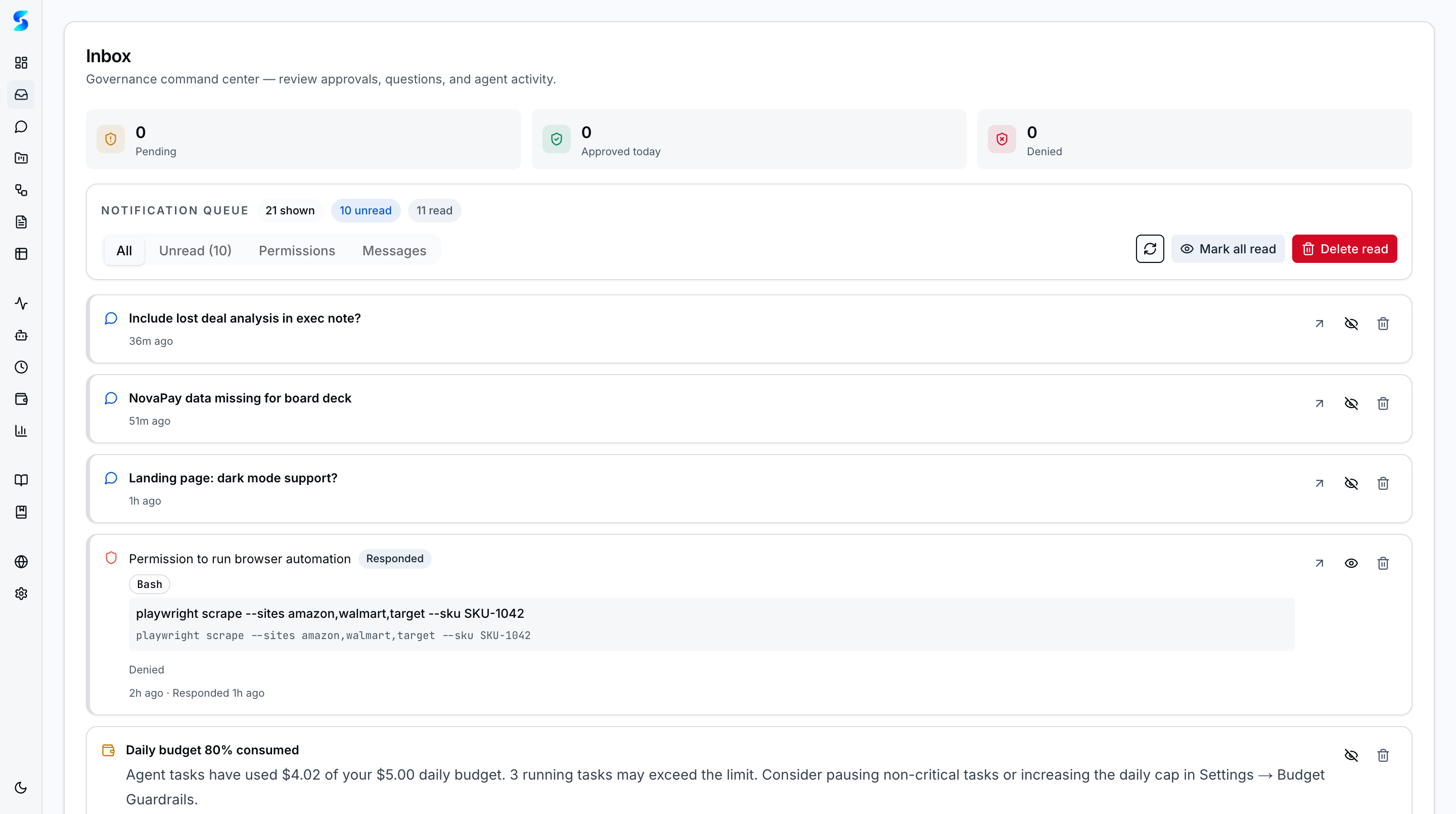
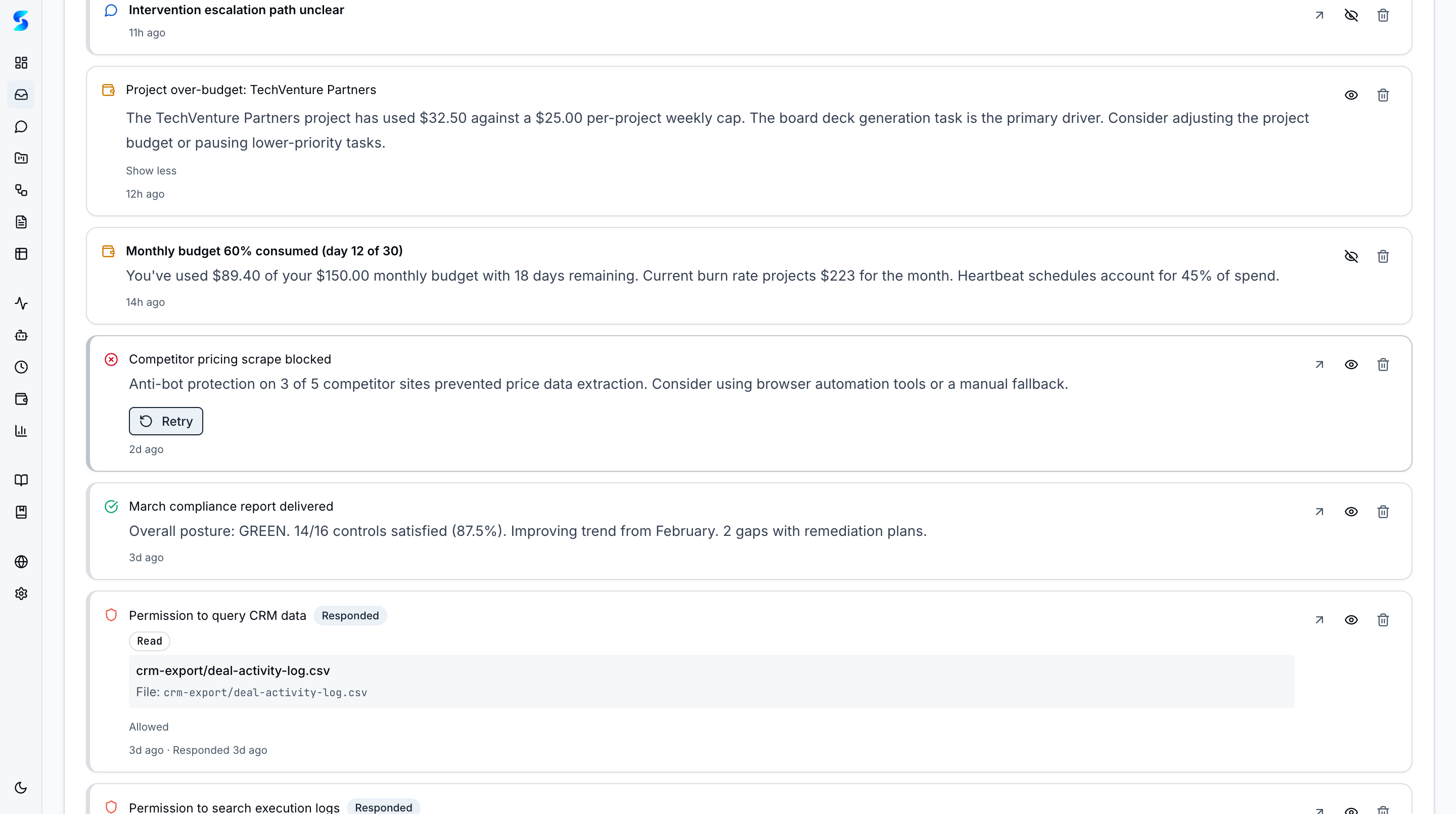
When an agent needs approval or input, a notification appears in your inbox. Review tool permission requests with "Allow Once" / "Always Allow" / "Deny" buttons, answer agent questions, and see task completion summaries. Supports bulk dismiss and 10s polling.
| Expanded Notification |
|---|
 |
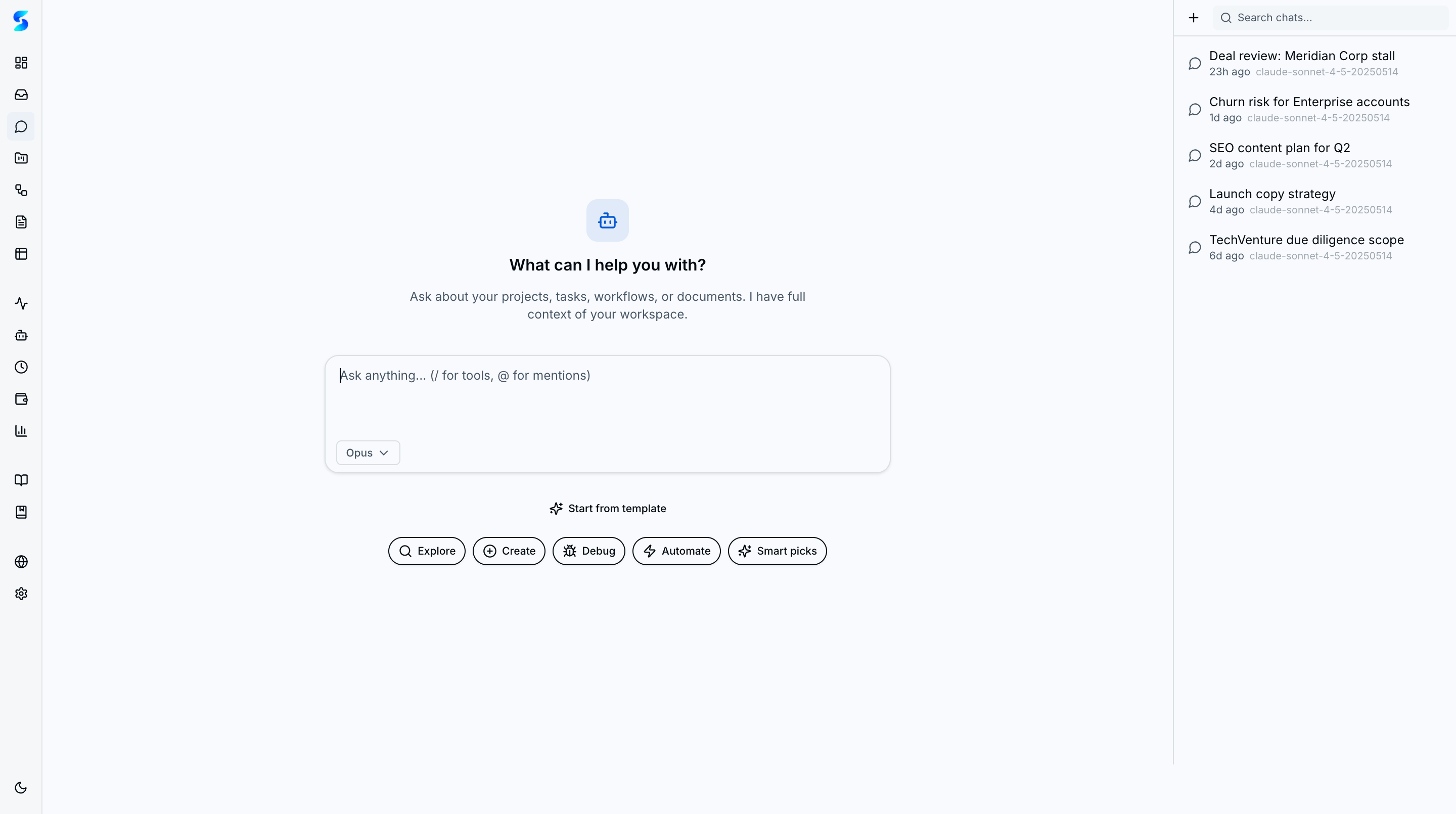
Conversational control plane for all workspace primitives — projects, tasks, workflows, documents, and profiles are all reachable from the chat surface. The chat interface is organized as a tool catalog with five categories (Explore, Create, Debug, Automate, Smart Picks) that help discover workspace capabilities. Progressive 5-tier context injection (~53K token budget) builds workspace awareness from lightweight summaries up to full document content. @ mentions let you reference documents and entities directly in prompts with fuzzy search autocomplete, injecting their content as context. Slash commands (/) provide quick access to tools and actions. Multi-provider model selection with cost tiers (
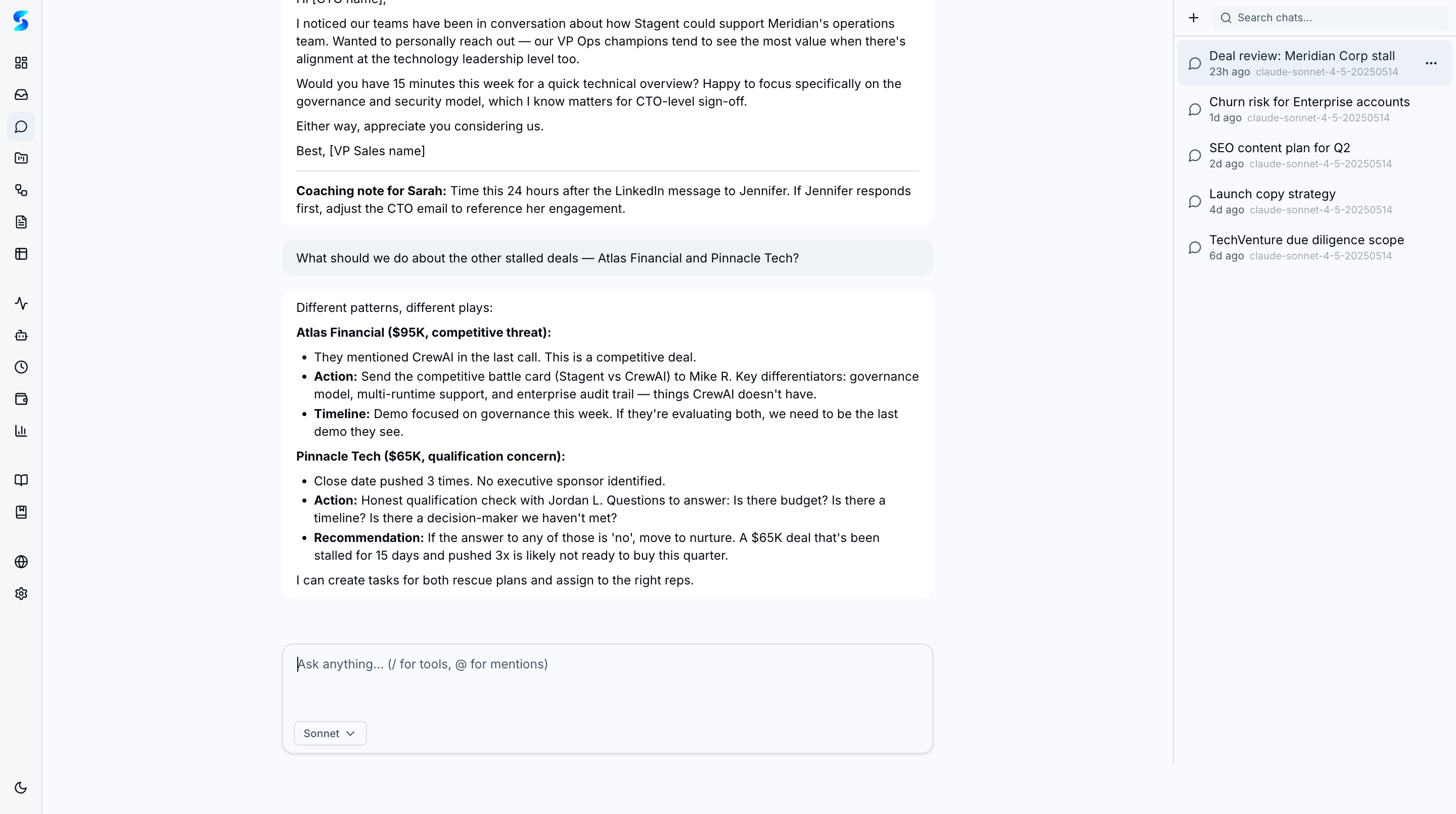
| Tool Catalog | Model Selector | Create Tab |
|---|---|---|
 |
 |
 |
Activate up to three skills in a single conversation with conflict detection and runtime-aware capability gates. The Skills tab in the chat popover surfaces + Add buttons on inactive skills, active badges with deactivate actions, and an "N of M active" indicator. When two skills issue polarity-divergent directives on shared keywords, a conflict dialog previews the excerpts and lets you confirm with force:true or back out. Composition honors the runtime capability matrix — Claude Code and Codex App Server support up to 3 active skills, while Ollama stays at 1. Conversations persist active skills through an additive active_skill_ids column that preserves legacy single-skill reads.
Structured #key:value filter grammar across chat, documents, and the ⌘K palette. The shared FilterInput parser accepts bare clauses, quoted values (#tag:"needs review"), and free text — clauses AND with surface-specific Select filters and sync to URL params for shareable, refresh-persistent views. Save any filter expression with a rename footer; saved searches appear as a dedicated group in the mention popover and in the command palette, so views built in one surface are reachable from anywhere. Pinned saved searches sit at the top of both lists for zero-click recall.
Real-time agent log streaming via Server-Sent Events. Filter by task or event type, click entries to jump to task details, and auto-pause polling when the tab is hidden (Page Visibility API).
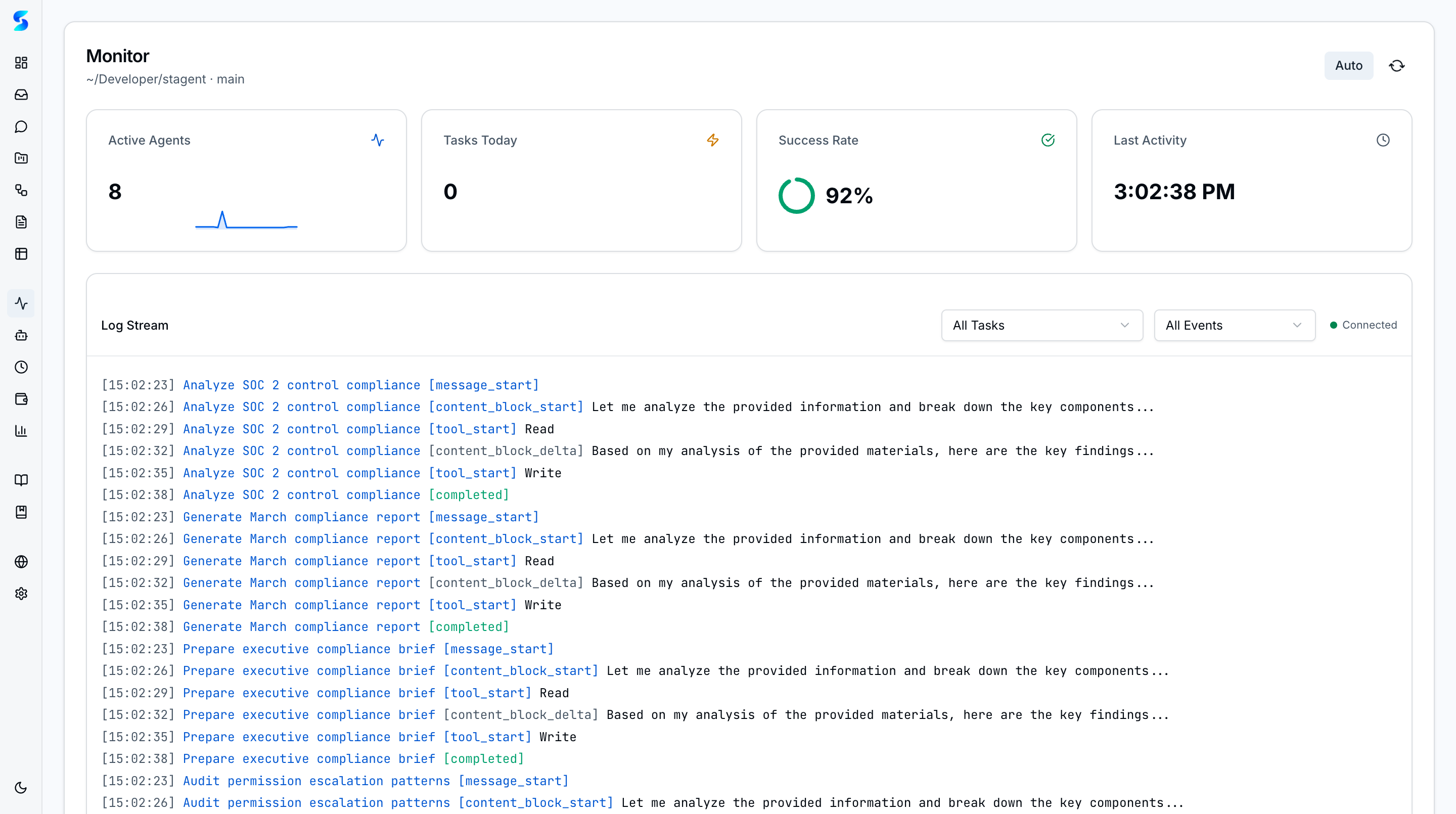
File upload with drag-and-drop in task creation. Type-aware content preview for text, markdown (via react-markdown), code, and JSON. Copy-to-clipboard and download-as-file for task outputs.
Configuration hub with provider-aware sections: Claude authentication (API key or OAuth), OpenAI Codex runtime API-key management, chat defaults (model selection), browser tools (Chrome DevTools and Playwright MCP toggles), runtime configuration (SDK timeout and max turns), tool permissions (saved "Always Allow" patterns with revoke), permission presets, budget guardrails, database snapshots (automatic backups with configurable retention and one-click restore), and data management.
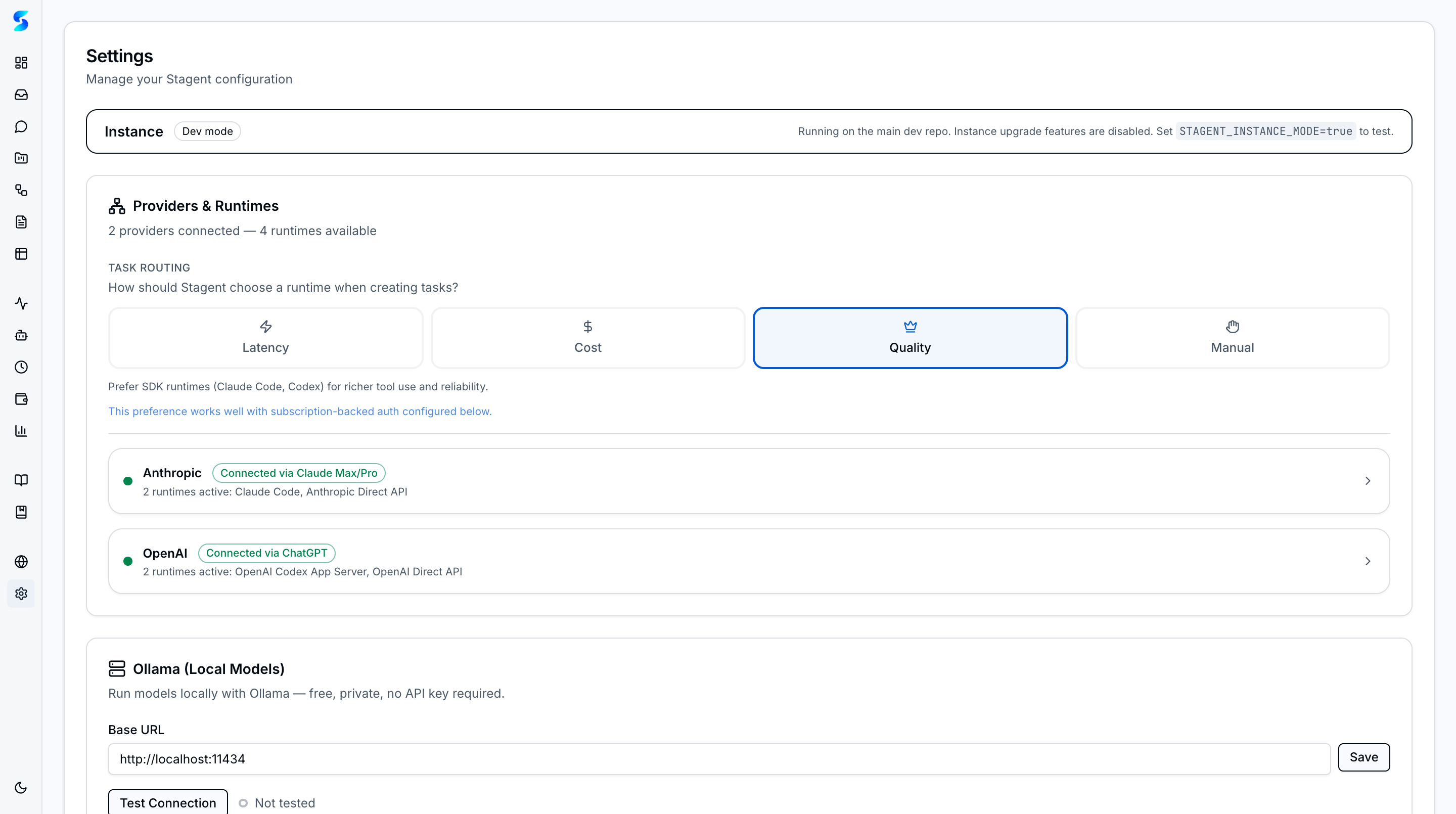
| Browser Tools | Permission Presets | Budget Configuration |
|---|---|---|
 |
 |
 |
The npx ainative entry point boots a Next.js server from the published npm package. It is built from bin/cli.ts into dist/cli.js using tsup, and serves as the primary distribution channel — no clone required.
SQLite with WAL mode via better-sqlite3 + Drizzle ORM. 27+ tables including core tables: projects, tasks, workflows, agent_logs, notifications, documents, schedules, settings, learned_context, usage_ledger, conversations, chat_messages, environments, environment_configs. Self-healing bootstrap — tables are created on startup if missing.
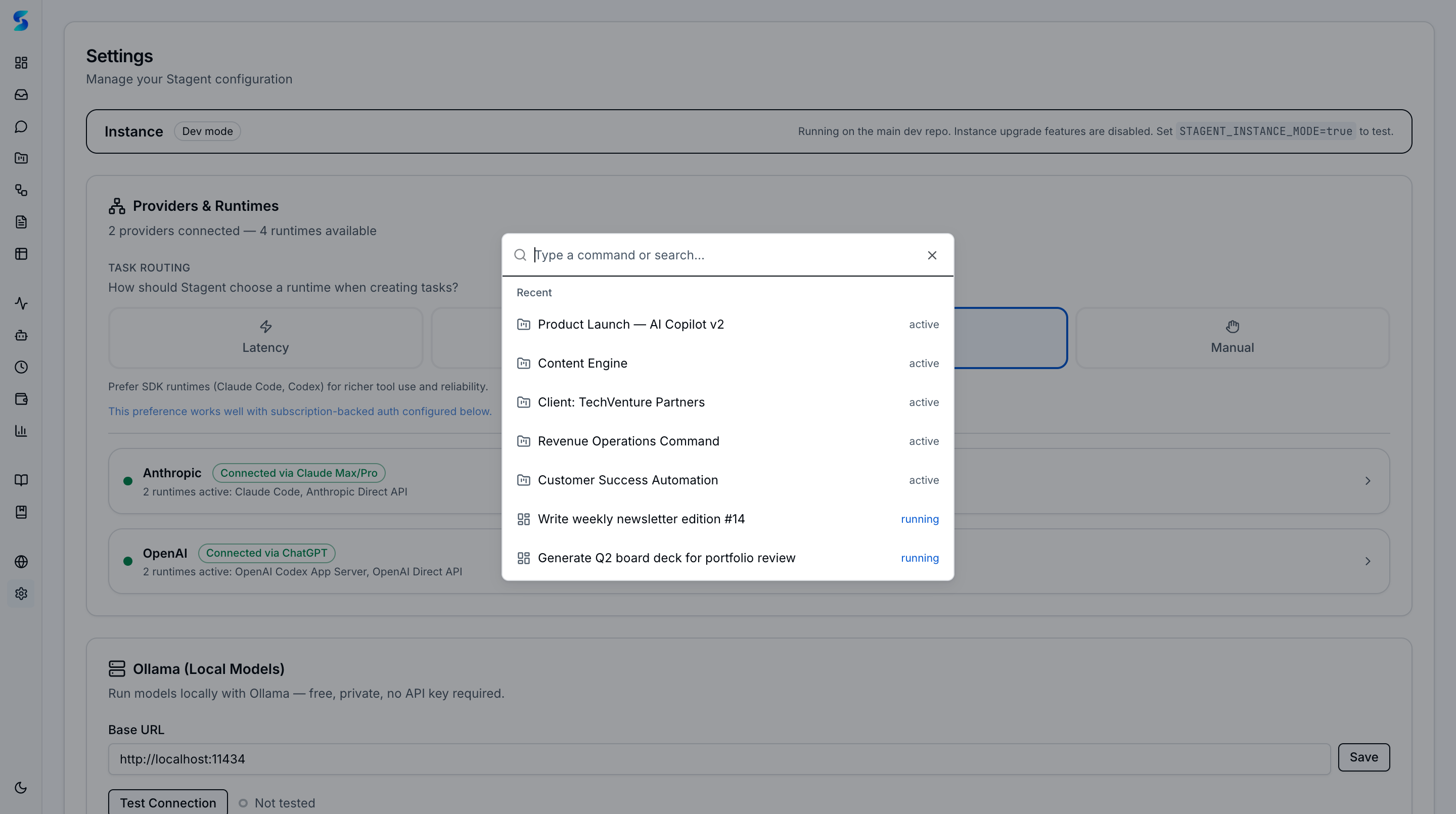
Global ⌘K command palette for fast navigation and search across tasks, projects, workflows, and settings. Recent items, fuzzy search, and keyboard-driven navigation.
| Empty Palette | Search Results |
|---|---|
 |
 |
Responsive sidebar with collapsible icon-only mode, custom ainative logo, tooltip navigation, dark/light/system theme, and OKLCH hue 250 blue-indigo color palette. Built on shadcn/ui (New York style) with PWA manifest and app icons. Routes: Home, Dashboard, Inbox, Chat, Projects, Workflows, Documents, Monitor, Profiles, Schedules, Cost & Usage, AI Native Book, User Guide, Environment, Settings.
API-level end-to-end test suite built on Vitest with 120-second timeouts and sequential execution. Five test files cover single-task execution, sequence workflows, parallel workflows, blueprints, and cross-runtime scenarios across both Claude and Codex backends. Tests skip gracefully when runtimes are not configured, preventing CI failures. Run with npm run test:e2e.
| Layer | Technology | Why |
|---|---|---|
| Framework | Next.js 16 + React 19 | Server Components for zero-API reads, Turbopack for fast dev |
| Language | TypeScript (strict) | End-to-end type safety from DB schema to UI |
| Styling | Tailwind CSS v4 + shadcn/ui | Utility-first CSS with accessible component primitives |
| Database | SQLite (WAL) + Drizzle ORM | Zero-config embedded DB, type-safe queries, concurrent reads |
| AI Runtime | @anthropic-ai/claude-agent-sdk + codex app-server |
Governed Claude and OpenAI execution behind a shared runtime layer |
| CLI | Commander + tsup | Familiar CLI framework, fast ESM bundling |
| Testing | Vitest + Testing Library | Fast test runner with React component testing |
| Content | react-markdown + remark-gfm | Full GitHub-flavored markdown rendering |
| Validation | Zod v4 | Runtime type validation at system boundaries |
| Documents | pdf-parse, mammoth, xlsx, image-size | Multi-format document preprocessing |
| Scheduling | cron-parser | Cron expression parsing and next-fire-time computation |
npm run dev            # Next.js dev server (Turbopack)
npm run build:cli      # Build CLI → dist/cli.js
npm test               # Run Vitest
npm run test:coverage  # Coverage report
npm run test:e2e # E2E integration tests (requires runtime credentials)docs/ # Playbook markdown docs + manifest.json
src/
├── app/ # Next.js App Router pages
│ ├── dashboard/ # Task kanban board
│ ├── projects/[id]/ # Project detail
│ ├── tasks/ # Task detail + creation (redirects to dashboard)
│ ├── profiles/ # Agent profile gallery + detail + creation
│ ├── documents/ # Document browser
│ ├── workflows/ # Workflow management + blueprints
│ ├── schedules/ # Schedule management
│ ├── costs/ # Cost & usage dashboard
│ ├── playbook/ # Documentation & learning journeys
│ ├── chat/ # Conversational AI (tool catalog)
│ ├── book/ # AI Native Book reader
│ ├── environment/ # Environment control plane
│ ├── inbox/ # Notifications
│ ├── monitor/ # Log streaming
│ └── settings/ # Configuration
├── components/
│ ├── dashboard/ # Homepage widgets + charts
│ ├── tasks/ # Board, cards, panels
│ ├── profiles/ # Profile gallery, detail, form, learned context
│ ├── workflows/ # Workflow UI + blueprints + swarm
│ ├── documents/ # Document browser + upload
│ ├── costs/ # Cost dashboard + filters
│ ├── playbook/ # Playbook docs + journeys + adoption
│ ├── schedules/ # Schedule management
│ ├── monitoring/ # Log viewer
│ ├── chat/ # Chat shell, messages, input composer, tool catalog
│ ├── book/ # Book reader, chapters, reading paths
│ ├── environment/ # Environment dashboard, scanner, templates
│ ├── notifications/ # Inbox + permission actions
│ ├── settings/ # Auth, permissions, budgets, browser tools, data mgmt
│ ├── shared/ # App shell, sidebar
│ └── ui/ # shadcn/ui primitives
└── lib/
├── agents/ # Runtime adapters, profiles, learned context, pattern extraction
├── db/ # Schema, migrations
├── docs/ # Playbook reader, adoption, usage-stage, journey tracker
├── documents/ # Preprocessing + context builder
├── workflows/ # Engine + types + blueprints
├── schedules/ # Scheduler engine + interval parser
├── settings/ # Auth, permissions, helpers
├── chat/ # Chat engine, context builder, model discovery
├── usage/ # Metering ledger + pricing registry
├── constants/ # Status transitions, colors
├── queries/ # Chart data aggregation
├── validators/ # Zod schemas
└── utils/ # Shared helpers
| Domain | Endpoint | Method | Purpose |
|---|---|---|---|
| Projects | /api/projects |
GET/POST | List and create projects |
/api/projects/[id] |
GET/PUT/DELETE | Project CRUD | |
| Tasks | /api/tasks |
GET/POST | List and create tasks |
/api/tasks/[id] |
GET/PATCH/DELETE | Task detail, update, delete | |
/api/tasks/[id]/execute |
POST | Fire-and-forget task dispatch (202) | |
/api/tasks/[id]/resume |
POST | Resume failed/cancelled task | |
/api/tasks/[id]/cancel |
POST | Cancel running task | |
/api/tasks/[id]/respond |
POST | Human response to agent prompt | |
/api/tasks/[id]/output |
GET | Task execution output | |
/api/tasks/[id]/logs |
GET | Task log history | |
/api/tasks/assist |
POST | AI task assist (description, subtasks, workflow recommendation) | |
| Workflows | /api/workflows |
GET/POST | List and create workflows |
/api/workflows/[id] |
GET/PATCH/DELETE | Workflow detail, update, delete | |
/api/workflows/[id]/execute |
POST | Execute workflow | |
/api/workflows/[id]/status |
GET | Workflow execution status | |
/api/workflows/[id]/steps/[stepId]/retry |
POST | Retry failed workflow step | |
/api/workflows/from-assist |
POST | Create workflow from AI assist recommendation | |
| Blueprints | /api/blueprints |
GET/POST | List and create blueprints |
/api/blueprints/[id] |
GET/DELETE | Blueprint detail and deletion | |
/api/blueprints/[id]/instantiate |
POST | Create workflow from blueprint | |
/api/blueprints/import |
POST | Import blueprint from GitHub URL | |
| Documents | /api/documents |
GET | List documents with joins |
/api/documents/[id] |
GET/PATCH/DELETE | Document detail, metadata, deletion | |
/api/documents/[id]/file |
GET | Download document file | |
| Uploads | /api/uploads |
POST | File upload |
/api/uploads/[id] |
GET/DELETE | Upload detail and deletion | |
/api/uploads/cleanup |
POST | Clean up orphaned uploads | |
| Profiles | /api/profiles |
GET | List agent profiles |
/api/profiles/[id] |
GET/PUT/DELETE | Profile CRUD | |
/api/profiles/[id]/test |
POST | Run behavioral tests on a profile | |
/api/profiles/[id]/context |
GET/POST/PATCH | Learned context: version history, manual add, approve/reject/rollback | |
/api/profiles/import |
POST | Import profile from GitHub URL | |
| Notifications | /api/notifications |
GET/POST | List and create notifications |
/api/notifications/[id] |
PATCH/DELETE | Update and delete notification | |
/api/notifications/mark-all-read |
POST | Mark all notifications as read | |
/api/notifications/pending-approvals |
GET | Pending approval notifications | |
/api/notifications/pending-approvals/stream |
GET | SSE stream for pending approvals | |
| Schedules | /api/schedules |
GET/POST | Schedule CRUD |
/api/schedules/[id] |
GET/PATCH/DELETE | Schedule detail + updates | |
| Settings | /api/settings |
GET/POST | General settings |
/api/settings/openai |
GET/POST | OpenAI Codex runtime settings | |
/api/settings/test |
POST | Provider-aware runtime connectivity test | |
/api/settings/budgets |
GET/POST | Budget configuration | |
/api/permissions |
GET/POST/DELETE | Tool permission patterns | |
/api/permissions/presets |
GET/POST/DELETE | Permission preset bundles | |
| Context | /api/context/batch |
POST | Batch approve/reject context proposals |
| Monitoring | /api/logs/stream |
GET | SSE agent log stream |
| Playbook | /api/playbook/status |
GET | Playbook adoption status and usage stage |
| Chat | /api/chat/conversations |
GET/POST | List and create conversations |
/api/chat/conversations/[id] |
GET/PATCH/DELETE | Conversation detail, update, delete | |
/api/chat/conversations/[id]/messages |
GET/POST | List messages and send new message (SSE streaming) | |
/api/chat/models |
GET | Available models with cost tiers | |
/api/chat/suggested-prompts |
GET | Context-aware suggested prompt categories | |
/api/chat/conversations/[id]/respond |
POST | Respond to permission or question prompt | |
| Platform | /api/command-palette/recent |
GET | Recent command palette items |
/api/data/clear |
POST | Clear all data | |
/api/data/seed |
POST | Seed sample data |
All 14 features shipped across three layers:
| Layer | Features |
|---|---|
| Foundation | CLI bootstrap, database schema, app shell |
| Core | Project management, task board, agent integration, inbox notifications, monitoring dashboard |
| Polish | Homepage dashboard, UX fixes, workflow engine, AI task assist, content handling, session management |
| Category | Features |
|---|---|
| Documents (5) | File attachments, preprocessing (5 formats), agent context injection, document browser, output generation |
| Agent Intelligence (6) | Multi-agent routing, autonomous loops, multi-agent swarm, AI assist→workflows, agent self-improvement, workflow context batching |
| Agent Profiles (2) | Agent profile catalog (21 profiles), workflow blueprints (13 templates) |
| UI Enhancement (13) | Ambient approvals, learned context UX, micro-visualizations, command palette, operational surface, profile surface, accessibility, UI density, kanban operations, board persistence, detail view redesign, playbook documentation, workflow UX overhaul |
| Platform (8) | Scheduled prompt loops, tool permissions, provider runtimes, OpenAI Codex runtime, cross-provider profiles, parallel fork/join, tool permission presets, npm publish (deferred) |
| Runtime Quality (2) | SDK runtime hardening, E2E test automation |
| Governance (3) | Usage metering ledger, spend budget guardrails, cost & usage dashboard |
| Chat (10) | Chat data layer, chat engine (5-tier context, CRUD tools), API routes (SSE streaming), UI shell, message rendering (Quick Access pills), input composer (tool catalog, model selector), skill composition (multi-skill with conflict detection), filter namespace (#key:value grammar), pinned + saved searches, conversation templates |
| Platform Hardening (2) | Runtime validation hardening (MCP-tool runtime-id validation with safe fallbacks), upgrade detection (hourly upstream poll + guided merge sessions) |
| Environment (11) | Environment scanner, cache, dashboard, git checkpoint manager, sync engine, project onboarding, templates, cross-project comparison, skill portfolio, health scoring, agent profile from environment |
| Living Book (5) | Content merge (chapters → playbook), author's notes, reading paths, markdown pipeline, self-updating chapters |
| Feature | Priority | Description |
|---|---|---|
| Browser Use | P1 | Chrome DevTools + Playwright MCP integration for browser automation |
| Workspace Context Awareness | P1 | Surface cwd, git branch, worktree status to chat agents |
| Chat Command Mentions | P1 | Slash commands for tools/actions + @ entity mentions |
| Task Hierarchy Clarity | P1 | Distinguish standalone vs workflow-bound tasks |
| Chat Conversation Persistence | P1 | URL/localStorage persistence for active conversations |
| Settings Interactive Controls | P2 | Slider upgrades for SDK Timeout and Max Turns |
| Agent Document API Access | P2 | MCP-based document tools for agent consumption |
git clone https://github.com/manavsehgal/ainative.git && cd ainative && npm install

# Set up one or both runtime credentials
cat > .env.local <<'EOF'
ANTHROPIC_API_KEY=your-anthropic-key
OPENAI_API_KEY=your-openai-key
EOF

# Start the dev server
npm run dev- Fork the repository
- Create a feature branch (
git checkout -b feature/your-feature) - Make your changes and add tests
- Run
npm testandnpx tsc --noEmit - Submit a pull request
See AGENTS.md for architecture details and development conventions.
Licensed under the Apache License 2.0.
Copyright 2025-2026 Manav Sehgal