




Tiercel is an easy-to-use and feature-rich pure Swift download framework that supports native-level background downloads and powerful task management capabilities to meet most of the needs of download-based apps.
Tiercel 2 is a brand new version. The download implementation is based on URLSessionDownloadTask. It supports native background downloading. It is more powerful and has some changes in usage. It is not compatible with the old version. Please pay attention to the new version. If you want to know the details and precautions of the background download, you can read this article: iOS native level background download details
The old version download is based on URLSessionDataTask, does not support background download, has been moved to the dataTask branch, in principle no longer updated, if you do not need background download function, or do not want to migrate to the new version, you can directly download the dataTask branch source Use, you can also install in Podfile using the following methods:
source 'https://github.com/CocoaPods/Specs.git'
platform :ios, '8.0'
use_frameworks!

target '<Your Target Name>' do
    pod 'Tiercel', :git => 'https://github.com/Danie1s/Tiercel.git', :branch => 'dataTask'
end- Support for background downloads at the native level
- Support offline breakpoint resuming, App can resume download regardless of crash or manually Kill
- has fine task management, each download task can be operated and managed separately
- supports the creation of multiple download modules, each of which does not affect each other
- Each download module has a separate manager who can operate and manage the total tasks
- Built-in common download information such as download speed and remaining time
- chained syntax call
- Support for controlling the maximum number of concurrent download tasks
- Support for file verification
- thread safe
- iOS 8.0+
- Xcode 10.2+
- Swift 5.0+
CocoaPods is a dependency manager for Cocoa projects. You can install it with the following command:
$ gem install cocoapodsCocoaPods 1.1+ is required to build Tiercel.
To integrate Tiercel into your Xcode project using CocoaPods, specify it in your Podfile:
source 'https://github.com/CocoaPods/Specs.git'
platform :ios, '8.0'
use_frameworks!

target '<Your Target Name>' do
    pod 'Tiercel'
end
Then, run the following command:
$ pod installIf you prefer not to use any of the aforementioned dependency managers, you can integrate Tiercel into your project manually.
To run the example project, clone the repo, and run Tiercel.xcodeproj .
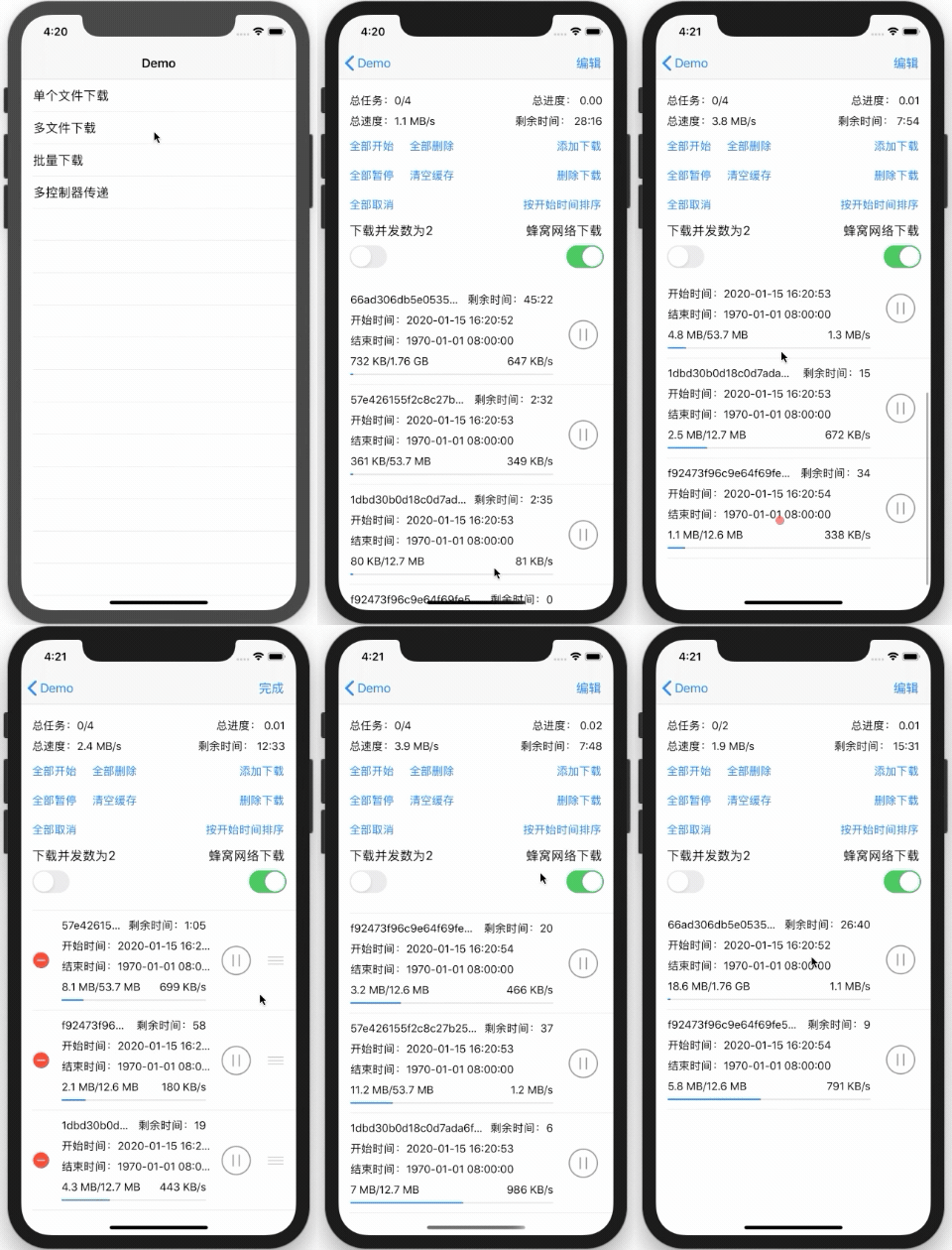
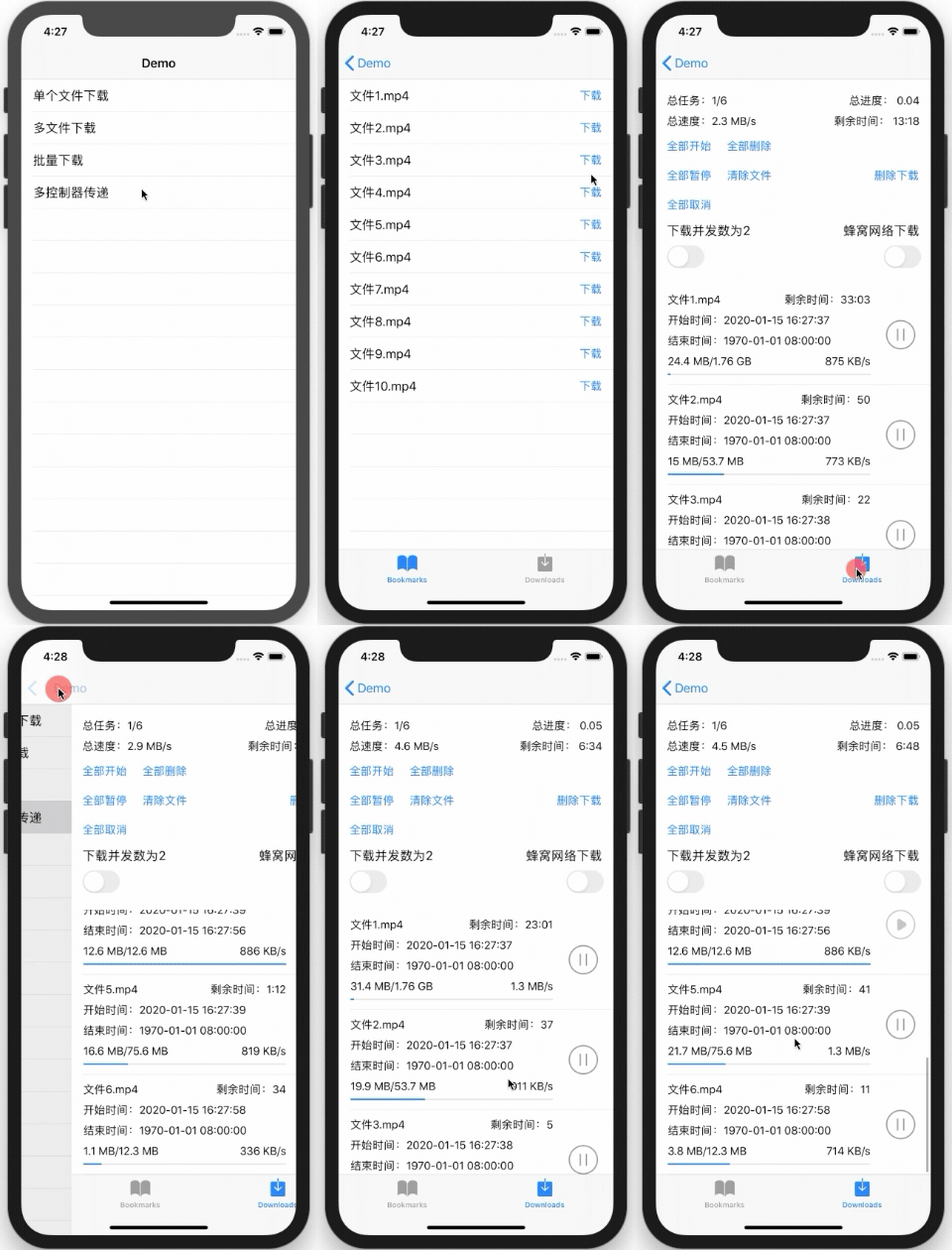
Because you need to support the native background download, you need to configure it in the AppDelegate file.
// in the AppDelegate file

// can't use lazy loading
var sessionManager: SessionManager = {
    var configuration = SessionConfiguration()
    configuration.allowsCellularAccess = true
    let manager = SessionManager("default", configuration: configuration, operationQueue: DispatchQueue(label: "com.Tiercel.SessionManager.operationQueue"))
    return manager
}()

func application(_ application: UIApplication, didFinishLaunchingWithOptions launchOptions: [UIApplication.LaunchOptionsKey: Any]?) -> Bool {

	// must be guaranteed to complete the SessionManager initialization before the end of this method
    return true
}

	// must implement this method, and save the completionHandler corresponding to the identifier
	func application(_ application: UIApplication, handleEventsForBackgroundURLSession identifier: String, completionHandler: @escaping () -> Void) {

    if sessionManager.identifier == identifier {
        sessionManager.completionHandler = completionHandler
    }
}One line of code to open the download
// Create a download task and start the download, returning an optional Type of DownloadTask instance, or nil if the url is invalid
let task = sessionManager.download("http://api.gfs100.cn/upload/20171219/201712191530562229.mp4")

// Create a download task in batches and start the download, return the task array corresponding to the effective url, the url needs to correspond to the fileNames one-to-one
let tasks = sessionManager.multiDownload(URLStrings)
If you need to set a callback
// The parameter of the callback closure is a Task instance, which can get all relevant information.
// All closures can choose whether to execute on the main thread, controlled by the onMainQueue parameter. If onMainQueue passes false, it will be executed on the queue specified by the sessionManager initialization.
// progress closure: if the task is being downloaded, it will trigger
// success Closure: The task has been downloaded, or the download is complete, it will be triggered. At this time task.status == .succeeded
// failure Closure: As long as task.status != .succeeded, it will fire:
// 1. Pause the task, this time task.status == .suspended
// 2. Task download failed, this time task.status == .failed
// 3. Cancel the task, this time task.status == .canceled
// 4. Remove the task, this time task.status == .removed
let task = sessionManager.download("http://api.gfs100.cn/upload/20171219/201712191530562229.mp4")

task?.progress(onMainQueue: true, { (task) in
    let progress = task.progress.fractionCompleted
    print("Download, progress:\(progress)")
}).success { (task) in
    print("Download completed")
}.failure { (task) in
    print("download failed")
}
Download the management and operation of the task. In Tiercel, url is the unique identifier of the download task. If you need to operate the download task, use the SessionManager instance to operate the url. Pause downloads, cancel downloads, remove downloads can add callbacks, and you can choose whether to execute the callback on the main thread.
let URLString = "http://api.gfs100.cn/upload/20171219/201712191530562229.mp4"

// Create a download task and start the download, returning an optional Type of DownloadTask instance, or nil if the url is invalid
let task = sessionManager.download(URLString)
// Find the download task according to URLString, return an optional type of Task instance, if it does not exist, return nil
let task = sessionManager.fetchTask(URLString)

// start download
// If you suspend to suspend the download, you can call this method to continue downloading
sessionManager.start(URLString)

// pause download
sessionManager.suspend(URLString)

// Cancel the download, the task that has not been downloaded will be removed, the cache will not be retained, and the download has been completed without being affected.
sessionManager.cancel(URLString)

// Remove the download, any state of the task will be removed, the cache file that has not been downloaded will be deleted, you can choose whether to keep the downloaded file
sessionManager.remove(URLString, completely: false)

// In addition to being able to operate on a single task, TRManager also provides an API for simultaneous operation of all tasks.
sessionManager.totalStart()
sessionManager.totalSuspend()
sessionManager.totalCancel()
sessionManager.totalRemove(completely: false)Tiercel 2's download implementation is based on URLSessionDownloadTask, which supports native background downloads. According to Apple's official documentation, the SessionManager instance must be created when the app is launched, and the following methods are implemented in the AppDelegate file.
// must implement this method, and save the completionHandler corresponding to the identifier
func application(_ application: UIApplication, handleEventsForBackgroundURLSession identifier: String, completionHandler: @escaping () -> Void) {

    if sessionManager.identifier == identifier {
        sessionManager.completionHandler = completionHandler
    }
}
Just use Tiercel to open the download task:
- Manual Kill App, the task will be paused, you can resume the progress after restarting the app, continue to download
- As long as it is not a manual Kill App, the task will always be downloaded, for example:
- App returns to the background
- App crashes or is shut down by the system
- restart cellphone
If you want to know the details and precautions of the background download, you can read this article: iOS native level background download details
Tiercel provides a file check function that can be added as needed, and the check result is in the task.validation of the callback.
let task = sessionManager.download("http://dldir1.qq.com/qqfile/QQforMac/QQ_V4.2.4.dmg")
// Callback closure can choose whether to execute on the main thread
task?.validateFile(code: "9e2a3650530b563da297c9246acaad5c",
                   type: .md5,
                   onMainQueue: true,
                   { (task) in
    if task.validation == .correct {
        // The file is correct
    } else {
        // file error
    }
})
FileChecksumHelper is a tool class for file verification. It can be used directly to verify existing files.
/// Check the file, it is done in the child thread
///
/// - Parameters:
/// - filePath: file path
/// - verificationCode: the hash value of the file
/// - verificationType: Hash type
/// - completion: complete callback, run in child thread
public class func validateFile(_ filePath: String,
                               code: String,
                               type: FileVerificationType,
                               _ completion: @escaping (Bool) -> ()) {

}
SessionManager is the administrator of the download task, managing all download tasks of the current module.
AppDelegate, or Global variables, please refer to Demo.
/// Initialization method
///
/// - Parameters:
/// - identifier: Set the identity of the SessionManager instance to distinguish between different download modules and the urlSession identifier. The background download of the native level must have a unique identifier.
/// - configuration: Configuration of SessionManager
/// - operationQueue: The proxy callback execution queue of urlSession. All closure callbacks in the SessionManager are executed in this queue if they are not specified to be executed on the main thread.
public init(_ identifier: String,
            configuration: SessionConfiguration,
            operationQueue: DispatchQueue = DispatchQueue(label: "com.Tiercel.SessionManager.operationQueue")) {
    // implemented code...
}
SessionManager as the manager of all download tasks, you can also set callbacks
// The parameter of the callback closure is the SessionManager instance, which can get all relevant information.
// All closures can choose whether to execute on the main thread, controlled by the onMainQueue parameter. If onMainQueue passes false, it will be executed on the queue specified by the sessionManager initialization.
// progress closure: as long as there is a task being downloaded, it will trigger
// success closure: only one case will trigger:
// All tasks are downloaded successfully (cancelled and removed tasks will be removed and destroyed, no longer managed by manager), then manager.status == .succeeded
// failure Closure: As long as manager.status != .succeeded, it will trigger:
// 1. Call all suspended methods, or no tasks waiting to run, and no running tasks, this time manager.status == .suspended
// 2. All tasks are finished, but one or more are failed, at this time manager.status == .failed
// 3. Call all canceled methods, or cancel the task when there is one more task. At this time manager.status == .canceled
// 4. Call the all removed method, or remove the task when there is one task left. At this time manager.status == .removed
sessionManager.progress(onMainQueue: true, { (manager) in
    let progress = manager.progress.fractionCompleted
    print("downloadManager running, total progress: \(progress)")
    }.success { (manager) in
         print("All download tasks have been successful")
    }.failure { (manager) in
         if manager.status == .suspended {
            print("All download tasks are suspended")
        } else if manager.status == .failed {
            print("There is a task that failed to download")
        } else if manager.status == .canceled {
            print("All download tasks have been canceled")
        } else if manager.status == .removed {
            print("All download tasks have been removed")
        }
}
The main properties of SessionManager
// Set the built-in log print level, if it is none, do not print
public static var logLevel: LogLevel = .detailed
// Do you need to manage the networkActivityIndicator
public static var isControlNetworkActivityIndicator = true
// urlSession's proxy callback execution queue. All closure callbacks in the SessionManager are executed in this queue if they are not specified to be executed on the main thread.
public let operationQueue: DispatchQueue
// SessionManager status
public var status: Status = .waiting
// SessionManager's cache management instance
public var cache: Cache
// SessionManager identification, distinguish between different download modules
public let identifier: String
// SessionManager's progress
public var progress: Progress
// SessionManager configuration, you can set the request timeout period, the maximum number of concurrent, whether to allow cellular network download
public var configuration = SessionConfiguration()
// The total speed of all the tasks in the download
public private(set) var speed: Int64 = 0
// The remaining time required for all downloaded tasks
public private(set) var timeRemaining: Int64 = 0
// SessionManager management of the download task, canceled and removed tasks will be destroyed, but the operation is asynchronous, in the callback closure to obtain the correct
public var tasks: [Task] = []
SessionConfiguration is the structure of the SessionManager in Tiercel. The configurable properties are as follows:
// request timeout
public var timeoutIntervalForRequest = 30.0

// maximum number of concurrent
// Support the task of downloading in the background, the system will carry out the maximum concurrency limit
// 6 on iOS 11 and above, 3 below iOS 11
public var maxConcurrentTasksLimit

// Whether to allow cellular network download
public var allowsCellularAccess = false
Change the configuration of the SessionManager
// You can change the SessionManager configuration whether or not a download task is running.
// If you just change an item, you can directly set the SessionManager property
sessionManager.configuration.allowsCellularAccess = true

// If you need to change more than one, you need to recreate the SessionConfiguration and then assign it.
let configuration = SessionConfiguration()
configuration.allowsCellularAccess = true
configuration.maxConcurrentTasksLimit = 2
configuration.timeoutIntervalForRequest = 60

sessionManager.configuration = configuration
Note: It is recommended to pass the modified SessionConfiguration instance when the SessionManager is initialized, refer to the Demo. Tiercel also supports modifying the configuration in the task download, but it is not recommended to open the task download immediately after modifying configuration, that is, do not open the task download after modifying configuration in the same code block, which is easy to cause errors.
// Don't do this
sessionManager.configuration.allowsCellularAccess = true
let task = sessionManager.download("http://api.gfs100.cn/upload/20171219/201712191530562229.mp4")
If you really need to do this, please modify configuration, set a delay of more than 1 second and then start the task download.
// If you really need it, please delay the task
sessionManager.configuration.allowsCellularAccess = true
DispatchQueue.main.asyncAfter(deadline: .now() + 1) {
    let task = sessionManager.download("http://api.gfs100.cn/upload/20171219/201712191530562229.mp4")
}
DownloadTask is a download task class in Tiercel, inherited from Task. ** In Tiercel, url is the unique identifier of the download task, url represents the task, if you need to operate on the download task, use the SessionManager instance to operate the url. ** So the DownloadTask instance is created by the SessionManager instance. It doesn't make sense to create it separately.
Main attribute
// The file name of the downloaded file saved to the sandbox. If it is not set at the time of download, the default is md5 of the url plus the file extension.
public internal(set) var fileName: String
// Download the url corresponding to the task
public let url: URL
// Download the status of the task
public var status: Status
// Download file check status
public var validation: Validation
// Download the progress of the task
public var progress: Progress = Progress()
// Download the start date of the task
public var startDate: TimeInterval = 0
// download task end date
public var endDate: TimeInterval = Date().timeIntervalSince1970
// Download the speed of the task
public var speed: Int64 = 0
// The remaining time of the download task
public var timeRemaining: Int64 = 0
// download file path
public var filePath: String
// download file extension
public var pathExtension: String?
The download task operation must be performed by the SessionManager instance, and cannot be directly operated by the DownloadTask instance.
- Open
- time out
- Cancel, unfinished tasks are removed from the tasks in the SessionManager instance, the cache is not retained, and the tasks that have been downloaded are not affected.
- Removed, completed tasks will also be removed, cache files that have not been downloaded will be deleted, files that have been downloaded can be selected or not
Note: Pause, cancel, and remove the task in the download. The result is an asynchronous callback. The state is obtained in the callback closure to ensure correctness, and you can choose whether to execute the callback on the main thread. The onMainQueue parameter is used. Control, if onMainQueue passes false, it will be executed on the queue specified during sessionManager initialization
Cache is the class in Tiercel that manages the cache download task information and download files. The Cache instance is generally used as an attribute of the SessionManager instance.
/// Initialization method
///
/// - Parameters:
/// - name: Different names represent different download modules, the corresponding files are placed in different places, corresponding to the identifier passed in when the SessionManager is created.
public init(_ name: String) {
	// implemented code...
}
Main attribute
// Download the directory path of the module
public let downloadPath: String

// Directory path for uncompleted download file cache
public let downloadTmpPath: String

// Download the directory path of the completed file
public let downloadFilePath: String
The main APIs fall into several broad categories:
-
Check if there is a file in the sandbox
-
Remove files related to download tasks
-
Save files related to the download task
-
Read the files related to the download task and get information about the download task
Tiercel is available under the MIT license. See the LICENSE file for more info.