use built-in widgets in android auto#6076
Conversation


 Zayankovsky
added
skip changelog
Zayankovsky
force-pushed
the
vz-maps-widgets
branch
from
Zayankovsky
added
skip changelog
Zayankovsky
force-pushed
the
vz-maps-widgets
branch
from
763e5e9 to
36272e0
Compare

|
For some reason all widgets disappear when you open and close feedback screen. |

Codecov Report
@@            Coverage Diff            @@
##               main    #6076   +/-   ##
=========================================
  Coverage     68.05%   68.05%
  Complexity     4086     4086
=========================================
  Files           617      617
  Lines         24972    24972
  Branches       2951     2951
=========================================
  Hits          16995    16995
  Misses         6852     6852
Partials 1125 1125 |
 Zayankovsky
removed
the
skip changelog
Zayankovsky
force-pushed
the
vz-maps-widgets
branch
from
Zayankovsky
removed
the
skip changelog
Zayankovsky
force-pushed
the
vz-maps-widgets
branch
from
36272e0 to
18c155f
Compare
Turned out the problem was caused by keeping and reusing the same |

| WidgetPosition(WidgetPosition.Horizontal.RIGHT, WidgetPosition.Vertical.BOTTOM), | ||
| marginX = 26f, marginY = 10f, |
There was a problem hiding this comment.
Thinking about cleaning this up a little, considering this will be a more permanent class. What do you think about adding the logo widget to the constructor, and adding the default to a companion object?
We could remove private var logoWidget: LogoWidget? = null and make a default in the constructor.
class CarLogoSurfaceRenderer(
  val logoWidget: LogoWidget = defaultLogoWidget
) : MapboxCarMapObserver {

  companion object {
    val defaultLogoWidget = LogoWidget(...
  }
}There was a problem hiding this comment.
Oh, it is constructed when onAttached is called so that idea is not great. Unless it has a Provider wrapper
Smaller change, would be to move the constants to a companion object so the magic numbers are a little more visible. These margin values are going to need to change in order to support different screen resolutions
class CarLogoSurfaceRenderer(
) : MapboxCarMapObserver {

  private companion object {
    private val defaultWidgetPosition = WidgetPosition(...
    private const val defaultMarginX = 26f
    private const val defaultMarginY = 10f
  }
}There was a problem hiding this comment.
Not sure about the naming, default suggests that these values can be customized, however they aren't. I think we can get back to it, when we add support for more screen resolutions.
| * The horizontal margin of the widget relative to the map. | ||
| */ | ||
| private val marginLeft: Float = 10f, | ||
| marginX: Float = 26f, |
There was a problem hiding this comment.
Is this specific to screen resolutions?
What happens when you run this on a different resolution mapbox/mapbox-navigation-android-examples#81 (comment)
There was a problem hiding this comment.
If there is an issue there, the issue would be existing. So if you test it please take some screenshots and post them on a new issue
There was a problem hiding this comment.
Turns out, testing other resolutions still takes a few steps. am posting the steps just because we're talking about it
- Update to a preview android studio https://developer.android.com/studio/preview/install-preview
- Update Android Auto Desktop Head Unit Emulator from Android Studio SDK downloads
- Configure desktop head unit https://developer.android.com/training/cars/testing#configure-dhu
- cd $(ANDROID_HOME)/extras/google/auto/ && ./desktop-head-unit -c config/default_1080p.ini
There was a problem hiding this comment.
By the way, I changed these margins, so that the widgets are better aligned with the rest of the buttons. Like in the screenshot below you can see that compass widget now has the same margin as the buttons on the right side.
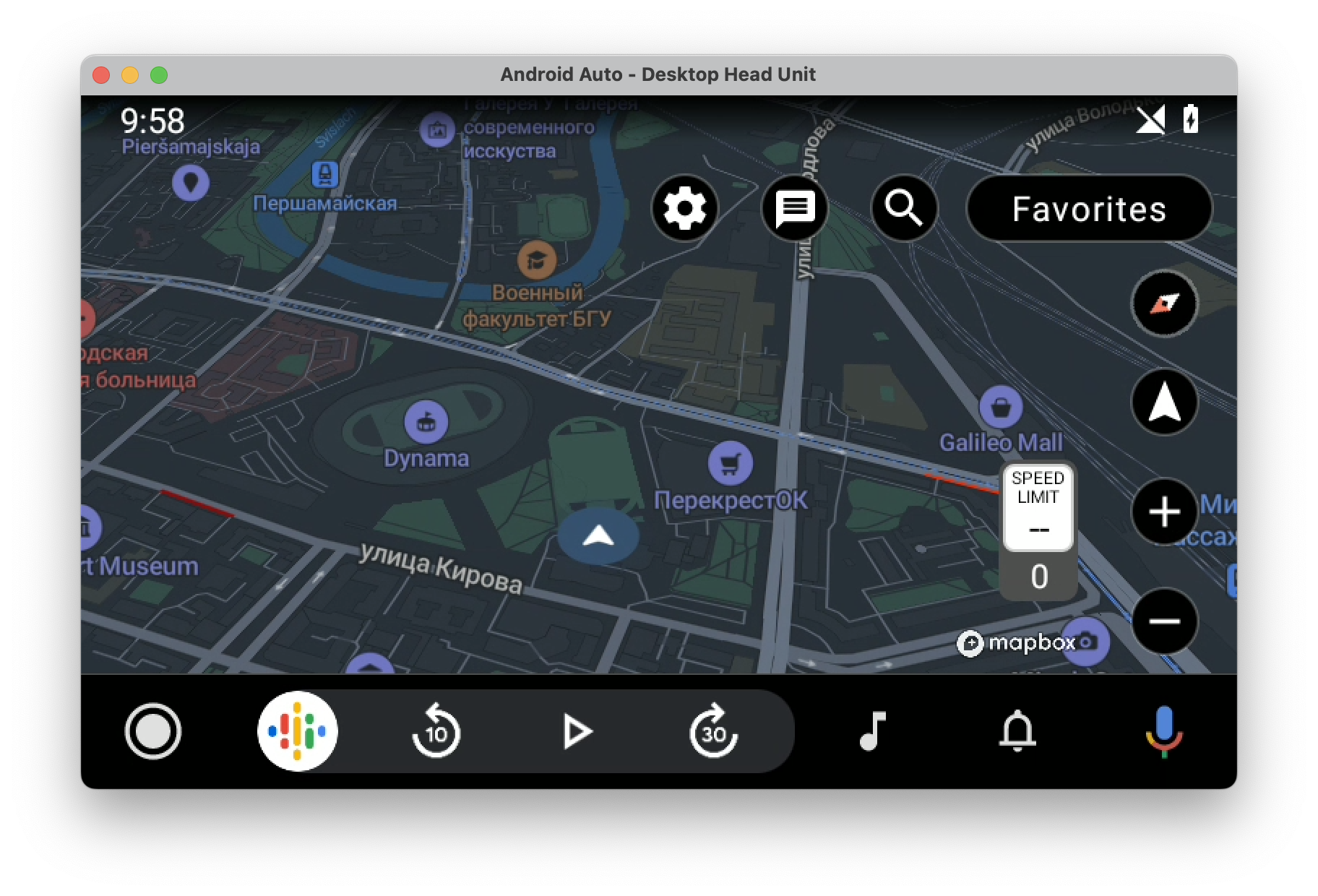
Also Maps examples use the same values: https://github.com/mapbox/mapbox-maps-android/blob/main/android-auto-app/src/main/java/com/mapbox/maps/testapp/auto/car/CarMapWidgets.kt.
 kmadsen
left a comment
kmadsen
left a comment
kmadsen
left a comment
There was a problem hiding this comment.
Awesome! Thanks for doing this 🪂
 Zayankovsky
force-pushed
the
vz-maps-widgets
branch
from
Zayankovsky
force-pushed
the
vz-maps-widgets
branch
from
18c155f to
5b88547
Compare
2 participants


Description
Closes #5793.
I decided to go ahead with this ticket, because I noticed that this also fixes an issue in 1TAP.