Delete confirm update#60
Delete confirm update#60math2001 merged 9 commits intomath2001:masterfrom TerminalFi:delete-confirm-update
Conversation


…ementation, definitely needs reviewed. However now, when a an item other than Confirm or Cancel is acted on, it is removed from the to be deleted list and then a new prompt is displayed for user confirmation.
…te-confirm-update


|
Oh that's a good idea! I really like it!! I was wondering what it did when I selected just one file. I quickly looked at the code, and I thought that it would delete just that file. I took a bit of time and I realized that it removes just that item from the "to delete" list. I think your option is better. But it needs to be clear, we can't live the user guessing. How about adding a message in the text under the Btw, we can delete files and folders, so we need to pay attention to that in the messages and in the code. Also, all the code should be formatted using If you don't want to install those plugins, just run Damn, I just merged #59, so this is going to conflict if you want to make some changes. Let me know if you have any trouble with that. Just to be clear, two more things that can need to be done:
|
 math2001
left a comment
math2001
left a comment
math2001
left a comment
There was a problem hiding this comment.
I really like that feature, but there are just a few things that I think can make the code a little bit better. And from what I gather from your other PR, you're after feedback, so I'm being 'bit peaky here 🙂
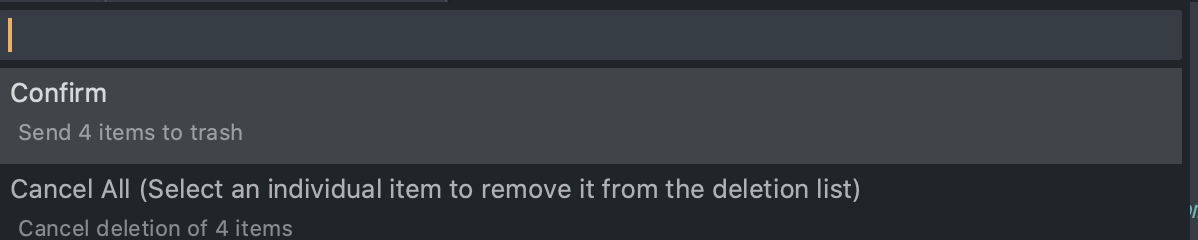
2. Updated the Confirm Title, Subtitle, Cancel Title, Subtitle
3. Updated the paths_to_display to utilize `os.path.basename` vs `path.split()`

Done and done.
|
|
Just to show the change of wording
|
math2001
left a comment
math2001
left a comment
There was a problem hiding this comment.
That's so much easier to read

|
🎉 Thanks a bunch @TheSecEng, great idea! |
|
@math2001 You are right, FileManager is amazing! Especially when combine with Deanishe's Alfred workflow for sublime projects.
|
2 participants


In reference to: #39
Purpose
In the current implementation, the confirm dialog presents all files into a single object on the quick look panel. This not only extends the height of each item, it makes it hard to visibly see the cancel button.
Changes
With the following changes, each file is broken into its own item on the quick look panel into its own row. It also adds the Confirm and Cancel options at the top of the list.