





Map Launcher is a Flutter plugin to open maps on all platforms: iOS, Android, web, and desktop. Show markers, get directions, or search across 32 supported maps.
Uses universal links (HTTPS URLs), with native app detection on mobile.
| Marker | Navigation |
|---|---|
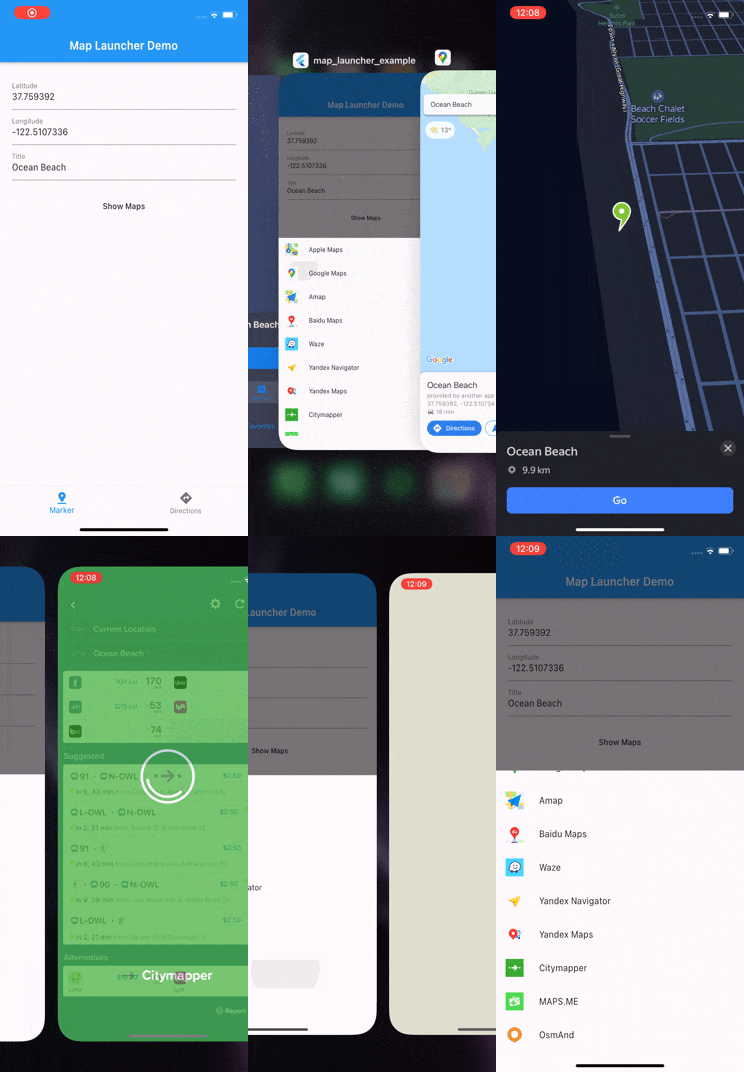 |
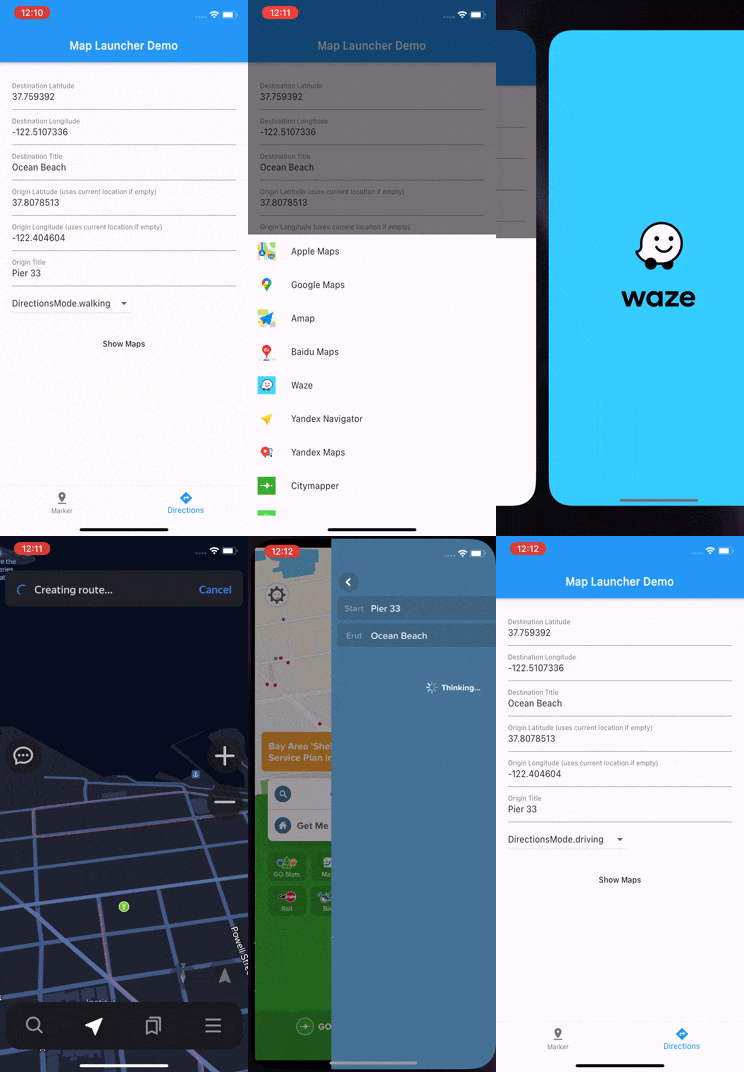 |
| Map | Marker | Search | Directions | Origin | Travel Mode | Waypoints | Platform |
|---|---|---|---|---|---|---|---|
 Google Maps Google Maps |
✓ | ✓ | ✓ | ✓ | ✓ | ✓ | All |
 Apple Maps Apple Maps |
✓ | ✓ | ✓ | ✓ | ✓ | — | All |
 Waze Waze |
— | — | ✓ | — | — | — | All |
 Yandex Maps Yandex Maps |
✓ | — | ✓ | ✓ | ✓ | ✓ | All |
 2GIS 2GIS |
✓ | — | ✓ | ✓ | ✓ | — | All |
 HERE WeGo HERE WeGo |
✓ | — | ✓ | ✓ | ✓ | — | All |
 Mapy.cz Mapy.cz |
✓ | — | ✓ | — | — | — | All |
 Mappls Mappls |
✓ | — | ✓ | — | ✓ | — | All |
 Baidu Maps Baidu Maps |
✓ | — | ✓ | ✓ | ✓ | — | Mobile |
 Amap Amap |
✓ | — | ✓ | ✓ | ✓ | — | Mobile |
 Tencent (QQ) Tencent (QQ) |
✓ | — | ✓ | ✓ | ✓ | — | Mobile |
 Yandex Navi Yandex Navi |
✓ | — | ✓ | ✓ | ✓ | ✓ | Mobile |
| Google Maps Go |
✓ | — | ✓ | — | ✓ | — | Android |
 Naver Map Naver Map |
✓ | — | ✓ | ✓ | — | — | Mobile |
 Kakao Maps Kakao Maps |
✓ | — | ✓ | ✓ | — | — | Mobile |
 TMap TMap |
✓ | — | ✓ | ✓ | — | — | Mobile |
 OsmAnd OsmAnd |
✓ | — | ✓ | — | — | — | Mobile |
 OsmAnd+ OsmAnd+ |
✓ | — | ✓ | — | — | — | Android |
 Petal Maps Petal Maps |
✓ | — | ✓ | ✓ | ✓ | — | Android |
 MAPS.ME MAPS.ME |
✓ | — | — | — | — | — | Mobile |
 Neshan Neshan |
✓ | — | ✓ | ✓ | — | — | Mobile |
 CoPilot CoPilot |
✓ | — | ✓ | — | — | — | Mobile |
 Moovit Moovit |
— | — | ✓ | ✓ | — | — | Mobile |
 Citymapper Citymapper |
— | — | ✓ | ✓ | ✓ | — | Mobile |
 TomTom Go TomTom Go |
— | — | ✓ | — | — | — | Mobile |
 TomTom Go Fleet TomTom Go Fleet |
— | — | ✓ | — | — | — | Android |
 Sygic Truck Sygic Truck |
— | — | ✓ | — | — | — | Mobile |
 Flitsmeister Flitsmeister |
— | — | ✓ | — | — | — | Android |
 Truckmeister Truckmeister |
— | — | ✓ | — | — | — | Android |
 Air Nav Pro Air Nav Pro |
✓ | — | — | — | — | — | Mobile |
 SPEDION Navigation SPEDION Navigation |
✓ | — | ✓ | — | — | — | Android |
 Magic Earth Magic Earth |
✓ | — | ✓ | — | ✓ | — | Mobile |
Platform: All = universal links (iOS, Android, web, desktop) • Mobile = native app (iOS + Android) • Android = Android only
dependencies:
  map_launcher: ^5.0.0
  flutter_svg: # optional — only needed for map icons
import 'package:map_launcher/map_launcher.dart';
// Show a marker (opens the best available map)
await MapLauncher.marker(.coords(59.33, 18.07, title: 'Gamla Stan')).show();
// Show directions
await MapLauncher.directions(.coords(59.33, 18.07), mode: .walking).show();
// Search
await MapLauncher.marker(.search('Fika near Södermalm')).show();
// Specific map
await MapLauncher.marker(.coords(59.33, 18.07)).show(map: .google);
// Discover available maps
final maps = await MapLauncher.marker(.coords(59.33, 18.07)).getSupportedMaps();Required for detecting installed native apps:
<key>LSApplicationQueriesSchemes</key>
<array>
    <string>comgooglemaps</string>
    <string>baidumap</string>
    <string>iosamap</string>
    <string>waze</string>
    <string>yandexmaps</string>
    <string>yandexnavi</string>
    <string>citymapper</string>
    <string>mapswithme</string>
    <string>osmandmaps</string>
    <string>dgis</string>
    <string>qqmap</string>
    <string>here-location</string>
    <string>tomtomgo</string>
    <string>copilot</string>
    <string>com.sygic.aura</string>
    <string>nmap</string>
    <string>kakaomap</string>
    <string>tmap</string>
    <string>szn-mapy</string>
    <string>mappls</string>
    <string>moovit</string>
    <string>neshan</string>
    <string>airnavpro</string>
    <string>magicearth</string>
</array>// By coordinates
await MapLauncher.marker(.coords(59.33, 18.07, title: 'Gamla Stan')).show();
// With zoom level
await MapLauncher.marker(.coords(59.33, 18.07), zoom: 14).show();
// By search query (Google & Apple Maps)
await MapLauncher.marker(.search('Vasa Museum Stockholm')).show();show() throws MapLaunchException if the map cannot be opened:
try {
  await MapLauncher.marker(.coords(59.33, 18.07)).show(map: .google);
} on MapLaunchException catch (e) {
  print('Failed to open map: $e');
}// Basic
await MapLauncher.directions(.coords(59.33, 18.07)).show();
// With origin, mode, and waypoints
await MapLauncher.directions(
.coords(59.33, 18.07),
from: .coords(59.33, 18.10, title: 'Djurgården'),
mode: .walking,
waypoints: [.coords(59.32, 18.08)],
).show();
// Search-based destination
await MapLauncher.directions(.search('Vasa Museum')).show();
// Search-based origin
await MapLauncher.directions(
.coords(59.33, 18.07),
from: .search('Stockholm Central'),
).show();// Specific map
await MapLauncher.marker(.coords(59.33, 18.07)).show(map: .google);
// If map is omitted, the best available map is used automatically:
// • iOS/macOS → Apple Maps
// • Other platforms → Google Maps
// • Falls back to web if native app unavailable// Maps that support a specific marker request
final marker = MapLauncher.marker(.coords(59.33, 18.07));
final maps = await marker.getSupportedMaps();
for (final map in maps) {
print('${map.displayName} (installed: ${map.isInstalled})');
}
// Maps that support a specific directions request
final directions = MapLauncher.directions(.coords(59.33, 18.07), mode: .walking);
final navMaps = await directions.getSupportedMaps();
// All maps available on this platform (installed + universal link)
final allAvailable = await MapLauncher.getAvailableMaps();final marker = MapLauncher.marker(.coords(59.33, 18.07, title: 'Gamla Stan'));
// Best URL for this platform (scheme on mobile, universal on web)
final url = marker.getUrl(map: .google);
// Universal (HTTPS) URL — always works in browser
final universal = marker.getUniversalUrl(map: .google);
// → https://www.google.com/maps/search/?api=1&query=59.33%2C18.07
// Native scheme URL — only works with installed app
final scheme = marker.getSchemeUrl(map: .google);
// → comgooglemaps://?q=59.33,18.07
// Preview scheme URL for a different platform
final iosScheme = marker.getSchemeUrl(map: .google, platform: .ios);
final androidScheme = marker.getSchemeUrl(map: .google, platform: .android);MapType properties are synchronous:
MapType.waze.displayName  // "Waze"
MapType.waze.icon         // asset path for SVG icon
MapType.waze.appStoreUrl  // "https://apps.apple.com/app/id323229106"
MapType.waze.playStoreUrl // "https://play.google.com/store/apps/details?id=com.waze"
MapType.waze.hasUniversalLink // trueTyped helper classes for map-specific parameters:
// Google — Place IDs, navigation mode
await MapLauncher.marker(.coords(59.33, 18.07)).show(
  map: .google,
  extra: GoogleExtra(queryPlaceId: 'ChIJLU7jZClu5kcR4PcOOO6p3I0'),
);

await MapLauncher.directions(.coords(59.33, 18.07)).show(
  map: .google,
  extra: GoogleExtra(navigate: true, destinationPlaceId: 'ChIJLU7j...'),
);

// Apple — map display type, search bias location
await MapLauncher.marker(.coords(59.33, 18.07)).show(
  map: .apple,
  extra: AppleExtra(display: AppleMapDisplay.satellite),
);

await MapLauncher.marker(.search('restaurants')).show(
  map: .apple,
  extra: AppleExtra(near: LocationCoords(59.33, 18.07)),
);

// Waze — auto-navigate
await MapLauncher.directions(.coords(59.33, 18.07)).show(
  map: .waze,
  extra: WazeExtra(navigate: true), // explicitly start navigation
);

// Tencent — API key
await MapLauncher.marker(.coords(39.9, 116.4)).show(
  map: .tencent,
  extra: TencentExtra(referer: 'your-app-key'),
);

// Yandex Navigator — auth
await MapLauncher.directions(.coords(55.75, 37.62)).show(
  map: .yandexNavi,
  extra: YandexNaviExtra(client: 'your-client-id', signature: 'your-sig'),
);

// Raw map — works with any map
await MapLauncher.marker(.coords(59.33, 18.07)).show(
  map: .apple,
  extra: {'t': 'k'}, // satellite view via raw params
);import 'package:flutter/material.dart';
import 'package:map_launcher/map_launcher.dart';
import 'package:flutter_svg/flutter_svg.dart';
class MapPickerSheet extends StatelessWidget {
final LocationCoords destination;
final String title;
const MapPickerSheet({
required this.destination,
required this.title,
});
@override
Widget build(BuildContext context) {
final request = MapLauncher.marker(destination);
return FutureBuilder<List<SupportedMap>>(
future: request.getSupportedMaps(),
builder: (context, snapshot) {
if (!snapshot.hasData) return const SizedBox.shrink();
final maps = snapshot.data!;
return SafeArea(
child: SingleChildScrollView(
child: Wrap(
children: [
for (final map in maps)
ListTile(
onTap: () => request.show(map: map.mapType),
title: Text(map.mapType.displayName),
leading: SvgPicture.asset(
map.mapType.icon,
height: 30,
width: 30,
),
),
],
),
),
);
},
);
}
}
// Usage
showModalBottomSheet(
context: context,
builder: (_) => MapPickerSheet(
destination: .coords(59.33, 18.07, title: 'Gamla Stan'),
title: 'Gamla Stan',
),
);- On iOS it's possible to "delete" Apple Maps which actually just removes it from the home screen and does not actually delete it. Because of that Apple Maps will always show up as available on iOS. More info
Pull requests are welcome. See CONTRIBUTING.md for setup instructions and guidelines.