3 Software Setup

The project software runs on Raspbian Operating System which is developed Debian distro for Raspberry Pi. Raspbian OS should be downloaded from official website and flashed into microSD card to run it. NOOBS can be used for installing the image file into MicroSD card. The project requires minimum 32 GB of storage.
The official webpage of Raspbian OS is raspbian.org
Kirpi project software depends on updated OS and different libraries on the OS. Internet connection, VNC service and SSH service should be activated after OS installation. These commands will update pre-installed packages and libraries: Project requires some Python 3 libraries should be installed by the following command on the system to run the script without any dependency problem.
apt update && apt upgrade
pip3 install Adafruit_DHT datetime signal requests json ftplib gtts
Also, FM radio transmitter program should be cloned in home directory of user by following git command:
git clone https://github.com/ChristopheJacquet/PiFmRds.git
Raspbian is a Linux distro which based on Debian. The default user password should be changed after installation in order to use it for SSH and remote desktop (VNC) connections. Password can be changed by passwd command. After command entered, terminal will ask you for new password twice.
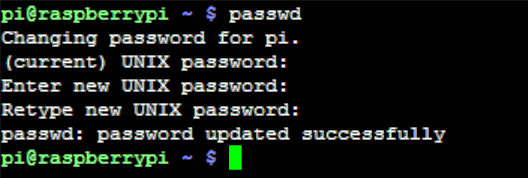
Project required remote shell and remote desktop connection for easy control and debugging. VNC is not strictly necessary but required for setting up the system without external display. In order to enable SSH and VNC the following instructions should be done:
- On your Raspberry Pi, boot into the graphical desktop.
- Select Menu > Preferences > Raspberry Pi Configuration > Interfaces.
- Ensure VNC and SSH is Enabled.
Testing the connection is essential after these steps.