iBike plugin for SportTracks (Desktop). Used to import data from the iBike power meter and display additional metrics in SportTracks..
Import and merge your files from the iBike power meter into SportTracks. Handles iBike specific data such as the wind and tilt tracks, along with some of the other specialized iBike data.
This software was open-sourced after SportTracks desktop was discontinued.
This plugin adds some new entries to the Edit menu, additional import capabilities (iBike .csv files) and a new detail pane, all described below.
See below for details...
If you're only recording with your iBike, life is easy. Save your iBike file using the iBike software as normal, then import the .csv file into SportTracks and you're done.
If you're using 2 devices such as a Garmin for GPS data, and iBike for power data (like me), then read on... Here's how to get both devices combined into 1 activity:
- Import your Garmin (or other) data first. I'm expecting this data should have either a cadence track, speed/distance track, or a GPS track.
- Select the Edit > iBike > Merge iBike File... item as shown below
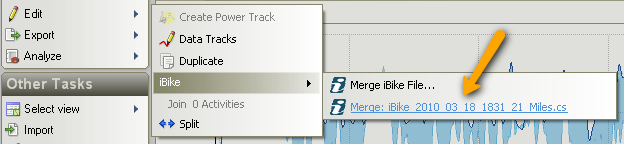
Once you import one file, the iBike Plugin will 'learn' where you store your iBike files and the file name format. Then, it'll automatically pick the most appropriate file to merge with the existing activity and your menu should look like the image above with the proper file already there for you. This basically just saves you a step and makes life more convenient.
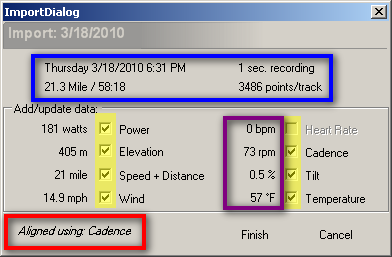
Once you select your file, the following popup will display. All of the data shown below is what was read from the iBike file. Blue is summary data, along with how many points are in each data track and recording frequency. You can select which data tracks to import by checking or un-checking the checkboxes for each data track. Beside the data track is an average/total for the data track read in the iBike file (purple box). This is for information only to give you an idea of what you're importing. For instance, the average power from the iBike file below was 181 watts.
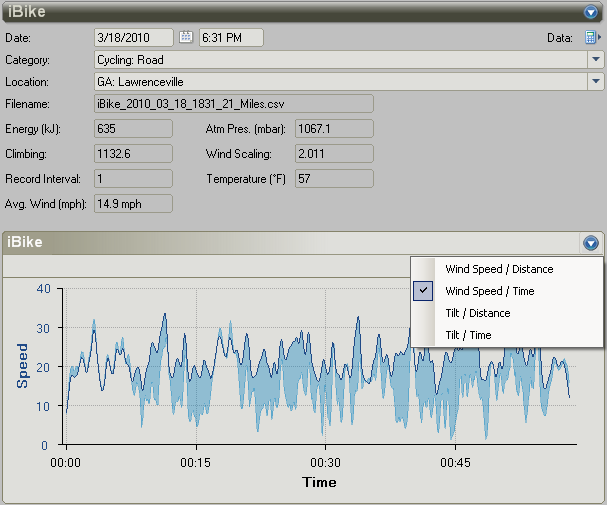
This can be found in the Activity Detail display (main display) of SportTracks under the 'Power' sub-menu. Once you import your iBike data, this pane will show you the iBike specific data such as Wind and Tilt. Wind is displayed as a relative value, similar to how it's displayed in the iBike software. At the beginning of the ride below, wind (light transparent blue) and speed (solid darker blue line) were almost equal, indicating I was in front of the pack. Later, the wind dropped off as I circled back behind some other riders.
English, Deutsch, español, français, italiano, Nederlands, norsk, polski, português, svenska, 中文(台灣)