KWin script that adds shortcuts to move the active window with the keyboard
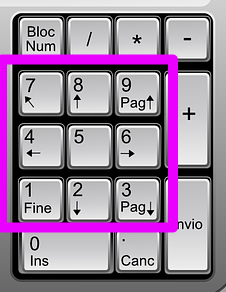
Defaults to assigning the Meta/Super/Windows key + numpad buttons to move the active window to the eight cardinal directions of the current monitor, and numpad 5 to move to the center.
Can be configured in System Settings -> Shortcuts -> KWin -> "Move Window to..."
Meta + Num1: window to bottom left corner
Meta + Num5: window to center
Versions 1.0.2 and earlier support Plasma 5.
Versions 1.1.0 and later support Plasma 6.