
Have you ever found yourself refreshing the Claude usage page, wondering how close you are to hitting your rate limit? Yeah, I've been there too. So I built this.
Now it's just a glimpse away — always sitting at the top of your screen.
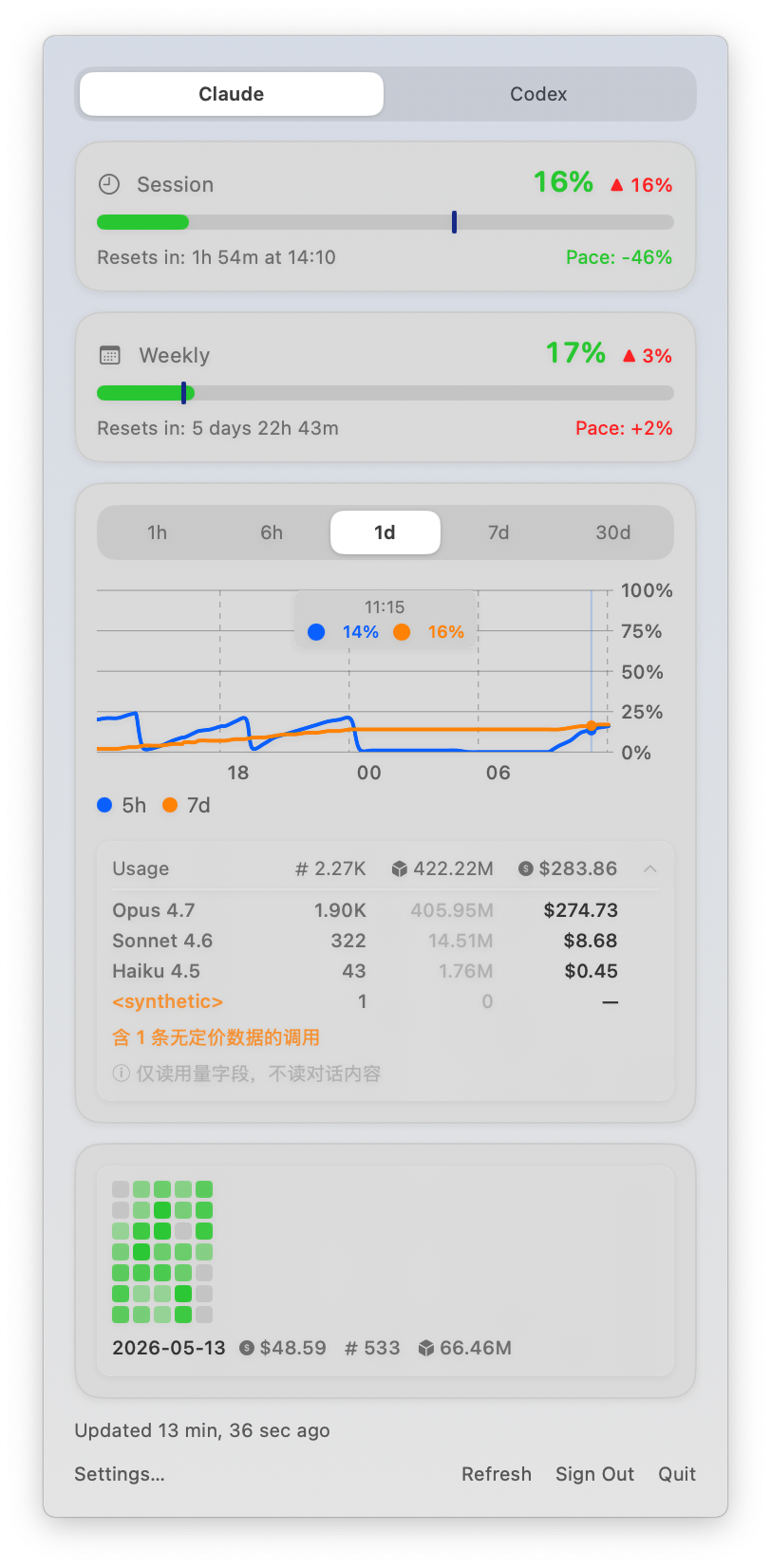
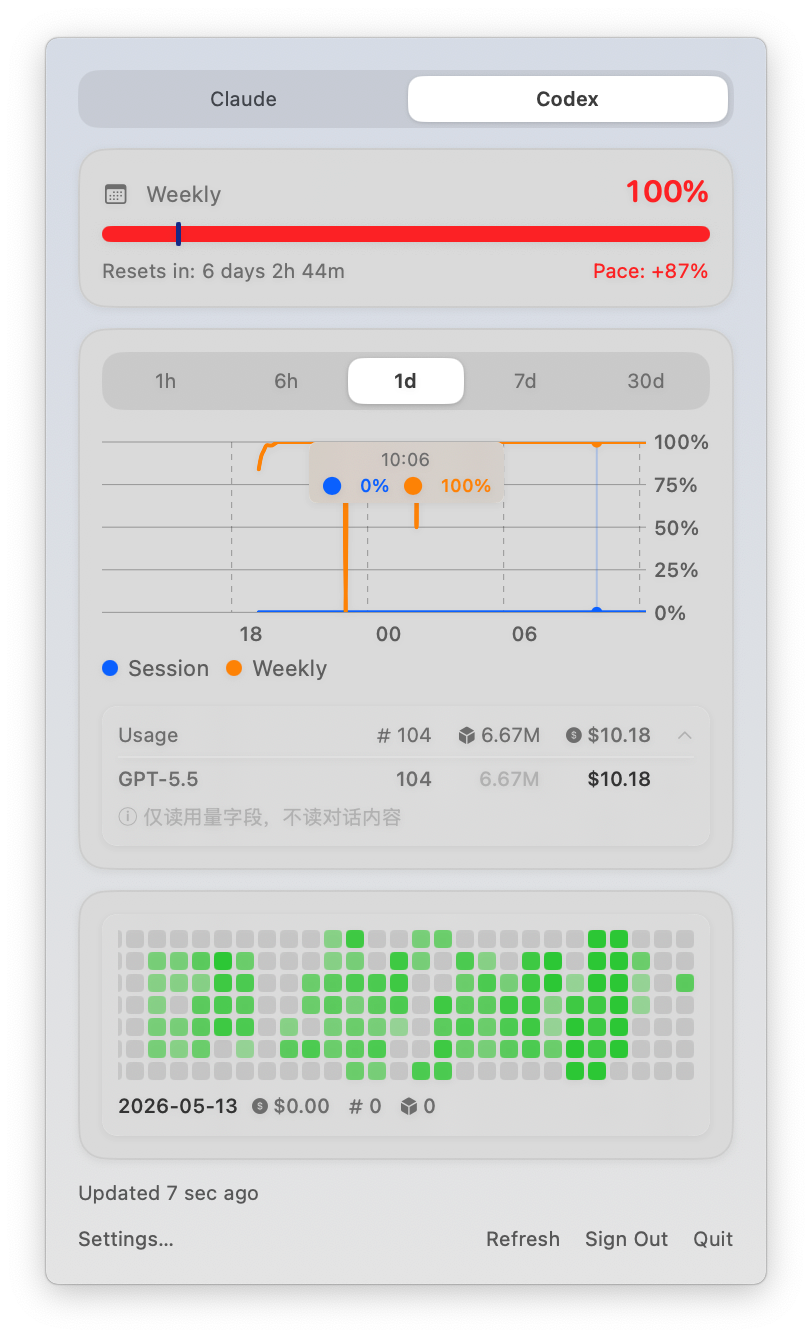




A tiny macOS menu bar app that shows your Claude API and Codex usage at a glance. Click it for the full picture:
- Menu bar icon with a mini dual-bar showing 5-hour and 7-day utilization
- Detailed popover with per-window usage, per-model breakdown, and reset timers
- Multi-provider support — switch between Claude, Codex, and Gemini tabs in the popover
- Extra usage tracking with USD currency display (pricing via LiteLLM snapshot)
- Usage history chart — see how your usage evolves over time (1h / 6h / 1d / 7d / 30d)
- Hover over the chart to see exact values at any point
- Configurable polling interval (5m / 15m / 30m / 1h)
- Built-in update checks via Sparkle
- Just sign in — Claude: OAuth via browser, no API keys to manage; Codex / Gemini: reads existing CLI credentials
- Minimal dependencies — SwiftUI, Swift Charts, Foundation, and Sparkle for updates
- macOS 14.0 (Sonoma) or later
- Apple Silicon or Intel — the app is a Universal Binary that runs natively on both chips
- Download
UsageBar.dmgfrom the latest release - Open the disk image and drag
UsageBar.appintoApplications - Launch the app from
/Applications - macOS may require right-click → Open on first launch
Requires Xcode 15+ / Swift 5.9+ and macOS 14 (Sonoma) or later.
git clone https://github.com/methol/usage-bar.git
cd usage-bar
make app            # build .app bundle
make dmg            # build drag-to-Applications disk image
make install # copy to /Applications- Launch the app — a menu bar icon appears
- Click the icon → Sign in with Claude → authorize in your browser
- Paste the code back into the app
- The icon updates automatically (default: every 30 minutes)
- Release builds show Check for Updates… in the popover so you can pull newer versions without re-downloading manually
Click the icon anytime to see:
- 5-hour and 7-day usage with progress bars and reset timers
- Per-model breakdown (Opus / Sonnet) when available
- Extra usage credits and limits
- Usage history chart with adjustable time range and hover details
If you have the Codex CLI installed and logged in, UsageBar automatically detects your credentials and shows a Codex tab in the popover. No additional sign-in is required — the app reads your existing ~/.codex/auth.json (written by the Codex CLI) and never modifies it.
To enable Codex tracking: install and log in to the Codex CLI, then relaunch UsageBar.
If you have the Gemini CLI installed and logged in, UsageBar automatically detects your credentials and shows a Gemini tab in the popover. No additional sign-in is required — the app reads your existing ~/.gemini/oauth_creds.json (written by the Gemini CLI) and refreshes the access token in-place when it expires.
To enable Gemini tracking: install and log in to the Gemini CLI, then relaunch UsageBar.
All data is stored locally:
| Path | Purpose |
|---|---|
~/.config/usage-bar/credentials.json |
Claude OAuth credentials (permissions: 0600) |
~/.config/usage-bar/history.json |
Usage history for the chart (30-day retention) |
~/.config/usage-bar/history-codex.json |
Codex usage history |
~/.config/usage-bar/history-gemini.json |
Gemini usage history |
~/.codex/auth.json |
Codex credentials — read-only by UsageBar, managed by Codex CLI |
~/.gemini/oauth_creds.json |
Gemini credentials — read-only by UsageBar, managed by gemini-cli; UsageBar may rewrite it (0600) when refreshing an expired access token |
History is buffered in memory and flushed to disk every 5 minutes and on app quit. No data is sent anywhere other than the respective provider APIs.
Legacy note: older versions stored Claude credentials in
~/.config/usage-bar/token. The app migrates this file automatically on first launch after upgrading.
UsageBar reuses on-machine credentials from the official CLI tools — it does not prompt you to log in again, and it does not bundle or distribute any third-party OAuth secrets:
- Claude — UsageBar manages its own OAuth flow (
~/.config/usage-bar/credentials.json) and falls back to reading the Claude CLI Keychain entry (Claude Code-credentials) when needed. - Codex — Read-only access to
~/.codex/auth.json(maintained by thecodexCLI). UsageBar never writes to it. - Gemini — Read access to
~/.gemini/oauth_creds.json(maintained by thegeminiCLI). When the access token expires, UsageBar refreshes it againstoauth2.googleapis.comand rewrites the file (0600). Google'sOAUTH_CLIENT_IDandOAUTH_CLIENT_SECRETare not hardcoded into UsageBar — they are extracted at runtime from the locally installedgemini-clipackage (the same install that already lives on your machine), and used only in-process.
UsageBar talks to each provider's quota endpoints (Anthropic OAuth usage, ChatGPT wham/usage, Google Code Assist cloudcode-pa.googleapis.com/v1internal:retrieveUserQuota). The Codex and Gemini endpoints are unofficial / private and have no published SLA — UsageBar treats failure modes (401, 5xx, schema drift) as transient and degrades gracefully.
You can sever the link between UsageBar and any provider at any time by uninstalling the corresponding CLI or deleting the credential file listed in Data storage above.
- Keychain prompts may reappear — UsageBar reads the Claude CLI's Keychain entry (
Claude Code-credentials) to reuse your existing Claude session. Because the app ships with an ad-hoc code signature (it is not signed with an Apple Developer ID nor notarized), macOS cannot persistently honor an Always Allow decision for that entry: the Keychain access prompt may reappear on each launch and will reappear after every app update. Clicking Allow lets UsageBar continue — it only reads the credential and never modifies it. A properly signed and notarized build would resolve this.
make build          # release build only
make app            # build + create .app bundle
make zip            # build + bundle + zip + verify distribution artifact
make dmg            # build + bundle + DMG + verify distribution artifact
make release-artifacts  # build once, then create and verify both ZIP and DMG
make verify-release # inspect the packaged ZIP and DMG artifacts
make install        # build + install to /Applications
make clean # remove build artifactsThis repo uses a tag-driven release flow. Pushing a v* tag will:
- build the
.appbundle once - produce
UsageBar.zipfor Sparkle andUsageBar.dmgfor manual installs - verify the packaged artifacts contain the expected app bundle resources and updater framework
- create the GitHub Release
- reuse GitHub-generated release notes for both the GitHub Release and the Sparkle update entry
- generate a signed Sparkle
appcast.xmlfrom that exact zip - deploy the appcast to GitHub Pages
Publishing a release is just:
git tag v0.0.5
git push origin v0.0.5
One-time repo setup:
- Enable GitHub Pages and set the source to
GitHub Actions. - Add a repository Actions secret named
SPARKLE_PRIVATE_KEY.
Local source builds intentionally ship with Sparkle disabled unless SU_FEED_URL is injected during packaging. This prevents forks and local builds from auto-updating to upstream binaries.
Manual installs should prefer the DMG. The ZIP remains the source of truth for Sparkle updates and appcast generation.
You can export the current Sparkle private key from your local Keychain with:
macos/.build/artifacts/sparkle/Sparkle/bin/generate_keys --account usage-bar -x /tmp/usage-bar.sparkle.key
gh secret set SPARKLE_PRIVATE_KEY < /tmp/usage-bar.sparkle.key
The appcast feed URL used by release builds is:
https://methol.github.io/usage-bar/appcast.xml
macos/                 # macOS menu bar app (Swift/SwiftUI)
├── Sources/UsageBar/  # App source files
├── Tests/             # Unit tests
├── Resources/         # App bundle resources (Info.plist, Assets.xcassets)
├── scripts/           # build.sh, verify-release.sh
└── Package.swift

docs/                  # Project documentation
scripts/               # Shared tooling (mock-server, issue scripts)
This repo is an AI-led fork of Blimp-Labs/claude-usage-bar (forked at upstream v0.0.6, 2026-03-10). From v0.0.7 onward the version numbering and release URLs are independent — see docs/adr/0004-fork-divergence-from-blimp-labs.md. Upstream commits are not auto-merged.
See CONTRIBUTING.md for development setup, testing with the mock server, and submission guidelines.
Note: this project is AI-led — see
AGENTS.mdfor the governance contract.
- Cost estimates use model price data from
BerriAI/litellm(model_prices_and_context_window.json), MIT License — bundled aslitellm_model_prices.json; seeTHIRD_PARTY_LICENSES.txtin the app bundle. - Update mechanism: Sparkle, MIT License.