1. Describe the bug
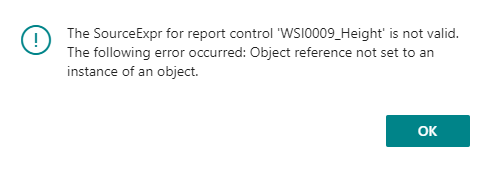
When using a report extension - Dataitem that contains elements that are extended by another "extension", referring to those fields in the report extension causes an error. Example: The SourceExpr for report control 'WSI0009_Height' is not valid. The following error occurred: Object reference not set to an instance of an object.
The field is part of table coming from an extension. That table has been extended by a second extension. Both of these extensions are "dependencies". So, the compiler does not complain about the fields. (There is no compiler errors)
If I remove the fields that are not extended by a second extension, the report will run without error.
2. To Reproduce
Create an extension that has dependency on 2 other extension. On one of these extensions, create a table. On the 2nd, extend the table from the first extension. Then, try and use those "extended" fields with a report extension.
- Go to '...'
reportextension 50100 "WSI Pick Instruction" extends "Pick Instruction" //214
{
    RDLCLayout = './Report Extensions/PickInstruction.rdl';
    dataset
    {
        // Add changes to dataitems and columns here
        add("Sales Header")
        {
            column(WSI_Shipping_Agent_Code; "Shipping Agent Code")
            {
            }
            column(WSI_Shipping_Agent_Service_Code; "Shipping Agent Service Code")
            {
            }
            column(WSI_Package_Tracking_No_; "Package Tracking No.")
            {
            }
        }
        addfirst("Sales Line")
        {
            dataitem("WSI0012 Pack Out Layer"; "WSI0012 Pack Out Layer")
            {
                DataItemLinkReference = "Sales Line";
                DataItemLink = bcsubtype = field("Document Type"), BCDocNum = field("Document No."), BCLineNum = field("Line No.");
                DataItemTableView = sorting(BCType) WHERE(BCType = const(36));
                column(Item_No_; "Item No.")
                {
                }

                dataitem("WSI0012 PackOut"; "WSI0012 PackOut")
                {
                    DataItemLink = BCDocNum = field(BCDocNum), BCType = field(BCType), BCSubType = field(BCSubType), "Pack No." = field("Pack No.");
                    DataItemTableView = sorting(BCType) WHERE("EasyPost OrderID" = filter('<>0'));
                    column(WSI_Pack_No_; "Pack No.")
                    {
                    }
                    column(WSI0009_PreDefinedPackage_Desc; "WSI0009 PreDefinedPackage Desc")
                    {
                    }
                    column(WSI0009_Height; "WSI0009 Height")
                    {
                    }
                    column(WSI0009_Length; "WSI0009 Length")
                    {
                    }
                    column(WSI0009_Width; "WSI0009 Width")
                    {
                    }
                    column(WSI0009_Weight; "WSI0009 Weight")
                    {
                    }
                    column(WSI_Contained; Contained)
                    {
                    }

                    trigger OnAfterGetRecord()
                    begin
                        Contained := "WSI0012 Pack Out Layer"."Item No.";
                    end;

                }
            }
        }
    }

    requestpage
    {
        // Add changes to the requestpage here
    }

    var
        Contained: Code[20];
}
3. Expected behavior
No error should occur when running the report (which uses the report extension)
4. Actual behavior
When running the report, an error occurs. (Even without referencing the fields in the report template)
5. Versions:
- AL Language: 7.1.453917
- Visual Studio Code: 1.56.0
- Business Central: Version: CA Business Central 18.0 (Platform 18.0.22893.25030 + Application 18.0.23013.25070)

1. Describe the bug
When using a report extension - Dataitem that contains elements that are extended by another "extension", referring to those fields in the report extension causes an error. Example: The SourceExpr for report control 'WSI0009_Height' is not valid. The following error occurred: Object reference not set to an instance of an object.
The field is part of table coming from an extension. That table has been extended by a second extension. Both of these extensions are "dependencies". So, the compiler does not complain about the fields. (There is no compiler errors)
If I remove the fields that are not extended by a second extension, the report will run without error.
2. To Reproduce
Create an extension that has dependency on 2 other extension. On one of these extensions, create a table. On the 2nd, extend the table from the first extension. Then, try and use those "extended" fields with a report extension.
3. Expected behavior
No error should occur when running the report (which uses the report extension)
4. Actual behavior

When running the report, an error occurs. (Even without referencing the fields in the report template)
5. Versions: