Hello,
1. Describe the bug
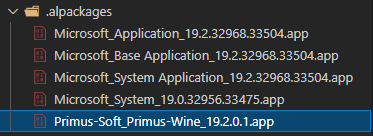
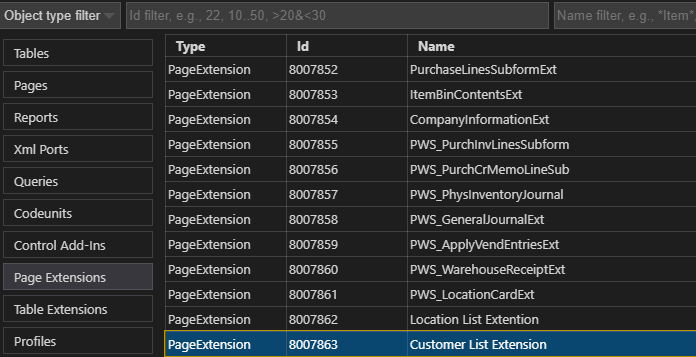
I'm on Business Centre 19.2 On-premise. I have compiled and published my app on my server. Then, from another project on VSCode, I've download the symbols from my instance. I got the standard Microsoft .app and my extension .app. When I open standard objects from Base App or System App (with Go To Definition, or from the list of objects from the package), they open in .dal. When I do this with the PageExt and TableExt objects of my .app, they open in .al and not in .dal. Because of this, the breakpoints I place in my page and table extensions don't work when I debug.
2. To Reproduce
Steps to reproduce the behavior:
With the command AL:Go!, create a new project. Set your launch.json to an instance On-Premise where you have published an app on. Download Symbols. Double-click on the package of your .app, search for any table of page extension, and open it (with a double-click, or Right-click > Go To Definition). It will open th object in .al and not in .dal. Put a breakpoint in it, and press ctrl+shift+f5 to debug without publishing. Your breakpoint will never be met.
3. Expected behavior
When I download my app package from Download Symbols, I expect to be able to open my table and page extension in .dal to put fonctional breakpoints in them.
4. Actual behavior

5. Versions:
- AL Language: v8.2.552672
- Visual Studio Code: 1.63.1
- Business Central: 19.2 On-Premise
- List of Visual Studio Code extensions that you have installed: AL Language, Al Object Designer, AZ AL Dev Tools/Al Code Outline, Bracket Pair Colorizer, Powershell, vscode-icons, Waldo's CRS AL Language Extension.
Thank you, have a nice day.
Pierre

Hello,
1. Describe the bug
I'm on Business Centre 19.2 On-premise. I have compiled and published my app on my server. Then, from another project on VSCode, I've download the symbols from my instance. I got the standard Microsoft .app and my extension .app. When I open standard objects from Base App or System App (with Go To Definition, or from the list of objects from the package), they open in .dal. When I do this with the PageExt and TableExt objects of my .app, they open in .al and not in .dal. Because of this, the breakpoints I place in my page and table extensions don't work when I debug.
2. To Reproduce
Steps to reproduce the behavior:
With the command AL:Go!, create a new project. Set your launch.json to an instance On-Premise where you have published an app on. Download Symbols. Double-click on the package of your .app, search for any table of page extension, and open it (with a double-click, or Right-click > Go To Definition). It will open th object in .al and not in .dal. Put a breakpoint in it, and press ctrl+shift+f5 to debug without publishing. Your breakpoint will never be met.
3. Expected behavior
When I download my app package from Download Symbols, I expect to be able to open my table and page extension in .dal to put fonctional breakpoints in them.
4. Actual behavior

5. Versions:
Thank you, have a nice day.
Pierre