Storage Explorer Version: 1.21.0-dev
Build Number: 20210710.1
Branch: main
Platform/OS: Windows 10/ Linux Ubuntu 18.04/ MacOS Big Sur 11.4
Architecture: ia32/x64
How Found: Exploratory testing
Regression From: Not a regression
Steps to Reproduce
- Expand one ADLS Gen2 storage account -> Blob Containers.
- Select one blob container -> Open it.
- Click the view dropdown icon -> Observe the view options.
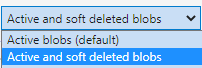
- Check whether there is an option 'Active and soft deleted blobs'.
Expected Experience
There is an option 'Active and soft deleted blobs'.
Actual Experience
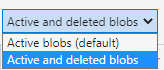
There is an option 'Active and deleted blobs'.


Storage Explorer Version: 1.21.0-dev
Build Number: 20210710.1
Branch: main
Platform/OS: Windows 10/ Linux Ubuntu 18.04/ MacOS Big Sur 11.4
Architecture: ia32/x64
How Found: Exploratory testing
Regression From: Not a regression
Steps to Reproduce
Expected Experience
There is an option 'Active and soft deleted blobs'.
Actual Experience
There is an option 'Active and deleted blobs'.
