Actual Result:
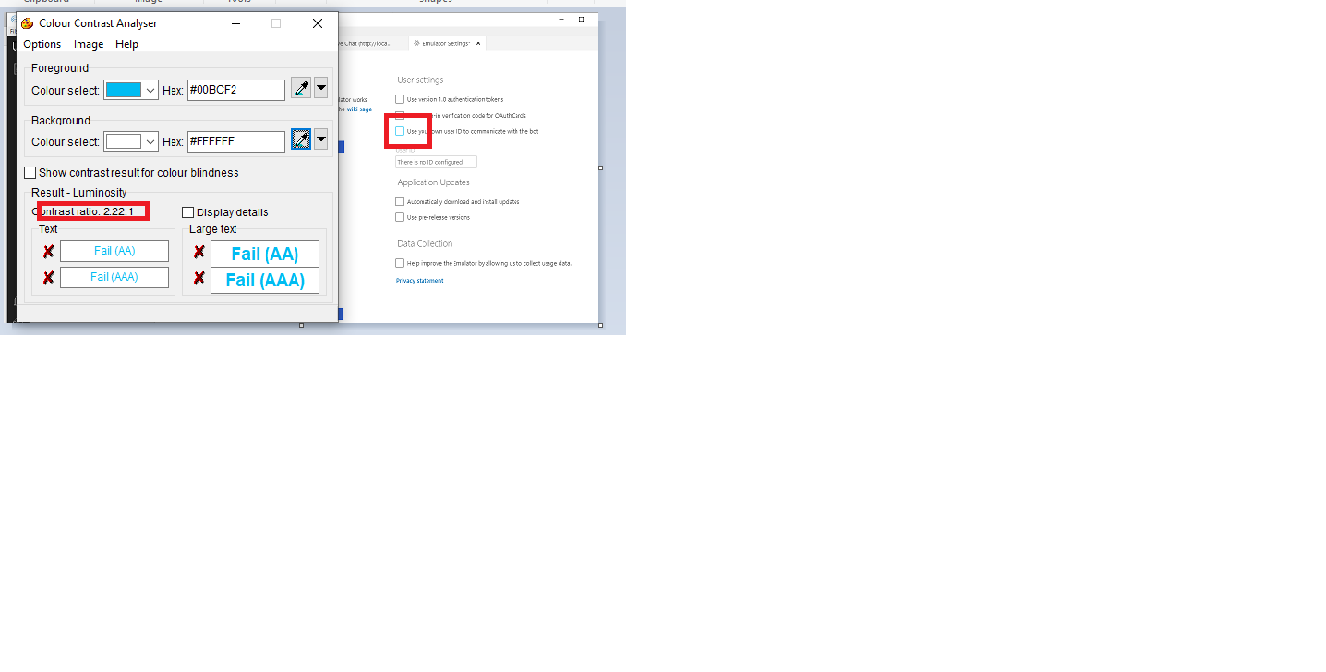
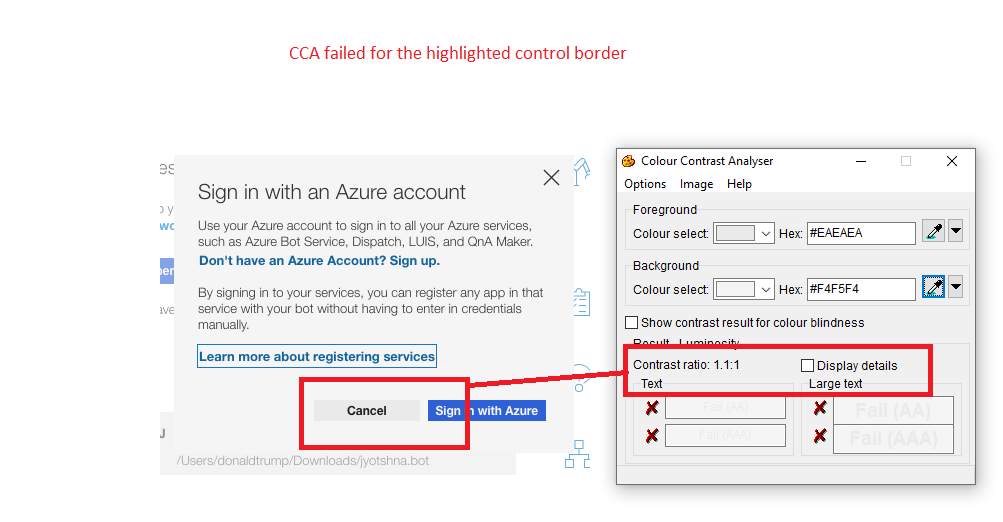
Luminosity Ratio is less than 3:1 for border outline with respective background colour for checkboxes
“User Settings ,Application updates ,Data collection” sections under checkboxes
Expected Result:
Luminosity Ratio should be greater than or equal to 3:1 for border outline with respective background colour for checkboxes
Note:
This issue exits for throughout application for all checkboxes and button controls
Same issue observed with Mac Os.
Repro Steps:
1.Open the Bot Framework V4 Emulator.
2.Navigate to Welcome tab screen and select it, screen gets opened
3.Navigate to the open bot and select it
4.Open bot dialog gets opened and connect to the open bot
5.Live chat screen gets appears
6.Navigate to the Edit ngrok settings and select it
7.Emulator screen gets opened
8.Navigate to the “1. User settings 2. Application updates 3. Data collection” section check boxes
9. Open 'Colour Contrast Analyser' application.
10.Observe the issue
User Impact:
Users with low vision or colour blindness needs that difference between contrast of text is always high.
Test Environment:
OS Build: Version 1903(OS Build 18362.239)
Browser: Edge
Application: Bot Framework V4 Emulator
Tool: Colour contrast Analyzer
OS: MacOs Version 10.15
Application: Bot Framework V4 Emulator (Version 4.5.2-80829)
MAS Reference Link:
https://microsoft.sharepoint.com/:w:/r/teams/msenable/_layouts/15/Doc.aspx?sourcedoc=%7B6CA3BF14-2635-434A-832C-28DD9A18B9FC%7D&file=MAS%201.4.11%20%E2%80%93%20Non-text%20Contrast.docx&action=default&mobileredirect=true&cid=c3837dea-3bb1-4c5a-9374-19ec384f14c6


Actual Result:
Luminosity Ratio is less than 3:1 for border outline with respective background colour for checkboxes
“User Settings ,Application updates ,Data collection” sections under checkboxes
Expected Result:
Luminosity Ratio should be greater than or equal to 3:1 for border outline with respective background colour for checkboxes
Note:
This issue exits for throughout application for all checkboxes and button controls
Same issue observed with Mac Os.
Repro Steps:
1.Open the Bot Framework V4 Emulator.
2.Navigate to Welcome tab screen and select it, screen gets opened
3.Navigate to the open bot and select it
4.Open bot dialog gets opened and connect to the open bot
5.Live chat screen gets appears
6.Navigate to the Edit ngrok settings and select it
7.Emulator screen gets opened
8.Navigate to the “1. User settings 2. Application updates 3. Data collection” section check boxes
9. Open 'Colour Contrast Analyser' application.
10.Observe the issue
User Impact:
Users with low vision or colour blindness needs that difference between contrast of text is always high.
Test Environment:
OS Build: Version 1903(OS Build 18362.239)
Browser: Edge
Application: Bot Framework V4 Emulator
Tool: Colour contrast Analyzer
OS: MacOs Version 10.15
Application: Bot Framework V4 Emulator (Version 4.5.2-80829)
MAS Reference Link:

https://microsoft.sharepoint.com/:w:/r/teams/msenable/_layouts/15/Doc.aspx?sourcedoc=%7B6CA3BF14-2635-434A-832C-28DD9A18B9FC%7D&file=MAS%201.4.11%20%E2%80%93%20Non-text%20Contrast.docx&action=default&mobileredirect=true&cid=c3837dea-3bb1-4c5a-9374-19ec384f14c6