URL: https://auditbotui-ppe.azurewebsites.net/
Image
Actual Result:
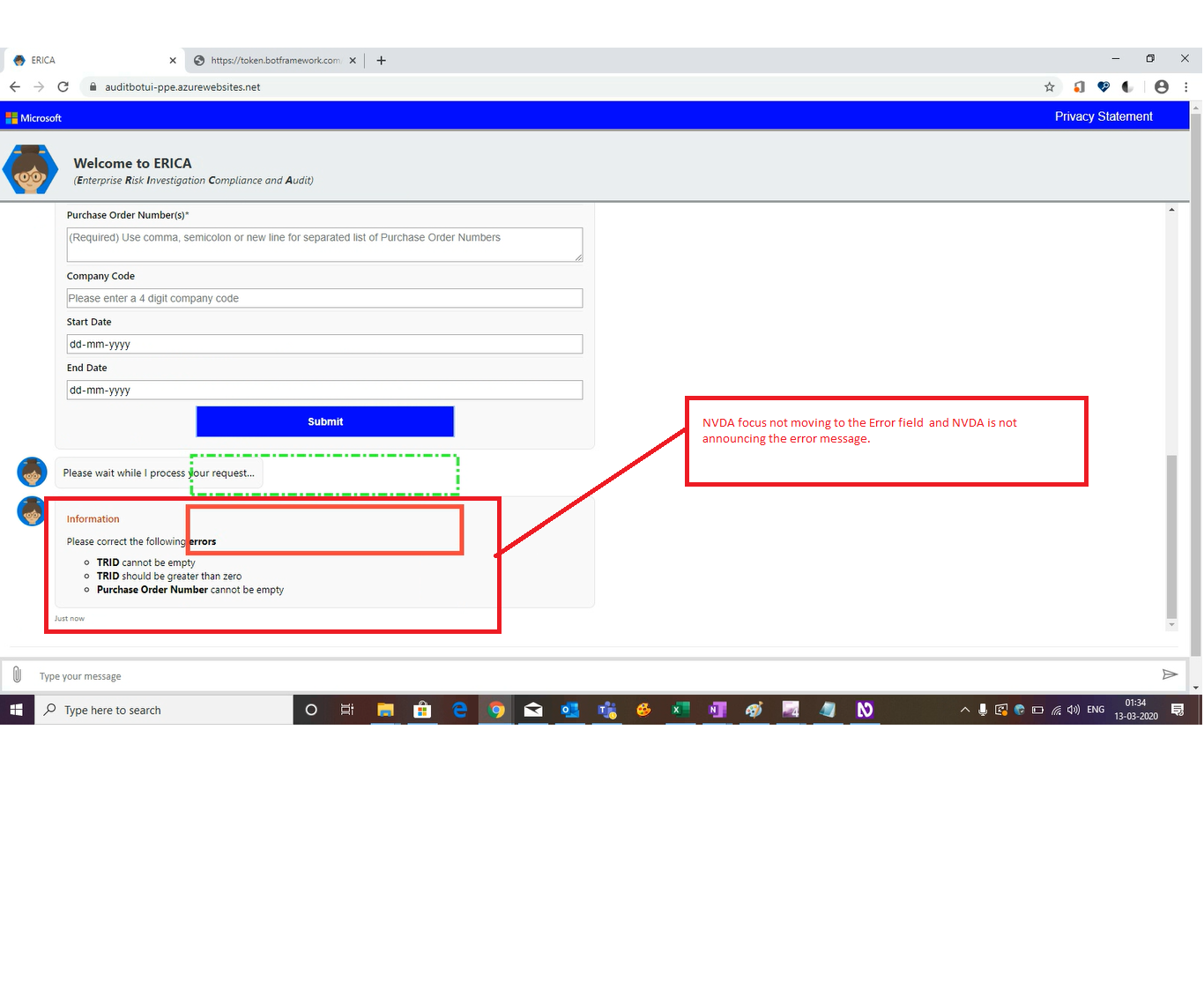
NVDA focus is not moving to pop up error message upon invoking 'Submit'Button leaving the mandatory fields blank.
Observation: When 'Submit' button is invoked leaving the mandatory fields blank then the NVDA focus remains on the 'Submit Button' itself.
Expected Result:
NVDA focus should move to pop up error message upon invoking 'Submit'Button leaving the mandatory fields blank.
Ex:When the Submit is invoked NVDA should narrate as "Information, Please correct the following errors, TRID cannot be empty, TRID should be greater than zero, Purchase Order Number cannot be empty"
Note: For a visual user, error caused fields should be highlighted with red color border indicating they need come modification/they need attention.
Other Instances:
Same issue is observed in the below screens also:
- SG Membership Request& SG Membership With File Upload
Image
When the Submit is invoked by leaving the mandatory fields blank, The NVDA focus should move to first error field and NVDA should narrate as Information, Please correct the following errors, TRID cannot be empty, TRID should be greater than zero, Please enter at least one security group names that you want to enlist.
Note: For a visual user, error caused fields should be highlighted with red color border indicating they need come modification/they need attention.


URL: https://auditbotui-ppe.azurewebsites.net/
Image
Actual Result:
NVDA focus is not moving to pop up error message upon invoking 'Submit'Button leaving the mandatory fields blank.
Observation: When 'Submit' button is invoked leaving the mandatory fields blank then the NVDA focus remains on the 'Submit Button' itself.
Expected Result:
NVDA focus should move to pop up error message upon invoking 'Submit'Button leaving the mandatory fields blank.
Ex:When the Submit is invoked NVDA should narrate as "Information, Please correct the following errors, TRID cannot be empty, TRID should be greater than zero, Purchase Order Number cannot be empty"
Note: For a visual user, error caused fields should be highlighted with red color border indicating they need come modification/they need attention.
Other Instances:
Same issue is observed in the below screens also:
Image
When the Submit is invoked by leaving the mandatory fields blank, The NVDA focus should move to first error field and NVDA should narrate as Information, Please correct the following errors, TRID cannot be empty, TRID should be greater than zero, Please enter at least one security group names that you want to enlist.
Note: For a visual user, error caused fields should be highlighted with red color border indicating they need come modification/they need attention.