User reported the following issue:
Exchange Health Checker version 22.01.19.1700
Exchange Information
--------------------
        Name: exchangeservername
        Generation Time: 01/28/2022 14:07:20
        Version: Exchange 2016 CU21
        Build Number: 15.01.2375.018
        Exchange IU or Security Hotfix Detected:
                Security Update for Exchange Server 2016 Cumulative Update 22 (KB5007012)
                Security Update for Exchange Server 2016 Cumulative Update 22 (KB5007409)
                Security Update for Exchange Server 2016 Cumulative Update 22 (KB5008631)
        Server Role: Mailbox
We can see (from the debug log) that the build and revision number which was used to perform the CU check in Get-ExchangeInformation is:
The build and revision number: 2375.18
The problem is caused by the fact that we're comparing doubles which are floating-point types and so, 2375.18[0000000...] is lower than 2375.7[0000000...].
} elseif ($buildAndRevision -lt 2375.7) {
    $buildInformation.CU = [HealthChecker.ExchangeCULevel]::CU21
    $buildInformation.FriendlyName += "CU21"
    $buildInformation.ReleaseDate = "06/29/2021"
    $buildInformation.SupportedBuild = $true
} elseif ($buildAndRevision -ge 2375.7) {
    $buildInformation.CU = [HealthChecker.ExchangeCULevel]::CU22
    $buildInformation.FriendlyName += "CU22"
    $buildInformation.ReleaseDate = "09/28/2021"
    $buildInformation.SupportedBuild = $true
}
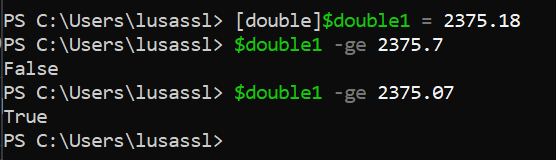
We could address this behavior by explicitly defining two digits after the dot like this: 2375.07 instead of 2375.7
Another option (which I preferer) is by using the [System.Version] class and then compare the full version number instead of just using the build and revision.
Side note:
I'm not sure why we're seeing the build number of the latest security update (SU) here. Get-ExchangeInformation uses the AdminDisplayVersion which is not getting updates post SU installation. We should, however, update the logic to make sure to prevent such an issue in the future.

User reported the following issue:
We can see (from the debug log) that the build and revision number which was used to perform the CU check in
Get-ExchangeInformationis:The build and revision number: 2375.18The problem is caused by the fact that we're comparing
doubleswhich arefloating-point typesand so, 2375.18[0000000...] is lower than 2375.7[0000000...].We could address this behavior by explicitly defining two digits after the dot like this: 2375.07 instead of 2375.7
Another option (which I preferer) is by using the [System.Version] class and then compare the full version number instead of just using the build and revision.
Side note:
I'm not sure why we're seeing the build number of the latest security update (SU) here.
Get-ExchangeInformationuses theAdminDisplayVersionwhich is not getting updates post SU installation. We should, however, update the logic to make sure to prevent such an issue in the future.