Rerun Publish Steps after Network Error#12413
Conversation


 github-actions
Bot
added
area: build
github-actions
Bot
added
area: build

| let t1+=1 | ||
| if ! grep -q "You cannot publish over the previously published versions" "publish_log" | ||
| then | ||
| let t1+=1 |

There was a problem hiding this comment.
We should fail and not continue in this case.
There was a problem hiding this comment.
Fixed it by moving code below line 140 (any error case besides the network error)
  fi
  rm "$f"
  mv "$local_f" "$f"
  exit $t1
fi
| fi | ||
| rm "$f" | ||
| mv "$local_f" "$f" | ||
| exit $t1 |
There was a problem hiding this comment.
This seems to exit even if the content of the package is the same?
There was a problem hiding this comment.
This is an existing behavior prior to working on the codebase. I have switched the non-network error case to the else case of the if grep -q "code ENOTFOUND" "publish_log"
| else | ||
| echo ERROR: Published package does not match the current one attempting to be released for the same version. | ||
| let t1+=1 | ||
| if ! grep -q "You cannot publish over the previously published versions" "publish_log" |
There was a problem hiding this comment.
How do you get this error message. Did you try it in npmjs.org?
ADO feed might have a different error message. See example
There was a problem hiding this comment.
This error message existed before I started working on the codebase. The npm error message that I added is grep -q "code ENOTFOUND" which appears when there is a timeout during publishing the package to the npm registry.
There was a problem hiding this comment.
Please test your change to make sure it works.
There was a problem hiding this comment.
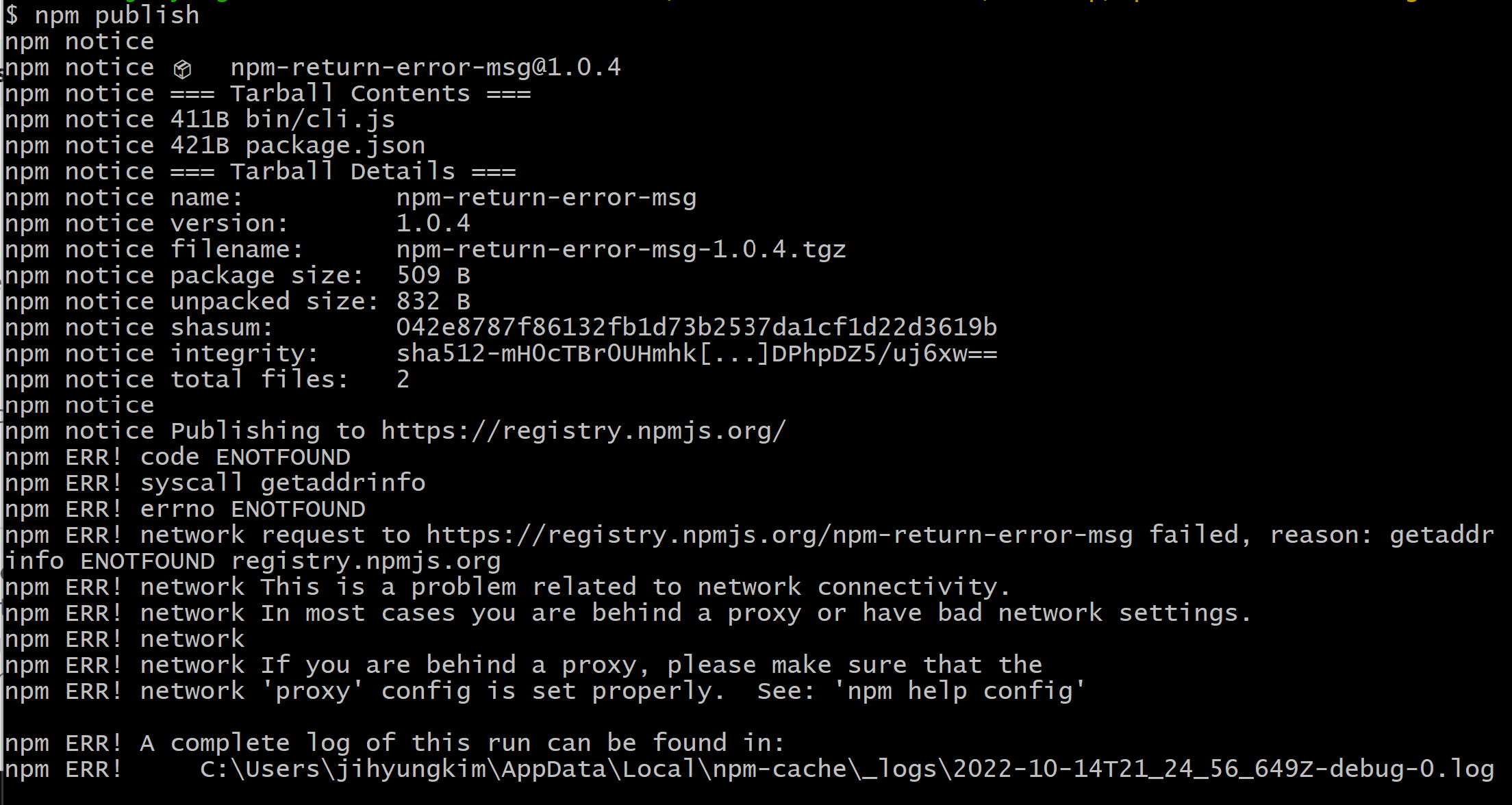
When disconnecting network in the middle of npm publish, npm ERR! code ENOTFOUND error message is returned.
Created a dummy package npm-return-error-msg which invokes the identical error message and checked that the process repeats for x-amount of times.
| npm pack $package_name | ||
| if cmp -s "$f" "$local_f" | ||
| then | ||
| echo Continuing as published package matches the current one that was attempting to be released. |
There was a problem hiding this comment.
We are still exiting even if the packages are the same?
There was a problem hiding this comment.
Added continue in line 131 to continue the loop if the packages are the same.
| echo Continuing as published package matches the current one that was attempting to be released. | ||
| else | ||
| echo ERROR: Published package does not match the current one attempting to be released for the same version. | ||
| let t1+=1 |
There was a problem hiding this comment.
t1 used be used for tracking how many errors we encountered, but since we are going to exist on error now, we probably don't need it anymore.
There was a problem hiding this comment.
Removed t1 from the codebase and made exit status to exit 1
As a result, made changes to the existing if-statement
Before
else
    if ! grep -q "You cannot publish over the previously published versions" "publish_log"
    then
        let t1+=1
     else
         echo Package has already been published.
          local_f="${f}_local"
          mv "$f" "$local_f"
          package_name=$(grep -oP 'npm notice package: \K.*' "publish_log")
          npm pack $package_name
          if cmp -s "$f" "$local_f"
          then
                 echo Continuing as published package matches the current one that was attempting to be released.
          else
                echo ERROR: Published package does not match the current one attempting to be released for the same version.
                 let t1+=1
         fi
      fi
    rm "$f"
    mv "$local_f" "$f"
    exit $t1
  fi
After
else
    if grep -q "You cannot publish over the previously published versions" "publish_log"
    then
         echo Package has already been published.
          local_f="${f}_local"
          mv "$f" "$local_f"
          package_name=$(grep -oP 'npm notice package: \K.*' "publish_log")
          npm pack $package_name
          if cmp -s "$f" "$local_f"
          then
                 echo Continuing as published package matches the current one that was attempting to be released.
                 continue
          else
                echo ERROR: Published package does not match the current one attempting to be released for the same version.
           fi
      fi
    rm "$f"
    mv "$local_f" "$f"
    exit $t1
  fi

### Description
665: Ability to Rerun Publish Step If There Are Any Network Error
https://dev.azure.com/fluidframework/internal/_workitems/edit/665/

### Cases
1. If Publish Package does not encounter an error continue with the
remaining packages

2. If Publish Package encounters an error
- Network Error: retry for `$maximumRetryIfNetworkError`-amount of time.
If network error is persisted during the entire loop, exit the task in
the pipeline
- Non-Network Error: Such as the current package is already published in
the registry, fail the pipeline and not continue
2 participants


Description
665: Ability to Rerun Publish Step If There Are Any Network Error https://dev.azure.com/fluidframework/internal/_workitems/edit/665/
Cases
If Publish Package does not encounter an error continue with the remaining packages
If Publish Package encounters an error
$maximumRetryIfNetworkError-amount of time. If network error is persisted during the entire loop, exit the task in the pipeline