Environment data
- PTVSD version: 4.3.2
- OS and version:
- Windows 10 Pro Version 10.0.17134 Build 17134 attaching to
- Raspberry Pi 3 with raspbian
- Python version (& distribution if applicable, e.g. Anaconda):
- On Windows 10: Python 3.7.
- On Raspberry, python 3.8 venv with following pip list:
Package Version
aniso8601 8.0.0
attrs 19.3.0
certifi 2019.11.28
chardet 3.0.4
Click 7.0
Flask 1.1.1
flask-restplus 0.13.0
idna 2.8
itsdangerous 1.1.0
Jinja2 2.10.3
jsons 1.1.1
jsonschema 3.2.0
MarkupSafe 1.1.1
pip 19.2.3
ptvsd 4.3.2
pyrsistent 0.15.6
pytz 2019.3
requests 2.22.0
setuptools 41.2.0
six 1.13.0
smbus2 0.3.0
typish 1.3.1
urllib3 1.25.7
Werkzeug 0.16.0
- Using VS Code or Visual Studio: Visual Studio Community 4.8.03761
Actual behavior
On Raspberry:
- Adding the ptvsd import and enable_attach in py code,
- then running flask run --host=0.0.0.0
On Windows:
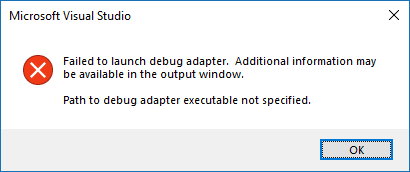
- Using Visual Studio attach to process, I see the remote process and try to attach to it but I end up with a popup window with message
Path to debug adapter executable not specified.
Got same message in output window under the Debug dropdown selection.
Expected behavior
- On Raspberry:
- Adding the ptvsd import and enable_attach in py code,
- then running flask run --host=0.0.0.0
- On Windows:
- Using Visual Studio attach to process, I should see the remote process and be able to attach to it and debug having same source files.
Steps to reproduce:
Honestly I look at several posts, web sites and videos and could not figure out what configuration is necessary for VSCode against VS. I have latest Visual Studio Community.
I also tried with VS 2017, but installed latest 2019 Community because of this issue.
- Copy same source files on both computers
- On Raspberry,
a. export FLASK_APP env var (should I enable FLASK_DEBUG as well?)
b. Did not use secret value in ptvsd.Attach_enable() call
c. Run Flask using flask run --host=0.0.0.0
- On the network Box, got NAT configured to allow access via ports 5678 and 80.
- On Windows,
a. running Visual Studio and solution with same source files.
b. Control-Alt P (Attach to process), Connection type = Python remote (ptvsd), Connection Target = tcp://176.189.XXX.YYY:5678/ , Attach To = automatic,
c. Press find.
d. Got process listed see image
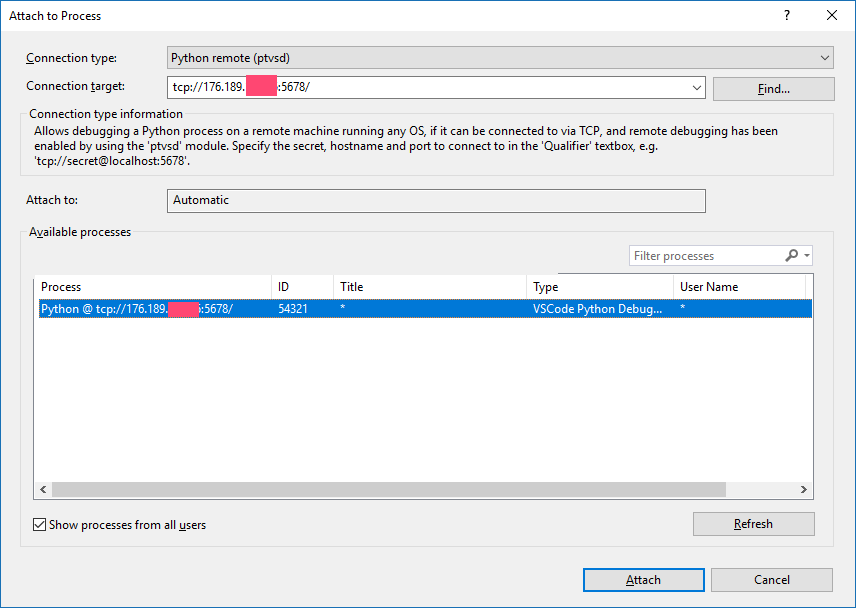
e. Select the process and attach.
f. Get error message
I have no clue what to put in requirements.txt or json files. From the video I saw from Microsoft, I understood it was not necessary to edit these when using Visual Studio.
Is there any configuration to perform in VS options ? I kept default values.
SSH works from windows to Raspberry.
Calls from browser works as well (GET calls to REST API using Flask rest_plus).
Is there any installation or troubleshoot guide I could look at?
Thank you for your help
Christophe

Environment data
Package Version
aniso8601 8.0.0
attrs 19.3.0
certifi 2019.11.28
chardet 3.0.4
Click 7.0
Flask 1.1.1
flask-restplus 0.13.0
idna 2.8
itsdangerous 1.1.0
Jinja2 2.10.3
jsons 1.1.1
jsonschema 3.2.0
MarkupSafe 1.1.1
pip 19.2.3
ptvsd 4.3.2
pyrsistent 0.15.6
pytz 2019.3
requests 2.22.0
setuptools 41.2.0
six 1.13.0
smbus2 0.3.0
typish 1.3.1
urllib3 1.25.7
Werkzeug 0.16.0
Actual behavior
On Raspberry:
On Windows:
Got same message in output window under the Debug dropdown selection.
Expected behavior
Steps to reproduce:
Honestly I look at several posts, web sites and videos and could not figure out what configuration is necessary for VSCode against VS. I have latest Visual Studio Community.
I also tried with VS 2017, but installed latest 2019 Community because of this issue.
a. export FLASK_APP env var (should I enable FLASK_DEBUG as well?)
b. Did not use secret value in ptvsd.Attach_enable() call
c. Run Flask using flask run --host=0.0.0.0
a. running Visual Studio and solution with same source files.
b. Control-Alt P (Attach to process), Connection type = Python remote (ptvsd), Connection Target = tcp://176.189.XXX.YYY:5678/ , Attach To = automatic,
c. Press find.
d. Got process listed see image
e. Select the process and attach.
f. Get error message
I have no clue what to put in requirements.txt or json files. From the video I saw from Microsoft, I understood it was not necessary to edit these when using Visual Studio.
Is there any configuration to perform in VS options ? I kept default values.
SSH works from windows to Raspberry.
Calls from browser works as well (GET calls to REST API using Flask rest_plus).
Is there any installation or troubleshoot guide I could look at?
Thank you for your help
Christophe