- VSCode Version: 1.29.1; 1-30.0-insider (2018-11-30)
- OS Version: Windows 10 1809
Steps to Reproduce:
Use this zip
callWithTimeout.zip
or
- Create new project through NPM
- npm init
- npm add --save-dev rxjs typescript
- Create tsconfig.json
{
    "compilerOptions": {
      "rootDir": "./",
      "target": "es6",
      "module": "commonjs",
      "declaration": true,
      "outDir": "./dist",
      "strict": true
    },
    "include": ["src"],
    "exclude": ["node_modules", "**/__tests__/*"],
  }
- create any file with .ts extension with content:
let a: Observable<any>;
- Press
ctrl+. with cursor on observable
Does this issue occur when all extensions are disabled?: Yes
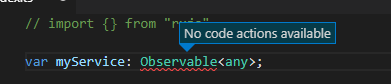
Current behaviour: No actions available
Expected behaviour: import from...
What is worth noting, if I add empty import like so import {} from "rxjs" it will suggest to add to existing import



Steps to Reproduce:
Use this zip
callWithTimeout.zip
or
let a: Observable<any>;ctrl+.with cursor on observableDoes this issue occur when all extensions are disabled?: Yes
Current behaviour: No actions available
Expected behaviour: import from...
What is worth noting, if I add empty import like so


import {} from "rxjs"it will suggest to add to existing import