Modify MRT Core UnpackagedTests clean-up, and reorganize test reporting#870
Merged
Modify MRT Core UnpackagedTests clean-up, and reorganize test reporting#870
Conversation


This reverts commit a990497.

 ghost
added
the
ghost
added
the

axelandrejs
approved these changes
May 26, 2021

huichen123
approved these changes
May 26, 2021
DrusTheAxe
pushed a commit
that referenced
this pull request
Jun 14, 2021

…ng (#870)

This change modifies the MRT Core UnpackagedTests to unblock running on my local PC.
It also improves how the tests are reported in the Azure DevOps UI.
This file contains hidden or bidirectional Unicode text that may be interpreted or compiled differently than what appears below. To review, open the file in an editor that reveals hidden Unicode characters.
Learn more about bidirectional Unicode characters
Sign up for free
to join this conversation on GitHub.
Already have an account?
Sign in to comment
3 participants


Add this suggestion to a batch that can be applied as a single commit.This suggestion is invalid because no changes were made to the code.Suggestions cannot be applied while the pull request is closed.Suggestions cannot be applied while viewing a subset of changes.Only one suggestion per line can be applied in a batch.Add this suggestion to a batch that can be applied as a single commit.Applying suggestions on deleted lines is not supported.You must change the existing code in this line in order to create a valid suggestion.Outdated suggestions cannot be applied.This suggestion has been applied or marked resolved.Suggestions cannot be applied from pending reviews.Suggestions cannot be applied on multi-line comments.Suggestions cannot be applied while the pull request is queued to merge.Suggestion cannot be applied right now. Please check back later.
This PR makes changes to the MRT Core UnpackagedTests to unblock running on my local PC, and also improves how the tests are reported in the Azure DevOps UI.
Unblocking the tests on my PC
This change adds what is effectively a work-around to get the test working on my PC. For some reason I have issues with the test clean-up when it attempts to delete the copied
resources.prifile.Hui wasn't able to reproduce this -- yet I consistently hit this issue every time I run the tests. (Thanks to Hui for trying to repro this).
FWIW, the error that I was seeing when trying to run the tests locally on my PC is similar to the following:
The access denied error message is somewhat misleading, as the real error is
STATUS_CANNOT_DELETEfromKERNELBASE!DeleteFileW.(This gets converted to an access denied error). I'm not sure what causes the issue as MRT Core opens the file with
FILE_SHARE_DELETE. The file isn't read-only, and the user should have permissions to delete the file.I thought perhaps it was due to Windows Defender -- but adding exceptions to Windows Defender didn't help.
I tried excluding the folder (
UnpackagedTests), the file (resources.pri), and the process (te.processhost.exe), but none of them had any effect. Also adding various sleep()s to the test didn't help either. (I wasn't sure if maybe there was a timing issue or not).The other work-around that worked was to run each test method in isolation by adding:
[TestProperty("IsolationLevel", "Method")]to each test method. However, this slows the test down somewhat.This change moves the delete to a Clean up method, and calls GC.Collect() beforehand.
Azure DevOps Test Reporting
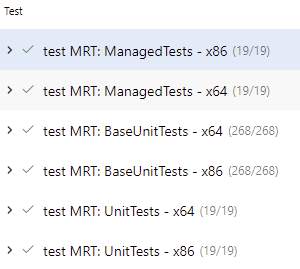
This change also reorganizes the MRT Core tests so that they show up with their own label in the Azure DevOps Test reporting UI. Before all the test results were all munged together -- which makes it hard to tell when a test fails where it is from.
The test reporting tab now looks like this:
And the CI pipeline has separate steps for each test:
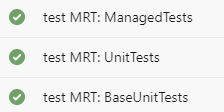
Note: I can't seem to get the MRT Core UnpackagedTests to work in the CI pipeline yet. I'm still trying to figure out what is the root cause.