

Weijie Wang1,2,*† Xiaoxuan He1,* Youping Gu1,* Yifan Yang2,‡ Zeyu Zhang3 Yefei He1 Yanbo Ding2 Xirui Hu3 Donny Y. Chen3 Zhiyuan He2 Yuqing Yang2,‡ Bohan Zhuang1,‡
1Zhejiang University 2Microsoft Research 3Independent Researcher
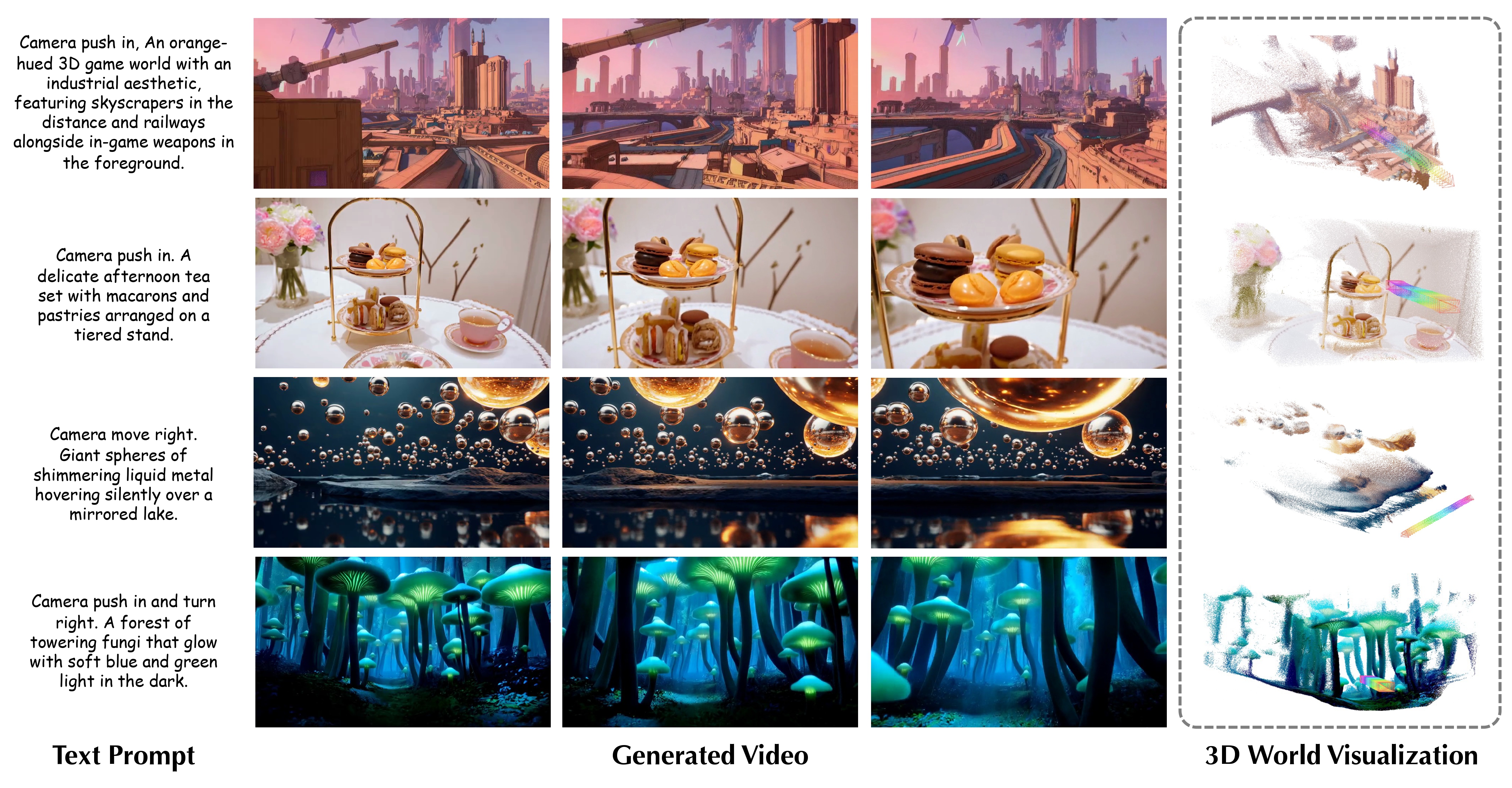
World-R1 aligns text-to-video generation with 3D constraints through reinforcement learning. Instead of changing the base video model architecture or relying on large-scale 3D supervision, it combines camera-aware latent initialization, 3D-aware rewards from pre-trained foundation models, and a periodic decoupled training strategy to improve geometric consistency while preserving visual quality and motion diversity.
- 3D-aware reinforcement learning aligns generated videos with geometric constraints through meta-view assessment, reconstruction consistency, and trajectory alignment rewards.
- General visual quality is preserved by combining the 3D-aware reward with an aesthetic reward during Flow-GRPO-based post-training.
- A periodic dynamic-only training phase regularizes the model with dynamic-scene prompts, improving motion diversity while retaining learned 3D consistency.
- Camera-aware latent initialization converts text-specified camera motion into trajectory-guided noise wrapping, enabling implicit camera conditioning without changing the base video architecture.
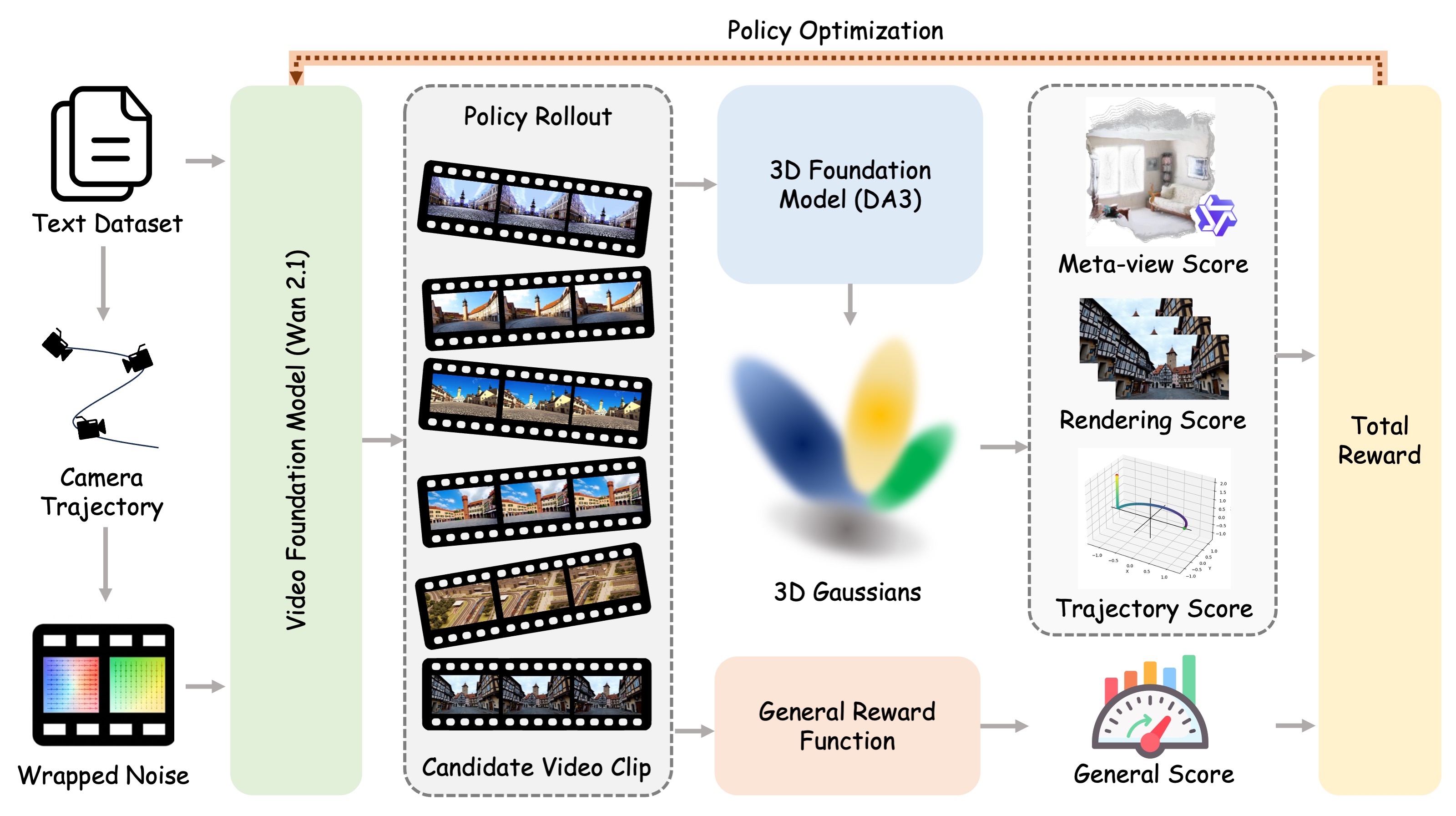
World-R1 first converts camera instructions in text prompts into explicit trajectories and injects the motion prior into the initial video latents through noise wrapping. During RL fine-tuning, the model is optimized with 3D-aware feedback from reconstruction and camera-control metrics, together with a general visual reward. A periodic dynamic-only phase prevents the model from overfitting to rigid static scenes.
Use a Python 3.10+ environment with CUDA and a PyTorch build that matches your driver. A practical setup flow is:
- Create and activate a clean environment:
conda create -n world-r1 python=3.10 -y
conda activate world-r1
pip install --upgrade pip- Install PyTorch first. Replace the wheel index below with the one that matches your CUDA version:
pip install torch torchvision --index-url https://download.pytorch.org/whl/cu124- Install the repository and the core runtime packages used by training and inference:
pip install -e .
pip install accelerate diffusers transformers peft wandb absl-py ml-collections \
  numpy pillow imageio tqdm requests httpx flask addict omegaconf einops \
ftfy sentencepiece protobuf scipy opencv-python huggingface_hub- Install the extra packages used by the 3D reward stack and visualization utilities:
pip install lpips trimesh plyfile moviepy pycolmap gsplat evo e3nn hpsv2 qwen-vl-utils- Optional acceleration packages, depending on your machine and base model setup:
pip install xformers bitsandbytesThe launcher scripts default to python3 and torchrun from PATH. If your environment uses different executables, set them explicitly:
export WAN_PYTHON=$(which python)
export WAN_TORCHRUN=$(which torchrun)
For WAN-based utilities, you can either pass --model /path/to/checkpoint or set:
export WORLD_R1_WAN_MODEL=/path/to/Wan-Diffusers-checkpointA simple smoke test after setup:
python -c "import torch, diffusers, transformers, peft, flask, lpips; print('env ok')"Single-node training with local reward servers:
MODEL_PATH=/path/to/Wan2.1-T2V-14B-Diffusers \
SERVER_VISIBLE_DEVICES=0,1 \
TRAIN_VISIBLE_DEVICES=2,3,4,5,6,7 \
NUM_PROCESSES=6 \
bash scripts/run_single_node.sh
If reward servers are already running, launch training directly:
REWARD_3D_SERVER_URL=http://127.0.0.1:18089 \
GENERAL_REWARD_SERVER_URL=http://127.0.0.1:18090 \
MODEL_PATH=/path/to/Wan2.1-T2V-14B-Diffusers \
NUM_PROCESSES=6 \
bash scripts/run_training.sh
For multi-node training, start external reward servers first and then provide REWARD_3D_SERVER_URL, GENERAL_REWARD_SERVER_URL, MASTER_ADDR, MASTER_PORT, NNODES, and NODE_RANK before running scripts/run_multi_node.sh.
Start the two release reward services independently:
bash scripts/run_reward_3d_server.sh
bash scripts/run_general_reward_server.sh
Useful utilities included in this release:
scripts/train_world_r1.py: main RL training entry point.scripts/infer_wan_lora.py: batch inference for WAN checkpoints or LoRAs.scripts/noise_wrap_ablation.py: visualize latent wrapping and generation effects.scripts/noise_wrap_strength_sweep.py: sweep wrap strengths over a prompt set.scripts/serve_reward_3d.pyandscripts/serve_general_reward.py: reward service backends.
The repository ships prompt-only data used by the release:
dataset/final/: the base prompt split used for training, validation, and dynamic regularization.dataset/enhanced/: expanded prompt variants used for richer post-training supervision.
The prompt-processing helpers under scripts/ are configured to read and write these repository-local directories by default.
This project is licensed under the MIT License.
The top-level licenses/ directory is reserved for bundled third-party source code that remains under its upstream license:
flow_grpo/includes bundled or adaptedFlow-GRPOcode. Seelicenses/FLOW_GRPO_LICENSE.reward_server/depth_anything_3/includes bundled or modifiedDepth Anything 3code. Seelicenses/DEPTH_ANYTHING_3_LICENSE.
Unless a file states otherwise, the rest of this repository is covered by the root MIT license. Please review the third-party license files before redistributing derivative work based on the bundled upstream code.
If you find this repository useful, please cite:
@article{wang2026worldr1,
  author={Weijie Wang and Xiaoxuan He and Youping Gu and Zeyu Zhang and Yefei He and Yanbo Ding and Xirui Hu and Donny Y. Chen and Zhiyuan He and Yuqing Yang and Yifan Yang and Bohan Zhuang},
  title={World-R1: Reinforcing 3D Constraints for Text-to-Video Generation},
  journal={arXiv preprint},
  year={2026},
}World-R1 builds on top of several strong open-source projects and model ecosystems, including Wan2.1, Flow-GRPO, Depth Anything 3, and Qwen3-VL. We thank the original authors and maintainers for making those foundations available.
See SUPPORT.md for usage support and SECURITY.md for vulnerability reporting.
This project welcomes contributions and suggestions. Most contributions require you to agree to a Contributor License Agreement (CLA) declaring that you have the right to, and actually do, grant us the rights to use your contribution. For details, visit Contributor License Agreements.
When you submit a pull request, a CLA bot will automatically determine whether you need to provide a CLA and decorate the PR appropriately. Simply follow the instructions provided by the bot. You will only need to do this once across all repos using our CLA.
This project has adopted the Microsoft Open Source Code of Conduct. For more information, see the Code of Conduct FAQ or contact opencode@microsoft.com with additional questions or comments.
This project may contain trademarks or logos for projects, products, or services. Authorized use of Microsoft trademarks or logos is subject to and must follow Microsoft's Trademark & Brand Guidelines. Use of Microsoft trademarks or logos in modified versions of this project must not cause confusion or imply Microsoft sponsorship. Any use of third-party trademarks or logos are subject to those third-party's policies.