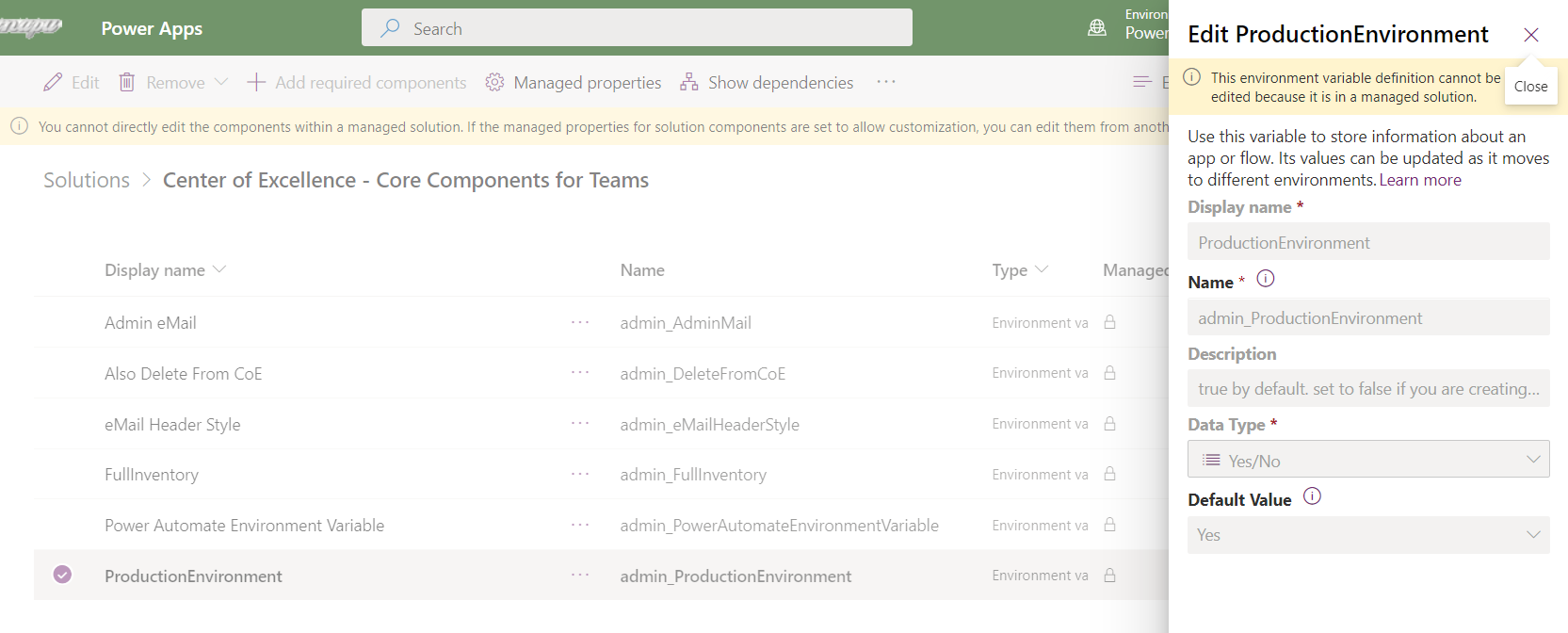
Not able to update the Environment variable value for COE DataVerse for Teams solution. #129

Description

Hi Team,
Congratulations on releasing the new version of COE on DataVerse for Teams.
Issue
Yesterday while I am configuring on my personal tenant I noticed there is no way I can update the environment variable
Steps to reproduce the behavior:
- Go to Solution of the Dataverse for Teams environment
- Select the core components solution
- select the Environment variables as part of the dropdown (on top right corner)
- Select ProductionEnvironment variable, it clearly says "This environment variable definition cannot be edited because it is in a managed solution" on top.
Note: I need this to be No because I want to configure it for DEV setup (description on the env variable "true by default. set to false if you are creating a dev type envt. this will allow some flows to set target users to the admin instead of object owners") - In the past we use to go on to the environment variable table at the environment level and change the value to No since we want to configure it as DEV environment.
Expected behavior
I should be able to change the variable value to No.
Screenshots