Since there has been talk to make NVDA the primary screen reader used for testing, I have been looking into resolving this issue.
Describe the bug; what happened?
When adding an aria-label attribute to fast-anchor or fast-button, native screen readers, like VoiceOver and Narrator will read the aria-label, but NVDA will not.
Repo steps:
- Add
aria-label to fast-anchor or fast-button to a host element.
- Run NVDA and tab to the link or button
- Notice NVDA does not read the
aria-label
What behavior did you expect?
NVDA should read what aria-label
Upon further investigation, adding the aria-label to the component does not set an aria-label to control inside the shadow root.
Here is the markup:

When inspecting the DOM, you see the anchor in the shadow root does not have an aria-label set on it.
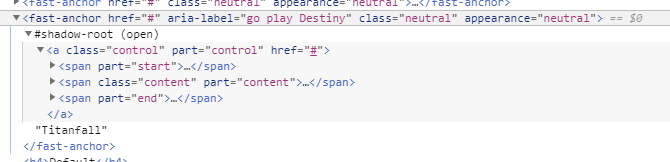
Two things:
- This could be an issue with NVDA, where it doesn't read aria-labels on our custom web components. We file an issue with them to investigate why.
or
- We need to set
aria-label in the template so it will pass aria-label onto the control inside the shadow root.
Here is the proposed fix is to pass aria-label to the control inside the shadow root if we choose this route.
Add an aria-label attribute to the anchor tag inside the fast-anchor template.

Add an aria-label attribute to the button tag inside the fast-button template.
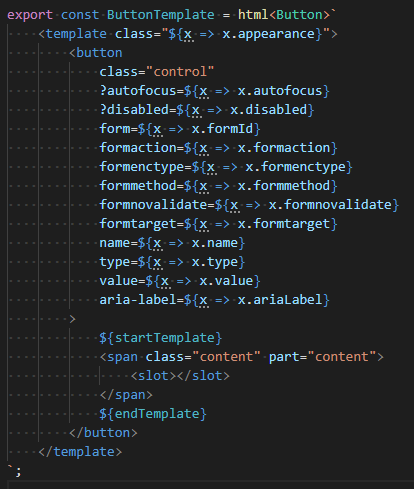
Now when inspecting the DOM, you see that aria-label is also added in the anchor control.

NVDA will now read out the aria-label.
Side note:
Another issue I noticed adding aria-label. Typically the screen reader should only read the aria-label and not the content text. In the case of our fast-anchor and fast-button, the screen reader is reading both the aria-label and the content text.
example:
The screen reader should only read out "go play Destiny, link".
Instead, it is reading out
"go play Destiny, link, Titanfall" (Narrator)
"link, Titanfall, go play Destiny" (VoiceOver)
The proposal fix will also resolve the screen reader from also reading out the content text when aria-label is added. My guess on this is because all the screen readers now reading an aria-label on HTML control.
Even though NVDA gets resolved, and reading the aria-label only gets resolved (on all 3 screen reader), it brings up another issue.
VoiceOver will now read the aria-label twice. My guess is, it is reading the aria-label on the template and on the control.

The question is, what is the correct approach, and which screen reader is right or wrong or buggy?
Do we file an issue with NVDA, for not reading the aria-label on the DOM level, or is it an issue with VoiceOver, for reading both aria-label on both the DOM and shadow root level?


Since there has been talk to make NVDA the primary screen reader used for testing, I have been looking into resolving this issue.
Describe the bug; what happened?
When adding an
aria-labelattribute tofast-anchororfast-button, native screen readers, like VoiceOver and Narrator will read thearia-label, but NVDA will not.Repo steps:
aria-labeltofast-anchororfast-buttonto a host element.aria-labelWhat behavior did you expect?
NVDA should read what
aria-labelUpon further investigation, adding the
aria-labelto the component does not set anaria-labelto control inside the shadow root.Here is the markup:

When inspecting the DOM, you see the anchor in the shadow root does not have an

aria-labelset on it.Two things:
or
aria-labelin the template so it will passaria-labelonto the control inside the shadow root.Here is the proposed fix is to pass
aria-labelto the control inside the shadow root if we choose this route.Add an

aria-labelattribute to the anchor tag inside thefast-anchortemplate.Add an

aria-labelattribute to the button tag inside thefast-buttontemplate.Now when inspecting the DOM, you see that

aria-labelis also added in the anchor control.NVDA will now read out the
aria-label.Side note:
Another issue I noticed adding
aria-label. Typically the screen reader should only read thearia-labeland not the content text. In the case of ourfast-anchorandfast-button, the screen reader is reading both thearia-labeland the content text.example:

The screen reader should only read out "go play Destiny, link".
Instead, it is reading out
"go play Destiny, link, Titanfall" (Narrator)
"link, Titanfall, go play Destiny" (VoiceOver)
The proposal fix will also resolve the screen reader from also reading out the content text when
aria-labelis added. My guess on this is because all the screen readers now reading anaria-labelon HTML control.Even though NVDA gets resolved, and reading the

aria-labelonly gets resolved (on all 3 screen reader), it brings up another issue.VoiceOver will now read the
aria-labeltwice. My guess is, it is reading thearia-labelon the template and on the control.The question is, what is the correct approach, and which screen reader is right or wrong or buggy?
Do we file an issue with NVDA, for not reading the
aria-labelon the DOM level, or is it an issue with VoiceOver, for reading botharia-labelon both the DOM and shadow root level?