WCAG 1.4.11 Color Contrast violation on hovered controls in Fluent Tester #745


Description

The hover background on some of the controls (button, context menu options, etc) do not meet WCAG 1.4.11 requirements for color contrast.
Success Criterion 1.4.11 Non-text Contrast (Level AA): The visual presentation of the following have a contrast ratio of at least 3:1 against adjacent color(s).
Environment Information
-
Package version(s): (fill this out, include which package manager you're using)
-
OS version: (fill this out if relevant)
-
Platform:
- iOS
- Xcode version:
- macOS
- Xcode version:
- win32
- windows
- android
- iOS
Please provide a reproduction of the bug:
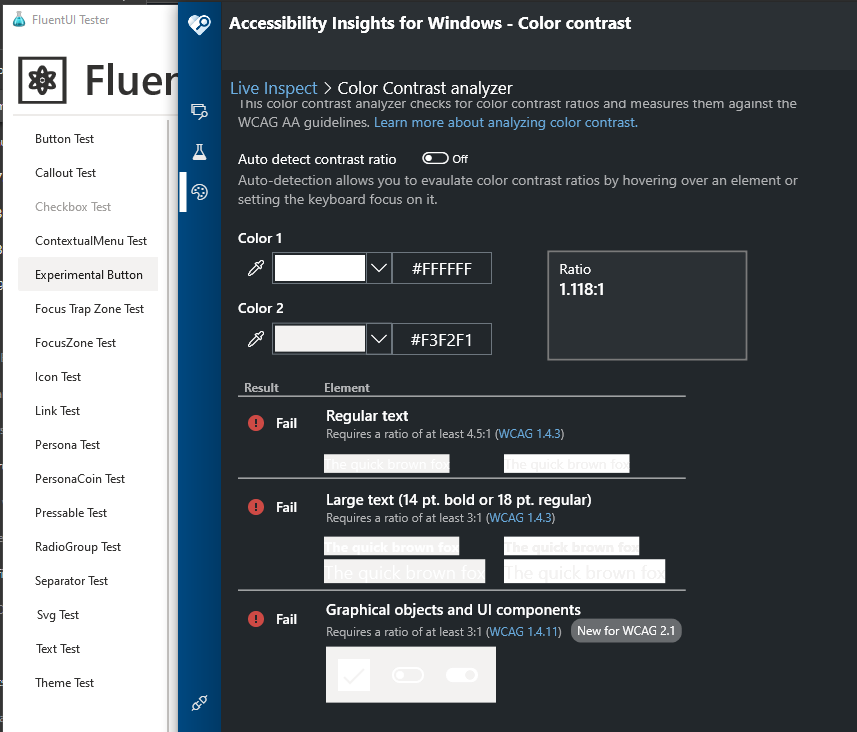
Open Fluent UI Tester and hover on one of the buttons. Inspect the color contrast of the hovered button with an adjacent color with AccessibilityInsights.
Actual behavior:
Color Contrast between hovered control and surrounding controls is 1.118.1
Expected behavior:
Color Contrast between hovered control and surrounding controls should be 3:1.
Priorities and help requested:
Are you willing to submit a PR to fix? Yes
Requested priority: Low/Normal?
Products/applications affected: (if applicable)