Platform:
OS - Windows 10-Version 1909- (Build 18363.778)
Microsoft Edge Dev Build
Version 84.0.502.0 (Official build) dev (64-bit)
Pre-requisites:
High contrast black -Turn on
Repro steps:
1.Load https://account.microsoft.com/internal/twoui/iframe.html?id=common-choicegroup--default&viewas=engineer&refd=account.microsoft.com in Edge browser with valid credentials.
-
Select 'option B' radio button
-
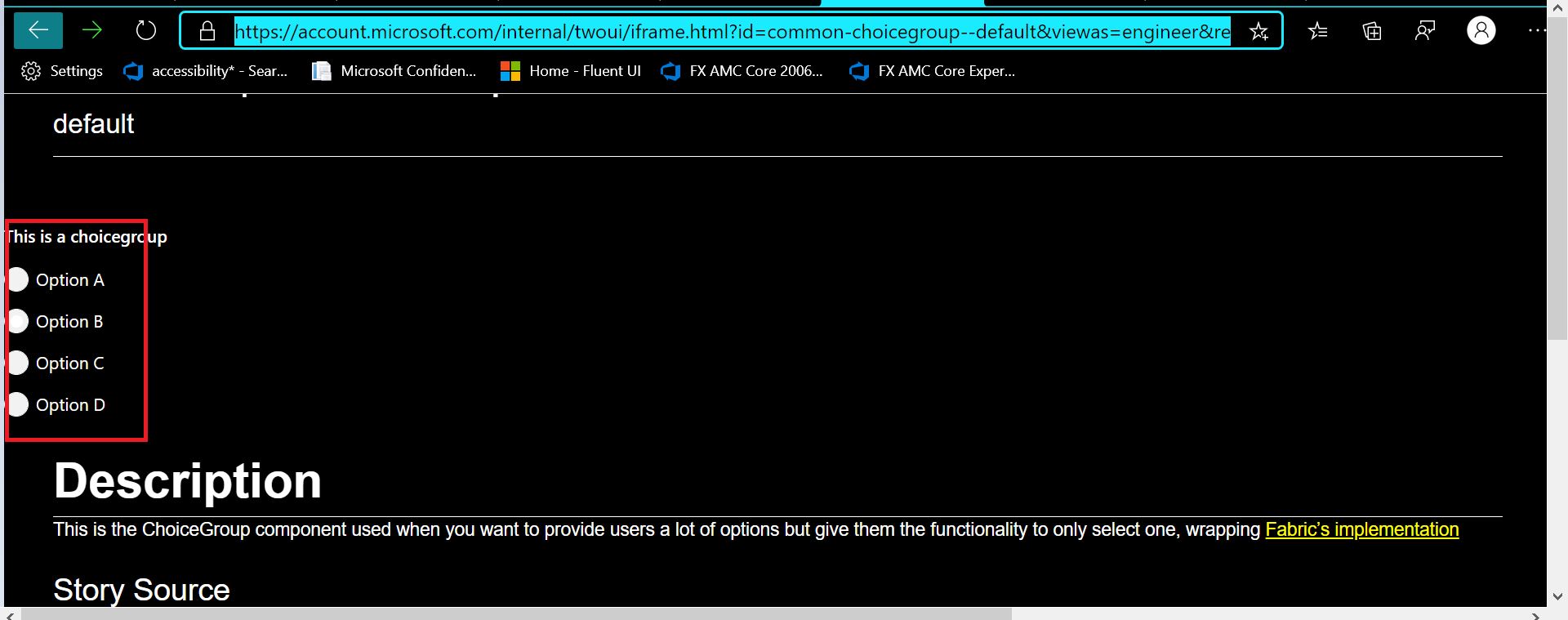
Observe option B select state in High contrast black
Expected Result:
Select radio button should be in 'Cyan blue' color and selected radio button should be visible to user.
Actual Result:
All buttons are in white and user doesn't know which one is selected.


Platform:
OS - Windows 10-Version 1909- (Build 18363.778)
Microsoft Edge Dev Build
Version 84.0.502.0 (Official build) dev (64-bit)
Pre-requisites:
High contrast black -Turn on
Repro steps:
1.Load https://account.microsoft.com/internal/twoui/iframe.html?id=common-choicegroup--default&viewas=engineer&refd=account.microsoft.com in Edge browser with valid credentials.
Select 'option B' radio button
Observe option B select state in High contrast black
Expected Result:
Select radio button should be in 'Cyan blue' color and selected radio button should be visible to user.
Actual Result:
All buttons are in white and user doesn't know which one is selected.