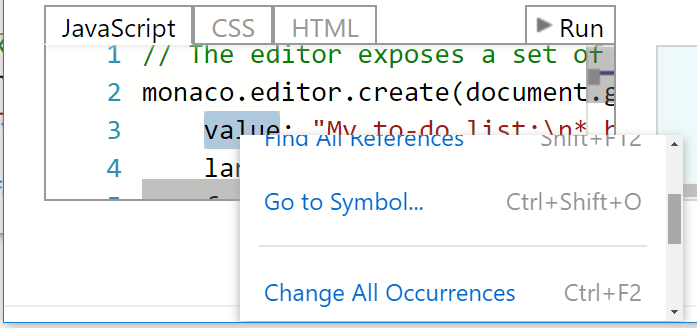
Monaco's context menu should not get clipped at container or browser boundaries #484


Description

monaco-editor version: 0.8.3
Browser: Any
OS: Windows 10
During Accessibility testing, one of the tests performed for the visually impaired is to check that a site is still functional (though not necessarily pretty) at 200% browser zoom on a typical/low-end monitor with no other OS scaling. An issue found was that Monaco's context menu can become clipped either by the edge of the browser window, or by the container hosting Monaco if it is styled with overflow:hidden.
A common pattern to avoid this is to append the context menu container to the BODY element rather than within the Monaco container, and use absolute positioning relative to the window. This gets it out of the Monaco container, so overflow styles do not affect it. Also, it should get a vertical scrollbar if needed (overflow-y auto) if it does not fit within the bounds of the browser window. Shown below is the Monaco playground, zoomed at 200%, with the menu getting clipped at the bottom of the browser window (figure 1). Following that is the same but with a height put on the menu at the boundary and a scrollbar, slightly scrolled down, so that all menu items can still be accessed (figure 2).
Figure 1: Monaco at 200% with clipped menu and inaccessible menu items.

Figure 2: Menu with a set height and vertical scrollbar.