VS2019 Project Properties failed to load with ONNX DirectML NuGet package. #10236

Description

Describe the bug
VS2019 Project Properties GUI failed to load when ONNX DirectML NuGet package is added to project.
Urgency
Can't change Visual Studio Project Application properties.
System information
Windows 10
VS2019 Version 16.11.8
NuGet Package Manager Version 5.11.0
CUDA 11.0.3, cuDNN 8.0.2.39
RTX 3070 8GB
To Reproduce
Create a console application.
Right click on the project and select Properties.
The UI should show up like in 'Expected' Screenshot below.
Close Project Properties tab.
Add Microsoft.ML.OnnxRuntime.DirectML v1.8.0 from NuGet Package Manager.
Right click and reopen Project Properties tab.
An error message shows up in the Application sub tab saying "An error occurred trying to load the page. Object reference not set to an instance of an object." See 'Got' screenshot below.
Expected behavior
See To Reproduce
Screenshots
Expected:

Got:
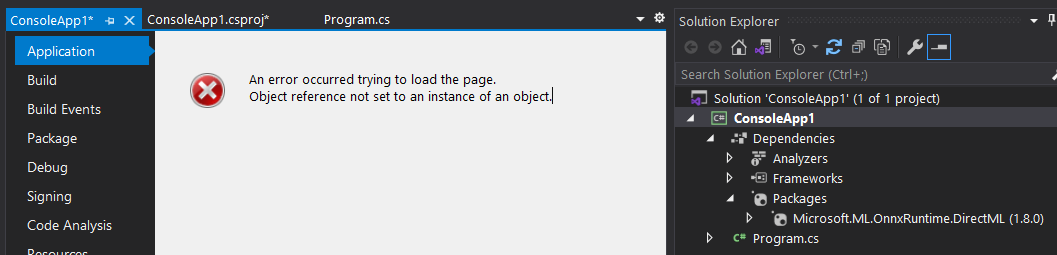
Additional context
I tried opening the project in VS2022 and Project Properties open up OK.
