Skip to content

Add Excel Add-in BERT NLP Custom Function Tutorial#13826

Merged
cassiebreviu merged 23 commits into
microsoft:gh-pagesfrom
cassiebreviu:add-excel-bert-docs-tutorial
Dec 6, 2022
Merged

Add Excel Add-in BERT NLP Custom Function Tutorial#13826
cassiebreviu merged 23 commits into
microsoft:gh-pagesfrom
cassiebreviu:add-excel-bert-docs-tutorial

Conversation

@cassiebreviu
Copy link
Copy Markdown
Contributor

Description

Add new tutorial for ONNX Runtime web to work in excel with local models.

https://cassiebreviu.github.io/onnxruntime/docs/tutorials/web/excel-addin-bert-js.html

@cassiebreviu cassiebreviu requested a review from natke December 2, 2022 21:40
Copy link
Copy Markdown
Contributor

@natke natke left a comment

Choose a reason for hiding this comment

The reason will be displayed to describe this comment to others. Learn more.

Cool tutorial!

I'm not sure from reading through it, how I embed the code into excel. Would it be possible to add a sentence or two on how that is done? Maybe in the Custom functions section e.g. you could explain how to add a function that prints your name or something trivial like that, to demonstrate how it runs in excel

@cassiebreviu
Copy link
Copy Markdown
Contributor Author

cassiebreviu commented Dec 2, 2022

Cool tutorial!

I'm not sure from reading through it, how I embed the code into excel. Would it be possible to add a sentence or two on how that is done? Maybe in the Custom functions section e.g. you could explain how to add a function that prints your name or something trivial like that, to demonstrate how it runs in excel

So this is covered in this section when following the doc to create the base project. https://cassiebreviu.github.io/onnxruntime/docs/tutorials/web/excel-addin-bert-js.html#creating-the-custom-function-project-with-the-yeoman-cli

However, I see if you were reading it without actually doing the steps it appears to be missing. I will add in the command to run it locally at the end of the description of each function logic. The command to run the project sideloads the addin to excel.

@cassiebreviu cassiebreviu requested a review from natke December 2, 2022 22:52
@natke
Copy link
Copy Markdown
Contributor

natke commented Dec 2, 2022

Cool tutorial!
I'm not sure from reading through it, how I embed the code into excel. Would it be possible to add a sentence or two on how that is done? Maybe in the Custom functions section e.g. you could explain how to add a function that prints your name or something trivial like that, to demonstrate how it runs in excel

So this is covered in this section when following the doc to create the base project. https://cassiebreviu.github.io/onnxruntime/docs/tutorials/web/excel-addin-bert-js.html#creating-the-custom-function-project-with-the-yeoman-cli

However, I see if you were reading it without actually doing the steps it appears to be missing. I will add in the command to run it locally at the end of the description of each function logic. The command to run the project sideloads the addin to excel.

Much better!

This is super nit picky but I think the explanation would be improved by calling out that the URL is the URL of the excel spreadsheet in the web browser (if that is indeed what it is)

Comment thread docs/tutorials/web/excel-addin-bert-js.md Outdated

```bash
// Command to run on the web.
npm run start:web -- --document {url}
Copy link
Copy Markdown
Contributor

Choose a reason for hiding this comment

The reason will be displayed to describe this comment to others. Learn more.

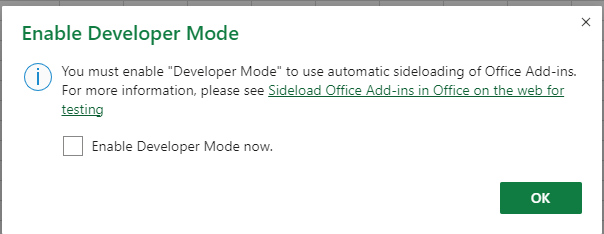
Also might want to highlight that Developer mode needs to be enabled
image

Copy link
Copy Markdown
Contributor

Choose a reason for hiding this comment

The reason will be displayed to describe this comment to others. Learn more.

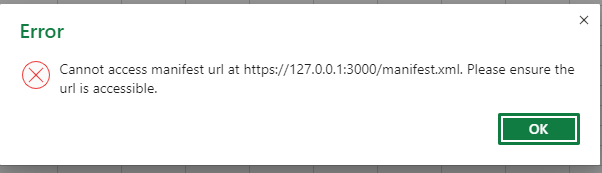
I got this when I tried to run it

image

But I think that was because I had to manually accept the certificate? Then I had to kill the job and start it again.

Once it was successfully loaded I couldn't see where I could find the example custom functions?

Copy link
Copy Markdown
Contributor

Choose a reason for hiding this comment

The reason will be displayed to describe this comment to others. Learn more.

Ok got it finally. Found the namespace. I don't think it would hurt to spell these things out for a naïve user, so that they can test the basic concepts before digging into the ORT stuff

Copy link
Copy Markdown
Contributor Author

Choose a reason for hiding this comment

The reason will be displayed to describe this comment to others. Learn more.

These issues are covered in the tutorial that is linked in the prerequisite. I do not think it needs to be duplicated in this tutorial. This is focused on the ORT and inference logic on top of the tutorial for making a plugin.

Copy link
Copy Markdown
Contributor

Choose a reason for hiding this comment

The reason will be displayed to describe this comment to others. Learn more.

I think this tutorial would be better as a self contained article. Taking the user out of this context and into the middle of the other tutorial blurs the clarity of this one (even more so, as the steps are pretty simple, and not too much work to bring the steps into this one). We could have the other tutorial as a reference if folks want more background

Copy link
Copy Markdown
Contributor Author

Choose a reason for hiding this comment

The reason will be displayed to describe this comment to others. Learn more.

Updated!

@cassiebreviu cassiebreviu requested a review from natke December 5, 2022 16:33
@cassiebreviu
Copy link
Copy Markdown
Contributor Author

Cool tutorial!
I'm not sure from reading through it, how I embed the code into excel. Would it be possible to add a sentence or two on how that is done? Maybe in the Custom functions section e.g. you could explain how to add a function that prints your name or something trivial like that, to demonstrate how it runs in excel

So this is covered in this section when following the doc to create the base project. https://cassiebreviu.github.io/onnxruntime/docs/tutorials/web/excel-addin-bert-js.html#creating-the-custom-function-project-with-the-yeoman-cli
However, I see if you were reading it without actually doing the steps it appears to be missing. I will add in the command to run it locally at the end of the description of each function logic. The command to run the project sideloads the addin to excel.

Much better!

This is super nit picky but I think the explanation would be improved by calling out that the URL is the URL of the excel spreadsheet in the web browser (if that is indeed what it is)

updated.

Copy link
Copy Markdown
Contributor

@natke natke left a comment

Choose a reason for hiding this comment

The reason will be displayed to describe this comment to others. Learn more.

Looking good!

We can remove the CLI pre req now I think?

Will approve now so you can merge after that has been removed

@cassiebreviu cassiebreviu merged commit 8d612d6 into microsoft:gh-pages Dec 6, 2022
Sign up for free to join this conversation on GitHub. Already have an account? Sign in to comment

Labels

None yet

Projects

None yet

Development

Successfully merging this pull request may close these issues.

2 participants