Context:
- Playwright Version: 1.22.0
- Operating System: Windows
- Node.js version: 14.17.6
- Browser: Edge Canary
- Extra:
We are trying to use PlayWright to test a feature that's currently only available in Edge Canary. The work flow is that user signs into twitter, types "We love plants!", then a paint brush icon will appear on the address bar. Clicking on the paint brush icon will show a "Designer in Microsoft Edge" flyout. The blocking issue we are having is that we can't get a reference to this flyout.
Please note that in Selenium, after we set options.add_experimental_option('windowTypes', ['other']), we can reference the flyout using self._driver.switch_to.window(handle). We need something similar on PlayWright.
This issue is blocking us from using PlayWright. We want to use PlayWright instead of Selenium, because we already have a lot of other tests written in PlayWright, and we are hoping to re-use these tests.
Below is the code you can run to repro this issue. You need to download edge canary as this feature is currently only available in edge canary.
import { chromium } from 'playwright';
describe('Twitter test', () => {
test('Twitter login', async () => {
    const context = await chromium.launchPersistentContext('C:\\temp-edge\\edge-dev-profile', {
        headless: false,
        channel: "msedge-canary",
        args: ['--enable-features=NetworkService,NetworkServiceInProcess,msEdgeDesignerUI,msDisableHubPopupLightDismiss'],
    });
    const page = await context.newPage();
    await page.goto('https://twitter.com/home');

    await page.pause();

    // Here you need to sign in to twitter
    // type 'We love plants!' in its message composing box
    // wait for the paint brush button to appear and click it to bring up the Designer In Microsoft Edge flyout
    // then resume the script

    const pages = context.pages();
    // The issue here is that pages array doesn't have the Designer in Microsoft Edge flyout

    await page.pause();
    console.log("Count of page is: " + pages.length);
  });
});
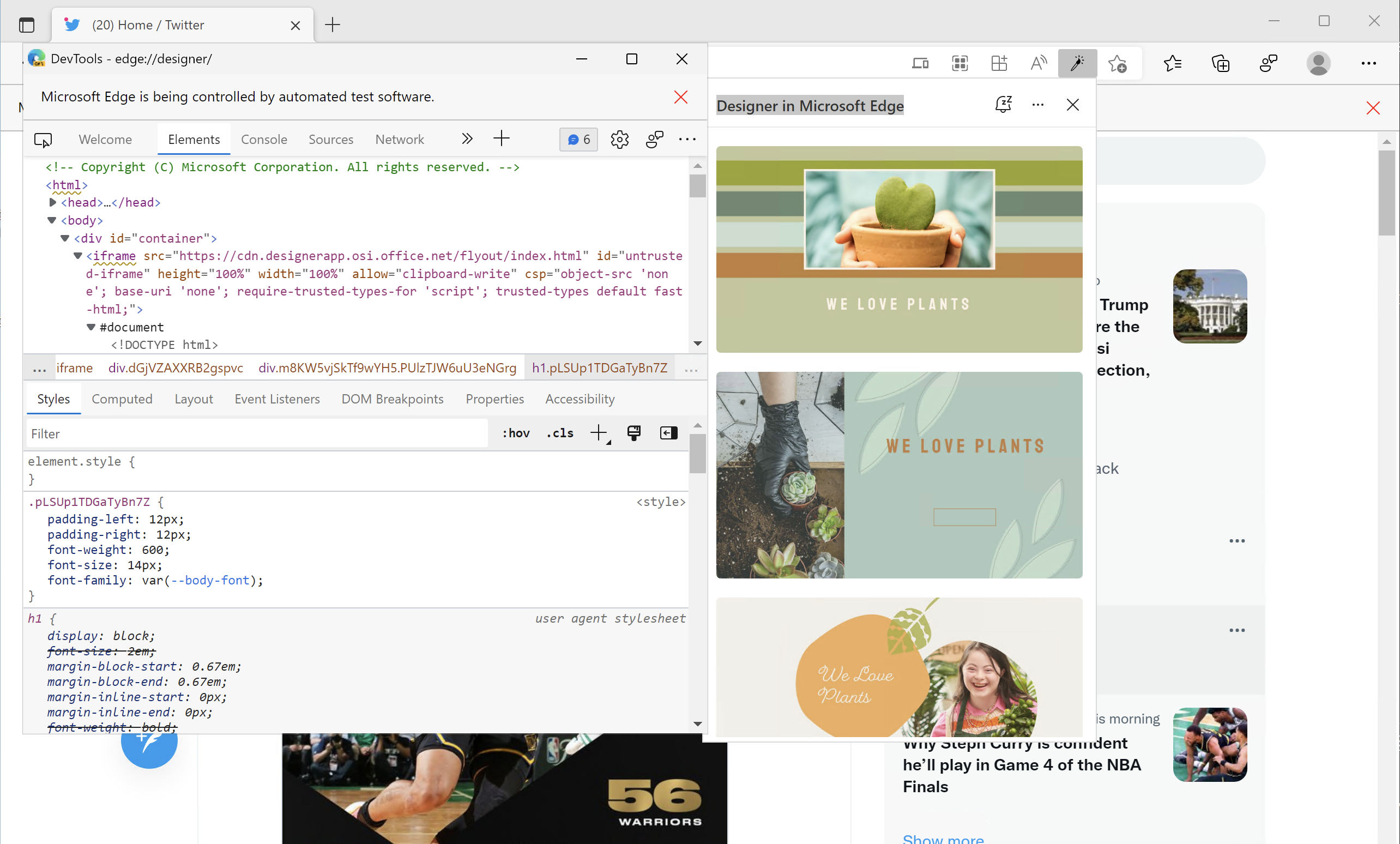
This screenshot shows the paint brush icon on the address bar to trigger the flyout, the Designer In Microsoft Edge flyout and also its DOM tree.
Talked with Pavel Feldman on this. If you can get this fixed in this week's release, that will be great. Please feel free to ping me on Teams if there is any more information I can provide.

Context:
We are trying to use PlayWright to test a feature that's currently only available in Edge Canary. The work flow is that user signs into twitter, types "We love plants!", then a paint brush icon will appear on the address bar. Clicking on the paint brush icon will show a "Designer in Microsoft Edge" flyout. The blocking issue we are having is that we can't get a reference to this flyout.
Please note that in Selenium, after we set options.add_experimental_option('windowTypes', ['other']), we can reference the flyout using self._driver.switch_to.window(handle). We need something similar on PlayWright.
This issue is blocking us from using PlayWright. We want to use PlayWright instead of Selenium, because we already have a lot of other tests written in PlayWright, and we are hoping to re-use these tests.
Below is the code you can run to repro this issue. You need to download edge canary as this feature is currently only available in edge canary.
import { chromium } from 'playwright';
describe('Twitter test', () => {
This screenshot shows the paint brush icon on the address bar to trigger the flyout, the Designer In Microsoft Edge flyout and also its DOM tree.

Talked with Pavel Feldman on this. If you can get this fixed in this week's release, that will be great. Please feel free to ping me on Teams if there is any more information I can provide.