Hi everyone, I'm trying so hard to do the following:
test('compare screenshots', async({page, context}) => {
const map_element1 = await page.$('map_selector');
const screen1 = await map_element1.screenshot({path:'screen.png'});
await page.waitForTimeout(5000);
const map_element2 = await page.$('map_selector_but_with_different_location');
const screen2 = await map_element2.screenshot({path: 'screen2.png'});
expect(screen2).toMatchSnapshot('screen.png');
});
that is, I want to write a test where I can make two subsequent screenshots and then compare them with the expect(screen2).toMatchSnapshot('screen.png').
Now I digged a bit into the inner code and I found that normally if a "-snapshots" folder is not present inside your project, then Playwright create it first but letting the test fail. Only since then you can re-run the test and make the comparison with a second screenshot you may take.
Is there a way to make everything in a single test? I also tried to modify a little bit the code inside the definition of .toMatchSnapshot() like in the image below:
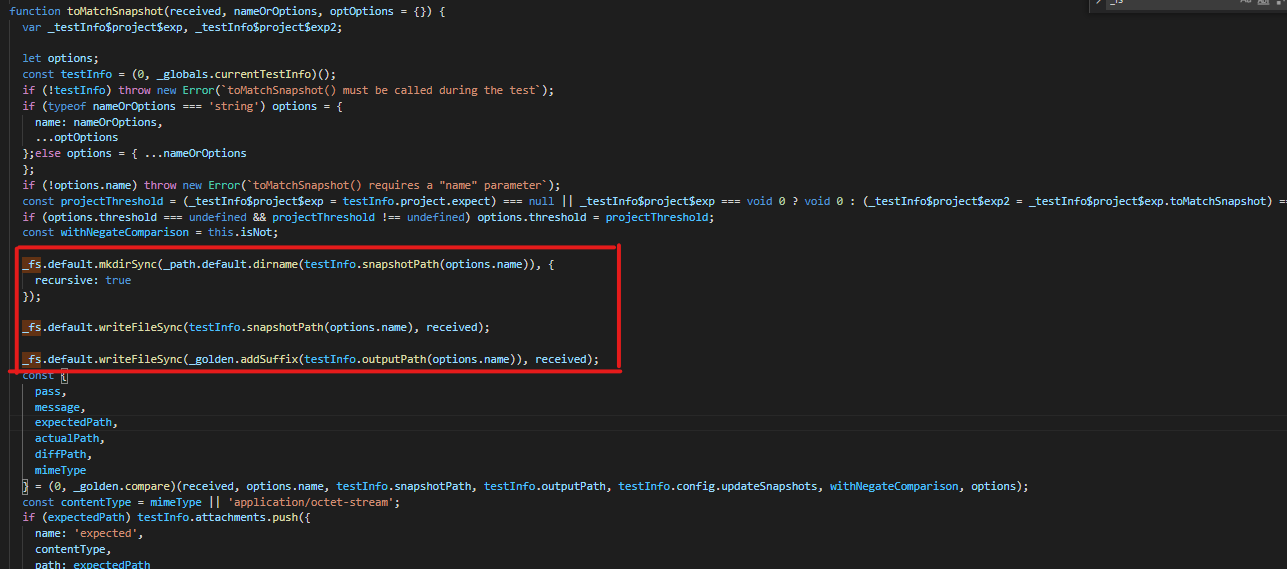
in order to:
- create the "-snapshots" folder before the core compare() function get called;
- once the compare() is called, it already finds a folder with the first screen inside it and then it compares it to the second one.
but it doesn't seem to work..any suggestion? Maybe I misunderstood something about all the steps? Thank you :)

Hi everyone, I'm trying so hard to do the following:
test('compare screenshots', async({page, context}) => {const map_element1 = await page.$('map_selector');const screen1 = await map_element1.screenshot({path:'screen.png'});await page.waitForTimeout(5000);const map_element2 = await page.$('map_selector_but_with_different_location');const screen2 = await map_element2.screenshot({path: 'screen2.png'});expect(screen2).toMatchSnapshot('screen.png');});that is, I want to write a test where I can make two subsequent screenshots and then compare them with the
expect(screen2).toMatchSnapshot('screen.png').Now I digged a bit into the inner code and I found that normally if a "-snapshots" folder is not present inside your project, then Playwright create it first but letting the test fail. Only since then you can re-run the test and make the comparison with a second screenshot you may take.
Is there a way to make everything in a single test? I also tried to modify a little bit the code inside the definition of .toMatchSnapshot() like in the image below:
in order to:
but it doesn't seem to work..any suggestion? Maybe I misunderstood something about all the steps? Thank you :)