
QDK Learning experience
This release introduces a new learning experience that tightly integrates the QDK developer tools with GitHub Copilot.
With learning content now in the same rich environment used to develop quantum programs, backed by the latest AI models and editor integration from VS Code and GitHub Copilot, you can rapidly switch between learning, experimenting, and developing.
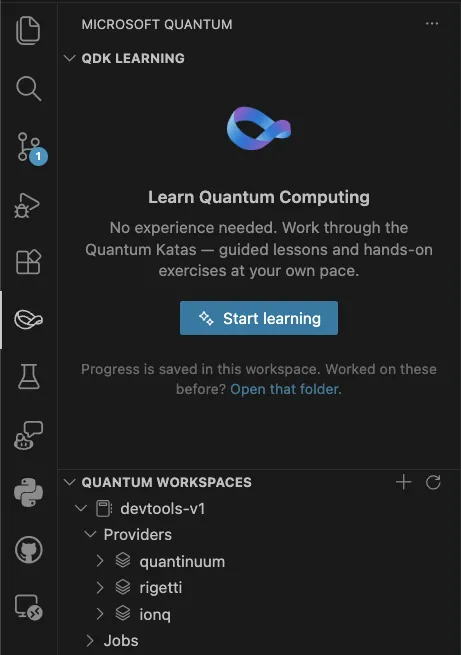
To get started, navigate to the new Microsoft Quantum icon on the activity bar (see next section), and click on Start learning. Copilot will then create a folder structure in your current workspace to track progress, bring up a list of lessons to work through, and help guide you through exercises, answer questions, or explore concepts further.
kata-sm2.mp4
If you need help getting GitHub Copilot configured in VS Code, see the docs at https://code.visualstudio.com/docs/copilot/setup.
This is a new feature and we will continue iterating on the experience. As always, if you have any suggestions or encounter any issues, please log them at https://github.com/microsoft/qdk/issues .
New Microsoft Quantum icon in the VS Code activity bar
In this release we have added a Microsoft Quantum area to the VS Code Activity Bar, identified by the Möbius strip icon. This area contains the new QDK Learning experience outlined above, and is the new home for the Quantum Workspaces container for connecting to Azure Quantum that previously lived in the Explorer view.
Deprecation of the qsharp Python package
With this release we have moved the Python implementation out of the qsharp package and into the qdk package, and marked the qsharp package as deprecated. If you import directly from the qsharp package in Python you will get a warning to use the qdk package and its submodules instead.
Besides the warning, there should be no change in functionality during the transition. We encourage you to update any code that imports directly from qsharp to use this new pattern, as the deprecated package will stop shipping in a future release.
Clifford simulation
When using the Python APIs qdk.qsharp.run or qdk.openqasm.run to run a quantum simulation, you may now pass a type="clifford" argument to indicate that the simulation should run on the Clifford simulator rather than the default sparse simulator.
Clifford simulation scales to a much higher number of qubits, but only supports a restricted set of quantum operations. See the page at https://learn.microsoft.com/en-us/azure/quantum/simulators-overview-qdk for more details.
Isolated Python context
Previously when evaluating or running Q# or QASM code in a Python environment, all interactions occurred in a single global interpreter. This reliance on global state was less than ideal for code that expected a clean environment. This release includes a new qdk.Context API to create a separate quantum interpreter from the global one. The returned context has an API similar to the top level API, e.g.
import qdk

ctx = qdk.Context()
ctx.eval("operation Main() : Result { use q = Qubit(); X(q); MResetZ(q) }")
assert ctx.run("Main()", 2) == [qdk.Result.One, qdk.Result.One]
See the PR at 3208 for more details.
Custom parameters for job submission via VS Code
The Python API to submit jobs to the Azure Quantum service has always had the ability to attach custom parameters with job submission. With this release, we've added the ability to set per-target custom parameters in VS Code, which will then be attached to any job submitted via the Quantum Workspaces tree view or GitHub Copilot tools.
See the PR at 3222 for more details.
Update Python API documentation
The Python API documentation has been cleaned up and refreshed for this release. The improvements should be noticeable both in the Python code editor via IntelliSense, as well as the online documentation at https://learn.microsoft.com/en-us/python/qdk/qdk
Other notable changes
- Provide lhs_span to binop errors when necessary by @joao-boechat in 3185
- Enable Clifford simulation in
qsharp.runby @swernli in 3164 - Optimize H/Rx/Ry in sparse sim by @swernli in 3196
- Fix azure error logging by @joao-boechat in 3197
- Fix debugger error formatting in circuit panel by @joao-boechat in 3191
- Move contents of
qsharppython package toqdkpython package by @ScottCarda-MS in 3192 - Compute runtime of a trace by @msoeken in 3209
- QREv3 neutral atom models by @msoeken in 3211
- Replace deprecated Microsoft.Quantum._ namespace references with Std._ in library tests by @Copilot in 3161
- Added 8T->CCX and cultivation models by @msoeken in 3212
- Add Context API by @fedimser in 3208
- Add array support to QIR bytecode by @orpuente-MS in 3219
- Custom Job Params for Targets by @ScottCarda-MS in 3222
- Improve performance of
OutputRecordingPasswhen processing QIR simulation results by @swernli in 3235 - Make prereqs.py specific about rust version by @amcasey in 3231
- Fix output processing on failed simulation by @swernli in 3237
- Add interactive Quantum Katas learning experience to VS Code extension by @minestarks in 3228
- Manual Memory-Compute qubits by @fedimser in 3204
- Learning panel: click-to-navigate, exercise reset, and layout cleanup by @minestarks in 3249
- Updated source, docstrings, and tests for qdk.magnets.trotter by @brad-lackey in 3226
- Update Python API Doc Strings by @ScottCarda-MS in 3225
New Contributors
Full Changelog: v1.28.0...v1.29.0


