Issues with getting previous command and backspace #10760

Description

Windows Terminal version (or Windows build number)
1.8.1521.0
Other Software
Using bash on WSL on Windows Terminal.
Steps to reproduce
Using bash on WSL on Windows Terminal.
- Type some command and run it.
- Then try to go back to a previous command (up arrow), and backspace to clear it.
Note that this does not happen every time. Sometimes the command can be cleared as expected, sometimes it cannot.
See below:
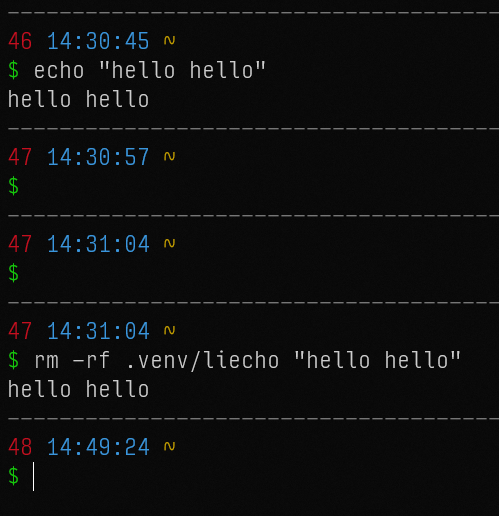
The first line ran fine. Then I tried to select a previous command, and was able to clear it fine, and pressed enter. Then again, same thing. But third time I tried to backspace, and it would not go past the li. However, the text actually get's cleared, as if I press enter it gives no output, and I can type additional commands and they work as expected. But visually, the text is still there.
I should add that I have seen similar behaviour before on the online IDE platform repl.it, where commands do not fully get deleted visually.
Apologies if this is a possible duplicate.
Expected Behavior
You should be able to clear the entire command.
Actual Behavior
Only some of the previous command gets cleared, and new text gets appended to it. However the actual text has been deleted, but it doesn't show.