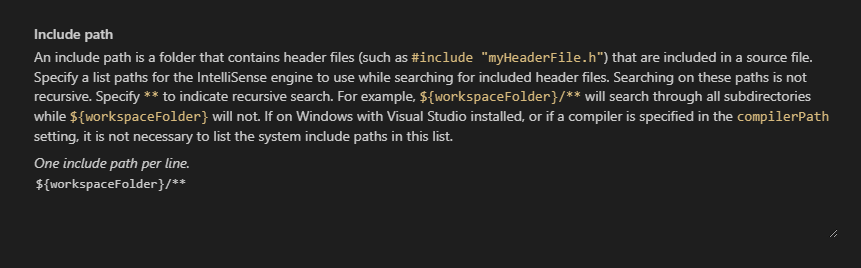
Wrong background color for text areas in config UI with Insiders 1.50.0 #6201

Description

Type: General
Describe the bug
- OS and Version: Microsoft Windows [Version 10.0.19041.487]
- VS Code Version:
Version: 1.50.0-insider (user setup)
Commit: e80644fd7da69295b18e7f79403720dd1b155507
Date: 2020-09-22T10:11:29.896Z
Electron: 9.3.0
Chrome: 83.0.4103.122
Node.js: 12.14.1
V8: 8.3.110.13-electron.0
OS: Windows_NT x64 10.0.19041
- C/C++ Extension Version: 1.0.1
- Other extensions you installed (and if the issue persists after disabling them):
- A clear and concise description of what the bug is.
To Reproduce
Please include code sample and task.json files.
Steps to reproduce the behavior:
- Open config UI
Expected behavior
A clear and concise description of what you expected to happen.
Using the same theme keys as the builtin settings UI:
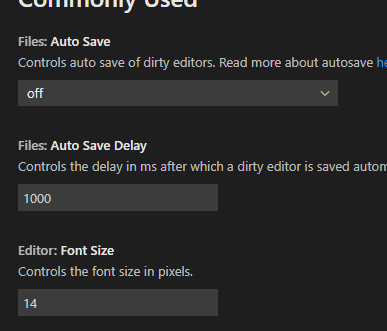
Otherwise it's hard to know what is input and what is just readonly text.
Screenshots
If applicable, add screenshots to help explain your problem.
Additional context
Add any other context about the problem here including log messages from the Output window.