Environment data
- VS Code version: 1.52.1
- Extension version: Python 2020.12.424452561
- OS and version: macOS 10.14.6
- Python version: 3.7.7 64-bit
- Type of virtual environment used: virtualenv
- Relevant/affected Python-related VS Code extensions and their versions:
advanced-new-file 1.2.2 (patbenetar)
Django 1.0.1 (Darthenay)
Highlight Line 0.0.1 (Fajardo)
Highlight Matchting Tag 0.10.0 (vincaslt)
Jupyter 2020.12.414227025
Live Server 5.6.1 (Dey)
Lorem Ipsum 1.2.0 (Imms
Quit Control for VSCode 3.1.3 (Adam)
Remote - SSH 0.62.0
Remote -SSH: Editing 0.62.0
Vim 1.18.5 (vscodevim)
vscode-icons 11.0.0
Peacock (3.9.1)
Expected behaviour
Open Code editor and all extensions load within a few seconds.
Actual behaviour
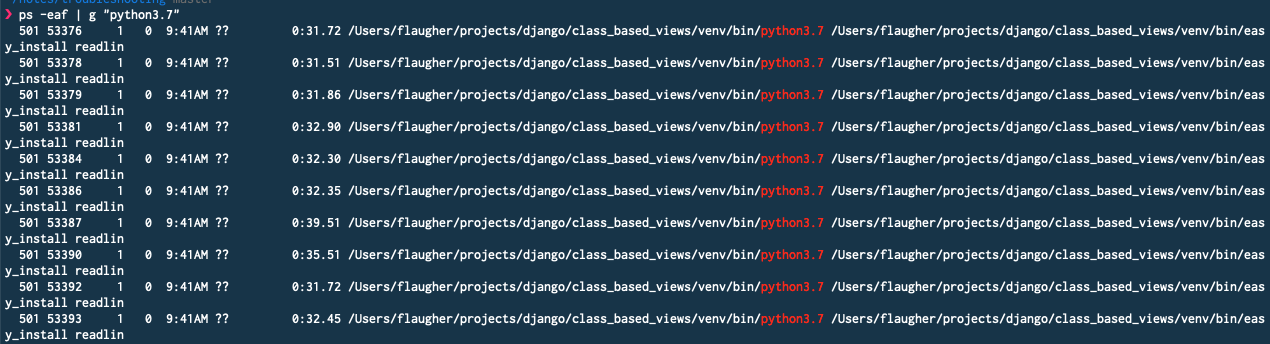
I open the Code editor and, if I add a new extension, I see "Python extension loading ..." and it never ends. The load on both CPU cores reaches almost 100% and the editor slows down to a crawl. I see about 50 new Python 3.7 processes running.
Steps to reproduce:
Open Code and add a new extension.
When I add a new extension, I can run "ps -eaf | grep "python3.7" and see over 50 new Python 3.7 processes appear and the Mac Bartender app will show both cores almost maxed out. If I then close the project and close and reopen Code, all extensions (including the Python extension) will load in approximately 2 seconds. I will then only see a couple of Python processes and the CPU load returns to normal (< 20% or so).
Please let me know what other information I can provide. Thank you.


Environment data
advanced-new-file 1.2.2 (patbenetar)
Django 1.0.1 (Darthenay)
Highlight Line 0.0.1 (Fajardo)
Highlight Matchting Tag 0.10.0 (vincaslt)
Jupyter 2020.12.414227025
Live Server 5.6.1 (Dey)
Lorem Ipsum 1.2.0 (Imms
Quit Control for VSCode 3.1.3 (Adam)
Remote - SSH 0.62.0
Remote -SSH: Editing 0.62.0
Vim 1.18.5 (vscodevim)
vscode-icons 11.0.0
Peacock (3.9.1)
Expected behaviour
Open Code editor and all extensions load within a few seconds.
Actual behaviour
I open the Code editor and, if I add a new extension, I see "Python extension loading ..." and it never ends. The load on both CPU cores reaches almost 100% and the editor slows down to a crawl. I see about 50 new Python 3.7 processes running.
Steps to reproduce:
Open Code and add a new extension.
When I add a new extension, I can run "ps -eaf | grep "python3.7" and see over 50 new Python 3.7 processes appear and the Mac Bartender app will show both cores almost maxed out. If I then close the project and close and reopen Code, all extensions (including the Python extension) will load in approximately 2 seconds. I will then only see a couple of Python processes and the CPU load returns to normal (< 20% or so).
Please let me know what other information I can provide. Thank you.